Tweaked Trojan Disables Automatic Updating of OS X Anti-Malware Tools
Last month, we noted as part of a report on an update to the anti-malware tools in OS X that a new trojan horse threat known as Flashback.A had surfaced, with the malware masquerading as a Flash Player installer. While Apple has continued to update its XProtect.plist to detect Flashback.A, security firm F-Secure now reports (via ZDNet) that a revised version of the trojan which disables the auto-updating feature of Apple's anti-malware tools has appeared.
There's something new brewing in Mac malware development (again).
Recent analysis has revealed to us that Trojan-Downloader:OSX/Flashback.C disables the automatic updater component of XProtect, Apple's built-in OS X anti-malware application.
The report walks through how the modified trojan overwrites XProtectUpdater files, preventing infected systems from performing their daily check for updated malware definitions and thus keeping the door open for future attacks.
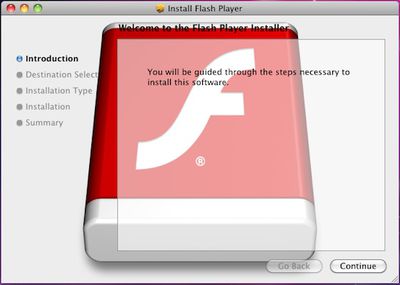 Flashback.C installer
The Flashback.C trojan is capable of connecting to a remote host in order to download and execute further code, but it is unclear what the exploit is being used for at this time. Users are of course advised to download Flash Player and other software from trusted sources so as to avoid infecting their systems with trojans such as Flashback.C.
Update: MacRumors has heard and Sophos has confirmed that Apple had already updated its XProtect.plist entries to detect Flashback.C by the time news of it broke to the public. Consequently, users encountering the malware on Mac OS X Snow Leopard or OS X Lion should be automatically warned of the threat prior to mounting the package.
Popular Stories
Bloomberg's Mark Gurman has high expectations for Apple's first foldable iPhone.
In his Power On newsletter today, he said the foldable iPhone will be "the most significant overhaul in the iPhone's history."
"iPhone 4, iPhone 6 and iPhone X were clearly a big deal, but this is a whole new design," he said.
Like Samsung's Galaxy Z Fold 7, the foldable iPhone will reportedly open up like ...
iOS 26.5 is now available for developers, and while it doesn't include any new Siri capabilities, there are some major changes for the European Union, and smaller tweaks for features available worldwide.
Suggested Places
In the Maps app, there's a new "Suggested Places" feature that recommends locations to visit based on trending places nearby and recent searches. When Apple launches ads in ...
Apple has been celebrating its upcoming 50th anniversary by hosting surprise performances and other events around the world over the past few weeks, and now Bloomberg's Mark Gurman has revealed details about the company's grand finale.
In a social media post, Gurman said Apple's celebrations will conclude this week with a finale at its Apple Park headquarters for employees.
A special...
Popular Stories
Bloomberg's Mark Gurman has high expectations for Apple's first foldable iPhone.
In his Power On newsletter today, he said the foldable iPhone will be "the most significant overhaul in the iPhone's history."
"iPhone 4, iPhone 6 and iPhone X were clearly a big deal, but this is a whole new design," he said.
Like Samsung's Galaxy Z Fold 7, the foldable iPhone will reportedly open up like ...
iOS 26.5 is now available for developers, and while it doesn't include any new Siri capabilities, there are some major changes for the European Union, and smaller tweaks for features available worldwide.
Suggested Places
In the Maps app, there's a new "Suggested Places" feature that recommends locations to visit based on trending places nearby and recent searches. When Apple launches ads in ...
Apple has been celebrating its upcoming 50th anniversary by hosting surprise performances and other events around the world over the past few weeks, and now Bloomberg's Mark Gurman has revealed details about the company's grand finale.
In a social media post, Gurman said Apple's celebrations will conclude this week with a finale at its Apple Park headquarters for employees.
A special...

























