

Apple's Fusion Drive: Faster Performance in a Simple Consumer-Focused Package

Over the past couple of weeks, we've taken a few looks at Apple's new Fusion Drive used in the latest Mac mini and the upcoming iMac. The Fusion Drive system uses software to seamlessly integrate a 128 GB solid-state drive (SSD) with a 1 TB or 3 TB traditional hard drive to offer users the best of both worlds when it comes to speed and capacity. System files and other frequently used data are automatically moved to the SSD for maximum speed, with lower-priority data being stored on the much larger traditional hard drive.

Macworld has now conducted some benchmarks on the various Late 2012 Mac mini models, including one equipped with Fusion Drive, demonstrating how much faster the system runs with the benefit of the SSD.

[I]t was the Fusion Drive that really kicked the BTO Mac mini into overdrive. The standard configuration $799 Mac mini with its 5400-rpm hard drive took more than three times as long to complete our copy file and uncompress file tests as the Fusion Drive did in the BTO Mac mini. The BTO Mac mini’s PCMark productivity test score (using VMWare Fusion) was three times higher than the high-end standard configuration’s score. [...]

The BTO Mac mini was actually faster than the Retina MacBook Pro in a few tests, like the iPhoto, iMovie, and Aperture import tests. But file copy and file uncompress tests were a bit faster on the Retina MacBook Pro with its “pure” flash storage than on the Mac mini’s Fusion Drive.
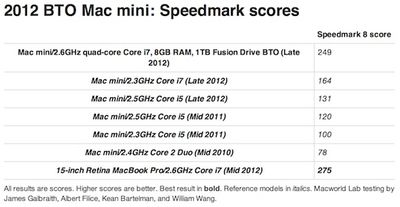
mac mini fusion speedmark
A new video posted by TechfastLunch&Dinner also shows how keeping the system files on the fast SSD cuts boot times in half for the Fusion Drive-equipped Mac mini compared to a similar system using only a traditional hard drive.


Ars Technica has also posted a thorough examination of how the Fusion Drive works at a detailed level. The report notes that Fusion Drive is a solid consumer-focused tiering solution with some distinct differences from other caching and tiering implementations.

There are no options to configure, no pinning settings to adjust, and no user-visible method to decide what goes where. The FD volume is a single volume, and its Core Storage underpinnings direct all IO to the SSD first. New files are saved transparently to the SSD side of the Fusion Drive, as are new applications you install. Everything goes to the SSD first.

The logic behind this is clear: Fusion Drive is not meant to be a feature that appeals to the propeller-head geek. The kind of person who already has an SSD and a spinny disk in his Mac... and who symlinks his iTunes and iPhoto libraries off the HDD onto the SDD... and who enjoys meticulously balancing out which files go where will almost certainly not enjoy Fusion Drive's hands-off approach. Fusion Drive is not designed to be poked at or prodded. Rather, much in the same way that Time Machine's hands-off approach brought backup to people who otherwise wouldn't be bothering, Fusion Drive's hands-off approach brings tiering to Mac masses who otherwise can't be bothered. The presentation is very Apple-like, with no knobs to twiddle.

Ars Technica goes on to force chunks of data and whole files to be promoted up to the SSD, examines Boot Camp functionality on the Fusion Drive, and explores what happens should one of the drives fail.


Popular Stories

Apple Wallet ID Illinois

Apple Plans to Expand iPhone Driver's Licenses to These 7 U.S. States

Wednesday December 24, 2025 8:40 am PST by
In select U.S. states, residents can add their driver's license or state ID to the Apple Wallet app on the iPhone and Apple Watch, and then use it to display proof of identity or age at select airports and businesses, and in select apps. The feature is currently available in 13 U.S. states and Puerto Rico, and it is expected to launch in at least seven more in the future. To set up the...
iPhone Top Left Hole Punch Face ID Feature Purple

iPhone 18 Pro Launching Next Year With These 12 New Features

Tuesday December 23, 2025 8:36 am PST by
While the iPhone 18 Pro and iPhone 18 Pro Max are not expected to launch for another nine months, there are already plenty of rumors about the devices. Below, we have recapped 12 features rumored for the iPhone 18 Pro models. The same overall design is expected, with 6.3-inch and 6.9-inch display sizes, and a "plateau" housing three rear cameras Under-screen Face ID Front camera in...
maxresdefault

Where's the New Apple TV?

Monday December 22, 2025 11:30 am PST by
Apple hasn't updated the Apple TV 4K since 2022, and 2025 was supposed to be the year that we got a refresh. There were rumors suggesting Apple would release the new Apple TV before the end of 2025, but it looks like that's not going to happen now. Subscribe to the MacRumors YouTube channel for more videos. Bloomberg's Mark Gurman said several times across 2024 and 2025 that Apple would...
maxresdefault

10 Mac Apps Worth Trying in 2026

Wednesday December 24, 2025 9:27 am PST by
2026 is almost upon us, and a new year is a good time to try out some new apps. We've rounded up 10 excellent Mac apps that are worth checking out. Subscribe to the MacRumors YouTube channel for more videos. Alt-Tab (Free) - Alt-Tab brings a Windows-style alt + tab thumbnail preview option to the Mac. You can see a full window preview of open apps and app windows. One Thing (Free) -...
iOS 26

iOS 26.2 Adds These 8 New Features to Your iPhone

Monday December 22, 2025 8:47 am PST by
Earlier this month, Apple released iOS 26.2, following more than a month of beta testing. It is a big update, with many new features and changes for iPhones. iOS 26.2 adds a Liquid Glass slider for the Lock Screen's clock, offline lyrics in Apple Music, and more. Below, we have highlighted a total of eight new features. Liquid Glass Slider on Lock Screen A new slider in the Lock...
airpods color prototypes

Apple Tested AirPods in Bright Colors

Saturday December 27, 2025 6:06 am PST by
Apple reportedly tested a version of the first-generation AirPods with bright, iPhone 5c-like colored charging cases. The images, shared by the Apple leaker and prototype collector known as "Kosutami," claim to show first-generation AirPods prototypes with pink and yellow exterior casings. The interior of the charging case and the earbuds themselves remain white. They seem close to some...
iPhone Fold Vertical Feature

Why Apple's Foldable iPhone May Be Smaller Than Expected

Tuesday December 23, 2025 5:21 am PST by
Apple's first foldable iPhone, rumored for release next year, may turn out to be smaller than most people imagine, if a recent report is anything to go by. According to The Information, the outer display on the book-style device will measure just 5.3 inches – that's smaller than the 5.4-inch screen on the ‌iPhone‌ mini, a line Apple discontinued in 2022 due to poor sales. The report has led ...
iPhone SE Cosmopolitan Clean

Apple Discontinued These 25 Products This Year

Wednesday December 24, 2025 7:24 am PST by
With the end of 2025 near, the time has come to look back at the devices and accessories that Apple discontinued throughout the year. Most of the products that were discontinued this year were simply replaced by a new model with an updated chip. However, the iPhone SE line was entirely discontinued when the iPhone 16e launched, and the iPhone Plus line is being phased out. Below, we have...
Foldable iPhone 2023 Feature Iridescent Search

Samsung Developing 'Wide Fold' With iPhone Fold-Like Design Ahead of Apple's 2026 Launch

Tuesday December 23, 2025 11:55 am PST by
Samsung is working on a new foldable smartphone that's wider and shorter than the models that it's released before, according to Korean news site ETNews. The "Wide Fold" will compete with Apple's iPhone Fold that's set to launch in September 2026. Samsung's existing Galaxy Z Fold7 display is 6.5 inches when closed, and 8 inches when open, with a 21:9 aspect ratio when folded and a 20:18...

Top Rated Comments

Mr-Stabby Avatar
171 months ago
While the Fusion Drive is certainly a fast option, i think everybody is forgetting that the iMac and the Mac Mini do not come with this option by default. It is a £200 upgrade. And what's more, the drive that it DOES come with (even the high spec iMacs come with this drive by default) is a pathetically slow (as we can see in the video on this article) 5400rpm drive. Apple should have put a 128gb SSD in the iMacs at least by default, but instead they've actually put in a drive that's a lot slower than the model it replaced. I'm not paying £200 extra on top of the already overpriced iMac to get a drive that performs the way a 2012 iMac should do. Sorry rant over.
Score: 47 Votes (Like | Disagree)
PeterQVenkman Avatar
171 months ago
This means that, like Time Machine, when it works it is invisible and beautiful. When there is an issue, there will be jack one can do about it.

I may get it on a mini.

Edit: dangit, only on the core i7 model, which pushes it above $1000.

I'll put it in an SSD myself.
Score: 13 Votes (Like | Disagree)
nuckinfutz Avatar
171 months ago
I've had a Seagate drive I installed in my mbp for the past several months that does the exact same thing. Is this actually something new, or just another example of apple taking an existing tech, putting a clever name on it and making it seem revolutionary?
No. The Momentus does Caching but it has much less SSD storage. You don't gain any storage you just cache some data to the SSD.

This is data tiering where a 1TB drive and 128GB SSD = 1.128GB of data prior to formatting and seen as 1 volume.

Performance should be better than simply caching.
Score: 12 Votes (Like | Disagree)
profets Avatar
171 months ago
Yes. SSDs are awesome.
Score: 11 Votes (Like | Disagree)
balamw Avatar
171 months ago
I've had a Seagate drive I installed in my mbp for the past several months that does the exact same thing. Is this actually something new, or just another example of apple taking an existing tech, putting a clever name on it and making it seem revolutionary?
From the article:

Commenters in the other articles—particularly those who only skimmed the texts—have wondered at length why we're spending so much (virtual) ink covering Fusion Drive. Isn't it just a plain caching solution? Isn't it the same as Intel SRT? Hasn't Linux been doing this since 1937?

No, no, and no. Intel's Smart Response Technology is a feature available on its newer Ivy Bridge chipsets, and it allows the use of a SSD (up to 64GB in size) as a write-back or write-through cache for the computer's hard drive. One significant difference between FD and a caching technology like Intel SRT is that Fusion Drive alters the canonical location of the data it tiers, moving it (copying it, really, because we don't see a "delete" file system call during Fusion migrations, as we'll demonstrate in a bit) from SSD to HDD. More importantly, with FD, as much data as possible goes to the SSD first, with data spilling off of the SSD onto the HDD. Picture Fusion Drive's SSD like a small drinking glass, and the HDD is a much larger bucket, below the SSD. When you put data onto a Fusion Drive, it's like you're pouring water into the glass; eventually, as the glass fills, water slops over the side and begins to be caught by the bucket. With Fusion Drive, you always pour into the glass and it spills into the bucket as needed.

On the other hand, caching solutions like SRT algorithmically determine what things should be mirrored up from HDD onto SSD. Even though the SSD can be used as a write cache, the default location of data is on the HDD, not the SSD. In caching, the HDD is the storage device with which you interact, and the SSD is used to augment the speed of the HDD. In Fusion Drive, the SSD is the device with which you interact and the HDD is used to augment the capacity of the SSD.

I'm definitely not going all starry-eyed over Fusion Drive, and it's not a revolutionary new thing that will make your computer shoot rainbows out of its USB slots while curing cancer and making sick children well again. However, as we'll see, Fusion Drive is a transparent tiering technology that simply works. It's that seamless always-on functionality that makes it newsworthy—you buy a computer with Fusion Drive enabled and you don't need to install or configure any additional hardware or software in order to enjoy its benefits.
B
Score: 10 Votes (Like | Disagree)
ThisIsNotMe Avatar
171 months ago
While the Fusion Drive is certainly a fast option, i think everybody is forgetting that the iMac and the Mac Mini do not come with this option by default. It is a £200 upgrade. And what's more, the drive that it DOES come with (even the high spec iMacs come with this drive by default) is a pathetically slow (as we can see in the video on this article) 5400rpm drive. Apple should have put a 128gb SSD in the iMacs at least by default, but instead they've actually put in a drive that's a lot slower than the model it replaced. I'm not paying £200 extra on top of the already overpriced iMac to get a drive that performs the way a 2012 iMac should do. Sorry rant over.

Slow for what, browsing the internet, writing the occasional word file, having a medium sized iPhoto/iTunes library?

LOL - You obviously don't understand the iMac or Mac Mini target market.
Score: 9 Votes (Like | Disagree)
















