

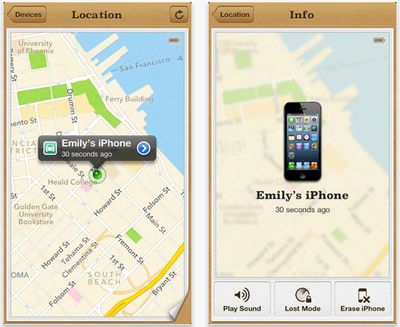
 Apple has updated its Find My iPhone iOS app with the ability to display driving directions to the lost device's location.
Find My iPhone is a free service built into iCloud. It allows users to lock, find, or erase a lost or stolen iPhone, iPad, iPod touch, or Mac.
If you misplace your iPhone, iPad, iPod touch, or Mac, the Find My iPhone app will let you use another iOS device to find it and protect your data. Simply install this free app on another iOS device, open it, and sign in with your Apple ID. Find My iPhone will help you locate your missing device on a map, play a sound, display a message, remotely lock your device, or erase all the data on it.
If the iPhone, iPad, or iPod touch you want to locate is running iOS 6, Find My iPhone also includes Lost Mode. Lost Mode locks your missing device with a 4-digit passcode and can display a contact phone number right on the lock screen. And while in Lost Mode, your device will keep track of where it has been and display its recent location history when you check in with the Find My iPhone app. Please note that Find My iPhone must be enabled in the iCloud settings on your device for you to locate it with this app.
Find My iPhone is a free download from the App Store. [Direct Link]






















Top Rated Comments
SIRI: "Ok, here are the directions to the nearest store that sells iPhones."