Older Versions of Safari Store Login Info in Plain Text - MacRumorsOpen MenuShow RoundupsShow Forums menuVisit ForumsOpen Sidebar
Skip to Content

Older Versions of Safari Store Login Info in Plain Text

by

Older versions of Safari for Mac store unencrypted user login credentials in a plain text file, according to security firm Kaspersky (via ZDNet). Safari saves the information in order to restore a previous browsing session, reopening all sites, even those that require authentication using the browser's "Reopen All Windows from Last Session" functionality.
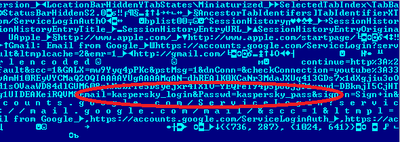
safari_loophole_01

Plist file screenshot showing login credentials from Kaspersky

It turns out that Safari for Mac OS, like many other contemporary browsers, can restore the previous browsing session. In other words, all the sites that were open in the previous session – even those that required authorization – can be restored in a few simple steps when the browser is launched. Convenient? Of course. Safe? No, unfortunately.

Safari 6.0.5 for OS X 10.8.5 and 10.7.5 does not encrypt previous sessions, storing them instead in a standard LastSession.plist file that includes website usernames and passwords. Though the file is located in a hidden folder, it is still easily accessible and can be opened on any system.

Apple fixed this issue in Safari 6.1, which was released alongside OS X 10.9 Mavericks. Mac users running Mavericks or those who have installed the Safari 6.1 update for OS X 10.8 Mountain Lion or OS X 10.7 Lion will not be affected. This problem is limited to users running Safari 6.0.5 and can be remedied by upgrading to the latest software.


Top Rated Comments

john.jansen Avatar
161 months ago
Thats totally misleading, firstly there is no point in encrypting data which can be seen in the browser address bar when the previous session is restored. Secondly, those are url params, sent in plain text over the wire. The problem with the example shown is not at the browser end, its the site at the other end which uses url params for auth over http not https.

Storm in a teacup anyone?
Score: 22 Votes (Like | Disagree)
161 months ago
Has nobody looked at Firefox's Saved Passwords feature? Literally the only security is a button labeled "Show Passwords". And it's been that way for years.

Score: 11 Votes (Like | Disagree)
161 months ago
Sometimes it amazes me how simple things like this go unnoticed for so long.
Score: 8 Votes (Like | Disagree)
161 months ago
Has nobody looked at Firefox's Saved Passwords feature? Literally the only security is a button labeled "Show Passwords". And it's been that way for years.

Image (http://cdn2.brunocunha.com/blog/wp-content/uploads/2013/08/firefox-passwords.png)

But you need to enter the Master Password to see them and the file that contains the passwords on the filesystem has its contents encrypted so not the same at all
Score: 5 Votes (Like | Disagree)
iSee Avatar
161 months ago
Thats totally misleading, firstly there is no point in encrypting data which can be seen in the browser address bar when the previous session is restored. Secondly, those are url params, sent in plain text over the wire. The problem with the example shown is not at the browser end, its the site at the other end which uses url params for auth over http not https.

Storm in a teacup anyone?

BOOM! You just sunk Kaspersky's battle ship.
Score: 4 Votes (Like | Disagree)
rboerdijk Avatar
161 months ago
<sarcasm on>
If the password is visible in plaintext, it means the NSA will catch more terrorists. So this is basically a good thing.
</sarcasm off>
Score: 4 Votes (Like | Disagree)
Related Apple News: Technology | Entertainment | Reviews | Travel | Health