

Alongside the start of online orders for the redesigned Mac Pro, Apple has released a major update for Final Cut Pro X. The program now supports optimized playback and rendering utilizing the dual AMD FirePro graphics chips found in the new Mac Pro, along with support for video monitoring at resolutions up to 4K via Thunderbolt 2 and HDMI on select Mac computers. The update also includes 4K-optimized content, and a host of other additions and performance enhancements. Final Cut Pro X companion apps Compressor [Direct Link] and Motion [Direct Link] have also received similar improvements.
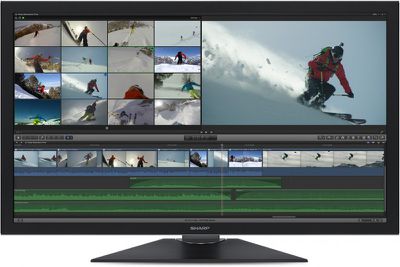
finalcutprox_dec13

What’s New in Final Cut Pro X version 10.1

Final Cut Pro X version 10.1 adds the following features:

- Optimized playback and rendering using dual GPUs in the new Mac Pro
- Video monitoring up to 4K via Thunderbolt 2 and HDMI on select Mac computers
- 4K content including titles, transitions, and generators
- Libraries allow you to gather multiple events and projects within a single bundle
- Easily open and close individual libraries to load just the material you need
- Option to import camera media to locations inside or outside of a library
- Automatically back up libraries to a user-specified drive or network location
- Project Snapshots let you quickly capture the project state for fast versioning
- Audio fade handles on individual audio channels in the timeline
- Add precise retime speeds by entering them numerically in the timeline
- Non-rippling retime option
- One step Replace and retime
- Custom project frame sizes
- Through edits displayed on all clip types
- Join Through Edit command removes bladed cuts to clips in the timeline
- Detach audio with Multicam clips in the timeline to manipulate audio and video separately
- Make video- or audio-only edits into the timeline with Multicam Clips as sources
- Blade and move audio in J- and L-cuts
- Ability to roll audio with J- and L-cut splits open
- Option to hide the Event browser to gain more screen space for viewing
- Native support for .MTS and .MT2S files from AVCHD cameras
- Used media indicators on source clips
- Improved performance with large projects
- Improved performance when modifying or adding keywords to many clips at once
- Easily move, copy, and paste multiple keyframes
- Option for the linear animation with Ken Burns effect
- Improved image stabilization with InertiaCam and Tripod mode
- Import photos from iOS devices
- Proxy and playback quality controls accessible in Viewer menu
- Support for portrait/landscape metadata in still images
- Effects parameters, fonts, and text size included in XML metadata
- Improved support for growing media and edit while ingest
- API for custom Share operations using third-party software
- FxPlug 3 with custom plug-in interfaces and dual-GPU support
- Share directly to YouTube at 4K resolution

Final Cut Pro X is available in the Mac App Store for $299.99. The 10.1 update is free for current customers. [Direct Link]


Top Rated Comments

MacUserUK Avatar
157 months ago
Now Aperture PPLLEEAASSEE
Score: 15 Votes (Like | Disagree)
mw360 Avatar
157 months ago
That ground-up rewrite not looking like such a bad idea now...
Score: 13 Votes (Like | Disagree)
chirpie Avatar
157 months ago
Why bother trying to fix something that's junk? and imovie has more.

Look back at FCP7 and see why people liked it and still use it, unless you have switched to sony V or Prem.

Put all the features that are in FCP7 and I might consider moving to X.
Ow and however came up with the idea that out can't open old projects
needs to come in to the real world, it shouldn't have to be left to third party software.

FCP was once a great product

Dude, it's not June 2011 anymore.
Score: 7 Votes (Like | Disagree)
ppenn Avatar
157 months ago
Generally on a project of any decent scale you'll edit with"offline" lower res/lower bitrate material and then when finished relink to the higher quality material ---usually in a different program designed for finishing.

Most feature films you see in theaters and nearly all TV Shows are still edited with Avid's Media Composer with the occasional one being edited with FCP7. And they'll be dragged away from it only if necessary and kicking and screaming all the way. Only smaller independent filmmakers are really using premiere or FCPX at the moment - and there's not that many of them. In the commercial/corporate/educational/broadcast sector you would be closer to right as premiere and fcpx have been picking up a lot of steam there. However the need to work with 4K industry wide has really been nonexistent (other than needing a way to convert camera originals to "offline" - res---usually just plain HD and color grading/finishing software used in the relink process. Although now every major NLE supports 4K in some fashion we're still a few years out before it'll really be all that useful considering the lack of ways to see it - and even then most professionals will still elect to use an offline workflow to save on hard drive space and system overhead.

Hope that answers your question.

EDIT: seems like there's a bit of confusion on the other apps out there

For Visual Effects and compositing you'd see both after effects and Nuke being used at the professional level - though nuke is definitely more advanced. While theoretically possible in practical terms you'd never actual edit with them. There's also a few other applications used for this purpose such as Autodesk's Flame. 3d Modeling for VFX would likely be done in Maya though there's others as well

While were at it I mentioned software you use for the final relink or "conform" and color grading/finishing. The most commonly used ones are Da Vinci Resolve, Scratch, Lustre, and Baselight with Apple Color (RIP) and Adobe's Speedgrade being used here and there.

As far as "editing" goes, which most of you are referring to in the sense of just cutting the footage, you'd be surprised to find out that many motion pictures are still cut on Avid. With the power of the new Mac Pro and FCPX though, television shows, and motion pictures are slowly adopting the new work flow.

It's just like the film vs digital debate. Who's is going to be willing to be different than the past for the sake of saving time and money while still producing a great product.

People who say FCPX isn't for pro's, haven't actually used FCPX, and aren't willing to adapt their workflow.

----------

Why bother trying to fix something that's junk? and imovie has more.

Look back at FCP7 and see why people liked it and still use it, unless you have switched to sony V or Prem.

Put all the features that are in FCP7 and I might consider moving to X.
Ow and however came up with the idea that out can't open old projects
needs to come in to the real world, it shouldn't have to be left to third party software.

FCP was once a great product

Tell me what what features you use on a regular basis in FCP7 that aren't in FCPX???
Score: 6 Votes (Like | Disagree)
YoGramMamma Avatar
157 months ago
I sort of understand what you're trying to say, but the point of my response was the misgivings of the newer version are largely dealt with outside of the traditional timeline vs magnetic approach.

The other poster was giving the same kind of response that's a stereotype shorthand for what is now a borderline ignorant viewpoint. (It's frustrating that people still think of X as iMovie Pro because the interface has some GUI similarities.)

I second this notion. I am glad to see people approaching FCPX with a clear and level mindset. I use FCPX every day (and have been since the day it came out) and I absolutely love it. I realize that it works great for my workflow, and that maybe that isn't the case with every "professional" but, I certainly consider myself a pro and FCPX is feature-rich and very capable imo.

I have a project fully edited in FCPX that nationally aired during this past Super Bowl, and another project for a major label artist that is on the front page of iTunes today, and plenty more professional level projects, all done in X. I constantly have to liaise with other post facilities for my work and using FCPX hasn't been an issue for me once.

The main reason people haven't switched away from FCP7 is because they're lazy or unwilling to learn something new. Period. Many people don't like slowing down their workflow to learn something new, and understandably so, but it's really a sign of stubbornness on behalf of the editor versus the software being incomplete imo. I have two roommates who also work in post and all but swear by Premiere, and will bash FCPX anytime they get the chance. But I can tell you that they have never taken the time to put FCPX through the paces long enough to learn what it does and how it works. Premiere is close enough to FCP7 in how it works, so they just went that route. They never read a manual or used an tutorial, or even looked over my shoulder while I'm working with FCPX and are clueless to probably 90% of what its capable of doing. This I have found to be common among anyone who truly bashes FCPX now days (it was a different story back when it first launched in 2011). They have simply mentally written it off because of what they've heard about it.

Let me be clear that I am not bashing Premiere, I do like it... just not better than FCPX. I could go on and on about what I like about it (including the magnetic timeline which I simply fill with a slug for my editing and edit solely from secondary timeline, which gives you much more freedom and alieviates most of people's main gripe with it) ... but I'll just leave it at that.

I'm very eager to see how well this new Library system simplifies my workflow. I just wish apple would add one tiny feature i really want... color labeling of clips on the timeline :/
Score: 4 Votes (Like | Disagree)
RednBlue Avatar
157 months ago
Now Aperture PPLLEEAASSEE
Copy that!
Score: 4 Votes (Like | Disagree)

Popular Stories

Apple Wallet ID Illinois

Apple Plans to Expand iPhone Driver's Licenses to These 7 U.S. States

Wednesday December 24, 2025 8:40 am PST by
In select U.S. states, residents can add their driver's license or state ID to the Apple Wallet app on the iPhone and Apple Watch, and then use it to display proof of identity or age at select airports and businesses, and in select apps. The feature is currently available in 13 U.S. states and Puerto Rico, and it is expected to launch in at least seven more in the future. To set up the...
iPhone Top Left Hole Punch Face ID Feature Purple

iPhone 18 Pro Launching Next Year With These 12 New Features

Tuesday December 23, 2025 8:36 am PST by
While the iPhone 18 Pro and iPhone 18 Pro Max are not expected to launch for another nine months, there are already plenty of rumors about the devices. Below, we have recapped 12 features rumored for the iPhone 18 Pro models. The same overall design is expected, with 6.3-inch and 6.9-inch display sizes, and a "plateau" housing three rear cameras Under-screen Face ID Front camera in...
maxresdefault

Where's the New Apple TV?

Monday December 22, 2025 11:30 am PST by
Apple hasn't updated the Apple TV 4K since 2022, and 2025 was supposed to be the year that we got a refresh. There were rumors suggesting Apple would release the new Apple TV before the end of 2025, but it looks like that's not going to happen now. Subscribe to the MacRumors YouTube channel for more videos. Bloomberg's Mark Gurman said several times across 2024 and 2025 that Apple would...
iOS 26

iOS 26.2 Adds These 8 New Features to Your iPhone

Monday December 22, 2025 8:47 am PST by
Earlier this month, Apple released iOS 26.2, following more than a month of beta testing. It is a big update, with many new features and changes for iPhones. iOS 26.2 adds a Liquid Glass slider for the Lock Screen's clock, offline lyrics in Apple Music, and more. Below, we have highlighted a total of eight new features. Liquid Glass Slider on Lock Screen A new slider in the Lock...
maxresdefault

10 Mac Apps Worth Trying in 2026

Wednesday December 24, 2025 9:27 am PST by
2026 is almost upon us, and a new year is a good time to try out some new apps. We've rounded up 10 excellent Mac apps that are worth checking out. Subscribe to the MacRumors YouTube channel for more videos. Alt-Tab (Free) - Alt-Tab brings a Windows-style alt + tab thumbnail preview option to the Mac. You can see a full window preview of open apps and app windows. One Thing (Free) -...
Foldable iPhone 2023 Feature Iridescent Search

Samsung Developing 'Wide Fold' With iPhone Fold-Like Design Ahead of Apple's 2026 Launch

Tuesday December 23, 2025 11:55 am PST by
Samsung is working on a new foldable smartphone that's wider and shorter than the models that it's released before, according to Korean news site ETNews. The "Wide Fold" will compete with Apple's iPhone Fold that's set to launch in September 2026. Samsung's existing Galaxy Z Fold7 display is 6.5 inches when closed, and 8 inches when open, with a 21:9 aspect ratio when folded and a 20:18...
iOS 26

iOS 26.3 Brings AirPods-Like Pairing to Third-Party Devices in EU Under DMA

Monday December 22, 2025 3:20 pm PST by
The European Commission today praised the interoperability changes that Apple is introducing in iOS 26.3, once again crediting the Digital Markets Act (DMA) with bringing "new opportunities" to European users and developers. The Digital Markets Act requires Apple to provide third-party accessories with the same capabilities and access to device features that Apple's own products get. In iOS...
iphone fold 3d print

Have a 3D Printer? You Can Make Your Own iPhone Fold Dummy

Tuesday December 23, 2025 1:31 pm PST by
Apple is working on a foldable iPhone that's set to come out in September 2026, and rumors suggest that it will have a display that's around 5.4 inches when closed and 7.6 inches when open. Exact measurements vary based on rumors, but one 3D designer has created a mockup based on what we've heard so far. On MakerWorld, a user named Subsy has uploaded a 1:1 iPhone Fold replica (via Macworld), ...
iPhone Fold Vertical Feature

Why Apple's Foldable iPhone May Be Smaller Than Expected

Tuesday December 23, 2025 5:21 am PST by
Apple's first foldable iPhone, rumored for release next year, may turn out to be smaller than most people imagine, if a recent report is anything to go by. According to The Information, the outer display on the book-style device will measure just 5.3 inches – that's smaller than the 5.4-inch screen on the ‌iPhone‌ mini, a line Apple discontinued in 2022 due to poor sales. The report has led ...
















