

OS X Yosemite: An In-Depth Look at Markup and Mail Drop in the Mail App

OS X Yosemite has brought some major changes to Apple's Mail app, and those changes aren't limited to a simple visual overhaul. Mail may have a new look, but it also has several new features like Mail Drop and Markup.

With Markup, you can annotate images and PDFs from directly within the Mail app. For example, when composing an email message and attaching a PDF, it's possible to use various tools to add signatures, emphasis, and more. The same is possible with an image -- simply attach a file in a message that's being composed and right click on it, selecting Markup.

Markup has a set of tools at the top that allow users to create shapes, write text words, and insert signatures. There are different brushes that can be used, along with a color palette and various font options.
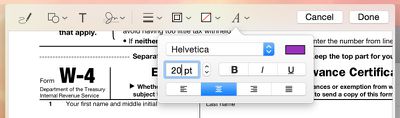
markuptools
Users can enter various shapes, such as stars, circles, squares, speech bubbles and more, and there's a magnifying glass that will magnify sections of text or photos. A crop tool also allows for simple image edits, and there's a pen tool for free-handed writing or drawing.

Markup's neatest feature is a signature tool that lets users insert a signature using the trackpad of a MacBook or a camera. With the trackpad, clicking begin and then signing a name with a finger on the trackpad will create a signature that's automatically entered into a document.
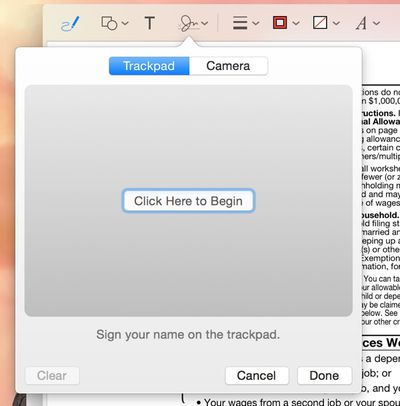
trackpad
There's also an option that allows users to write a signature on a white piece of paper and use a Mac's FaceTime camera to import it into the document. It's a little bit finicky getting the camera to recognize the signature, but once it's lined up properly, the feature works well.
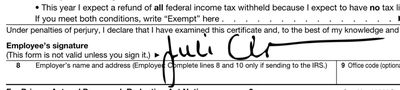
markupsignature
Along with Markup, Mail has a new feature called Mail Drop that lets users send large file attachments of up to 5GB using iCloud. Composing an email message and attaching a file that would normally be too large to send will prompt Mail to ask a user if they would like to use Mail Drop to deliver the message.
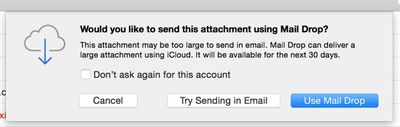
sendmaildrop
When the Mail Drop option is selected, the person receiving the email will receive the file attachment as normal if they're using Mail, while non-Mail users will receive a message with a download link that allows them to download the file directly from iCloud. Files are stored in iCloud for several days before being deleted.

maildropicloud
MacRumors did not experience any issues getting Mail Drop to function with files ranging in size from 10MB to over 1GB, but some users on the Apple Support forums have been having trouble with the feature. Because Mail Drop works based on a sender's file size limits rather than a receiver's, users have run into an issue where they can send a file that is below their own maximum file size threshold, but above a receiver's file size limits.

For example, sending a 10MB message from an email account that has a 30MB file size limit to an email account that has a 6MB file size limit will not activate Mail Drop and turn the file into a clickable link that can be downloaded from iCloud. Therefore, the person sending the message will get a bounce back reply that the user can't accept a message of that size, even if the receiver also has Mail Drop.

According to Apple, Mail Drop can only be used to send files that "exceed the maximum size allowed by the provider of your email account," which means there is no way for a user to select a custom file size threshold to activate Mail Drop to avoid the above situation. It is not clear if Apple has plans to implement manual size controls for Mail Drop, but for the time being, it appears that Mail Drop may not be useful for all users in certain situations.

Released to the public yesterday, OS X Yosemite can be downloaded from the Mac App Store at no cost. It runs on all machines that were capable of running OS X Mountain Lion and OS X Mavericks, and it requires 8GB of storage space and 2GB of RAM. [Direct Link]


Related Forum: OS X Yosemite

Popular Stories

Apple Wallet ID Illinois

Apple Plans to Expand iPhone Driver's Licenses to These 7 U.S. States

Wednesday December 24, 2025 8:40 am PST by
In select U.S. states, residents can add their driver's license or state ID to the Apple Wallet app on the iPhone and Apple Watch, and then use it to display proof of identity or age at select airports and businesses, and in select apps. The feature is currently available in 13 U.S. states and Puerto Rico, and it is expected to launch in at least seven more in the future. To set up the...
iPhone Top Left Hole Punch Face ID Feature Purple

iPhone 18 Pro Launching Next Year With These 12 New Features

Tuesday December 23, 2025 8:36 am PST by
While the iPhone 18 Pro and iPhone 18 Pro Max are not expected to launch for another nine months, there are already plenty of rumors about the devices. Below, we have recapped 12 features rumored for the iPhone 18 Pro models. The same overall design is expected, with 6.3-inch and 6.9-inch display sizes, and a "plateau" housing three rear cameras Under-screen Face ID Front camera in...
iOS 26

iOS 26.2 Adds These 8 New Features to Your iPhone

Monday December 22, 2025 8:47 am PST by
Earlier this month, Apple released iOS 26.2, following more than a month of beta testing. It is a big update, with many new features and changes for iPhones. iOS 26.2 adds a Liquid Glass slider for the Lock Screen's clock, offline lyrics in Apple Music, and more. Below, we have highlighted a total of eight new features. Liquid Glass Slider on Lock Screen A new slider in the Lock...
maxresdefault

10 Mac Apps Worth Trying in 2026

Wednesday December 24, 2025 9:27 am PST by
2026 is almost upon us, and a new year is a good time to try out some new apps. We've rounded up 10 excellent Mac apps that are worth checking out. Subscribe to the MacRumors YouTube channel for more videos. Alt-Tab (Free) - Alt-Tab brings a Windows-style alt + tab thumbnail preview option to the Mac. You can see a full window preview of open apps and app windows. One Thing (Free) -...
maxresdefault

Where's the New Apple TV?

Monday December 22, 2025 11:30 am PST by
Apple hasn't updated the Apple TV 4K since 2022, and 2025 was supposed to be the year that we got a refresh. There were rumors suggesting Apple would release the new Apple TV before the end of 2025, but it looks like that's not going to happen now. Subscribe to the MacRumors YouTube channel for more videos. Bloomberg's Mark Gurman said several times across 2024 and 2025 that Apple would...
Foldable iPhone 2023 Feature Iridescent Search

Samsung Developing 'Wide Fold' With iPhone Fold-Like Design Ahead of Apple's 2026 Launch

Tuesday December 23, 2025 11:55 am PST by
Samsung is working on a new foldable smartphone that's wider and shorter than the models that it's released before, according to Korean news site ETNews. The "Wide Fold" will compete with Apple's iPhone Fold that's set to launch in September 2026. Samsung's existing Galaxy Z Fold7 display is 6.5 inches when closed, and 8 inches when open, with a 21:9 aspect ratio when folded and a 20:18...
iOS 26

iOS 26.3 Brings AirPods-Like Pairing to Third-Party Devices in EU Under DMA

Monday December 22, 2025 3:20 pm PST by
The European Commission today praised the interoperability changes that Apple is introducing in iOS 26.3, once again crediting the Digital Markets Act (DMA) with bringing "new opportunities" to European users and developers. The Digital Markets Act requires Apple to provide third-party accessories with the same capabilities and access to device features that Apple's own products get. In iOS...
iphone fold 3d print

Have a 3D Printer? You Can Make Your Own iPhone Fold Dummy

Tuesday December 23, 2025 1:31 pm PST by
Apple is working on a foldable iPhone that's set to come out in September 2026, and rumors suggest that it will have a display that's around 5.4 inches when closed and 7.6 inches when open. Exact measurements vary based on rumors, but one 3D designer has created a mockup based on what we've heard so far. On MakerWorld, a user named Subsy has uploaded a 1:1 iPhone Fold replica (via Macworld), ...
iPhone SE Cosmopolitan Clean

Apple Discontinued These 25 Products This Year

Wednesday December 24, 2025 7:24 am PST by
With the end of 2025 near, the time has come to look back at the devices and accessories that Apple discontinued throughout the year. Most of the products that were discontinued this year were simply replaced by a new model with an updated chip. However, the iPhone SE line was entirely discontinued when the iPhone 16e launched, and the iPhone Plus line is being phased out. Below, we have...

Top Rated Comments

X-X Avatar
146 months ago
what a hideous confusing UI
Do you want to use Mail Drop?

YES_____NO


That is too confusing for you :D ...hilarious
Score: 11 Votes (Like | Disagree)
darkslide29 Avatar
146 months ago
Seem OS X 10.10 could benefit from more work before rushing it out every year since 10.7. Delta updates during beta testing over a few months for developers compared to 1-2 years prior with clean installs each beta does not a solid OS make. Quite a few open bugs that are serious enough have yet to be resolved. I'd wait for 10.10.1 before diving in.
One does not simply visit MacRumors every day and anticipate releases, only to be patient and wait for 10.10.1! :D
Score: 7 Votes (Like | Disagree)
KALLT Avatar
146 months ago
Didn’t Federighi say that they would focus on ‘the basics’ of Mail in Yosemite? So far the only changes I can see are the features he demonstrated during the keynote. Mail Drop and Markup are nice additions, but not ones I would use very often, if at all. I still miss features like the swipe gestures, tagging, better folder management, new e-mail rules, better spam filtering, native PGP support and so on.
Score: 7 Votes (Like | Disagree)
X-X Avatar
146 months ago
People still use email?
How do you communicate with clients, employer, online stores, insurance, banks...

Snapchat?
Score: 6 Votes (Like | Disagree)
Asclepio Avatar
146 months ago
what a hideous confusing UI
Score: 6 Votes (Like | Disagree)
MacOG728893 Avatar
146 months ago
People still use email?

Another instance where I truly miss the down vote option.
Score: 5 Votes (Like | Disagree)
















