

Apple is heavily pushing its new "Continuity" features in OS X Yosemite that improve cross-platform integration between iOS and the Mac. The most significant of the Continuity features is Handoff, which allows OS X and iOS users to start a task on one device and swap to another one nearby to continue work.
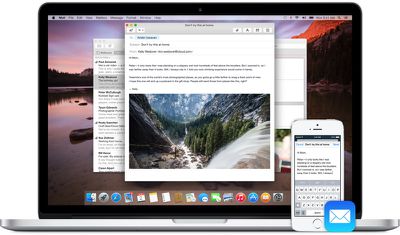
Handoff can be used for a number of different activities, including email, web browsing, messaging, and more. Users can begin composing an email on their iPhone and finish it on their Mac. Maps and websites work in a similar fashion, as users can load up content on one device and look at it on another. Currently, Handoff works with Mail, Safari, Pages, Numbers, Keynote, Maps, Messages, Reminders, Calendar, and Contacts. A number of third-party apps including Pixelmator, Wunderlist, PCalc, and Things also contain support for Handoff.
Requirements
You will need iOS 8.1 and OS X Yosemite in order to use Handoff. You also need to make sure that both your Mac and iPhone are logged into the same iCloud account, and check that your Mac supports Handoff. You can check if your Mac is compatible with Handoff by clicking the symbol in the top left-hand side of the Menu bar, going to About This Mac, clicking on System Report and clicking on the "Bluetooth" section. You should then see information about whether your system is compatible with Handoff.
Handoff is compatible with a select number of devices running iOS 8, including the iPhone 5 and later, the iPad Air, the iPad Air 2, the iPad 4, all models of the iPad mini, and the fifth-generation iPod Touch.

Handoff is limited to Macs with Bluetooth 4.0, which leaves many older Macs unable to access the new features. Additionally, even though the 2011 MacBook Air and 2011 Mac mini include Bluetooth 4.0, Apple has chosen to make both devices incompatible with OS X Yosemite's Continuity features. To solve this issue, a number of talented members of the MacRumors forums have come up with a set of instructions and a Continuity Activation Tool that should get Continuity working on Macs unable to support the feature.
Setting Up Handoff
1. Turn on Wi-Fi on your iPhone (Settings -> Wi-Fi) and Mac (Menu Bar -> Wi-Fi -> Turn Wi-Fi On.
2. Turn on Bluetooth on your iPhone (Settings -> Bluetooth) and Mac (Menu Bar -> Apple -> System Preferences -> Bluetooth -> Turn Bluetooth On).
3. Turn on Handoff on your iPhone (Settings -> General -> Handoff & Suggested Apps -> Turn Handoff On) and Mac (Menu Bar -> Apple -> System Preferences -> General -> Recent Items - > Turn On "Allow Handoff Between this Mac and your iCloud devices")
4. You may now begin using Handoff by launching a compatible app on your Mac or iOS device and swapping to another to see your content. For example, try launching Safari on your Mac and then switch to your iPhone. On your iPhone's lock screen, you should see a small Safari icon in the lower left corner. Slide up to launch Safari, and the iOS app will display the same website as seen on your Mac.

You can also see a Handoff-enabled app through the multitasking switcher by double-pressing your home button and scrolling to the left.
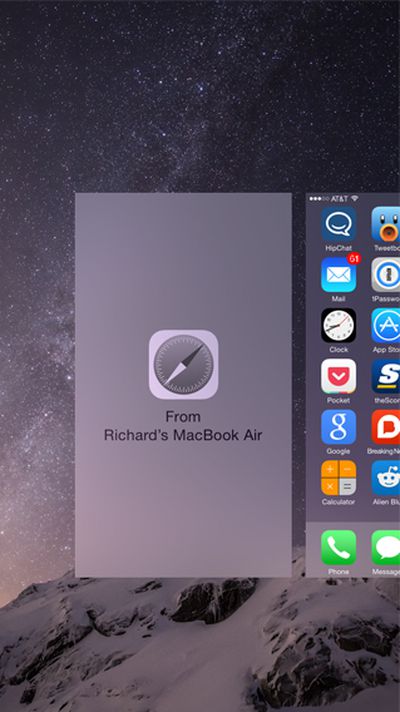
Handoff works in a similar fashion when transitioning from an iOS device to a Mac. On the Mac, a Handoff-compatible app will be displayed on the left-most side of the dock. Clicking on the app in the Mac's dock will load the same content as seen on an iOS device.

Walkthrough Video
Troubleshooting
Since the launch of OS X Yosemite and iOS 8 earlier this month, many users have had issues getting Handoff to work with their devices.
Users on our forums seem to have found that the most common solution is a combination of logging out and back into iCloud on their devices, disabling and enabling Handoff, disabling and enabling Bluetooth, and restarting devices. But even amongst those who found success, it may not last forever. Handoff clearly remains buggy in this early release.
If those steps don't work for you, members on Apple's own support forums have also suggested that deleting Bluetooth preferences in OS X and then restarting Bluetooth can also solve problems with Handoff, but we haven't been able to get that to work on our end.
Any of these steps may help if you are having trouble with activating Handoff on your devices, but ultimately, Apple may have to release an update to allow Handoff to work consistently for everyone.





















Top Rated Comments
Or... take off the tinfoil hat and simply wait for 10.10.1.
This is the reason people wait until at least the first update before upgrading. That's not a slight on Apple - it's simply the way things go in software (and other businesses). "I'd love to release a new version, but there are no bugs for me to fix" said no developer ever. It's a trade-off between having everything perfect, and needing to ship soon. If you wait until it's 100% perfect, you'll never ship.
I deploy OS X for a living, and I've never deployed a 1.0 (10.x.0) version.
So, how about everybody calm the F down and give them a chance to actually fix these glitches? One of the most annoying things I ever run across - more so than the person who bitches and moans about everything to me - is when they just bitch and moan behind my back but never tell me about an issue they've run into and never give me the chance to fix it, provide a workaround, or escalate to the vendor. They just nail themselves up on the cross and refuse to come down. Report it, and make sure they know about it, but then back off and give them a chance to investigate and fix it.
I could be wrong, but I think the Bluetooth LE component of handoff exist to keep the power drain to a minimum. Remember a single Bluetooth LE device can last for over year on a single small coin battery. If Apple implemented it correctly then any device waiting for handoff will pull basically no power until the handoff happens. This power saving ability would more than justify the inclusion of Bluetooth LE into the procedure.
Personally I am not surprised that Apple have done this, but whiners will whine that they aren't getting a feature that they didn't have before.
I have one way handoff on one login/account on my mid2011MBA (from iDevice to MBA) but it works perfectly in both directions, including calling, instant hotspot, etc., on a different account. Both have the same iCloud login.
I suggest anyone having problems set up a new account with administrative privileges and see if you can get everything to work with a "fresh" account on your Mac. You can try using the same iCloud login.
Probably over the years on my "main" account I hacked some file for some reason, and now it's unhappy. If this doesn't get sorted eventually I'll probably just move everything over to the new account.
----------
Actually Siri is awful at voice recognition on the iPhone4 because it has a junk microphone. They put a better mic in the 4s. That is also, incidentally, around the time that people on iPhones became intelligible to the party on the other end. Never underestimate the ability of apple to use the cheapest possible components, and charge the highest possible premium, if they think they can get away with it.
Ok, most short sighted stupid Apple decision ever made. Why for the love of anything would they use Bluetooth when Wifi is everywhere and forward and backward compatible?
Did not the Notes app sync between devices over any network connection before Handoff was made a thing?
Just another intentional planned obsolesces to make you buy a new Mac.
Siri could have worked on iPhone 4, all the processing was done in the cloud!
My fanboy status has died and I'm trapped in an ecosystem I can't leave. I feel like Tom Cruise on South Park stuck in the closet.
Someone smart should make a slim profile Bluetooth 4.0 USB adapter for $10 that solves the problem and beats Apple at their stupid game.