OS X El Capitan Opens Door to TRIM Support on Third-Party SSDs for Improved Performance

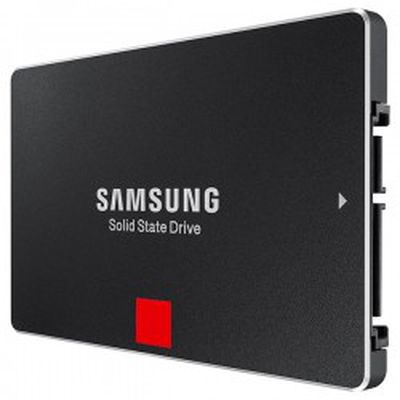
samsung_ssdFor users looking to upgrade their older Macs with third-party solid-state drives (SSDs), one issue has been a lack of support for TRIM on these drives under OS X. TRIM is a system-level command that allows the operating system and the drive to communicate about which areas of the drive are considered unused and thus ready to be erased and rewritten to. In the absence of TRIM, users can see significantly slower drive writes as the drive begins to fill up.

Officially TRIM has only been supported on Apple's drives, and while tools such as TRIM Enabler have been developed to turn on TRIM for third-party drives, they ran into issues under OS X Yosemite due to Apple's use of kext signing. With this security measure in place, users have had to disable kext signing in order to enable TRIM, and should kext signing be turned back on such as by resetting NVRAM/PRAM during troubleshooting, the user's system will refuse to boot.

Since the developer release of OS X El Capitan on Monday, a number of users interested in TRIM support have been investigating the possibilities for TRIM on third-party SSDs, particularly with the new "rootless" security features that prevent access to many system-level files.

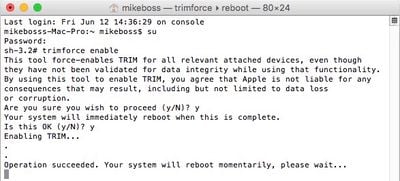
Some users have been playing with various options involving turning off rootless temporarily in order to run utilities like TRIM Enabler, and members of our forum have discovered a simple command to enable built-in support for TRIM on third-party drives that can be enabled once rootless has been disabled. The developer behind TRIM Enabler and others have confirmed the method does work and are making plans to enhance their software to support it.
trim_elcap
Enabling TRIM using this method does come with a warning from Apple, as it can cause issues on occasion and the company wants to make sure users are operating it at their own risk.

This tool force-enables TRIM for all relevant attached devices, even though they have not been validated for data integrity while using that functionality. By using this tool to enable TRIM, you agree that Apple is not liable for any consequences that may result, including but not limited to data loss or corruption.

Apple could certainly make changes as development on OS X El Capitan continues, but given the built-in trimforce tool it certainly appears the company intends to allow TRIM to run on third-party SSDs. The "man" documentation for the trimforce command indicates it was introduced in OS X 10.10.4, which remains in developer testing, but forum member mikeboss has determined it is not present in the current developer build.

While most users will never need to deal with this issue, upgrading to an SSD is a popular way to squeeze some more speed and life out of an older Mac, so there is a sizable community of users interested in getting TRIM to function on their third-party drives, and some of them may find TRIM a helpful tool.


(Thanks, not Jony!)

Tag: TRIM
Related Forum: OS X El Capitan

Popular Stories

Apple Wallet ID Illinois

Apple Plans to Expand iPhone Driver's Licenses to These 7 U.S. States

Wednesday December 24, 2025 8:40 am PST by
In select U.S. states, residents can add their driver's license or state ID to the Apple Wallet app on the iPhone and Apple Watch, and then use it to display proof of identity or age at select airports and businesses, and in select apps. The feature is currently available in 13 U.S. states and Puerto Rico, and it is expected to launch in at least seven more in the future. To set up the...
iPhone Top Left Hole Punch Face ID Feature Purple

iPhone 18 Pro Launching Next Year With These 12 New Features

Tuesday December 23, 2025 8:36 am PST by
While the iPhone 18 Pro and iPhone 18 Pro Max are not expected to launch for another nine months, there are already plenty of rumors about the devices. Below, we have recapped 12 features rumored for the iPhone 18 Pro models. The same overall design is expected, with 6.3-inch and 6.9-inch display sizes, and a "plateau" housing three rear cameras Under-screen Face ID Front camera in...
maxresdefault

Where's the New Apple TV?

Monday December 22, 2025 11:30 am PST by
Apple hasn't updated the Apple TV 4K since 2022, and 2025 was supposed to be the year that we got a refresh. There were rumors suggesting Apple would release the new Apple TV before the end of 2025, but it looks like that's not going to happen now. Subscribe to the MacRumors YouTube channel for more videos. Bloomberg's Mark Gurman said several times across 2024 and 2025 that Apple would...
maxresdefault

10 Mac Apps Worth Trying in 2026

Wednesday December 24, 2025 9:27 am PST by
2026 is almost upon us, and a new year is a good time to try out some new apps. We've rounded up 10 excellent Mac apps that are worth checking out. Subscribe to the MacRumors YouTube channel for more videos. Alt-Tab (Free) - Alt-Tab brings a Windows-style alt + tab thumbnail preview option to the Mac. You can see a full window preview of open apps and app windows. One Thing (Free) -...
iOS 26

iOS 26.2 Adds These 8 New Features to Your iPhone

Monday December 22, 2025 8:47 am PST by
Earlier this month, Apple released iOS 26.2, following more than a month of beta testing. It is a big update, with many new features and changes for iPhones. iOS 26.2 adds a Liquid Glass slider for the Lock Screen's clock, offline lyrics in Apple Music, and more. Below, we have highlighted a total of eight new features. Liquid Glass Slider on Lock Screen A new slider in the Lock...
airpods color prototypes

Apple Tested AirPods in Bright Colors

Saturday December 27, 2025 6:06 am PST by
Apple reportedly tested a version of the first-generation AirPods with bright, iPhone 5c-like colored charging cases. The images, shared by the Apple leaker and prototype collector known as "Kosutami," claim to show first-generation AirPods prototypes with pink and yellow exterior casings. The interior of the charging case and the earbuds themselves remain white. They seem close to some...
iPhone Fold Vertical Feature

Why Apple's Foldable iPhone May Be Smaller Than Expected

Tuesday December 23, 2025 5:21 am PST by
Apple's first foldable iPhone, rumored for release next year, may turn out to be smaller than most people imagine, if a recent report is anything to go by. According to The Information, the outer display on the book-style device will measure just 5.3 inches – that's smaller than the 5.4-inch screen on the ‌iPhone‌ mini, a line Apple discontinued in 2022 due to poor sales. The report has led ...
Foldable iPhone 2023 Feature Iridescent Search

Samsung Developing 'Wide Fold' With iPhone Fold-Like Design Ahead of Apple's 2026 Launch

Tuesday December 23, 2025 11:55 am PST by
Samsung is working on a new foldable smartphone that's wider and shorter than the models that it's released before, according to Korean news site ETNews. The "Wide Fold" will compete with Apple's iPhone Fold that's set to launch in September 2026. Samsung's existing Galaxy Z Fold7 display is 6.5 inches when closed, and 8 inches when open, with a 21:9 aspect ratio when folded and a 20:18...
iPhone SE Cosmopolitan Clean

Apple Discontinued These 25 Products This Year

Wednesday December 24, 2025 7:24 am PST by
With the end of 2025 near, the time has come to look back at the devices and accessories that Apple discontinued throughout the year. Most of the products that were discontinued this year were simply replaced by a new model with an updated chip. However, the iPhone SE line was entirely discontinued when the iPhone 16e launched, and the iPhone Plus line is being phased out. Below, we have...

Top Rated Comments

Temptin Avatar
138 months ago
Edit: This post has a lot of visibility, so I'd also like to point your attention to an earlier post of mine which gives you safe TRIM in Yosemite 10.10.3 and up:

I've investigated how "trimforce" works and written up a method for doing stable, patchless TRIM enabling on OS X 10.10.3 or higher. No more boot issues, and no more loss of the TRIM settings after OS updates. Trimforce + Yosemite = Yes!

https://github.com/Temptin/Documents/blob/master/OSX_TRIM_Tutorial.md

(Be sure to read the whole page so that you understand the legal implications. And consider giving this post a thumbs up to help others discover it!)
The following is the original post from before the edit, and has nothing to do with the above edit:

----------------------------------------------------

Geez... there's a lot of combined issues in that article...

The first issue is the queued TRIM implementation in Linux. It is the only operating system that tries to send FPDMA QUEUED TRIM (a new SATA II extension of NCQ, and therefore also called NCQ TRIM). The latest Samsung firmwares mistakenly set word 77 bit 6 to 1 in the ATA IDENTIFY flags, which tells the OS that they support FPDMA QUEUED operations, when they actually don't. If you try to send a FPDMA QUEUED TRIM, the latest Samsung drives spectacularly overwrite random data with zeroes. The Linux kernel now blacklists those drives from trying to use FPDMA QUEUED TRIM, since they're misbehaving with that command. The Samsung engineers are aware of it since the issue first surfaced a year ago, but a fix is not yet ready.

So if you've got a modern Samsung drive, it's important that your OS uses regular sequential TRIM. Linux is the only OS that uses queued. All versions of OS X (even El Capitan) and Windows (latest) still use sequential TRIM, and will continue to do so for the foreseeable future.

Next up... the article is actually about a bug in the Linux kernel's sequential (non-queued) TRIM implementation.

You see... It's not just SSD firmwares that sometimes implement TRIM badly. The OS can do it wrong too, if it sends out incorrect TRIM commands that tell the SSD to delete data that's actually in use. You need the OS filesystem driver to understand the filesystem at a deep level so that it knows exactly how to properly TRIM it, and it also needs to be aware of what data is on the drive and what data is in the memory-buffered filesystem (which may be out of sync with what's on the drive), so that it knows exactly what data it will tell the SSD to delete. It's a very complex science and it even took Windows a while to get it right due to peculiarities in the NTFS filesystem. In the linked article's case, Linux is the culprit. They're talking to Linux kernel devs to get it fixed.

Since OS X and Windows use sequential TRIM, the followup questions become:
* A) Does my drive implement sequential TRIM properly?
* B) Does the OS implement sequential TRIM properly?

For A, the answer is YES for all modern drives. But NO for *old* drives such as early SandForce controllers. *THAT* is why Apple displays the warning saying that you're enabling TRIM at your own peril. It's also the reason why Apple only allowed TRIM on their own drives initially; because back when they first implemented TRIM in OS X 10.6.8 (July of 2011), a lot of popular drives had buggy TRIM implementations - and it's better to have a slow untrimmed drive than a corrupt drive.

For B, we need to find out whether the OS sends out correct TRIM commands and doesn't send out anything that would tell the drive to delete valid data. To test this, I coded a benchmark that first writes a 50 GB verification-file (a very large file, covering a lot of SSD surface area, and whose contents can be verified to be intact later), and it then writes and deletes/TRIMS over 1000 gigabytes of data, and then pauses to let the drive perform its TRIM and garbage collection, to be sure that all the TRIM commands have been carried out. The test was executed several times on a Samsung 850 PRO SSD (same one used in the article you guys linked to), on OS X Yosemite and OS X El Capitan.

Every single bit of the 50 GB test file stayed intact, thus proving:
* A) Yes, the Samsung 850 PRO with latest firmware implements old-school sequential TRIM properly.
* B) Yes, OS X (even El Capitan) uses *sequential* TRIM and has a proper TRIM implementation that *doesn't* tell the drive to delete random valid data.

So as long as your SSD properly implements sequential TRIM (and all modern ones pretty much do, since TRIM is default in Windows and all drives want to support Windows), then you'll have zero issues with enabling TRIM in *any* version of OS X.

And do we need TRIM? Yes. The SATA TRIM command was invented to solve an extremely important need: It's the *only* way for an OS to tell an SSD to free up space from deleted files. Without TRIM, the SSD will think that *all* blocks are in use until the OS tries to overwrite them again. If all blocks are marked as in use, the SSD is literally *physically full*, and in that state it will be extremely difficult for the SSD's garbage collection to try to passively free up a bunch of empty space for new writes to take place. So all further writes will first go into the SSD's on-board buffer (that's fast), but then they'll sit there for a long time as the SSD reads, merges and re-writes data (that's extremely slow). A lack of TRIM also causes write amplification, as the SSD's garbage collection shuffles around all blocks of dead/old data from deleted files that the SSD still thinks are in use and thinks must be preserved. TRIM is the only command that can let an OS tell an SSD that the data from a deleted file is safe to delete during garbage collection. If the drive had been properly TRIM'd, the SSD would have known that most of the space is actually free, and its garbage collection would be allowed to free up those blocks in the background so that they're ready for new writes. Garbage collection is basically a process that does two things: Erase TRIM'd blocks (the primary source of freeing up space on the disk for new writes), and erase overwritten blocks that have been invalidated by new data (that's only responsible for freeing up a *tiny* amount of the storage space on an SSD). So garbage collection without TRIM is like a runner with one leg. It works (kinda), but it's crippled.

Now relax, don't panic, and remember to always carry a towel.

Score: 20 Votes (Like | Disagree)
macsmurf Avatar
138 months ago
Apple has actively sabotaged the long-term performance of non-Apple branded SSDs for years. Now they might finally provide a standard (though somewhat convoluted) way to enable TRIM without hacking the kernel extensions.

To thank Apple profusely for this move is classic Stockholm syndrome.
Score: 11 Votes (Like | Disagree)
thefredelement Avatar
138 months ago
AWESOME SAUCE!!!!

#legitness
Score: 9 Votes (Like | Disagree)
Cindori Avatar
138 months ago
Updates are coming to Trim Enabler and Disk Sensei to take advantage of the Apple sanctioned way of enabling Trim. We're finally going to get Trim on the Mac without compromising system security or stability.
Score: 8 Votes (Like | Disagree)
keysofanxiety Avatar
138 months ago
Is yours an early or late 2011? I have the late 2011 15" MBP and have been wanting to go SSD for a while but have read some about some issues surrounding this particular model. Can you offer me any insight based on your experience?
I'd recommend Crucial over Samsung, got an 840 Evo in my 2012 15" MBP and I really wish I went Crucial. Fitted 50+ Crucial SSDs in Win/Mac systems @work in addition to 7 in friends' MacBooks and they just seem to run much, much smoother.

But either way you won't run into any problems, they both still work.
Score: 7 Votes (Like | Disagree)
SlCKB0Y Avatar
138 months ago
This is the problem with Open Source programming - often it is done by people living in their parents' garage or basement.
1. This is massively insulting to anyone who has ever contributed to Linux

2. The vast majority of Linux code now comes from corporations/paid developers:


* The number of paid developers is on the rise, as companies aggressively recruit top Linux talent. More than 80 percent of kernel development is done by developers who are being paid for their work. Volunteer developers tend not to stay that way for long.

(http://www.linuxfoundation.org/news-media/announcements/2015/02/linux-foundation-releases-linux-development-report)

3. I seem to remember someone else working in their parents garage who did Ok?
Score: 7 Votes (Like | Disagree)