Apple advertises that the latest MacBook Pro models provide up to 10 hours of battery life on a single charge for web browsing and iTunes movie playback, but a user's mileage may vary based upon factors such as display brightness, which apps are running, and external devices connected.
For this reason, Apple lists apps using a significant amount of energy under the battery menu in the macOS menu bar. The feature enables users to monitor which apps are drawing a lot of power and impacting battery life, whether it be the built-in Spotlight tool or a power-hungry web browser with several tabs open.
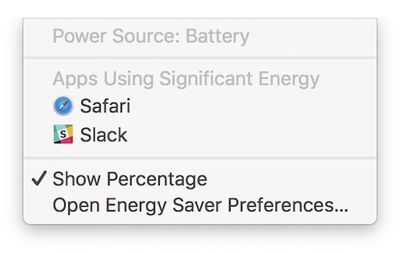
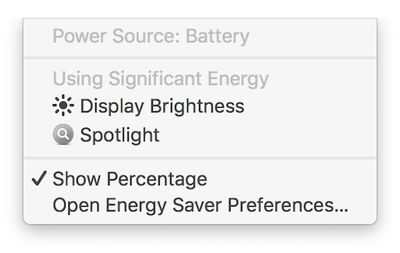
Now, Apple has gone one step further and expanded the feature to include display brightness. On the latest macOS Sierra beta, when a Mac's display is set above 75% brightness—or at least 13 out of 16 notches—a new item called "Display Brightness" is listed under the battery menu.
Clicking on "Display Brightness" lowers the Mac's brightness to 75%. Likewise, when we updated a new MacBook Pro to the fourth beta of macOS Sierra 10.12.3, the display's brightness was automatically lowered to 75%. This is the same brightness level as Apple used during its latest MacBook Pro battery tests.
Battery life on the latest MacBook Pro models has been a controversial topic since the notebooks launched in October. A subset of users have reported getting as little as three to six hours of battery life on a single charge, sometimes even with only basic web browsing and other non-intensive tasks.
Apple has consistently stood by its advertised battery life for the latest MacBook Pro. It did, however, remove the "time remaining" battery life indicator on macOS Sierra 10.12.2, noting the estimates "couldn't accurately keep up with what users were doing" because of the "dynamic ways" people use their Macs.
Consumer Reports initially failed to recommend the latest MacBook Pro because of battery life inconsistencies, but it later worked with Apple and learned that a Safari bug triggered by its own testing configuration was to blame for the mixed results. Apple fixed that bug in macOS 10.12.3, and Consumer Reports has since reversed course and now recommends the latest MacBook Pro after retesting.
The new feature is currently limited to beta testers. It will be widely available when macOS 10.12.3 is officially released over the coming days.