

OmniGroup on Wednesday released OmniOutliner 5, which it is calling the biggest update to the outlining app ever. Available in both a $10 Essentials edition (replacing Standard) and an improved Pro version, the changes to the former are said to focus on simplicity for the newcomer, while the latter brings extra features for the power user.

The new Essentials edition features a redesigned interface that aims to keep the focus on outlining, and includes ten original themes, including dark and solarized color schemes, as well as typewriter and distraction free modes. Live document statistics, filtering, and zoom features are also available in the new stripped down content window.
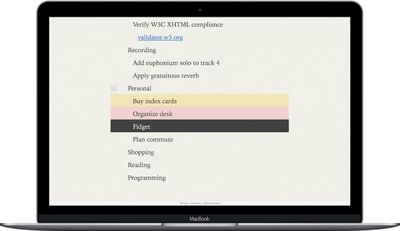
OmniOutliner 5

In OmniOutliner 5's new Essentials edition, your entire focus is on your own content: there are no distracting sidebars or panels. You can choose to work in a window or in a distraction-free full-screen mode, selecting from a set of beautiful built-in themes. As you write, you'll be able to see some key statistics about your content so you can track progress towards your goals. But our goal is to help you focus on your content and whatever task you're working on—not on the tool you're using.

The upgrade to Outliner Pro brings over the new focused UI of Essentials, but adds slide-in sidebars, saved filters, and comprehensive custom settings to control styling. The more advanced environment also includes document password encryption, keyboard shortcut options for every menu item, and support for OPML editing. Other features include:

  • Smarter Paste — To avoid bringing in extra styles when copying data from outside sources, Paste now removes styles but retain links and images. Use the new Paste with Original Style to retain the styles from your source content.

  • New File Format — While .ooutline files are zipped by default, package files are still available for scenarios where that makes more sense, like for version control.

  • Inspector Sidebar — The inspectors are now contained in a sidebar, allowing you to show or hide them on a per-document basis.

  • Style View — When selecting a style in the Styles sidebar, rows that are affected by that style appear highlighted in the outline.

  • Side Margins — Lock the outline column to a specific width and keep your outline centered in the window with side margins. Customize the color of the margins per-document.

  • Specify Column Widths — The Column Inspector now has an editable field for the column width. The outline column can also be set to automatically resize with the window or be set to a specific width.

  • Resize Column to Fit — Select a column and have OmniOutliner adjust the width to fit your content for you with the Resize to fit button in the Column Type Inspector.

  • Column Resizing — Columns can be resized by dragging anywhere on their right edges. Dragging the left-most edge also resizes the outline column.

  • Style Preview — A preview of the style you are inspecting is shown at the top of the Selection Style Inspector.

  • Multiple-Row Focus — Focus on multiple selections by command-clicking them in the sidebar section list.

  • Focus Indicator — When focused, a focus bar appears to remind you that content is hidden and provide easy access to unfocus.

  • Excel Export — Export to the Excel (xlsx) format.

  • PowerPoint Export — PowerPoint export now places embedded images on corresponding slides. You’ll need to manually re-position them, though.

Both versions of OmniOutliner 5 require macOS 10.11. With the Essentials edition, OmniGroup has lowered the app's entry price from $49.99 to a more affordable $9.99. The upgrade price from Essentials to Pro is $49.99, while the new list price for Pro has been lowered to $59.99. Mac and iOS apps are sold separately. OmniOutliner for iOS costs $29.99 and is available for iPhone and iPad on the App Store. The new Mac versions are available in the Trial download via the Mac App Store (with in-app purchases).


Top Rated Comments

ginkobiloba Avatar
114 months ago
I would like to thank OmniGroup for making OmniFocus 2 so unusable that after 10 years I've finally gone back to a paper based productivity system and have been more mentally productive in the past few weeks than I have been in the years I used OF2.
Give "2Do" a try. I was a long time Omnifocus user and have tried all To-do apps , and settled on 2Do. Extremely flexble and doesn't force you into a productivity dogma like OF does with the David Allen GTD method.
( on the other hand, if you feel happy with paper based methods, one should stick to what works best )
Score: 4 Votes (Like | Disagree)
HappyDude20 Avatar
114 months ago
I would like to thank OmniGroup for making OmniFocus 2 so unusable that after 10 years I've finally gone back to a paper based productivity system and have been more mentally productive in the past few weeks than I have been in the years I used OF2.
Score: 2 Votes (Like | Disagree)
ScottNWDW Avatar
109 months ago
I love how this article was about OmniOUTLINER yet the entire conversation was gripes about OmniFOCUS. These are two different apps people, do you even know what you are talking about? Are you confusing OmniOutliner with OmniFocus? If you are then I can understand your frustrations since it's not the app you think you are using. OmniFocus is probably one of the best task manager apps out there and with that being said, I have used numerous task apps out there including 2Do, Things, ToDo, Pocket Informant etc. The one I keep coming back to is OmniFocus. The others just don't compare, however, that's not saying the others are bad, they each have features I like.

I was hoping to read about OmniOutliner 5, but all the comments are about a different product which to me sounds like people are mistaking OmniOutliner for OmniFocus and therefore don't know what app they are trying to use. Kind of like reading an article about Six Flags and everyone comments about Disney World. 2 different places.
Score: 1 Votes (Like | Disagree)

Popular Stories

Apple Wallet ID Illinois

Apple Plans to Expand iPhone Driver's Licenses to These 7 U.S. States

Wednesday December 24, 2025 8:40 am PST by
In select U.S. states, residents can add their driver's license or state ID to the Apple Wallet app on the iPhone and Apple Watch, and then use it to display proof of identity or age at select airports and businesses, and in select apps. The feature is currently available in 13 U.S. states and Puerto Rico, and it is expected to launch in at least seven more in the future. To set up the...
iPhone Top Left Hole Punch Face ID Feature Purple

iPhone 18 Pro Launching Next Year With These 12 New Features

Tuesday December 23, 2025 8:36 am PST by
While the iPhone 18 Pro and iPhone 18 Pro Max are not expected to launch for another nine months, there are already plenty of rumors about the devices. Below, we have recapped 12 features rumored for the iPhone 18 Pro models. The same overall design is expected, with 6.3-inch and 6.9-inch display sizes, and a "plateau" housing three rear cameras Under-screen Face ID Front camera in...
maxresdefault

Where's the New Apple TV?

Monday December 22, 2025 11:30 am PST by
Apple hasn't updated the Apple TV 4K since 2022, and 2025 was supposed to be the year that we got a refresh. There were rumors suggesting Apple would release the new Apple TV before the end of 2025, but it looks like that's not going to happen now. Subscribe to the MacRumors YouTube channel for more videos. Bloomberg's Mark Gurman said several times across 2024 and 2025 that Apple would...
maxresdefault

10 Mac Apps Worth Trying in 2026

Wednesday December 24, 2025 9:27 am PST by
2026 is almost upon us, and a new year is a good time to try out some new apps. We've rounded up 10 excellent Mac apps that are worth checking out. Subscribe to the MacRumors YouTube channel for more videos. Alt-Tab (Free) - Alt-Tab brings a Windows-style alt + tab thumbnail preview option to the Mac. You can see a full window preview of open apps and app windows. One Thing (Free) -...
iOS 26

iOS 26.2 Adds These 8 New Features to Your iPhone

Monday December 22, 2025 8:47 am PST by
Earlier this month, Apple released iOS 26.2, following more than a month of beta testing. It is a big update, with many new features and changes for iPhones. iOS 26.2 adds a Liquid Glass slider for the Lock Screen's clock, offline lyrics in Apple Music, and more. Below, we have highlighted a total of eight new features. Liquid Glass Slider on Lock Screen A new slider in the Lock...
airpods color prototypes

Apple Tested AirPods in Bright Colors

Saturday December 27, 2025 6:06 am PST by
Apple reportedly tested a version of the first-generation AirPods with bright, iPhone 5c-like colored charging cases. The images, shared by the Apple leaker and prototype collector known as "Kosutami," claim to show first-generation AirPods prototypes with pink and yellow exterior casings. The interior of the charging case and the earbuds themselves remain white. They seem close to some...
iPhone Fold Vertical Feature

Why Apple's Foldable iPhone May Be Smaller Than Expected

Tuesday December 23, 2025 5:21 am PST by
Apple's first foldable iPhone, rumored for release next year, may turn out to be smaller than most people imagine, if a recent report is anything to go by. According to The Information, the outer display on the book-style device will measure just 5.3 inches – that's smaller than the 5.4-inch screen on the ‌iPhone‌ mini, a line Apple discontinued in 2022 due to poor sales. The report has led ...
iPhone SE Cosmopolitan Clean

Apple Discontinued These 25 Products This Year

Wednesday December 24, 2025 7:24 am PST by
With the end of 2025 near, the time has come to look back at the devices and accessories that Apple discontinued throughout the year. Most of the products that were discontinued this year were simply replaced by a new model with an updated chip. However, the iPhone SE line was entirely discontinued when the iPhone 16e launched, and the iPhone Plus line is being phased out. Below, we have...
Foldable iPhone 2023 Feature Iridescent Search

Samsung Developing 'Wide Fold' With iPhone Fold-Like Design Ahead of Apple's 2026 Launch

Tuesday December 23, 2025 11:55 am PST by
Samsung is working on a new foldable smartphone that's wider and shorter than the models that it's released before, according to Korean news site ETNews. The "Wide Fold" will compete with Apple's iPhone Fold that's set to launch in September 2026. Samsung's existing Galaxy Z Fold7 display is 6.5 inches when closed, and 8 inches when open, with a 21:9 aspect ratio when folded and a 20:18...

















