

Camera+ 2 was released for iPhone and iPad today, a complete rewrite of the popular photography app of the same name that appeared almost eight years ago and sold over 14 million copies in that time. The successor app features a completely redesigned interface for accessing manual controls, raw shooting and editing, depth capture, and more.

As a universal app, Camera+ 2 promises a consistent experience across iPhone and iPad, with multitasking support for the latter baked in. Unlike its predecessor, the app also comes with all features, one-touch filters, and tools included as-is – no in-app purchases required.
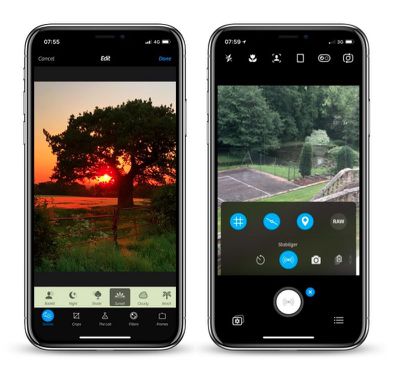
camera 2
In shooting modes, the manual onscreen wheels and controls include traditional settings like shutter speed, ISO, White Balance, and Macro, with wide-angle and telephoto options available on dual-lens devices. These functions can also be hidden during casual shooting.

With depth capture enabled in Camera+ 2, the depth information is saved alongside the image, and the adjustments in The Lab section of the editor can be selectively applied to distant or close subjects. A collection of filters are also available, with options to adjust their strength and layer them to customize the aesthetic.
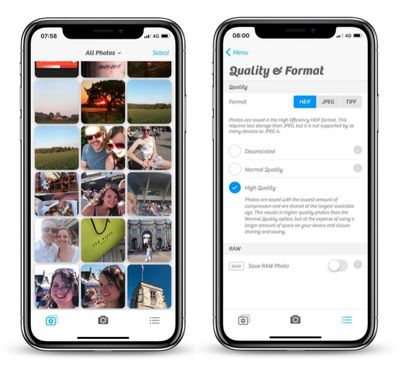
camera 2 1
A new Smile mode enables Camera+ 2 to detect smiles and shoot automatically, while a Stabilizer mode shoots only when the iPhone is steady enough to produce a sharp picture. The Slow Shutter mode meanwhile brings the ability to take long exposures, even in daylight, with additional Burst and Timer modes also included.

Elsewhere, in a much-requested change, Camera+ now has full Photo Library integration with editing support, with the added ability to switch between the Photo Library and the Lightbox with the tap of a button. Drag and drop gestures on the iPad are supported for copying or sharing photos, while Files and iTunes integration are also available for transferring pictures to a computer or other apps.

Camera+ 2 is available to download on the App Store for $2.99 and requires iOS 11 or later. [Direct Link]


Top Rated Comments

urtules Avatar
99 months ago
Really what I miss most from traditional cameras is the option to have the date and time stamp automatically applied to images in the proper bottom corner location. Without having to manually add it later.

That’s the feature I want. Otherwise, the built in camera seems adequate for me.
You mean like water mark, why you want to do this unless for print? Image file contains metadata already. Do you add label with GPS coordinates and time zone as well?
Score: 3 Votes (Like | Disagree)
gaanee Avatar
99 months ago
Is this new app related to the original Camera+ app? This not just upgrade for Camera+ app. and looks like they formed a new company with a similar name to that of the original Camera+: both sellers are different but have LateNiteSoft in the name.
If indeed it's the same developers, I wonder why they chose to list this app as from a separate developer and not just alongside the original Camera+.. possibly to avoid backlash from customers since this is a paid app and not a free upgrade
Score: 2 Votes (Like | Disagree)
Mic'sBook Avatar
99 months ago
Really what I miss most from traditional cameras is the option to have the date and time stamp automatically applied to images in the proper bottom corner location. Without having to manually add it later.

That’s the feature I want. Otherwise, the built in camera seems adequate for me.
To me, the most wanted feature is the ability to take photos at lower resolution. Sometimes there's no need to take photos at full resolution for receipts, etc. Camera+ (and this Camera+ 2) can do exactly that.

To the best of my knowledge ProCam 5 is another camera app that enables the user to manually control the camera settings though I'm not sure if date stamps are available.

Camera+ is the must-have app and it was the most well-spent HKD $8. I guess I bought it since the iPhone 4 (2010).
Score: 1 Votes (Like | Disagree)
H3LL5P4WN Avatar
99 months ago
Really what I miss most from traditional cameras is the option to have the date and time stamp automatically applied to images in the proper bottom corner location. Without having to manually add it later.

That’s the feature I want. Otherwise, the built in camera seems adequate for me.
Mom, what did I tell you about posting on the internet?

(Seriously, that's what metadata is for. Having anything on the picture, ruins the picture. Any time I'm around her, I turn that off on her camera.)
[doublepost=1527685122][/doublepost]
Halide? Obscura 2? Camera+ 2?

Which one am I supposed to know is best for me?!
Only way to find out is to use them all.
He's pretty much right. I love Halide's GUI, haven't used Obscura 2, and just got Camera+ 2 for nostalgia's sake. It all depends on what you want.

The two camera apps on my main homescreen are Camera.app and Pro HDR X, if for no reason other than I still can't reliably denoise RAW files (and that's what I have Halide for, shooting RAW) on my phone. There's no "one touch" denoise app that I know of.

*goes and looks up Obscura 2*
Score: 1 Votes (Like | Disagree)
flyinmac Avatar
99 months ago
You mean like water mark, why you want to do this unless for print? Image file contains metadata already. Do you add label with GPS coordinates and time zone as well?
For documentation purposes. I cannot legally edit a photo that is taken for documentation purposes.

As soon as I alter the image manually, it loses all value.

And metadata is useless legally.

For other purposes, it is also nicer to look at a photo and have that date and time in the image for easy reference. I don’t have to go and find the original and look at metadata.

And so many actions alter metadata as well.
Score: 1 Votes (Like | Disagree)
daniellidio Avatar
99 months ago
Really what I miss most from traditional cameras is the option to have the date and time stamp automatically applied to images in the proper bottom corner location. Without having to manually add it later.

That’s the feature I want. Otherwise, the built in camera seems adequate for me.
I sometimes need this as well, found a camera app a while a go called Procamera, it's by Cocologics. It adds Date, Time and Timezone. I will upload a file of mine so you can look how it works.

Also it is a really good camera app.

Attachment Image
Score: 1 Votes (Like | Disagree)

Popular Stories

Apple Wallet ID Illinois

Apple Plans to Expand iPhone Driver's Licenses to These 7 U.S. States

Wednesday December 24, 2025 8:40 am PST by
In select U.S. states, residents can add their driver's license or state ID to the Apple Wallet app on the iPhone and Apple Watch, and then use it to display proof of identity or age at select airports and businesses, and in select apps. The feature is currently available in 13 U.S. states and Puerto Rico, and it is expected to launch in at least seven more in the future. To set up the...
iPhone Top Left Hole Punch Face ID Feature Purple

iPhone 18 Pro Launching Next Year With These 12 New Features

Tuesday December 23, 2025 8:36 am PST by
While the iPhone 18 Pro and iPhone 18 Pro Max are not expected to launch for another nine months, there are already plenty of rumors about the devices. Below, we have recapped 12 features rumored for the iPhone 18 Pro models. The same overall design is expected, with 6.3-inch and 6.9-inch display sizes, and a "plateau" housing three rear cameras Under-screen Face ID Front camera in...
maxresdefault

Where's the New Apple TV?

Monday December 22, 2025 11:30 am PST by
Apple hasn't updated the Apple TV 4K since 2022, and 2025 was supposed to be the year that we got a refresh. There were rumors suggesting Apple would release the new Apple TV before the end of 2025, but it looks like that's not going to happen now. Subscribe to the MacRumors YouTube channel for more videos. Bloomberg's Mark Gurman said several times across 2024 and 2025 that Apple would...
maxresdefault

10 Mac Apps Worth Trying in 2026

Wednesday December 24, 2025 9:27 am PST by
2026 is almost upon us, and a new year is a good time to try out some new apps. We've rounded up 10 excellent Mac apps that are worth checking out. Subscribe to the MacRumors YouTube channel for more videos. Alt-Tab (Free) - Alt-Tab brings a Windows-style alt + tab thumbnail preview option to the Mac. You can see a full window preview of open apps and app windows. One Thing (Free) -...
iOS 26

iOS 26.2 Adds These 8 New Features to Your iPhone

Monday December 22, 2025 8:47 am PST by
Earlier this month, Apple released iOS 26.2, following more than a month of beta testing. It is a big update, with many new features and changes for iPhones. iOS 26.2 adds a Liquid Glass slider for the Lock Screen's clock, offline lyrics in Apple Music, and more. Below, we have highlighted a total of eight new features. Liquid Glass Slider on Lock Screen A new slider in the Lock...
airpods color prototypes

Apple Tested AirPods in Bright Colors

Saturday December 27, 2025 6:06 am PST by
Apple reportedly tested a version of the first-generation AirPods with bright, iPhone 5c-like colored charging cases. The images, shared by the Apple leaker and prototype collector known as "Kosutami," claim to show first-generation AirPods prototypes with pink and yellow exterior casings. The interior of the charging case and the earbuds themselves remain white. They seem close to some...
iPhone Fold Vertical Feature

Why Apple's Foldable iPhone May Be Smaller Than Expected

Tuesday December 23, 2025 5:21 am PST by
Apple's first foldable iPhone, rumored for release next year, may turn out to be smaller than most people imagine, if a recent report is anything to go by. According to The Information, the outer display on the book-style device will measure just 5.3 inches – that's smaller than the 5.4-inch screen on the ‌iPhone‌ mini, a line Apple discontinued in 2022 due to poor sales. The report has led ...
iPhone SE Cosmopolitan Clean

Apple Discontinued These 25 Products This Year

Wednesday December 24, 2025 7:24 am PST by
With the end of 2025 near, the time has come to look back at the devices and accessories that Apple discontinued throughout the year. Most of the products that were discontinued this year were simply replaced by a new model with an updated chip. However, the iPhone SE line was entirely discontinued when the iPhone 16e launched, and the iPhone Plus line is being phased out. Below, we have...
Foldable iPhone 2023 Feature Iridescent Search

Samsung Developing 'Wide Fold' With iPhone Fold-Like Design Ahead of Apple's 2026 Launch

Tuesday December 23, 2025 11:55 am PST by
Samsung is working on a new foldable smartphone that's wider and shorter than the models that it's released before, according to Korean news site ETNews. The "Wide Fold" will compete with Apple's iPhone Fold that's set to launch in September 2026. Samsung's existing Galaxy Z Fold7 display is 6.5 inches when closed, and 8 inches when open, with a 21:9 aspect ratio when folded and a 20:18...
















