

Apple Announces macOS 10.14 Mojave, Featuring New Dark Mode, Desktop Stacks, a Redesigned Mac App Store, and More

Apple today previewed macOS Mojave during its keynote event at the Worldwide Developers Conference in San Jose, California. Version 10.14 of the Mac operating system introduces a slew of new features, including a Dark Mode, Dynamic Desktop wallpapers, Desktop Stacks, a redesigned Mac App Store, and more.

mojave e1528142238343
The new optional Dark Mode lets users shift their desktop to a darkened color scheme that touches almost every part of the OS, including System Preferences, Messages, Mail, Maps, Photos, Calendar, and more. Developers will be happy to learn that the newest version of Xcode coming in Mojave also supports the new Dark Mode, and Apple is making an API available so developers can implement Dark Mode in their own apps.
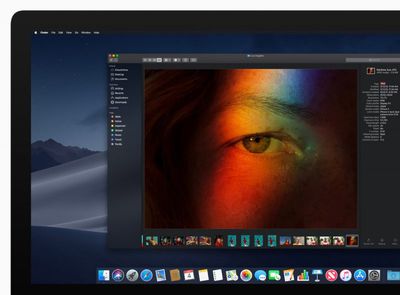
iMac macOS dark mode finder preview 06042018

"macOS Mojave is a major update that introduces powerful new features for a wide range of Mac users, from consumers to pros," said Craig Federighi, Apple’s senior vice president of Software Engineering. "Dark Mode brings a dramatic new look to macOS that puts your content front and center, familiar iOS apps come to the Mac for the first time and the redesigned Mac App Store makes finding new apps easier and more enjoyable than ever."

Mojave's Dark Mode also includes a new Dynamic Desktop feature that automatically transitions new desktop wallpapers to match the time of day.

Meanwhile, a new Desktop Stacks feature is designed to keep your desktop more organized. The new Stacks feature organizes messy desktops by automatically stacking files into neat groups based on file type. Users can customize their Stacks to sort based on other file attributes like date and tags.
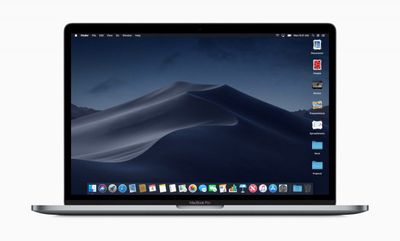
macOS preview Stacks Finder screen 06042018
In addition, a new Gallery view for Finder makes it easier to preview files visually, including images, video, presentations, spreadsheets, PDFs, and more. It also comes with a new Finder sidebar that offers media metadata and Quick Actions, which allow users to do things like create and password-protect PDFs and run custom Automator Actions on files.

Finder's Quick View has also been updated with new Markup tools, and will allows users to rotate and crop images, mark up PDFs, and trim video and audio clips without ever opening an app.
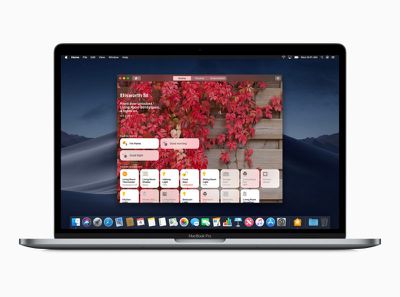
macOS preview Home screen 06042018
macOS Mojave also introduces desktop versions of a number of iOS apps, including News, Stocks, Voice Memos and Home. The apps were were brought to Mac using iOS frameworks that have been adapted to macOS. Apple says that starting in late 2019, these additional frameworks will be available for developers to bring their iOS apps to macOS.

An all-new redesigned Mac App Store is also coming with macOS Mojave. Like the iOS App Store, the redesigned Mac App Store has a new look and includes rich editorial content to help app discovery. The new design also highlights new and updated apps in a Discover tab, while tabs for Create, Work, Play and Develop aim to help users find apps for a specific project or purpose.
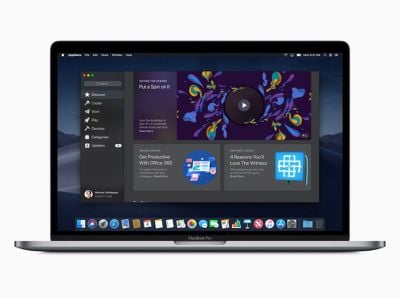
macOS preview Mac App Store Discover screen 06042018
Apple has also focused on improving security and privacy in macOS 10.14. For example, the new Safari browser includes enhanced Intelligent Tracking Prevention to help block social media "Like" or "Share" buttons and comment widgets from tracking users without permission.

In addition, Safari now presents simplified system information when users browse the web, preventing them from being tracked based on their system configuration. In another security measure, Safari will automatically create, autofill, and store strong passwords when users create new online accounts, and flag reused passwords so users can change them.
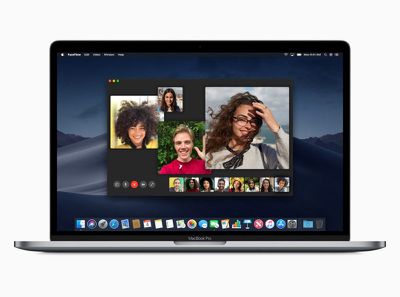
Macbook Pro macOS preview Facetime screen 06042018
Group FaceTime is another feature exclusive to macOS Mojave, and enables users to initiate chat sessions with up to 32 people at the same time. FaceTime users can also join later if a conversation is still active and choose to join using video or audio from an iPhone, iPad or Mac, or using FaceTime audio via Apple Watch. Group FaceTime is also available on iPhones and iPads running iOS 12.

Elsewhere, in an extension of Apple's existing Continuity features, a new function called Continuity Camera allows the Photos app in macOS Mojave to access still shots and video captured from nearby iOS devices. Screenshots in macOS will also include new on-screen controls for accessing existing but hidden screenshot options as well as new video recording and photo editing capabilities.

macOS Mojave will be available this fall as a free software update for Macs introduced in mid-2012 or later, plus 2010 and 2012 Mac Pro models with recommended Metal-capable graphics cards.


Related Forum: macOS Mojave

Popular Stories

Apple Wallet ID Illinois

Apple Plans to Expand iPhone Driver's Licenses to These 7 U.S. States

Wednesday December 24, 2025 8:40 am PST by
In select U.S. states, residents can add their driver's license or state ID to the Apple Wallet app on the iPhone and Apple Watch, and then use it to display proof of identity or age at select airports and businesses, and in select apps. The feature is currently available in 13 U.S. states and Puerto Rico, and it is expected to launch in at least seven more in the future. To set up the...
iPhone Top Left Hole Punch Face ID Feature Purple

iPhone 18 Pro Launching Next Year With These 12 New Features

Tuesday December 23, 2025 8:36 am PST by
While the iPhone 18 Pro and iPhone 18 Pro Max are not expected to launch for another nine months, there are already plenty of rumors about the devices. Below, we have recapped 12 features rumored for the iPhone 18 Pro models. The same overall design is expected, with 6.3-inch and 6.9-inch display sizes, and a "plateau" housing three rear cameras Under-screen Face ID Front camera in...
iOS 26

iOS 26.2 Adds These 8 New Features to Your iPhone

Monday December 22, 2025 8:47 am PST by
Earlier this month, Apple released iOS 26.2, following more than a month of beta testing. It is a big update, with many new features and changes for iPhones. iOS 26.2 adds a Liquid Glass slider for the Lock Screen's clock, offline lyrics in Apple Music, and more. Below, we have highlighted a total of eight new features. Liquid Glass Slider on Lock Screen A new slider in the Lock...
maxresdefault

Where's the New Apple TV?

Monday December 22, 2025 11:30 am PST by
Apple hasn't updated the Apple TV 4K since 2022, and 2025 was supposed to be the year that we got a refresh. There were rumors suggesting Apple would release the new Apple TV before the end of 2025, but it looks like that's not going to happen now. Subscribe to the MacRumors YouTube channel for more videos. Bloomberg's Mark Gurman said several times across 2024 and 2025 that Apple would...
maxresdefault

10 Mac Apps Worth Trying in 2026

Wednesday December 24, 2025 9:27 am PST by
2026 is almost upon us, and a new year is a good time to try out some new apps. We've rounded up 10 excellent Mac apps that are worth checking out. Subscribe to the MacRumors YouTube channel for more videos. Alt-Tab (Free) - Alt-Tab brings a Windows-style alt + tab thumbnail preview option to the Mac. You can see a full window preview of open apps and app windows. One Thing (Free) -...
Foldable iPhone 2023 Feature Iridescent Search

Samsung Developing 'Wide Fold' With iPhone Fold-Like Design Ahead of Apple's 2026 Launch

Tuesday December 23, 2025 11:55 am PST by
Samsung is working on a new foldable smartphone that's wider and shorter than the models that it's released before, according to Korean news site ETNews. The "Wide Fold" will compete with Apple's iPhone Fold that's set to launch in September 2026. Samsung's existing Galaxy Z Fold7 display is 6.5 inches when closed, and 8 inches when open, with a 21:9 aspect ratio when folded and a 20:18...
iOS 26

iOS 26.3 Brings AirPods-Like Pairing to Third-Party Devices in EU Under DMA

Monday December 22, 2025 3:20 pm PST by
The European Commission today praised the interoperability changes that Apple is introducing in iOS 26.3, once again crediting the Digital Markets Act (DMA) with bringing "new opportunities" to European users and developers. The Digital Markets Act requires Apple to provide third-party accessories with the same capabilities and access to device features that Apple's own products get. In iOS...
iphone fold 3d print

Have a 3D Printer? You Can Make Your Own iPhone Fold Dummy

Tuesday December 23, 2025 1:31 pm PST by
Apple is working on a foldable iPhone that's set to come out in September 2026, and rumors suggest that it will have a display that's around 5.4 inches when closed and 7.6 inches when open. Exact measurements vary based on rumors, but one 3D designer has created a mockup based on what we've heard so far. On MakerWorld, a user named Subsy has uploaded a 1:1 iPhone Fold replica (via Macworld), ...
iPhone Fold Vertical Feature

Why Apple's Foldable iPhone May Be Smaller Than Expected

Tuesday December 23, 2025 5:21 am PST by
Apple's first foldable iPhone, rumored for release next year, may turn out to be smaller than most people imagine, if a recent report is anything to go by. According to The Information, the outer display on the book-style device will measure just 5.3 inches – that's smaller than the 5.4-inch screen on the ‌iPhone‌ mini, a line Apple discontinued in 2022 due to poor sales. The report has led ...

Top Rated Comments

Christian 5G Avatar
99 months ago
Don’t know about you guys but I’m Going Dark from Day 1!
Score: 15 Votes (Like | Disagree)
freezelighter Avatar
99 months ago
My body is ready for the Dark Mode...

Attachment Image
Score: 14 Votes (Like | Disagree)
tkermit Avatar
99 months ago
finder Gallery mode is a feature I remember using in Windows XP. :/
What's old is new again, huh? :D


Attachment Image
Score: 9 Votes (Like | Disagree)
jmh600cbr Avatar
99 months ago
No dark mode on iOS? or did they just not announce it because it was a flagship feature for macOS?
Score: 9 Votes (Like | Disagree)
lunarworks Avatar
99 months ago
No dark mode on iOS? or did they just not announce it because it was a flagship feature for macOS?
Y Apple Y? No Dark Mode for iOS Buy for MacOS o_O
My guess is dark mode is part of the iOS redesign that they pushed back to next year in order to focus on quality.
Score: 8 Votes (Like | Disagree)
FrancoisC Avatar
99 months ago
HomeKit on macOS finally!
Score: 7 Votes (Like | Disagree)
















