

As promised earlier in March, Apple today introduced major updates for all of its iWork for iOS apps, including Pages, Keynote, and Numbers.

Today's update brings enhanced Apple Pencil functionality, coinciding with the addition of ‌Apple Pencil‌ support on the new iPad Air and the fifth-generation iPad mini.
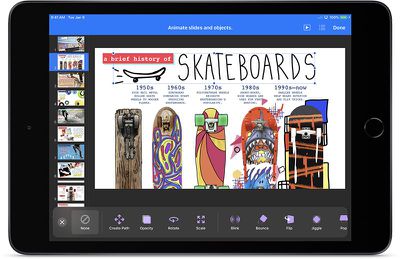
Keynote 2019
The new version of Keynote allows you to draw paths with your finger or with the ‌Apple Pencil‌ to animate an object, and there are options to add action build effects, like new move, rotate, and scale animations.

You can create and share animated GIFs by exporting one or more slides, and there's an option to edit presenter notes while presenting or rehearsing a slide show. With Keynote and the other iWork apps, you can also save custom shapes. Keynote's full release notes are below:

- Draw a path with your finger or Apple Pencil to animate an object across the slide.
- Add emphasis to presentations with action build effects, including move, rotate, and scale animations.
- Create and share an animated GIF by exporting one or more slides.
- Edit presenter notes while presenting or rehearsing a slideshow.
- Save custom shapes for use in other presentations and access them on any device using iCloud.
- Create themes to use as a model for new presentations, and access them on any device using iCloud.
- Slides with custom wider aspect ratios now display better in the slide navigator, light table, and presenter display.
- Create image placeholders to easily replace images without affecting the formatting of your slide.
- Improved performance while collaborating on presentations.
- Edit grouped objects while collaborating.
- Support for vertical text in shapes and text boxes in Chinese, Japanese, and Korean languages.

In the Numbers app, there's a new feature for making precise changes to table row and column counts with the format pane, the maximum zoom level has been increased to 400 percent, collaboration features have been improved, and there's an option to create templates to use as a model for new spreadsheets. The full Numbers release notes are below:

- Make precise changes to table row and column counts and sizes with the format pane.
- Performance and usability improvements to Smart Categories.
- Save custom shapes for use in other spreadsheets, then access them on any device using iCloud.
- Create templates to use as a model for new spreadsheets, and access them on any device using iCloud.
- Increased maximum zoom level to 400%.
- Enhancements to Excel and comma separated value file import.
- Create image placeholders to easily replace images without affecting the formatting of your spreadsheet.
- Improved performance while collaborating on spreadsheets.
- Edit grouped objects while collaborating.
- Support for vertical text in shapes and text boxes in Chinese, Japanese, and Korean languages.

Pages features a new table of contents view to navigate through a document or book, and a table of contents can be inserted into a page. Custom shapes can be saved and used in other documents, and image placeholders can be added to replace images without affecting page formatting. Release notes for the Pages update are below:

- Use the new table of contents view to easily navigate your document or book.
- Insert a table of contents onto a page in a word-processing document.
- Save custom shapes for use in other documents and access them on any device using iCloud.
- Create templates to use as a model for new documents, and access them on any device using iCloud.
- Create image placeholders to easily replace images without affecting the formatting of your page.
- Switch your document between word processing and page layout.
- Improved performance while collaborating on documents.
- Edit grouped objects while collaborating.
- In Chinese, Japanese, and Korean languages, you can now type vertically in your entire document or in an individual text box.

Apple has also updated its iWork for macOS apps with some of the same features that have been added to its iOS apps. All of Apple's iWork apps for both macOS and iOS are free for you to download.

Apple first announced all of these updates on Monday, March 18, when debuting the new ‌iPad mini‌ and the new ‌iPad Air‌ models. All of Apple's iPads now support either the original ‌Apple Pencil‌ or the ‌Apple Pencil‌ 2 (iPad Pro models), both which can be used in all of the iWork apps.

Tag: iWork

Top Rated Comments

Konigi Avatar
88 months ago
macOS versions received updates today too.
You're right, thanks! The article focused primarily on iOS versions and my AppStore page was not refreshed.

I am a heavy user of these macOS apps, I love seeing updates. I feel like iWorks are much more interesting to use than Microsoft Office versions.
Score: 4 Votes (Like | Disagree)
ignatius345 Avatar
88 months ago
You can create and share animated GIFs by exporting one or more slides,
This is a fun little addition, and useful for quick proofing and feedback. I have worked with clients who are mostly on PCs but can be convinced to run a Keynote off a Mac for maximum polish -- but when you're going back and forth with them, it's a bit of a nightmare because they're emailing you from a PC or (maybe) an iPhone if you're lucky. Being able to quickly export a GIF is a cool workaround for this.
[doublepost=1553811536][/doublepost]
Apple has done quite a bit to close the gap, but no, the latest version of iWork still doesn't have all of the functionality that iWork '09 had. (btw, iWork '09 still works on the latest version of mac OS).

For those who are curious, no, this version still doesn't restore the full functionality of linked text boxes.
I just want my g-d control palattes back, at this point. Those sidebars do not cut it at all.

The big thing for me that was lost (and thank god later restored) was the ability to paste vector objects from Illustrator and back again with no pixelization or loss of quality. That means you can build illustrations and icons off to the side in Illustrator and never have to worry about exporting individual assets. It's a massive time saver. But damn, I miss the palattes.

But overall, I have to say I'm very happy with iWork, especially since it's free. If Pages alone was a standalone word processor and layout program by another company, I could see it costing $50-75, even $100. (Or, worse, some kind of $5.99/month software rental deal).
Score: 2 Votes (Like | Disagree)
tubular Avatar
88 months ago
Big fan of Keynote.
Score: 2 Votes (Like | Disagree)
sracer Avatar
88 months ago
I've never really used iWork, but I'm curious. Has iWork on Mac caught up to where it was beore the "iOS-ification"?
Apple has done quite a bit to close the gap, but no, the latest version of iWork still doesn't have all of the functionality that iWork '09 had. (btw, iWork '09 still works on the latest version of mac OS).

For those who are curious, no, this version still doesn't restore the full functionality of linked text boxes.
Score: 2 Votes (Like | Disagree)
Unregistered 4U Avatar
88 months ago
Apple should really borrow some functionality from it.
I think it’d be fruitless to compete with Excel when there’s a great product already out there that has 100% of Excel’s features and is 100% compatible with Excel... which is, of course, Excel :) The majority of people using Excel really don’t need all the features, they’re just looking to do some quick totals or, in a LOT of cases, just order some lists. I think it’s reasonable that someone should be expected to graduate out of Numbers knowing a lot of the basics to work in Excel and then do pivot charts!
Score: 1 Votes (Like | Disagree)
Joniz Avatar
88 months ago
I haven’t cared about iWorks in years until just recently, when I discovered how great Smart Annotation is for editing. No longer need a separate PDF app for redlining. Just export from Ulysses to Word, open with Pages, and redline away.

Now that the iPad Mini has Pencil support, I’m stoked.
Score: 1 Votes (Like | Disagree)

Popular Stories

Apple Wallet ID Illinois

Apple Plans to Expand iPhone Driver's Licenses to These 7 U.S. States

Wednesday December 24, 2025 8:40 am PST by
In select U.S. states, residents can add their driver's license or state ID to the Apple Wallet app on the iPhone and Apple Watch, and then use it to display proof of identity or age at select airports and businesses, and in select apps. The feature is currently available in 13 U.S. states and Puerto Rico, and it is expected to launch in at least seven more in the future. To set up the...
iPhone Top Left Hole Punch Face ID Feature Purple

iPhone 18 Pro Launching Next Year With These 12 New Features

Tuesday December 23, 2025 8:36 am PST by
While the iPhone 18 Pro and iPhone 18 Pro Max are not expected to launch for another nine months, there are already plenty of rumors about the devices. Below, we have recapped 12 features rumored for the iPhone 18 Pro models. The same overall design is expected, with 6.3-inch and 6.9-inch display sizes, and a "plateau" housing three rear cameras Under-screen Face ID Front camera in...
maxresdefault

Where's the New Apple TV?

Monday December 22, 2025 11:30 am PST by
Apple hasn't updated the Apple TV 4K since 2022, and 2025 was supposed to be the year that we got a refresh. There were rumors suggesting Apple would release the new Apple TV before the end of 2025, but it looks like that's not going to happen now. Subscribe to the MacRumors YouTube channel for more videos. Bloomberg's Mark Gurman said several times across 2024 and 2025 that Apple would...
maxresdefault

10 Mac Apps Worth Trying in 2026

Wednesday December 24, 2025 9:27 am PST by
2026 is almost upon us, and a new year is a good time to try out some new apps. We've rounded up 10 excellent Mac apps that are worth checking out. Subscribe to the MacRumors YouTube channel for more videos. Alt-Tab (Free) - Alt-Tab brings a Windows-style alt + tab thumbnail preview option to the Mac. You can see a full window preview of open apps and app windows. One Thing (Free) -...
iOS 26

iOS 26.2 Adds These 8 New Features to Your iPhone

Monday December 22, 2025 8:47 am PST by
Earlier this month, Apple released iOS 26.2, following more than a month of beta testing. It is a big update, with many new features and changes for iPhones. iOS 26.2 adds a Liquid Glass slider for the Lock Screen's clock, offline lyrics in Apple Music, and more. Below, we have highlighted a total of eight new features. Liquid Glass Slider on Lock Screen A new slider in the Lock...
airpods color prototypes

Apple Tested AirPods in Bright Colors

Saturday December 27, 2025 6:06 am PST by
Apple reportedly tested a version of the first-generation AirPods with bright, iPhone 5c-like colored charging cases. The images, shared by the Apple leaker and prototype collector known as "Kosutami," claim to show first-generation AirPods prototypes with pink and yellow exterior casings. The interior of the charging case and the earbuds themselves remain white. They seem close to some...
iPhone Fold Vertical Feature

Why Apple's Foldable iPhone May Be Smaller Than Expected

Tuesday December 23, 2025 5:21 am PST by
Apple's first foldable iPhone, rumored for release next year, may turn out to be smaller than most people imagine, if a recent report is anything to go by. According to The Information, the outer display on the book-style device will measure just 5.3 inches – that's smaller than the 5.4-inch screen on the ‌iPhone‌ mini, a line Apple discontinued in 2022 due to poor sales. The report has led ...
iPhone SE Cosmopolitan Clean

Apple Discontinued These 25 Products This Year

Wednesday December 24, 2025 7:24 am PST by
With the end of 2025 near, the time has come to look back at the devices and accessories that Apple discontinued throughout the year. Most of the products that were discontinued this year were simply replaced by a new model with an updated chip. However, the iPhone SE line was entirely discontinued when the iPhone 16e launched, and the iPhone Plus line is being phased out. Below, we have...
Foldable iPhone 2023 Feature Iridescent Search

Samsung Developing 'Wide Fold' With iPhone Fold-Like Design Ahead of Apple's 2026 Launch

Tuesday December 23, 2025 11:55 am PST by
Samsung is working on a new foldable smartphone that's wider and shorter than the models that it's released before, according to Korean news site ETNews. The "Wide Fold" will compete with Apple's iPhone Fold that's set to launch in September 2026. Samsung's existing Galaxy Z Fold7 display is 6.5 inches when closed, and 8 inches when open, with a 21:9 aspect ratio when folded and a 20:18...

















