

Apple today updated its Clips app for the iPhone and the iPad to introduce new posters, new title and caption options, updated stickers, a camcorder filter, and more.
The Clips app, for those unfamiliar with it, is a video editing app that's designed to let users combine video clips, images, and photos with voice-based titles, music, filters, and graphics to create unique videos that can be shared on social media.
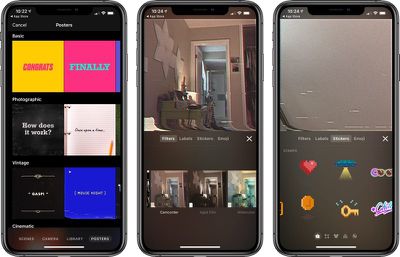
Apple has added a new camcorder filter that's designed to introduce a retro video camera look for your videos, and there are eight new poster background options with colorful vintage designs, a camcorder recording screen, and an animated globe in honor of earth day.
You can create titles and captions using three newly introduced Live Titles styles, and there are new 8-bit and 3D stickers you can add to your videos. Songs created in GarageBand or other music apps can be added to your Clips projects, and there's now ClassKit support to allow students to deliver video assignments to teachers through the Schoolwork app. Full release notes are below:
- Use the new camcorder filter to give your videos a retro video camera look
- Choose from 8 new posters including options with solid backgrounds, colorful vintage designs, a classic blue camcorder recording screen, and an animated globe to celebrate Earth Day.
- Create titles and captions with 3 new Live Titles styles featuring static text that appears all at once or animated text that highlights each word as it's spoken
- Apply new 8-bit and 3D-styled stickers to add emphasis to your videos
- Create songs in GarageBand and other music apps, then add them directly to new or existing Clips projects
- Duplicate and rename projects
- Share projects with friends via AirDrop or email, save them to Files, or upload them to cloud storage service with share extensions
- ClassKit support lets students deliver video assignments to teachers using the Schoolwork app
Apple first released clips in early 2017 and has since updated it multiple times. Clips is compatible with the iPhone 5s and later, the original iPad Air and later, and the iPad mini 2 and later. Style transfer effects require the iPhone 7 or 2017 iPad Pro or later, while Selfie Scenes require an iPhone or iPad Pro with TrueDepth Camera.
Clips can be downloaded from the App Store for free. [Direct Link]























