Satechi Launches Dual-Connector Type-C Multimedia Adapter, Supporting Two 4K Displays - MacRumorsOpen MenuShow RoundupsShow Forums menuVisit ForumsOpen Sidebar
Skip to Content

Satechi Launches Dual-Connector Type-C Multimedia Adapter, Supporting Two 4K Displays

by

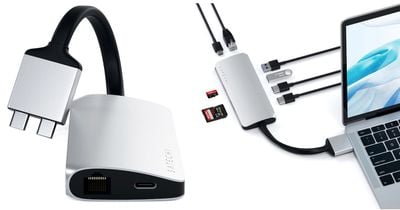
Satechi today announced the Type-C Dual Multimedia Adapter, which plugs into two of the MacBook Pro's USB-C ports to offer a handful of add-on ports.
satechi new dongle
In total, this includes: one 4K HDMI port at 60Hz, one 4K HDMI port at 30Hz, USB-C power delivery charging, Gigabit Ethernet, a micro/SD card reader and two USB 3.0 ports. Satechi said that this dual-connector design is patent pending.

Satechi's accessory allows users to connect their ‌MacBook Pro‌ to external 4K monitors, and extend the display across two screens. The company is also launching the Type-C Dual HDMI Adapter for anyone who solely wants a dual-display setup, without the extra ports.


The smaller adapter features two HDMI ports at 60Hz, supporting an extended 4K display, as well as an added USB-C charging port. The company includes a silicone cover for the dongle, which it says is recommended for added heat protection when both 4K 60Hz HDMI display ports and the power port are all being used at once.

The Type-C Dual Multimedia Adapter is available to purchase now in Silver or Space Gray for $109.99 [Amazon / Satechi], while the Type-C Dual HDMI Adapter is available for $64.99 [Amazon / Satechi]. You can enter the code DUALDISPLAY on Satechi.net or Amazon to get 20 percent off the accessories through September 3.

Note: MacRumors is an affiliate partner with these vendors. When you click a link and make a purchase, we may receive a small payment, which helps us keep the site running.


Tag: Satechi

Top Rated Comments

timborama Avatar
86 months ago
Until Apple changes the space between the ports...
Score: 9 Votes (Like | Disagree)
86 months ago
Until Apple changes the space between the ports...
Non-issue. You just get two USB-C female to male extension cables. :rolleyes: Haha
Score: 5 Votes (Like | Disagree)
NickName99 Avatar
86 months ago
I appreciate what they’re trying to accomplish, but this is ultimately an overpriced proprietary solution. For dual 4K 60hz displays, just use two $15 adapters, or spend more for a Thunderbolt 3 dock.
Score: 4 Votes (Like | Disagree)
NickName99 Avatar
86 months ago
A totally different approach would be to buy a Razer Core X external GPU enclosure like I did. They’re $250 refurbished. I picked up a cheap Radeon RX 580 GPU secondhand. I plug the eGPU into my MacBook Pro, it provides power and the 580 could drive four 4K displays at 60hz, and it’s a huge performance upgrade over the built in graphics. It also works great with Bootcamp, I’ve got a nice gaming partition now.
Score: 3 Votes (Like | Disagree)
4jasontv Avatar
86 months ago
And fewer plug in/out events = less wear and tear on hardware.
Isn’t this product and the other posts suggestion the same number of plug in and out per day? I understand the point about convenience but not this one.
Score: 2 Votes (Like | Disagree)
86 months ago
I've made THREE visits to Apple Stores (Boulder, Broomfield, San Jose) trying to find a 2019 MBP compatible USB-C -> dual HDMI hub at a reasonable price. Since the 20-something sales people aren't office workers, they're not hip to the idea of using two external monitors. So they generally begin with a Google search or by asking a better informed co-worker who then performs the Google search.

Sometimes, their Google searches reveal the Henge article on USB C hubs that connect to dual monitors, or they find the $250 CalDigit TS3 Plus Dock that they sell in-store. Other times they suggest using multiple USB-C to HDMI adapters. I'll give this thing a shot, it looks promising. None of my monitors run at 4k, so the second, slower port should be fine.

Their web site indicates that the PD port supports up to 60 watts, by the way.
Score: 2 Votes (Like | Disagree)
Related Apple News: Health | Sport | Motoring | Iphone | Buyers Guide