Apple Releases iOS and iPadOS 13.2 With New Emoji, Deep Fusion for iPhone 11, Siri Privacy Options, and More

Apple today released iOS 13.2, the second major update to the iOS and iPadOS 13 operating systems. The new software updates come two weeks after the release of iOS/iPadOS 13.1.3 and over a month after the initial release of iOS 13.

The iOS and ‌iPadOS‌ 13.2 updates are available on all eligible devices over-the-air in the Settings app. To access the updates, go to Settings > General > Software Update. For older iPhones still running iOS 12, Apple has also released an iOS 12.4.3 update with security improvements.
ryanscoolios13thumbnail
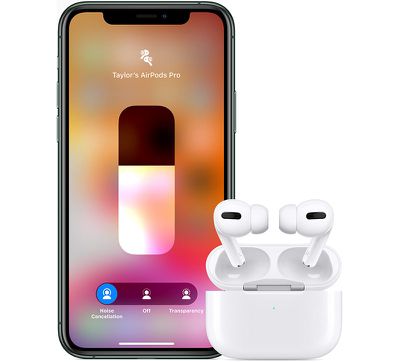
iOS 13.2 is a major update that introduces support for the new AirPods Pro earbuds that were just announced as there are new Control Center features for Active Noise Nancellation.
airpodsprocontrolcenter
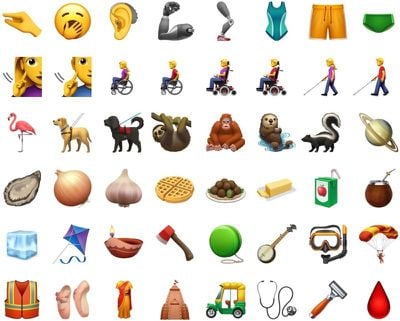
iOS 13.2 brings support for new Unicode 12 emojis, with more than 230 characters when different genders and skin tones are taken into account.

Orangutan, sloth, otter, skunk, and flamingo are the new animals included in the update, while new food items include garlic, onion, waffle, falafel, butter, oyster, maté, and ice cube.
newemojis

Image via Emojipedia

New faces, gestures, and poses include yawning face, pinching hand, person kneeling, person standing, and new people holding hands options that are both gender and skin tone inclusive, plus accessibility-related emoji like deaf person, person in wheelchair, guide dog, and more.

For the iPhone 11 and 11 Pro models, iOS 13.2 brings Deep Fusion, a new camera feature. Deep Fusion is an image processing system that leverages the A13 Bionic and the Neural Engine to take advantage of machine learning techniques for pixel-by-pixel processing of photos.

Deep Fusion optimizes for texture, details, and noise in each part of an image, resulting in better overall photographs. Deep Fusion is aimed at improving indoor photos and photos taken in medium lighting.

deepfusion
When taking a photo on an ‌iPhone‌ 11, 11 Pro, or 11 Pro Max following the update, Deep Fusion will activate automatically when the lighting conditions require it.

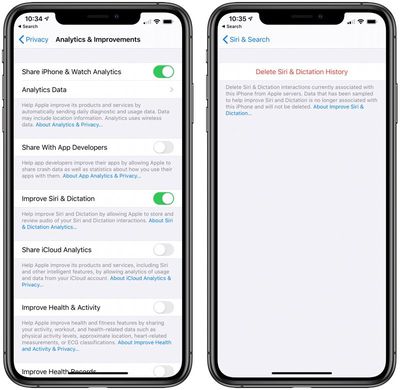
iOS and iPadOS 13.2 bring a promised privacy option that lets users opt out of sharing their Siri and dictation audio recording with Apple, plus it adds an option to delete ‌Siri‌ and dictation history.

ios132newsiriprivacy
These settings, which you can find under Privacy > Analytics and Improvements and ‌Siri‌ > Search, provide users with more control over how their ‌Siri‌ voice recordings are used.

Apple has reintroduced the Announce Messages with ‌Siri‌ feature in the update, which lets ‌Siri‌ read incoming messages without having to unlock the ‌iPhone‌. The feature works with the second-generation AirPods and the Beats Pro.
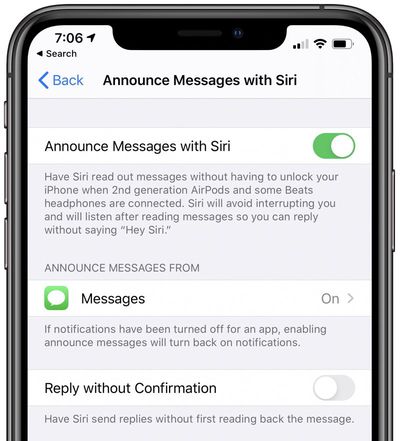
announcemessageswithsiri
Deleting apps from the Home screen is an option for the first time, with the delete button coming up when long pressing or Haptic Touching on an app's icon. The Rearrange Apps option has also been changed to "Edit Home Screen."
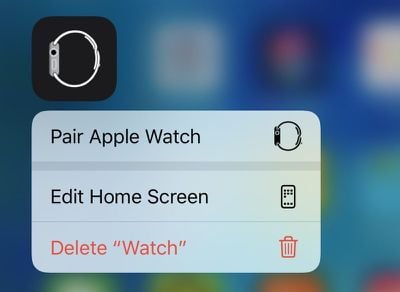
deleteappsios132
On the ‌iPhone‌ 11 and 11 Pro, there's a new option to change video recording settings right from the Camera app, and there are privacy settings for Apple's upcoming Research app, which could potentially see a launch alongside iOS 13.2.

There's a new Transfer to HomePod toggle in the Settings app to turn on ‌HomePod‌ handoff, there's an updated volume bar in Control Center that displays AirPods and Beats icons, and an option to display multi-function HomeKit products as either multiple tiles or a single tile.

Apple's full release notes for the update are below:

iOS 13.2 introduces Deep Fusion, an advanced image processing system that uses the A13 Bionic Neural Engine to capture images with dramatically better texture, detail, and reduced noise in lower light, on iPhone 11, iPhone 11 Pro, and iPhone 11 Pro Max. Additional features include updated and additional emoji, Announce Messages for AirPods, support for AirPods Pro, HomeKit Secure Video, HomeKit enabled routers, and new Siri privacy settings. This update also contains bug fixes and improvements.

Camera
- Deep Fusion for iPhone 11, iPhone 11 Pro, and iPhone 11 Pro Max uses the A13 Bionic Neural Engine to capture multiple images at various exposures, run a pixel-by-pixel analysis, and fuse the highest quality parts of the images together resulting in photos with dramatically better texture, details, and reduced noise, especially for mid to low light scenes
- Ability to change the video resolution directly from the Camera app for iPhone 11, iPhone 11 Pro, and iPhone 11 Pro Max

Emoji
- Over 70 new or updated emoji, including animals, food, activities, new accessibility emoji, gender neutral emoji, and skin tones selection for couple emoji

AirPods support
- Announce Messages with Siri to read your incoming messages aloud to your AirPods
- AirPods Pro support

Home App
- HomeKit Secure Video enables you to privately capture, store, and view encrypted video from your security cameras and features people, animal, and vehicle detection
- HomeKit enabled routers put you in control of what your HomeKit accessories communicate with over the internet or in your home

Siri
- Privacy settings to control whether or not to help improve Siri and Dictation by allowing Apple to store audio of your Siri and Dictation interactions
- Option to delete your Siri and Dictation history from Siri Settings

This update also includes bug fixes and other improvements. This update:
- Fixes an issue that may prevent passwords from autofilling in 3rd party apps
- Resolves an issue that may prevent the keyboard from appearing when using Search
- Addresses an issue where swipe to go home might not work on iPhone X and later
- Fixes an issue where Messages would only send a single notification when the option to repeat alerts was enabled
- Addresses an issue where Messages may display a phone number instead of a contact name
- Resolves an issue that caused Contacts to launch to the previously opened contact instead of the contact list
- Fixes an issue that may prevent Markup annotations from being saved
- Resolves an issue where saved notes could temporarily disappear
- Fixes an issue where iCloud Backup might not successfully complete after tapping Backup Now in Settings
- Improves performance when using AssistiveTouch to activate App Switcher

For more on all of the new features that are included in the iOS 13 update, make sure to check out our iOS 13 roundup.


Related Forum: iOS 13

Popular Stories

Apple Wallet ID Illinois

Apple Plans to Expand iPhone Driver's Licenses to These 7 U.S. States

Wednesday December 24, 2025 8:40 am PST by
In select U.S. states, residents can add their driver's license or state ID to the Apple Wallet app on the iPhone and Apple Watch, and then use it to display proof of identity or age at select airports and businesses, and in select apps. The feature is currently available in 13 U.S. states and Puerto Rico, and it is expected to launch in at least seven more in the future. To set up the...
iPhone Top Left Hole Punch Face ID Feature Purple

iPhone 18 Pro Launching Next Year With These 12 New Features

Tuesday December 23, 2025 8:36 am PST by
While the iPhone 18 Pro and iPhone 18 Pro Max are not expected to launch for another nine months, there are already plenty of rumors about the devices. Below, we have recapped 12 features rumored for the iPhone 18 Pro models. The same overall design is expected, with 6.3-inch and 6.9-inch display sizes, and a "plateau" housing three rear cameras Under-screen Face ID Front camera in...
iOS 26

iOS 26.2 Adds These 8 New Features to Your iPhone

Monday December 22, 2025 8:47 am PST by
Earlier this month, Apple released iOS 26.2, following more than a month of beta testing. It is a big update, with many new features and changes for iPhones. iOS 26.2 adds a Liquid Glass slider for the Lock Screen's clock, offline lyrics in Apple Music, and more. Below, we have highlighted a total of eight new features. Liquid Glass Slider on Lock Screen A new slider in the Lock...
maxresdefault

Where's the New Apple TV?

Monday December 22, 2025 11:30 am PST by
Apple hasn't updated the Apple TV 4K since 2022, and 2025 was supposed to be the year that we got a refresh. There were rumors suggesting Apple would release the new Apple TV before the end of 2025, but it looks like that's not going to happen now. Subscribe to the MacRumors YouTube channel for more videos. Bloomberg's Mark Gurman said several times across 2024 and 2025 that Apple would...
maxresdefault

10 Mac Apps Worth Trying in 2026

Wednesday December 24, 2025 9:27 am PST by
2026 is almost upon us, and a new year is a good time to try out some new apps. We've rounded up 10 excellent Mac apps that are worth checking out. Subscribe to the MacRumors YouTube channel for more videos. Alt-Tab (Free) - Alt-Tab brings a Windows-style alt + tab thumbnail preview option to the Mac. You can see a full window preview of open apps and app windows. One Thing (Free) -...
Foldable iPhone 2023 Feature Iridescent Search

Samsung Developing 'Wide Fold' With iPhone Fold-Like Design Ahead of Apple's 2026 Launch

Tuesday December 23, 2025 11:55 am PST by
Samsung is working on a new foldable smartphone that's wider and shorter than the models that it's released before, according to Korean news site ETNews. The "Wide Fold" will compete with Apple's iPhone Fold that's set to launch in September 2026. Samsung's existing Galaxy Z Fold7 display is 6.5 inches when closed, and 8 inches when open, with a 21:9 aspect ratio when folded and a 20:18...
iOS 26

iOS 26.3 Brings AirPods-Like Pairing to Third-Party Devices in EU Under DMA

Monday December 22, 2025 3:20 pm PST by
The European Commission today praised the interoperability changes that Apple is introducing in iOS 26.3, once again crediting the Digital Markets Act (DMA) with bringing "new opportunities" to European users and developers. The Digital Markets Act requires Apple to provide third-party accessories with the same capabilities and access to device features that Apple's own products get. In iOS...
iphone fold 3d print

Have a 3D Printer? You Can Make Your Own iPhone Fold Dummy

Tuesday December 23, 2025 1:31 pm PST by
Apple is working on a foldable iPhone that's set to come out in September 2026, and rumors suggest that it will have a display that's around 5.4 inches when closed and 7.6 inches when open. Exact measurements vary based on rumors, but one 3D designer has created a mockup based on what we've heard so far. On MakerWorld, a user named Subsy has uploaded a 1:1 iPhone Fold replica (via Macworld), ...
iPhone SE Cosmopolitan Clean

Apple Discontinued These 25 Products This Year

Wednesday December 24, 2025 7:24 am PST by
With the end of 2025 near, the time has come to look back at the devices and accessories that Apple discontinued throughout the year. Most of the products that were discontinued this year were simply replaced by a new model with an updated chip. However, the iPhone SE line was entirely discontinued when the iPhone 16e launched, and the iPhone Plus line is being phased out. Below, we have...

Top Rated Comments

citysnaps Avatar
81 months ago

OMG Apple, PLEASE TELL ME YOU FIXED THE BUG WHERE APPS KEEPS CLOSING THE MOMENT YOU LEAVE THE APP.
If in your shoes, I'd pray they fixed your stuck caps lock key.
Score: 27 Votes (Like | Disagree)
Spock Avatar
81 months ago
Why are the in app resolution settings in the camera app only available for the iPhone 11? What the hell Apple?
Score: 21 Votes (Like | Disagree)
sniffies Avatar
81 months ago
My brand new iPhone 11 Pro running iOS 13 and a new Mac running Catalina are so mindblowingly buggy, it’s not even funny.

The two have been the absolute worst releases in Apple history.

Worse than MobileMe, worse than [insert the worst product here].

Unforgivable
???
Score: 18 Votes (Like | Disagree)
Razeus Avatar
81 months ago

Why are the in app resolution settings in the camera app only available for the iPhone 11? What the hell Apple?
Stuff like this really gets on my nerves. In 2018, they talked about how A12 was soooo powerful. But suddenly, in 2019, it can't do simple stuff like this. I really hate it when Apple cherry picks features.
Score: 14 Votes (Like | Disagree)
trekkie604 Avatar
81 months ago
Does it fix Mail not refreshing Exchange mailboxes until you open the app yet?
Score: 9 Votes (Like | Disagree)
DSMinAtlanta Avatar
81 months ago
Mail in iOS 13 has been a total disaster. I had zero issues in iOS 12 and now there are several significant bugs:

* When I forward emails it often strips the content of the forwarded message
* I get notifications of new email messages and when I go to the Inbox they do not display
* I open messages, go back to the Inbox, and they are never marked as Read
* Older email messages show up at the top of the list and newer messages show up below the older ones
* Sent messages often display multiple times in the Sent folder
* I have had to force close Mail several times or reboot the phone to get things to work correctly (as they did in iOS 12)


With each iOS 13 patch I hope to see some of these items fixed but nothing has been fixed yet.
Score: 9 Votes (Like | Disagree)