Hands-On With Filmic's DoubleTake iPhone App That Lets You Record Video From Two Cameras at the Same Time

When Apple's latest iPhones were introduced in September, Filmic, known for its video recording apps, showed off a new app designed to capture video from multiple iPhone cameras at the same time, allowing for unique new footage.

Filmic today made that functionality available for Apple's latest iPhones through a new DoubleTake app, and we thought we'd check it out to see if it's as interesting and useful as it sounds.


The DoubleTake app works with all of the cameras on Apple's newest iPhones, so on the ‌iPhone‌ 11 Pro, that includes the telephoto lens, the wide-angle lens, and the super wide-angle lens, along with the front-facing selfie camera.

Using the app is fairly simple. When you open it up, there's a video recording interface and four different icons, one in each corner of the app that correspond to different functions. The top left icon lets you access recorded videos, the top right icon lets you swap between cameras, the bottom right icon offers a record button, and the bottom left icon lets you configure which lenses you want to record with.

If you tap on the lens icon, you'll see four boxes on the ‌iPhone‌ 11 Pro (fewer on iPhones with fewer cameras like the dual-lens ‌iPhone‌ 11). You can tap on two of the four lenses to record with, as DoubleTake supports recording from just two of the cameras simultaneously.
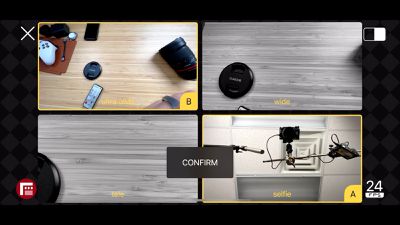
lens selection
Once you've chosen the cameras, you can adjust frame rate (24, 25, and 30 fps are options) and then choose how you want the video displayed when you're recording. There's a picture-in-picture option that shows the secondary camera in a pop out lens, a split screen view, or a discrete view.

These modes affect what the finalized video looks like. The recording features a picture-in-picture recording with that option selected, or a dual-screen recording with split view selected. If you choose discrete, it looks similar to picture-in-picture when recording, but you end up with two separate videos, one from each camera, rather than a combined view.

Discrete is useful if you want to capture a standard video but aren't sure which lens might be best. You can record with the ultra wide-angle and wide-angle lenses at the same time, getting two videos you can work with and edit in post production.

The picture-in-picture and split view modes are perhaps most useful when recording with one of the rear cameras and the selfie camera as you can capture an event and a personal reaction at the same time, or use it for vlogging purposes.
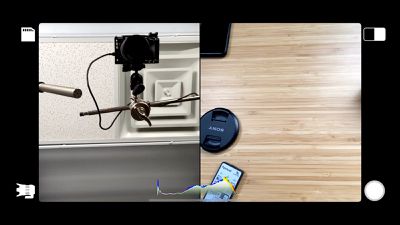
split view
Recording video can be done in either landscape or portrait mode, and the app is no frills and simple to use, so even those not familiar with videography on the ‌iPhone‌ will be able to use it to capture video.

Videos can be saved to the camera roll, shared with people or social media networks, or deleted. There are no editing tools in DoubleTake, so that will need to be done in either the Camera app itself or another third-party video editing app.
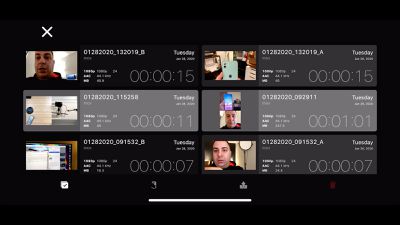
media management
DoubleTake is a neat little concept that's easy to use and can create some fun, unique videos. The only major downside to the app is that recordings are limited to 1080p at 30fps, which means no 4K video recordings. It's possible that will be updated in the future, but for now, it's a limiting factor. The app should still produce video that's great for sharing on social networks and with friends.

DoubleTake works with the ‌iPhone‌ XR, ‌iPhone‌ XS, ‌iPhone‌ XS Max, ‌iPhone‌ 11, ‌iPhone‌ 11 Pro, and iPhone 11 Pro Max. It is not compatible with older iPhones or iPads. For those who want to try it out, it's a free download from the App Store. [Direct Link]

What do you think of the DoubleTake app and what will you use it for, if you're planning to download it? Let us know in the comments.


Popular Stories

Apple Wallet ID Illinois

Apple Plans to Expand iPhone Driver's Licenses to These 7 U.S. States

Wednesday December 24, 2025 8:40 am PST by
In select U.S. states, residents can add their driver's license or state ID to the Apple Wallet app on the iPhone and Apple Watch, and then use it to display proof of identity or age at select airports and businesses, and in select apps. The feature is currently available in 13 U.S. states and Puerto Rico, and it is expected to launch in at least seven more in the future. To set up the...
iPhone Top Left Hole Punch Face ID Feature Purple

iPhone 18 Pro Launching Next Year With These 12 New Features

Tuesday December 23, 2025 8:36 am PST by
While the iPhone 18 Pro and iPhone 18 Pro Max are not expected to launch for another nine months, there are already plenty of rumors about the devices. Below, we have recapped 12 features rumored for the iPhone 18 Pro models. The same overall design is expected, with 6.3-inch and 6.9-inch display sizes, and a "plateau" housing three rear cameras Under-screen Face ID Front camera in...
maxresdefault

Where's the New Apple TV?

Monday December 22, 2025 11:30 am PST by
Apple hasn't updated the Apple TV 4K since 2022, and 2025 was supposed to be the year that we got a refresh. There were rumors suggesting Apple would release the new Apple TV before the end of 2025, but it looks like that's not going to happen now. Subscribe to the MacRumors YouTube channel for more videos. Bloomberg's Mark Gurman said several times across 2024 and 2025 that Apple would...
maxresdefault

10 Mac Apps Worth Trying in 2026

Wednesday December 24, 2025 9:27 am PST by
2026 is almost upon us, and a new year is a good time to try out some new apps. We've rounded up 10 excellent Mac apps that are worth checking out. Subscribe to the MacRumors YouTube channel for more videos. Alt-Tab (Free) - Alt-Tab brings a Windows-style alt + tab thumbnail preview option to the Mac. You can see a full window preview of open apps and app windows. One Thing (Free) -...
iOS 26

iOS 26.2 Adds These 8 New Features to Your iPhone

Monday December 22, 2025 8:47 am PST by
Earlier this month, Apple released iOS 26.2, following more than a month of beta testing. It is a big update, with many new features and changes for iPhones. iOS 26.2 adds a Liquid Glass slider for the Lock Screen's clock, offline lyrics in Apple Music, and more. Below, we have highlighted a total of eight new features. Liquid Glass Slider on Lock Screen A new slider in the Lock...
airpods color prototypes

Apple Tested AirPods in Bright Colors

Saturday December 27, 2025 6:06 am PST by
Apple reportedly tested a version of the first-generation AirPods with bright, iPhone 5c-like colored charging cases. The images, shared by the Apple leaker and prototype collector known as "Kosutami," claim to show first-generation AirPods prototypes with pink and yellow exterior casings. The interior of the charging case and the earbuds themselves remain white. They seem close to some...
iPhone Fold Vertical Feature

Why Apple's Foldable iPhone May Be Smaller Than Expected

Tuesday December 23, 2025 5:21 am PST by
Apple's first foldable iPhone, rumored for release next year, may turn out to be smaller than most people imagine, if a recent report is anything to go by. According to The Information, the outer display on the book-style device will measure just 5.3 inches – that's smaller than the 5.4-inch screen on the ‌iPhone‌ mini, a line Apple discontinued in 2022 due to poor sales. The report has led ...
iPhone SE Cosmopolitan Clean

Apple Discontinued These 25 Products This Year

Wednesday December 24, 2025 7:24 am PST by
With the end of 2025 near, the time has come to look back at the devices and accessories that Apple discontinued throughout the year. Most of the products that were discontinued this year were simply replaced by a new model with an updated chip. However, the iPhone SE line was entirely discontinued when the iPhone 16e launched, and the iPhone Plus line is being phased out. Below, we have...
Foldable iPhone 2023 Feature Iridescent Search

Samsung Developing 'Wide Fold' With iPhone Fold-Like Design Ahead of Apple's 2026 Launch

Tuesday December 23, 2025 11:55 am PST by
Samsung is working on a new foldable smartphone that's wider and shorter than the models that it's released before, according to Korean news site ETNews. The "Wide Fold" will compete with Apple's iPhone Fold that's set to launch in September 2026. Samsung's existing Galaxy Z Fold7 display is 6.5 inches when closed, and 8 inches when open, with a 21:9 aspect ratio when folded and a 20:18...

Top Rated Comments

seinman Avatar
77 months ago

we go from 4 camera 4K, 30FPS
Might want to double check that. I’m pretty sure 2-camera 4K is what was promised. Makes sense that the free app is limited to 1080p, as the paid app will have 4K.
Score: 3 Votes (Like | Disagree)
Juiceboy Avatar
77 months ago
Coudl you imagine how fast you'll run out of storage when filming 4 cameras at 4K 60FPS at the same time? I make lots of videos and i generally just stick to 1080p, most of my views are mobile and the time it takes to export and processing power needed to render and file size is just too much.
Score: 2 Votes (Like | Disagree)
adamw Avatar
77 months ago
Very good to see this multi-camera support app being released. Hopefully, the 4K support and other refinements will be added to this app, and also they will add multi-camera support to their FiLMiC Pro camera app very soon as well.
Score: 1 Votes (Like | Disagree)
scottct1 Avatar
77 months ago
I wish you could use this to transmit live to Facebook Live or YouTube, that would be awesome!
Score: 1 Votes (Like | Disagree)
adamjackson Avatar
77 months ago
Just used it for a motorcycle dash cam unboxing video but I had PIP enabled so instead of getting 2 video files I could splice together for closeups or commentary, I'm left with 1 video file that has both streams in it which means I have to re-shoot. Oh well.


Score: 1 Votes (Like | Disagree)
elemenohme Avatar
77 months ago
From the keynote, I thought this was going to be more like what Switcher Studio* does, just with one phone. I could really use an app that let me record a closeup and two-shot with the rear camera and an interviewer with the front camera. Doesn't sound like this will do that :(

(*Switcher lets you do multicamera recording over wifi with multiple iphones or ipads, but they moved to a subscription model for web streaming so it's unreasonably expensive if you just want to record.)
Score: 1 Votes (Like | Disagree)