

Apple Seeds Second Public Beta of macOS Big Sur 11.3

Apple today seeded the second public beta of an upcoming macOS Big Sur 11.3 update to its public beta testing group, with the new software coming two weeks after the first public beta.

First Look Big Sur Feature2
Public beta testers can download ‌macOS Big Sur‌ 11.3 from the Software Update section of the System Preferences app after installing the proper profile from Apple's beta software website.

macOS Big Sur 11.3 introduces more customization options for Safari, adding a way to rearrange the different sections on the Start Page like Favorites, Reading List, Siri Suggestions, Privacy Report, and more. Developers also have access to a new integration to develop features for the Start Page.

The update includes optimizations for using iOS apps on M1 Macs. When running iPhone and iPad apps on ‌M1‌ Macs, there's a Touch Alternatives preference pane that allows users to set keyboard commands for touch input alternatives, plus iPadOS apps launch with a larger window if the Mac's display allows it. Touch Alternatives can be enabled for ‌iPhone‌ or ‌iPad‌ apps by clicking on the app's name in the menu bar and then selecting the Preferences option. Touch Alternatives let you customize taps, swipes, and drags.

macOS Big Sur 11.3 also adds support for the latest PlayStation 5 DualSense and Xbox Series X/S controllers for use with macOS games.

In the Reminders app, reminder lists can be sorted by Due Date, Creation Date, Priority, or Title, and there is an option to print lists by going to File > Print. Reminders can also be moved manually across lists with drag and drop, something that wasn't possible before.

Apple is adding a new "Made For You" library shortcut in Apple Music for finding personal mixes and Replay playlists, and the Listen Now section has been updated with support for highlighting live events. In the second beta, there's a new autoplay feature in the ‌Apple Music‌ app that allows the streaming service to continue to play music after a playlist or music queue ends. ‌Apple Music‌ sources music similar to what's in a person's ‌Apple Music‌ library, similar to the autoplay feature added in iOS 14.
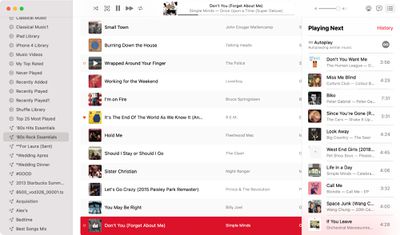
macos big sur apple music autoplay
With this feature enabled, ‌Apple Music‌ audio will not end even after a playlist or album is over. To check that it's on, play a playlist or album and then click on the three dot/line menu button in the upper right hand corner. From there, make sure the infinity symbol is toggled on.

In the Apple News app, there's a redesigned ‌Apple News‌+ tab with a dedicated "For You" section and a new Browse tab that makes it easier to browse through available content. The new For You section is designed to help ‌Apple News‌+ users find favorite magazines and newspapers much faster, plus it adds new tools for managing downloaded issues.

There's also an updated "Support" interface when accessing "About This Mac." The new design includes details on your warranty and it allows for starting a repair right from the Mac interface.
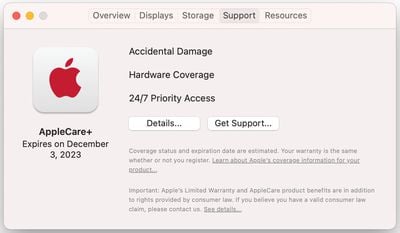
macos big sur beta support
macOS Big Sur 11.3 adds support for HomePod Stereo pairs, allowing a set of paired HomePods to be set as the default sound output option, with the two HomePods showing up as a single selectable speaker rather than separate as in prior versions of macOS.

Code in the update suggests that the Optimized Battery Charging feature will now make sure the Mac's battery is fully charged before a scheduled calendar event. The Mac will charge to 100 percent three hours before a calendar event's start time.

Optimized Battery Charging is designed to preserve the lifespan of the Mac's battery by limiting the amount of time that a Mac sits at 100 percent battery.

In Safari, there's support for WebM video playback, allowing users to play WebM videos using Apple's browser. WebM is a niche video format designed to be a royalty-free alternative to the H.264 codec used in the MP4 format. WebM allows video files to remain small without sacrificing quality and can be played with little processing power, making it ideal for webpages and browsers.

More on macOS Big Sur can be found in our macOS Big Sur roundup. The software is expected to see a release this spring.


Related Forum: macOS Big Sur

Popular Stories

Apple Wallet ID Illinois

Apple Plans to Expand iPhone Driver's Licenses to These 7 U.S. States

Wednesday December 24, 2025 8:40 am PST by
In select U.S. states, residents can add their driver's license or state ID to the Apple Wallet app on the iPhone and Apple Watch, and then use it to display proof of identity or age at select airports and businesses, and in select apps. The feature is currently available in 13 U.S. states and Puerto Rico, and it is expected to launch in at least seven more in the future. To set up the...
iPhone Top Left Hole Punch Face ID Feature Purple

iPhone 18 Pro Launching Next Year With These 12 New Features

Tuesday December 23, 2025 8:36 am PST by
While the iPhone 18 Pro and iPhone 18 Pro Max are not expected to launch for another nine months, there are already plenty of rumors about the devices. Below, we have recapped 12 features rumored for the iPhone 18 Pro models. The same overall design is expected, with 6.3-inch and 6.9-inch display sizes, and a "plateau" housing three rear cameras Under-screen Face ID Front camera in...
maxresdefault

Where's the New Apple TV?

Monday December 22, 2025 11:30 am PST by
Apple hasn't updated the Apple TV 4K since 2022, and 2025 was supposed to be the year that we got a refresh. There were rumors suggesting Apple would release the new Apple TV before the end of 2025, but it looks like that's not going to happen now. Subscribe to the MacRumors YouTube channel for more videos. Bloomberg's Mark Gurman said several times across 2024 and 2025 that Apple would...
maxresdefault

10 Mac Apps Worth Trying in 2026

Wednesday December 24, 2025 9:27 am PST by
2026 is almost upon us, and a new year is a good time to try out some new apps. We've rounded up 10 excellent Mac apps that are worth checking out. Subscribe to the MacRumors YouTube channel for more videos. Alt-Tab (Free) - Alt-Tab brings a Windows-style alt + tab thumbnail preview option to the Mac. You can see a full window preview of open apps and app windows. One Thing (Free) -...
iOS 26

iOS 26.2 Adds These 8 New Features to Your iPhone

Monday December 22, 2025 8:47 am PST by
Earlier this month, Apple released iOS 26.2, following more than a month of beta testing. It is a big update, with many new features and changes for iPhones. iOS 26.2 adds a Liquid Glass slider for the Lock Screen's clock, offline lyrics in Apple Music, and more. Below, we have highlighted a total of eight new features. Liquid Glass Slider on Lock Screen A new slider in the Lock...
airpods color prototypes

Apple Tested AirPods in Bright Colors

Saturday December 27, 2025 6:06 am PST by
Apple reportedly tested a version of the first-generation AirPods with bright, iPhone 5c-like colored charging cases. The images, shared by the Apple leaker and prototype collector known as "Kosutami," claim to show first-generation AirPods prototypes with pink and yellow exterior casings. The interior of the charging case and the earbuds themselves remain white. They seem close to some...
iPhone Fold Vertical Feature

Why Apple's Foldable iPhone May Be Smaller Than Expected

Tuesday December 23, 2025 5:21 am PST by
Apple's first foldable iPhone, rumored for release next year, may turn out to be smaller than most people imagine, if a recent report is anything to go by. According to The Information, the outer display on the book-style device will measure just 5.3 inches – that's smaller than the 5.4-inch screen on the ‌iPhone‌ mini, a line Apple discontinued in 2022 due to poor sales. The report has led ...
iPhone SE Cosmopolitan Clean

Apple Discontinued These 25 Products This Year

Wednesday December 24, 2025 7:24 am PST by
With the end of 2025 near, the time has come to look back at the devices and accessories that Apple discontinued throughout the year. Most of the products that were discontinued this year were simply replaced by a new model with an updated chip. However, the iPhone SE line was entirely discontinued when the iPhone 16e launched, and the iPhone Plus line is being phased out. Below, we have...
Foldable iPhone 2023 Feature Iridescent Search

Samsung Developing 'Wide Fold' With iPhone Fold-Like Design Ahead of Apple's 2026 Launch

Tuesday December 23, 2025 11:55 am PST by
Samsung is working on a new foldable smartphone that's wider and shorter than the models that it's released before, according to Korean news site ETNews. The "Wide Fold" will compete with Apple's iPhone Fold that's set to launch in September 2026. Samsung's existing Galaxy Z Fold7 display is 6.5 inches when closed, and 8 inches when open, with a 21:9 aspect ratio when folded and a 20:18...

Top Rated Comments

hybrid_x Avatar
63 months ago
I think it's hilarious that Apple is adding calendar awareness to charging of all things, when they've totally broken the calendar awareness of things like Do Not Disturb (no more "… until the end of this event"), and have broken the options for snoozing notifications as well (no more options for how an alert gets snoozed… the only option is "snooze" which is 9 minutes, no more "until it's time to leave," "until X minutes before start time" or anything… just… snooze). Considering they've been trying to make macOS more iPhone-like, this is one area where they have fallen down badly.

And another thing, while I'm here…

I just plugged in an external display for the first time since upgrading to Big Sur, and holy crap, have they ever turned display spanning into a hot mess.

You get a menu bar on every display now, not just your Primary display. This was confusing to me at first, but I can see how it might come in handy.

[S]Auto-show/hide of the dock on spanned displays is also now a complete mess. The dock no longer automatically shows when the cursor is touched to the bottom of the primary display. You have to put the cursor there and click for the dock to appear. Again, unexpected and undocumented behaviour. I can see where it might be handy, but it's weird and feels broken. There is also no longer a keyboard shortcut (command+option+D) to manually show/hide the dock.[/S]

[HR][/HR]

UPDATE: It turns out, this issue was actually being caused by a mouse that was acting as if it had a button held down, which was interfering with several other click/gesture inputs.

[HR][/HR]

Also, the little "displays" widget we used to get in the menu bar? It's only there for "mirroring" now. If you're spanning your display, you get nothing in the menu bar or the Control Center. Apparently display spanners are second-class citizens compared to mirroring now.
Score: 5 Votes (Like | Disagree)
Phantom iCloud tabs Avatar
63 months ago

Do you have a list of the "many, many bugs"? I am not seeing any, notta, zilcho, zero-ony. so many, many strikes me as a bit of a false narrative. are some of them specific to certain hardware? I guess many many must be at least 20, right?
Sure. Some are major, some aren't major. Apple Music still throws up errors of "Failed to load" when browsing around the app. When logging out and then logging back into a user account (without restarting the machine), iMessage notifications show up as phone numbers rather than as contacts. When channeling audio from a phone call to a nearby Mac, using the audio selection circle on the call screen, the call cuts off. There are other issues that I've run into that seem more difficult to reproduce. This is all in addition to the iCloud tabs issue I mentioned in my previous comment, which might or might not relate specifically to macOS software. Everybody has different usage patterns than everybody else, so it's possible that some folks like you might not have encountered many or even any bugs. But many of us here on this forum, heck even in this very thread, have.

None of these issues existed for me under Catalina. Zilcho, notta, zero-ony. So while this might be a "false narrative" in your case (in which case I am actually happy things are working smoothly for you!), it's not false for all too many people. I don't know why anybody would try to disseminate a "false narrative" about a computer operating system they are using. That strikes me as ... odd.
Score: 5 Votes (Like | Disagree)
SkyRom Avatar
63 months ago
Big Sur has been the worst Apple OS I've ever used, bar none. It was not ready for primetime. Too many issues to even bother listing. Apparently they spent all their time making COVID emoji's to explain how the 'talent' were treated during their filming instead of making a stable product.
Score: 4 Votes (Like | Disagree)
hagjohn Avatar
63 months ago
Apple need stop introducing new features and concentrate on getting these long term bugs fixed for the next few updates.
Score: 3 Votes (Like | Disagree)
itrends Avatar
63 months ago
Another update, still no ability for the Mac to remember my screen resolutions after a reboot or to turn off both screens in stand by.

Specifically
Mac mini M1
2 x ultra wide Red Eagle displays
One of those is rotated 90 degrees

I can set everything up.
If I log out the screens get messed up.
If I log in they go back as expected.
If I shut down / reboot they are messed up.
Logging in after reboot they remain entirely messed up until I configure them again.

The native resolutions are not shown unless I option click the 'scaled' radio button.

I appreciate the fact I can even use my screens is positive, but it's astounding to me how broken external displays STILL are for others in additional to my own situation.

I'm tired of submitting the same bug reports. But I'll do it once again.

Good luck everyone.

EDIT// that didn't last long. Now it's not even waking one of the monitors at all (DP) one.

And FWIW it saves my resolutions after reboot as long as I don't have either one of them rotated 90 degrees. But the resolutions are still always messed up whatever the case at the login screen.

Computers + inputs + displays. These are the basics of computing. The essentials. That fact that the basic peripherals are in this state leaves me incredibly worried at this point.
Score: 3 Votes (Like | Disagree)
itrends Avatar
63 months ago

I think it's hilarious that Apple is adding calendar awareness to charging of all things, when they've totally broken the calendar awareness of things like Do Not Disturb (no more "… until the end of this event"), and have broken the options for snoozing notifications as well (no more options for how an alert gets snoozed… the only option is "snooze" which is 9 minutes, no more "until it's time to leave," "until X minutes before start time" or anything… just… snooze). Considering they've been trying to make macOS more iPhone-like, this is one area where they have fallen down badly.

And another thing, while I'm here…

I just plugged in an external display for the first time since upgrading to Big Sur, and holy crap, have they ever turned display spanning into a hot mess.

You get a menu bar on every display now, not just your Primary display. This was confusing to me at first, but I can see how it might come in handy.

Auto-show/hide of the dock on spanned displays is also now a complete mess. The dock no longer automatically shows when the cursor is touched to the bottom of the primary display. You have to put the cursor there and click for the dock to appear. Again, unexpected and undocumented behaviour. I can see where it might be handy, but it's weird and feels broken. There is also no longer a keyboard shortcut (command+option+D) to manually show/hide the dock.

Also, the little "displays" widget we used to get in the menu bar? It's only there for "mirroring" now. If you're spanning your display, you get nothing in the menu bar or the Control Center. Apparently display spanners are second-class citizens compared to mirroring now.
I think you may be mistaken

- there was almost always a menu on all screens
- putting my cursor at the bottom and waiting a moment does show the dock (no clicking)
- CMD OPTION + D is hiding and showing my dock
- the display item from the menu bar is moved into the control centre but you can drag it out of there back up on to the menu if you want


I am on 11.3 beta 2

Attachment Image
Score: 3 Votes (Like | Disagree)
















