

Apple today released macOS Big Sur 11.3, the third major update to the macOS Big Sur operating system that launched in November. macOS Big Sur 11.3 comes two months after the release of macOS Big Sur 11.2, a bug fix update.

The new macOS Big Sur 11.3 update can be downloaded for free on all eligible Macs using the Software Update section of System Preferences.
macOS Big Sur 11.3 adds additional customization options for Safari, introducing a way to rearrange the different sections on the Start Page like Favorites, Reading List, Siri Suggestions, Privacy Report, and more. Developers also have access to a new integration to develop features for the Start Page.
The update includes optimizations for using iOS apps on M1 Macs. When running iPhone and iPad apps on M1 Macs, there's a Touch Alternatives preference pane that allows users to set keyboard commands for touch input alternatives, plus iPadOS apps launch with a larger window if the Mac's display allows it. Touch Alternatives let you customize taps, swipes, and drags.
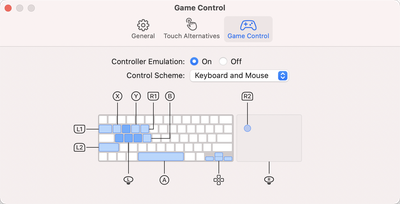
Apple has added a "Controller Emulation" feature that can be enabled for iPhone and iPad apps to map game controller buttons to keyboard keys and mouse buttons. Controller Emulation will allow iPhone and iPad games that have controller support built in to be accurately controlled with a keyboard and/or mouse when those games are played on an M1 Mac, plus there's also now hibernation support for M1 Macs.
In the Reminders app, reminder lists can be sorted by Due Date, Creation Date, Priority, or Title, and there is an option to print lists by going to File & Print, plus Apple is adding a new "Made For You" Library shortcut in Apple Music for finding personal mixes and replay playlists.
The Apple Music app also includes a new autoplay option that allows the streaming service to continue to play music after a playlist or music queue ends.
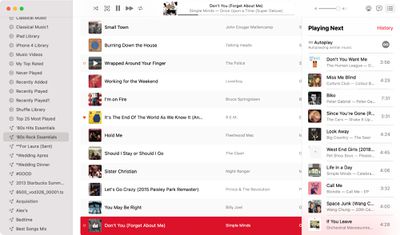
With this feature enabled, Apple Music audio will not end even after a playlist or album is over. To check that it's on, play a playlist or album and then click on the three dot/line menu button in the upper right hand corner. From there, make sure the infinity symbol is toggled on.
In the Apple News app, there's a redesigned Apple News+ tab with a dedicated "For You" section and a new Browse tab that makes it easier to browse through available content. The new For You section is designed to help Apple News+ users find favorite magazines and newspapers much faster, plus it adds new tools for managing downloaded issues.
macOS Big Sur 11.3 adds support for the latest PlayStation 5 DualSense and Xbox Series X/S controllers for use with macOS games, and there's an updated "Support" interface when accessing "About This Mac." The new design includes details on your warranty and it allows for starting a repair right from the Mac interface.
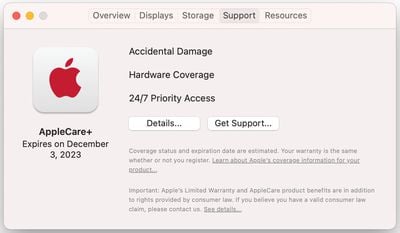
The tab works similarly to the AppleCare coverage menu in the iOS Settings app, which lets users request repairs, buy an AppleCare plan, and check their coverage.
macOS Big Sur now works with AirTags, Apple's newly introduced item trackers. AirTags can be tracked inside the Find My app, and there's a networking feature that can help you find your lost AirTag by utilizing the iOS devices and Macs of others.
There are a handful of new emoji, and Siri now offers more diverse voice options. The update includes several bug fixes, addressing issues like iCloud Keychain refusing to switch off and problems with AirPods Automatic Switching.
Apple's full release notes for the macOS Big Sur 11.3 update can be found below:
macOS Big Sur 11.3 adds support for AirTag, includes iPhone and iPad app improvements for Macs with M1, introduces separate skin tone variations for emoji with couples, and adds more diverse voice options for Siri.
AirTag and Find My
- Support for AirTag to keep track of and find your important items like your keys, wallet, backpack and more, privately and securely in the Find My app
- The Find My network with hundreds of millions of devices can help you find your AirTag, even when it isn't nearby
- Lost Mode notifies you when your AirTag is found, and you can enter a phone number where you can be contactediPhone and iPad apps on Macs with M1
- Option to change an iPhone and iPad app's window size
- Support for displaying the highest resolution version of an iPhone or iPad app in full screen
- Keyboard support for iPhone and iPad games designed to use device tilt
- Keyboard, mouse and trackpad support for iPhone and iPad games that support game controllersEmoji
- Support for separate skin tones for each individual in all variations of the couple kissing emoji and couple with heart emoji
- New face emojis, heart emojis, woman with a beard emojiSiri
- Siri now includes more diverse voice optionsApple Music
- Autoplay keeps music playing by automatically playing a similar song, once you've reached the end of a song or playlist
- City charts showcase what's popular in over 100 cities from all over the worldPodcasts
- Podcasts Show Pages are redesigned to make it easier to start listening
- Option to save and download episodes, automatically adding them to your Library for quick access
- Download behavior and notification settings can be customized on a show-by-show basis
- Top Charts and popular categories in Search help you discover new showsNews
- Redesigned News+ feed enables Apple News+ subscribers to quickly find, download, and manage magazine and newspaper issues
- All-new Search experience that helps you find relevant topics, channels, and storiesSafari
- Start Page section order can now be customized
- Additional WebExtensions API lets developers offer extensions that replace the new tab page
- Web Speech API lets developers incorporate speech recognition into their web pages for real-time captioning, dictation, and voice navigation
- WebM and Vorbis video and audio format supportReminders
- Ability to sort Today Smart list
- Support for syncing the order of reminders in lists across your devices
- Option to print your reminder listsGaming
- Xbox Series X S Wireless Controller or Sony PS5 DualSenseTM Wireless Controller supportMac computers with the M1 chip
- Hibernation supportAbout This Mac
- About this Mac displays Apple warranty status and AppleCare+ coverage in the Service tab when signed in with Apple ID
- Support for purchasing and enrolling in AppleCare+ for eligible Mac computers from About This MacThis release also fixes the following issues:
- Reminders created via Siri may be unintentionally set for early morning hours
- iCloud Keychain might not turn off
- AirPods audio routing to incorrect device for Automatic Switching
- AirPods Automatic Switching notifications might be missing or duplicated
- External 4K monitors may not display in full resolution when connected over USB-C
- Login window may not display properly after restarting Mac mini (M1, 2020)
- The Dwell feature may not work in the Accessibility Keyboard
More on macOS Big Sur can be found in our macOS Big Sur roundup.























