PSA: Google Photos Unlimited Storage Ends Next Month, Here's How to Export Your Pictures to iCloud

For as long as it's existed, Google Photos has offered free unlimited storage for uploading images at a reduced yet good enough quality for most users. From June 1, 2021, however, all photos and videos uploaded to Google accounts will count against users' cloud storage. If you've been relying on Google to back up your media library, it may be time to move that content elsewhere. This article shows you how.

google photos

High Quality vs Original Quality Uploads

Google Photos has traditionally offered two storage options: "Original Quality," for which photos count against your storage quota, and "High Quality," which is the free and unlimited option, although it shrinks images bigger than 16 megapixels and videos over 1080p.

Whichever option you rely on, from next month both of these options will count against your Google cloud storage allocation. That could present a problem if you rely on the 15GB of free storage that comes with every Google account, or even if you already pay Google for extra storage.

What Does That Mean for My Existing Uploads?

It's important to note that any "High Quality" images already uploaded before June 1 will be exempt from this change and won't count against your storage quota, but anything uploaded after that date will eat up your allowance, so unless you plan on upping your Google storage with a paid plan, it may be time to export your photos and store them elsewhere. If you're already invested in Apple's ecosystem, iCloud is the obvious choice.

Google One storage costs $2/month for 100GB, $3/month for 200GB, and $10/month for 2TB, with discounted annual payment options also available. As for Apple's iCloud, storage options are $1/month for 50GB, $3/month for 200GB, and $10/month for 2TB. Apple One bundles also include storage allowances alongside other digital services like Apple Music, Apple Arcade, and Apple TV+.

How to Export Your Google Photos

By using the Share option in the Google Photos app, you can export individual images from Google Photos, but if you're looking for a bulk-export option, the following steps walk through the process.

  1. Using a desktop browser, navigate to takeout.google.com and sign in using your Google account credentials.
  2. Under "Create a New Export," in the section titled "Select Data to include," click Deselect all.
    google

  3. Scroll down to Google Photos and check the relevant box, then scroll to the bottom and click the Next step button.
    google

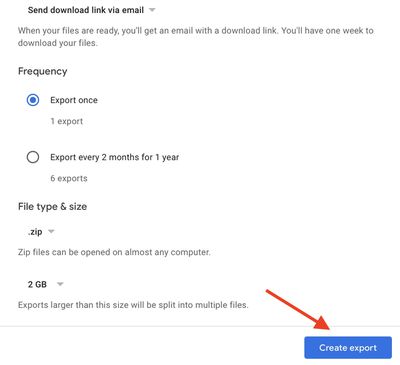
  4. Choose your export file type, frequency, and destination, then click the Create export button.

    google

Once the request has been made, you'll see an "Export progress" message. The time it takes for your export to finish depends on the size of your media library, but Google will send an email to let you know when it's ready. Alternately, leave the page open and you'll see a Download button when the export is ready.
photos
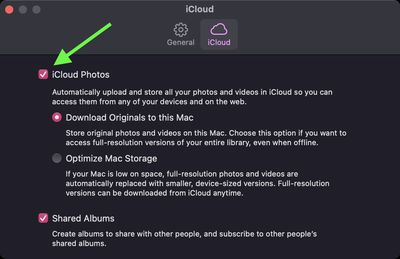
Once you've received your exported images, you can drag them into the Photos app on your Mac. To ensure the changes are synced to your Apple devices, check that iCloud Photos is turned on: You can find the switch in he iCloud tab in Photos' preferences (click Photos -> Preferences in the menu bar). Note that you can also upload photos via a browser by going to the iCloud Photos section on the icloud.com website.


Popular Stories

Apple Wallet ID Illinois

Apple Plans to Expand iPhone Driver's Licenses to These 7 U.S. States

Wednesday December 24, 2025 8:40 am PST by
In select U.S. states, residents can add their driver's license or state ID to the Apple Wallet app on the iPhone and Apple Watch, and then use it to display proof of identity or age at select airports and businesses, and in select apps. The feature is currently available in 13 U.S. states and Puerto Rico, and it is expected to launch in at least seven more in the future. To set up the...
iPhone Top Left Hole Punch Face ID Feature Purple

iPhone 18 Pro Launching Next Year With These 12 New Features

Tuesday December 23, 2025 8:36 am PST by
While the iPhone 18 Pro and iPhone 18 Pro Max are not expected to launch for another nine months, there are already plenty of rumors about the devices. Below, we have recapped 12 features rumored for the iPhone 18 Pro models. The same overall design is expected, with 6.3-inch and 6.9-inch display sizes, and a "plateau" housing three rear cameras Under-screen Face ID Front camera in...
iOS 26

iOS 26.2 Adds These 8 New Features to Your iPhone

Monday December 22, 2025 8:47 am PST by
Earlier this month, Apple released iOS 26.2, following more than a month of beta testing. It is a big update, with many new features and changes for iPhones. iOS 26.2 adds a Liquid Glass slider for the Lock Screen's clock, offline lyrics in Apple Music, and more. Below, we have highlighted a total of eight new features. Liquid Glass Slider on Lock Screen A new slider in the Lock...
maxresdefault

Where's the New Apple TV?

Monday December 22, 2025 11:30 am PST by
Apple hasn't updated the Apple TV 4K since 2022, and 2025 was supposed to be the year that we got a refresh. There were rumors suggesting Apple would release the new Apple TV before the end of 2025, but it looks like that's not going to happen now. Subscribe to the MacRumors YouTube channel for more videos. Bloomberg's Mark Gurman said several times across 2024 and 2025 that Apple would...
maxresdefault

10 Mac Apps Worth Trying in 2026

Wednesday December 24, 2025 9:27 am PST by
2026 is almost upon us, and a new year is a good time to try out some new apps. We've rounded up 10 excellent Mac apps that are worth checking out. Subscribe to the MacRumors YouTube channel for more videos. Alt-Tab (Free) - Alt-Tab brings a Windows-style alt + tab thumbnail preview option to the Mac. You can see a full window preview of open apps and app windows. One Thing (Free) -...
Foldable iPhone 2023 Feature Iridescent Search

Samsung Developing 'Wide Fold' With iPhone Fold-Like Design Ahead of Apple's 2026 Launch

Tuesday December 23, 2025 11:55 am PST by
Samsung is working on a new foldable smartphone that's wider and shorter than the models that it's released before, according to Korean news site ETNews. The "Wide Fold" will compete with Apple's iPhone Fold that's set to launch in September 2026. Samsung's existing Galaxy Z Fold7 display is 6.5 inches when closed, and 8 inches when open, with a 21:9 aspect ratio when folded and a 20:18...
iOS 26

iOS 26.3 Brings AirPods-Like Pairing to Third-Party Devices in EU Under DMA

Monday December 22, 2025 3:20 pm PST by
The European Commission today praised the interoperability changes that Apple is introducing in iOS 26.3, once again crediting the Digital Markets Act (DMA) with bringing "new opportunities" to European users and developers. The Digital Markets Act requires Apple to provide third-party accessories with the same capabilities and access to device features that Apple's own products get. In iOS...
iphone fold 3d print

Have a 3D Printer? You Can Make Your Own iPhone Fold Dummy

Tuesday December 23, 2025 1:31 pm PST by
Apple is working on a foldable iPhone that's set to come out in September 2026, and rumors suggest that it will have a display that's around 5.4 inches when closed and 7.6 inches when open. Exact measurements vary based on rumors, but one 3D designer has created a mockup based on what we've heard so far. On MakerWorld, a user named Subsy has uploaded a 1:1 iPhone Fold replica (via Macworld), ...
iPhone Fold Vertical Feature

Why Apple's Foldable iPhone May Be Smaller Than Expected

Tuesday December 23, 2025 5:21 am PST by
Apple's first foldable iPhone, rumored for release next year, may turn out to be smaller than most people imagine, if a recent report is anything to go by. According to The Information, the outer display on the book-style device will measure just 5.3 inches – that's smaller than the 5.4-inch screen on the ‌iPhone‌ mini, a line Apple discontinued in 2022 due to poor sales. The report has led ...

Top Rated Comments

gimmesomemo Avatar
60 months ago
The thought of asking iCloud to upload a good 20,000 files fills me with dread
Score: 21 Votes (Like | Disagree)
KanosWRX Avatar
60 months ago
Not sure why people would switch to iCloud, Google Photos is still better. iCloud is what $120 a year for 2 TB, Google Storage is $100 TB. Google Photos has far superior tagging and searching capabilities which are critical for finding photos these days since we take so many. I mean those two reasons alone would make me want to keep my photos on Google Photos. Nothing is free, storage costs money, mobile apps cost money. I have no issues with Google Photos costing money as it is the best photo storage service still. My one complaint is the massive hole between their 2TB tier and the 10TB tier.. why not a 5TB tier in the middle?
Score: 15 Votes (Like | Disagree)
01Shambrook Avatar
60 months ago
I went through this process last month, and I'm sorry to say that this article hardly even skims the surface about how painful this process actually is. Here's why:

* If you have a lot of photos, Google Takeout will export them as 2GB zip files, which you have to download one by one. I had around 130 to download, which took ages. Also, your Google Takeout export only remains available for around 2 weeks before it's deleted, so you're against the clock to do the below.
* When downloading these files, you better have a MacBook that has enough storage. I have a MBP with 256GB which I ended up completely resetting so that I could have enough space to download the files.
* The killer bit of all this: when you upload the photos through Apple's Photos app, Photos essentially makes a copy of them in its Library file. This very quickly takes up any leftover space on the MacBook, at which point Photos refuses to upload them to iCloud, citing lack of storage space. I ended up having to follow some steps to create a separate partition of my hard drive with a limited amount of space, and move my Photos Library file into there. That way, Apple Photos would pick up sooner that the drive was full, and delete uploaded files from the local drive.
* If you're transitioning from an Android phone, there's extra, pretty awful news; iCloud distinguishes the date of your photos by a certain EXIF date ("DateTimeOriginal"), but Android does it by the photo's "File Created" date. This has the side effect of meaning that the Photos app thinks all of your photos were taken on the same day (i.e. the day you downloaded them), because it couldn't find a date stamp. This meant I had to buy a separate Mac app, which would go through my photos and copy the Date Created field to the relevant EXIF fields.

So just to be clear:
[LIST=1]
* Download a couple of zip files from Google Photos
* Unzip them and run them through a tool that will change the date stamps as above
* Import to Photos app, wait for them to upload
* Delete zip and unzipped files.
* Repeat 1-4

Hopefully you can see now, this is not an easy process, and took me at least a week. It's really frustrating when you consider that there's a tool for moving your iCloud photos to Google Photos ('https://support.apple.com/en-gb/HT208514') in the cloud, but not the reverse.
Score: 11 Votes (Like | Disagree)
velocityg4 Avatar
60 months ago
I guess the value of AI training people were providing (most without realizing it). Plus the value of data mining is no longer cost efficient for Google. Given how much larger files are with high res pictures, live photos, HDR and 4k 60FPS video shot by phones.

So, if I pay for storage. Does that mean Google no longer gets free data mining or AI training from me?
Score: 11 Votes (Like | Disagree)
827538 Avatar
60 months ago
I've completely removed myself from all Google products at this point. If they aren't going to kill/kneecap a service or product they are going to harvest every last shred of data from you.

Switched to Duckduckgo and love having uncensored results once again.

I've basically totally entrenched myself in Apple's ecosystem and see no reason to move, privacy, support, best hardware/software around. Not saying there's not areas Apple can't improve but they pretty much have the best of the best.
iPhone, AirPods, M1 MacBook Pro, Apple Watch all integrated together - show me an alternative to that? This is coming from an engineer who's historically been a Windows/Linux guy.
Score: 11 Votes (Like | Disagree)
zorinlynx Avatar
60 months ago
Two things:

1) On the free tier, Google recompresses your original photos before upload. If you have access to the original full quality photos, you probably want to import THAT into iCloud Photo Library instead of what's on Google.


2) Google used to keep all your photos synced in Google Drive, which would then sync to your local computers, providing you with a continuously updated local copy of your photo library. They stopped doing this at some point, and now the only way to get a full local copy of your photo library is to use Google Takeout. However, all photos synced up to that point will be in Google Drive. It's important to NOT assume that is your entire photo library; it will be missing photos taken after they stopped doing that.

Frankly, Google Photos has become a less viable solution over the years. The lack of a continuously synced local copy of your photos, along with the lack of a great local native app to manage your library on a computer (like Photos.app on the Mac) pretty much destroyed it for me.
Score: 7 Votes (Like | Disagree)