

Apple Putting a Stop to Email Tracking Pixels With Mail Privacy Protection in iOS 15 and macOS Monterey

Tracking when you've opened up an email and what you've read is something that many companies and advertisers rely on for their marketing efforts, plus there are email clients out there designed to let users know when the emails they've sent have been opened up.
ios15 mail privacy feature
Much of this tracking is facilitated by remote images that load when viewing an email, and some of it is even sneakier, with advertisers using invisible tracking pixels. Tracking pixels are hidden graphics that you might not see in an email, but your email client loads them, allowing senders to gather data from you. Senders can see that you've opened an email get other information, such as your IP address.

With iOS 15, iPadOS 15, and macOS Monterey, Apple is putting a stop to email tracking with a suite of Mail Privacy Protection features.

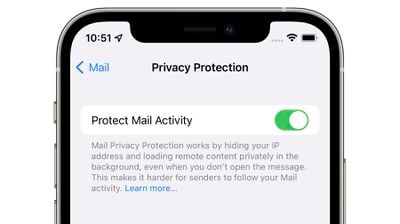
Mail Privacy Protection is not enabled by default, but Apple will highlight it as an option when you upgrade to iOS 15 or iPadOS 15. If you're running one of these updates, you can turn it on in Settings > Mail. Tap on "Privacy Protection" and then toggle on "Protect Mail Activity." In macOS Monterey, open up Mail, go to the Mail Preferences, and then click on Privacy. From there, toggle on Protect Mail Activity.
mail privacy protection
When enabled, Mail Privacy Protection hides your IP address and loads all remote content privately in the background, routing it through multiple proxy services and randomly assigning an IP address.

Here's how Apple describes the feature in full:

Emails that you receive may include hidden pixels that allow the email's sender to learn information about you. As soon as you open an email, information about your Mail activity can be collected by the sender without transparency and an ability to control what information is shared. Email senders can learn when and how many times you opened their email, whether you forwarded the email, your Internet Protocol (IP) address, and other data that can be used to build a profile of your behavior and learn your location.

If you choose to turn it on, Mail Privacy Protection helps protect your privacy by preventing email senders, including Apple, from learning information about your Mail activity. When you receive an email in the Mail app, rather than downloading remote content when you open an email, Mail Privacy Protection downloads remote content in the background by default - regardless of how you do or don't engage with the email. Apple does not learn any information about the content.

In addition, all remote content downloaded by Mail is routed through multiple proxy servers, preventing the sender from learning your IP address. Rather than share your IP address, which can allow the email sender to learn your location, Apple's proxy network will randomly assign an IP address that corresponds only to the region your device is in. As a result, email senders will only receive generic information rather than information about your behavior. Apple does not access your IP address.

It's worth noting that senders will see an IP address that corresponds to the region where you're located, giving them generic information about your behavior that is non-specific and cannot be used for building a profile of your behavior.

You could previously block email trackers by blocking the loading of remote content in the Mail app on iOS and macOS, but Apple's new feature is superior because you can still view all email content as normal while Mail Privacy Protection works in the background with no visual compromises.

Email senders can still monitor your behavior with tracked links that you will need to be mindful of, but the behind the scenes tracking that you might not notice won't happen.

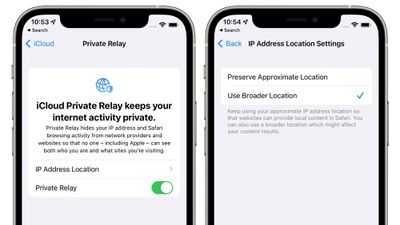
Mail Tracking Privacy pairs well with iCloud Private Relay, a feature that's included in ‌iCloud‌+. ‌iCloud‌+ is just Apple's name for its paid ‌iCloud‌ plans, which start out at $0.99 per month. With that $1 per month, all the traffic that leaves your device is routed through two separate internet relays so advertisers can't see your IP address or location, nor can they link your browsing history to this information to build a profile about you.
icloud private relay
‌iCloud‌ Private Relay is not quite a VPN, but it's similar, and it's an incredible feature for the less technically inclined that would not think to use a VPN or wouldn't know how, such as elderly people who need the most protection from tracking and scams.

Apple's plans for ‌iCloud‌ Private Relay and Mail Tracking Privacy are already worrying advertisers, according to a report earlier this week from The Wall Street Journal. Ad-measurement firm Branch Metrics' CEO Alex Austin said that Private Relay could be "vastly more damaging to the advertising ecosystem than the App Tracking Transparency measures implemented early this year. "If IP were to go away entirely, it would be very challenging for a lot of companies to operate," he said.

As for Mail Privacy Protection, advertisers are "surprised" that Apple blocked tracking in emails because of how much harder it will be for brands to know if their emails are working.

These new privacy features could spur Google to adopt similar measures for Chrome, and a Google spokesperson confirmed that Google is indeed considering similar features for blocking IP addresses.

‌iCloud‌ Private Relay and Mail Privacy Protection alone are enough reason to upgrade to the newest software when it becomes available this fall, but the rest of the features coming in iOS 15 and macOS Monterey can be found in our roundups.


Related Forums: iOS 15, macOS Monterey

Popular Stories

Apple Wallet ID Illinois

Apple Plans to Expand iPhone Driver's Licenses to These 7 U.S. States

Wednesday December 24, 2025 8:40 am PST by
In select U.S. states, residents can add their driver's license or state ID to the Apple Wallet app on the iPhone and Apple Watch, and then use it to display proof of identity or age at select airports and businesses, and in select apps. The feature is currently available in 13 U.S. states and Puerto Rico, and it is expected to launch in at least seven more in the future. To set up the...
iPhone Top Left Hole Punch Face ID Feature Purple

iPhone 18 Pro Launching Next Year With These 12 New Features

Tuesday December 23, 2025 8:36 am PST by
While the iPhone 18 Pro and iPhone 18 Pro Max are not expected to launch for another nine months, there are already plenty of rumors about the devices. Below, we have recapped 12 features rumored for the iPhone 18 Pro models. The same overall design is expected, with 6.3-inch and 6.9-inch display sizes, and a "plateau" housing three rear cameras Under-screen Face ID Front camera in...
maxresdefault

Where's the New Apple TV?

Monday December 22, 2025 11:30 am PST by
Apple hasn't updated the Apple TV 4K since 2022, and 2025 was supposed to be the year that we got a refresh. There were rumors suggesting Apple would release the new Apple TV before the end of 2025, but it looks like that's not going to happen now. Subscribe to the MacRumors YouTube channel for more videos. Bloomberg's Mark Gurman said several times across 2024 and 2025 that Apple would...
iOS 26

iOS 26.2 Adds These 8 New Features to Your iPhone

Monday December 22, 2025 8:47 am PST by
Earlier this month, Apple released iOS 26.2, following more than a month of beta testing. It is a big update, with many new features and changes for iPhones. iOS 26.2 adds a Liquid Glass slider for the Lock Screen's clock, offline lyrics in Apple Music, and more. Below, we have highlighted a total of eight new features. Liquid Glass Slider on Lock Screen A new slider in the Lock...
maxresdefault

10 Mac Apps Worth Trying in 2026

Wednesday December 24, 2025 9:27 am PST by
2026 is almost upon us, and a new year is a good time to try out some new apps. We've rounded up 10 excellent Mac apps that are worth checking out. Subscribe to the MacRumors YouTube channel for more videos. Alt-Tab (Free) - Alt-Tab brings a Windows-style alt + tab thumbnail preview option to the Mac. You can see a full window preview of open apps and app windows. One Thing (Free) -...
Foldable iPhone 2023 Feature Iridescent Search

Samsung Developing 'Wide Fold' With iPhone Fold-Like Design Ahead of Apple's 2026 Launch

Tuesday December 23, 2025 11:55 am PST by
Samsung is working on a new foldable smartphone that's wider and shorter than the models that it's released before, according to Korean news site ETNews. The "Wide Fold" will compete with Apple's iPhone Fold that's set to launch in September 2026. Samsung's existing Galaxy Z Fold7 display is 6.5 inches when closed, and 8 inches when open, with a 21:9 aspect ratio when folded and a 20:18...
iOS 26

iOS 26.3 Brings AirPods-Like Pairing to Third-Party Devices in EU Under DMA

Monday December 22, 2025 3:20 pm PST by
The European Commission today praised the interoperability changes that Apple is introducing in iOS 26.3, once again crediting the Digital Markets Act (DMA) with bringing "new opportunities" to European users and developers. The Digital Markets Act requires Apple to provide third-party accessories with the same capabilities and access to device features that Apple's own products get. In iOS...
iPhone Fold Vertical Feature

Why Apple's Foldable iPhone May Be Smaller Than Expected

Tuesday December 23, 2025 5:21 am PST by
Apple's first foldable iPhone, rumored for release next year, may turn out to be smaller than most people imagine, if a recent report is anything to go by. According to The Information, the outer display on the book-style device will measure just 5.3 inches – that's smaller than the 5.4-inch screen on the ‌iPhone‌ mini, a line Apple discontinued in 2022 due to poor sales. The report has led ...
iphone fold 3d print

Have a 3D Printer? You Can Make Your Own iPhone Fold Dummy

Tuesday December 23, 2025 1:31 pm PST by
Apple is working on a foldable iPhone that's set to come out in September 2026, and rumors suggest that it will have a display that's around 5.4 inches when closed and 7.6 inches when open. Exact measurements vary based on rumors, but one 3D designer has created a mockup based on what we've heard so far. On MakerWorld, a user named Subsy has uploaded a 1:1 iPhone Fold replica (via Macworld), ...

Top Rated Comments

macsplusmacs Avatar
59 months ago
I am so into this feature. thx apple.
Score: 39 Votes (Like | Disagree)
TheYayAreaLiving ?️ Avatar
59 months ago
Protection + privacy = transparency to the consumers.

win/win for everyone.
Score: 29 Votes (Like | Disagree)
firesuite Avatar
59 months ago

Can someone clarify; if an invisible pixel is associated with my email address then what does it matter how many proxies it goes through? If that image is loaded they know it was my email address that did it. Is this literally just hiding my IP and nothing more?
I’m not 100% positive, but I read this line:

“When you receive an email in the Mail app, rather than downloading remote content when you open an email, Mail Privacy Protection downloads remote content in the background by default - regardless of how you do or don't engage with the email. Apple does not learn any information about the content.”

… as meaning that Apple’s service will automatically download remote content through THEIR proxy servers (possibly anonymized), whether the email was ever opened by the user or not. This would result in the sender not having reliable tracking data. If every email they send is automatically loaded by a proxy server with a scrubbed IP, their data is mostly noise and no signal. It could essentially render most remote tracking pixels/images/etc useless to the sender, because it doesn’t tell them anything about the user’s behavior. Including whether the end user actually ever opened the email or not. It may look to the sender as if every email was always opened immediately, but that’s not actually what’s happening. The more widely adopted this feature is, the less reliable the data is for the senders.

I could be misunderstanding, but that’s how I read this.
Score: 22 Votes (Like | Disagree)
fwmireault Avatar
59 months ago
It’s annoying for apple mail to have all these great privacy features but lacking basic features that all other mail client have, like send later mail, giving a distinct color for each account connected or customizable notifications. I want Spark features with Apple privacy policy
Score: 21 Votes (Like | Disagree)
Morod Avatar
59 months ago
Apple costs, but saves even more…
Score: 15 Votes (Like | Disagree)
Techwatcher Avatar
59 months ago
This is only for Apple's in-house Mail app right? If so I suppose I'll switch back to it from Outlook. Outlook is so good though. :rolleyes:
Score: 11 Votes (Like | Disagree)
















