

Apple Seeds Second Public Beta of macOS 13 Ventura - MacRumorsOpen MenuShow RoundupsShow Forums menuVisit ForumsOpen Sidebar
Skip to Content

Apple Seeds Second Public Beta of macOS 13 Ventura

Apple today seeded the second beta of macOS Ventura to its public beta testing group, allowing non-developers to test the new macOS Ventura operating system ahead of its release. The second beta comes a little over two weeks after the first public beta and it corresponds with the fourth developer beta.
clock weather macos ventura
Public beta testers can download the macOS 13 Ventura update from the Software Update section of the System Preferences app after installing the proper profile from Apple's beta software website.

macOS Ventura introduces Stage Manager, a new multi-tasking option for focusing on a task while having other apps waiting in the wings. ‌Stage Manager‌ puts your main app front and center, tucking your other apps to the side for quick access.

Continuity Camera allows you to use your iPhone as a webcam for your Mac, offering much better camera quality than the built-in Mac camera. Apple is building special stands to hold the iPhone with a Mac, and there are neat features like Desk View, which uses the Ultra Wide lens.

Handoff now works with FaceTime so you can answer calls on the Mac and then transfer them over to another device, and Messages is gaining undo, edit, and mark as unread features. SharePlay now works in Messages in addition to ‌FaceTime‌, and the Mail app has been overhauled. Search is more relevant, emails can be scheduled, and there's even an option to undo an email for up to 10 seconds after it's sent.

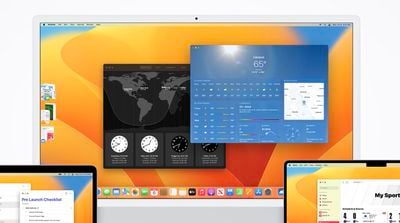
Apple brought the Weather and Clock apps to the Mac, redesigned System Preferences and renamed it System Settings, and added support for Shared Tab Groups. Passwords are being replaced with more secure Passkeys in iOS 16 and macOS Ventura, and there are updates to Spotlight, Visual Lookup, Live Text, and more.

There are a ton of other features in macOS Ventura, and we have a full rundown available in our dedicated macOS Ventura roundup.


Related Forum: macOS Ventura

Top Rated Comments

Realityck Avatar
48 months ago
I found this dev, now PB beta 4 to run better then what you guys received with updated beta 3.
Score: 3 Votes (Like | Disagree)
Realityck Avatar
48 months ago

I updated from PB1 on my Mac Studio, and when it came back up, none of my login programs had run. I checked and there were no items listed in the Login Items in System Settings. I restarted the Mac, and when it came back up the second time, all was fine...
IMHO this MacRumors identifying this as 1st PB and 2nd PB in their article is for the birds, you are on the 4th beta of Ventura. ;)
Score: 2 Votes (Like | Disagree)
Realityck Avatar
48 months ago
You can see the large number of fixes in the notes with beta 4. Both for MacOS and iOS/iPadOS

iOS 16 beta 4 (20A5328h) - July 27, 2022i
PadOS 16 beta 4 (20A5328h) - July 27, 2022
macOS 13 beta 4 (22A5311f) - July 27, 2022
tvOS 16 beta 4 (20J5344f) - July 27, 2022


Link to MacOS beta 4 notes ('https://forums.macrumors.com/threads/apple-seeds-fourth-beta-of-macos-13-ventura-to-developers.2352753/post-31289952'), iOS/IPadOS beta 4 notes ('https://forums.macrumors.com/threads/apple-seeds-fourth-betas-of-ios-16-and-ipados-16-to-developers.2352751/post-31289986').
Score: 2 Votes (Like | Disagree)
Lycanthrope Avatar
48 months ago

Thanks a million, going to register for beta now to check it out 👍
Confirmation that the audio issue appears top be resolved with this Beta
Score: 1 Votes (Like | Disagree)
Realityck Avatar
48 months ago

Question for those running the PB on MBMP M1 16" - does it resolve the infamous audio-crackling issue?
See comment from gerardoezequiel
[MEDIA=reddit]macbookpro/comments/w26yko[/MEDIA]
Score: 1 Votes (Like | Disagree)
Monotremata Avatar
48 months ago

Had a weird Finder thing...no windows would open, was still running, dock still ok, files visible on desktop...restart cured it. But can't see my Synology. Will investigate.
Yeah I had WindowServer crap out and die on me within the first 20 minutes or so. As soon as I logged in after the update, checked a few things and was on a Reddit thread with a YouTube video. Clicked play on the YouTube video and the whole Finder froze on me. Mouse still worked for awhile but eventually the pointed disappeared. Had to manually reboot it and when it came back up, filled out my first feedback report for a WindowServer crash.
Score: 1 Votes (Like | Disagree)
Related Apple News: Apple Ai Pin | Iphone | Macbook Air | Ios | Homepod Deals
















