

Constant pop-ups, annoying forms, and frustrating website behaviors can make browsing and using the web an unpleasant experience. Thankfully on iOS, iPadOS, and macOS, several Safari extensions help turn the experience around.

We've listed some Safari extensions that you may not have known about that can help remove annoyances and make a pleasant Safari experience.
No More Cookies
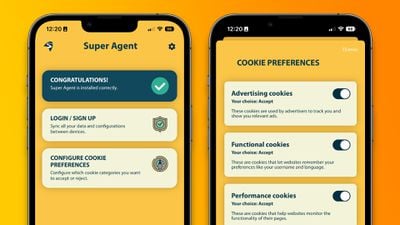
Perhaps the most universally dreaded web pop-up is: "This website uses cookies. Accept or Reject?" Virtually every website shows users a form to consent to using cookies as they browse that website. While it may be helpful for some to have granular controller over the use of cookies on each website they visit, there is likely to be a better solution for many.
Super Agent for Safari is an extension that automatically fills out the cookies consent form on each website you visit, meaning you'll no longer see those annoying pop-ups. The Super Agent for Safari app lets you customize how you would like websites to use cookies.
Users can choose whether they want to accept or reject advertising, functional, performance, and other cookies. The settings are applied universally to all websites.
Super Agent for Safari is free with no in-app subscription and can be found in the App Store.
'Open in App?' No Thanks.
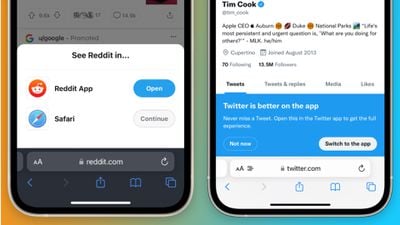
Some websites with accompanying apps on the App Store love to bombard users with pop-ups and banners to push them to use their app rather than the website.
Banish, a relatively new Safari extension on the App Store gets rid of such website notifications. Banish is a one-time purchase of $2 with no in-app subscription and can be found in the App Store.
StopTheMadness, Literally
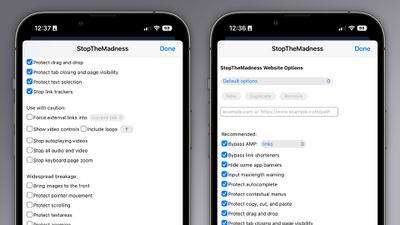
StopTheMadness, as the name suggests, is a general-purpose privacy protection extension with several nifty features. Within the extension's settings page, StopTheMadness includes several toggles that users can enable and disable, including:
- Bypassing Google's AMP webpages
- Protects the ability to copy, cut, and paste on websites
- Gets rid of link trackers and clickjacking in Google search results, and others
- Stop autoplaying videos
- Stop all audio and video on websites
StopTheMadness is a one-time purchase of $7.99 with no in-app subscription and can be found in the App Store.
Dark Mode For All
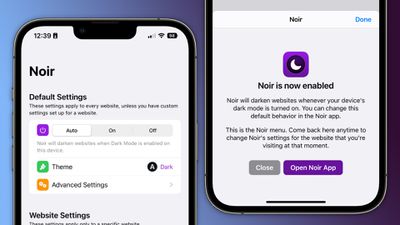
Spearheaded by the introduction of systemwide dark mode in iOS 13, many websites on the web now have the option of light and dark themes. For those websites that don’t have a dark mode option, however, there is a solution.
Noir is a Safari extension that automatically turns a website into dark mode, even if it doesn’t support it. Noir only kicks in if the website doesn’t have a native dark mode theme built-in. This can be especially helpful when your phone is in dark mode, but a website isn’t and you’re suddenly blinded by a bright white webpage.
Noir is a $2.99 purchase with no in-app subscription and can be found in the App Store.























