Apple Responds to Report About Thieves Permanently Locking Out iPhone Users

The Wall Street Journal's Nicole Nguyen and Joanna Stern today published a report highlighting how thieves can use Apple's optional recovery key security option to permanently lock out iPhone users from their Apple ID account.
iphone passcode green
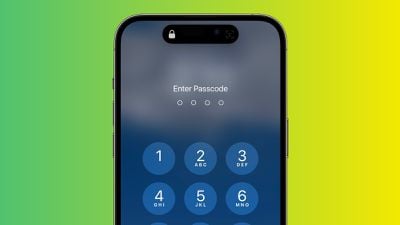
As the journalists first revealed in February, there have been increasing instances of thieves spying on an iPhone user's passcode in public and then stealing the device in order to gain widespread access to the device and its contents, including financial apps. All of the victims interviewed in the initial report said their iPhones were stolen while they were out socializing at bars and other public places at night.

With knowledge of the iPhone's passcode, a thief can easily reset the victim's Apple ID password in the Settings app, even if Face ID or Touch ID is enabled. Subsequently, the thief can turn off Find My iPhone on the device, preventing the owner of the device from tracking its location or remotely erasing the device via iCloud.

Today's report places more focus on an additional step that thieves can take: using the stolen device to set or reset a recovery key, a randomly generated 28-character code that is required to regain access to an Apple ID once enabled.


"Apple's policy gives users virtually no way back into their accounts without that recovery key," the report states. With unmitigated access to a stolen iPhone, the device's passcode, and the Apple ID password, thieves can steal money via Apple Pay and potentially other banking apps, view sensitive information like photos and emails, and more.

Apple's website does warn that losing access to both your trusted devices and recovery key means that "you could be locked out of your account permanently." In this scenario, however, thieves spying on iPhone passcodes before stealing the devices means that victims only need to lose their device in order to potentially be permanently locked out. The report serves as a valuable reminder to protect your iPhone's passcode in public.

For more details, read our previous coverage.

Apple Responds

In a statement shared in response to the report, Apple said it is "always investigating additional protections against emerging threats like this one."

"We sympathize with people who have had this experience and we take all attacks on our users very seriously, no matter how rare," an Apple spokesperson told The Wall Street Journal. "We work tirelessly every day to protect our users' accounts and data, and are always investigating additional protections against emerging threats like this one."

How to Stay Protected

iPhone users should use Face ID or Touch ID as much as possible when in public to prevent thieves from spying on their passcode. In situations where entering the passcode is necessary, users can hold their hands over their screen to hide passcode entry.

The report also recommends that users switch from a four-digit passcode to an alphanumeric passcode, which would be more difficult for thieves to spy on. This can be done in the Settings app under Face ID & Passcode → Change Passcode.

To protect a bank account, consider storing the password in a password manager that does not involve the device's passcode, such as 1Password.

Users can enable Screen Time parental controls to further lock down their device, the report adds.


Popular Stories

Apple Wallet ID Illinois

Apple Plans to Expand iPhone Driver's Licenses to These 7 U.S. States

Wednesday December 24, 2025 8:40 am PST by
In select U.S. states, residents can add their driver's license or state ID to the Apple Wallet app on the iPhone and Apple Watch, and then use it to display proof of identity or age at select airports and businesses, and in select apps. The feature is currently available in 13 U.S. states and Puerto Rico, and it is expected to launch in at least seven more in the future. To set up the...
iPhone Top Left Hole Punch Face ID Feature Purple

iPhone 18 Pro Launching Next Year With These 12 New Features

Tuesday December 23, 2025 8:36 am PST by
While the iPhone 18 Pro and iPhone 18 Pro Max are not expected to launch for another nine months, there are already plenty of rumors about the devices. Below, we have recapped 12 features rumored for the iPhone 18 Pro models. The same overall design is expected, with 6.3-inch and 6.9-inch display sizes, and a "plateau" housing three rear cameras Under-screen Face ID Front camera in...
maxresdefault

Where's the New Apple TV?

Monday December 22, 2025 11:30 am PST by
Apple hasn't updated the Apple TV 4K since 2022, and 2025 was supposed to be the year that we got a refresh. There were rumors suggesting Apple would release the new Apple TV before the end of 2025, but it looks like that's not going to happen now. Subscribe to the MacRumors YouTube channel for more videos. Bloomberg's Mark Gurman said several times across 2024 and 2025 that Apple would...
airpods color prototypes

Apple Tested AirPods in Bright Colors

Saturday December 27, 2025 6:06 am PST by
Apple reportedly tested a version of the first-generation AirPods with bright, iPhone 5c-like colored charging cases. The images, shared by the Apple leaker and prototype collector known as "Kosutami," claim to show first-generation AirPods prototypes with pink and yellow exterior casings. The interior of the charging case and the earbuds themselves remain white. They seem close to some...
iOS 26

iOS 26.2 Adds These 8 New Features to Your iPhone

Monday December 22, 2025 8:47 am PST by
Earlier this month, Apple released iOS 26.2, following more than a month of beta testing. It is a big update, with many new features and changes for iPhones. iOS 26.2 adds a Liquid Glass slider for the Lock Screen's clock, offline lyrics in Apple Music, and more. Below, we have highlighted a total of eight new features. Liquid Glass Slider on Lock Screen A new slider in the Lock...
maxresdefault

10 Mac Apps Worth Trying in 2026

Wednesday December 24, 2025 9:27 am PST by
2026 is almost upon us, and a new year is a good time to try out some new apps. We've rounded up 10 excellent Mac apps that are worth checking out. Subscribe to the MacRumors YouTube channel for more videos. Alt-Tab (Free) - Alt-Tab brings a Windows-style alt + tab thumbnail preview option to the Mac. You can see a full window preview of open apps and app windows. One Thing (Free) -...
top stories 2025 12 27

Top Stories: iPhone Fold Mockup, Where's the New Apple TV?, and More

Saturday December 27, 2025 6:00 am PST by
Merry Christmas and Happy Holidays from MacRumors! News in the Apple world has unsurprisingly been relatively slow over the past week, but Apple's upcoming foldable iPhone managed to make its way back into the news, while we also shared updates on current and future Apple TV news. iOS 26.3 will be bringing some new features, particularly for users in the EU, so we'll look for additional...

Top Rated Comments

cgs1xx Avatar
35 months ago
So, Apple’s response was “aahh… sympathies” ?
Score: 28 Votes (Like | Disagree)
bunty Avatar
35 months ago
So we're gonna have our 989 post conversation all over again? https://forums.macrumors.com/threads/apple-responds-to-report-about-thieves-spying-on-iphone-passcodes-to-steal-your-entire-digital-life.2381922/page-40

The point is the passcode to unlock an iPhone can also be used to access or recover anything that asks for your Apple ID password...if you forget or pretend to forget your Apple ID password. Try it. It's all covered in the other conversation thread.

The screentime passcode can be circumvented easily. https://forums.macrumors.com/threads/apple-responds-to-report-about-thieves-spying-on-iphone-passcodes-to-steal-your-entire-digital-life.2381922/page-38?post=32028392#post-32028392
Score: 27 Votes (Like | Disagree)
brandoman Avatar
35 months ago
All one has to do is turn on Screen Time > Content & Privacy Restrictions > Passcode Changes > Don't Allow. Be sure to use a different passcode for Screen Time.

Oh, and Account Changes (Don't Allow). Thanks for that tip @ypl.

Score: 24 Votes (Like | Disagree)
RamGuy Avatar
35 months ago
Is this even the case anymore? When I try to disable Find My, I'm prompted for my Apple ID password, not my passcode. Same if I try to log out of iCloud, this requires me to disable Find My as a part of the process prompting me t verify with my password, not my passcode.

All of this is common sense. You can't expect a 4-digit passcode to be all that secure. If you feel paranoid, use an alphanumeric passcode, aka password, instead.
Score: 21 Votes (Like | Disagree)
ELman Avatar
35 months ago
Essentially, be responsible for the device you own. It's not our issue.
Score: 20 Votes (Like | Disagree)
zorinlynx Avatar
35 months ago
This would be less of an issue if iOS didn't randomly fail to FaceID and ask for a passcode, often at the least convenient time.

I wish Apple would get this resolved.
Score: 19 Votes (Like | Disagree)