While Apple's Macs are less targeted by malware than Windows PCs, concerning Mac malware does pop up regularly. This week, there's new Mac malware out in the wild that Mac users should be aware of.
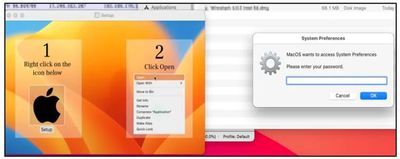
Called Atomic macOS Stealer (AMOS), the malware was found on Telegram by Cyble Research. A Telegram user was selling access to the malware, which is designed to steal sensitive information like usernames and passwords.
Whoever designed the Atomic macOS Stealer is working behind the scenes to improve it and add new functionality to make it more effective. In its current incarnation, AMOS is able to access keychain passwords, system information, files from the desktop and documents folder, and the password of the Mac.
It is able to infiltrate browser apps like Chrome and Firefox, extracting autofill information, passwords, cookies, wallets, and credit card information. Cryptowallets like Electrum, Binance, and Atomic are specific targets.
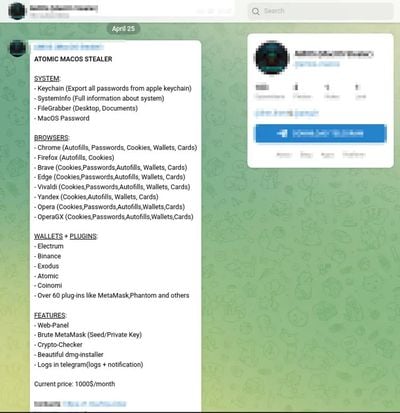
AMOS can be purchased with a web panel that makes it easy to manage malware targets, along with tools for brute-forcing private keys. The malware and accompanying services to make it easier to use against victims can be purchased on Telegram for $1,000 per month.
A .dmg file is used to get the malware on a victim's machine, and once installed, it immediately begins accessing sensitive information and sending it to a remote server. A fake system prompt is presented to get access to the system password, and it asks for access to files in the documents and desktop folders.
Because this requires a user to click on a .dmg file to install, Mac users can avoid the malware by not installing any kind of untrusted software from an unverified source. Cyble Research recommends installing software from the Mac App Store, using strong passwords and multi-factor authentication, and using biometric authentication where possible.
Users should also avoid opening links in emails, using caution whenever an app asks for permissions, and keeping devices, operating systems, and apps up to date.