

macOS Sonoma Tidbits: New FaceTime UI, Safari Profiles, Screen Sharing Improvements, and More

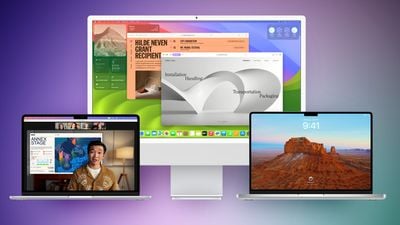
The first macOS Sonoma beta was released to developers and early adopters this week, and changes in the newest version of Apple's macOS operating system are still being unearthed. Below are just a handful of notable differences that may have passed you by.
macos sonoma feature purple green

System Settings

In macOS Ventura, Apple replaced System Preferences with System Settings to align it with iOS and iPadOS, but the way controls were organized left many users wanting.
macos sonoma tidbits2
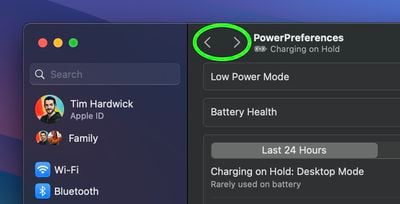
The same System Settings interface remains in macOS Sonoma, but it is now easier to navigate through different menu screens you have visited without continually scrolling through the side bar, thanks to the addition of backward and forward buttons.

FaceTime UI and Reactions

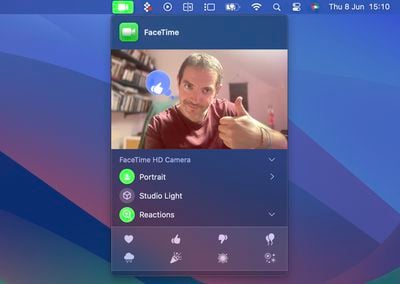
Apple has changed the way FaceTime integrates with the menu bar. The video effects options no longer appear in the Control Center, and instead have a new home in a dedicated green ‌FaceTime‌ menu bar item, which also includes a mini webcam view and buttons to trigger Reactions.
macos sonoma tidbits1
Reactions include Love, Like, Dislike, Balloons, Rain, Confetti, Lasers, and Fireworks. Some reactions are even triggered automatically by the user's physical actions: One thumb up triggers a Like, and two thumbs up are attended by Fireworks. Similarly, one thumb down counts as a dislike, and two thumbs down initiates a rain shower.

Safari Profiles

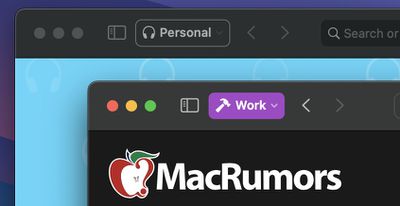
Safari has gained a new feature called Profiles, which is designed to help keep your browsing separate for topics like Work, School, or Personal.
macos sonoma tidbits3
Each profile gets its own icon and silos your history, Tab Groups, favorites, and cookies. You can even assign specific extensions to different profiles to optimize your browsing experience based on the task at hand.

Seamless Keyboard Input and Dictation

macOS Sonoma supports simultaneous use of keyboard input and Dictation, without any disruption in your flow of thought.
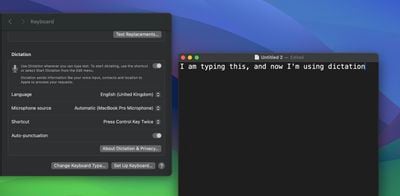
macos sonoma tidbits4
In other words, you can keep typing after hitting the Dictation shortcut. So whenever your fingers need a rest, you can complete the sentence you were just typing by saying it out loud.

Screen Sharing Improvements

When you're in a ‌FaceTime‌ or Zoom call, click-hold the green traffic light in the corner of an open app window and you'll see a screen sharing option, and a new Presenter Overlay feature can be used to keep you on screen and better able to point to details.
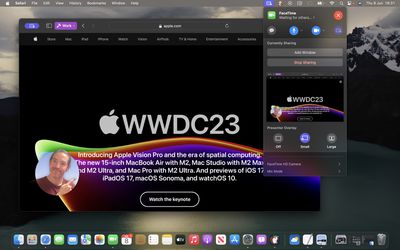
macos sonoma tidbits7
When on a video call, you can either place yourself inside a movable bubble in the corner of the window or desktop that you're sharing, or you can bring on-screen content into the background of your own environment so that it looks as if you're standing just in front of it.

Docked Web Apps

Thanks to a new option in Safari, you can now create independent web apps that can be added to your Dock.
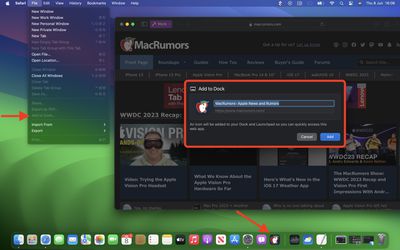
macos sonoma tidbits6
All you have to do is visit a website and select File -> Add to Dock.... You can then give the web app a name and even change its icon. When you open a docked web app, it will open in its own separate window that includes back and forward buttons for simple navigation.

Other Notable Tidbits

  • New visual Caps Lock indicator
  • Mail search prioritizes upcoming travel-related emails
  • Use the Share button to send a note in Notes into Pages.
  • New Zoom and Pan controls for Continuity Camera

Developers are still learning what else has changed in macOS Sonoma, so be sure to check back for more coverage here on MacRumors.


Related Forum: macOS Sonoma

Popular Stories

Apple Wallet ID Illinois

Apple Plans to Expand iPhone Driver's Licenses to These 7 U.S. States

Wednesday December 24, 2025 8:40 am PST by
In select U.S. states, residents can add their driver's license or state ID to the Apple Wallet app on the iPhone and Apple Watch, and then use it to display proof of identity or age at select airports and businesses, and in select apps. The feature is currently available in 13 U.S. states and Puerto Rico, and it is expected to launch in at least seven more in the future. To set up the...
iPhone Top Left Hole Punch Face ID Feature Purple

iPhone 18 Pro Launching Next Year With These 12 New Features

Tuesday December 23, 2025 8:36 am PST by
While the iPhone 18 Pro and iPhone 18 Pro Max are not expected to launch for another nine months, there are already plenty of rumors about the devices. Below, we have recapped 12 features rumored for the iPhone 18 Pro models. The same overall design is expected, with 6.3-inch and 6.9-inch display sizes, and a "plateau" housing three rear cameras Under-screen Face ID Front camera in...
iOS 26

iOS 26.2 Adds These 8 New Features to Your iPhone

Monday December 22, 2025 8:47 am PST by
Earlier this month, Apple released iOS 26.2, following more than a month of beta testing. It is a big update, with many new features and changes for iPhones. iOS 26.2 adds a Liquid Glass slider for the Lock Screen's clock, offline lyrics in Apple Music, and more. Below, we have highlighted a total of eight new features. Liquid Glass Slider on Lock Screen A new slider in the Lock...
maxresdefault

Where's the New Apple TV?

Monday December 22, 2025 11:30 am PST by
Apple hasn't updated the Apple TV 4K since 2022, and 2025 was supposed to be the year that we got a refresh. There were rumors suggesting Apple would release the new Apple TV before the end of 2025, but it looks like that's not going to happen now. Subscribe to the MacRumors YouTube channel for more videos. Bloomberg's Mark Gurman said several times across 2024 and 2025 that Apple would...
maxresdefault

10 Mac Apps Worth Trying in 2026

Wednesday December 24, 2025 9:27 am PST by
2026 is almost upon us, and a new year is a good time to try out some new apps. We've rounded up 10 excellent Mac apps that are worth checking out. Subscribe to the MacRumors YouTube channel for more videos. Alt-Tab (Free) - Alt-Tab brings a Windows-style alt + tab thumbnail preview option to the Mac. You can see a full window preview of open apps and app windows. One Thing (Free) -...
Foldable iPhone 2023 Feature Iridescent Search

Samsung Developing 'Wide Fold' With iPhone Fold-Like Design Ahead of Apple's 2026 Launch

Tuesday December 23, 2025 11:55 am PST by
Samsung is working on a new foldable smartphone that's wider and shorter than the models that it's released before, according to Korean news site ETNews. The "Wide Fold" will compete with Apple's iPhone Fold that's set to launch in September 2026. Samsung's existing Galaxy Z Fold7 display is 6.5 inches when closed, and 8 inches when open, with a 21:9 aspect ratio when folded and a 20:18...
iOS 26

iOS 26.3 Brings AirPods-Like Pairing to Third-Party Devices in EU Under DMA

Monday December 22, 2025 3:20 pm PST by
The European Commission today praised the interoperability changes that Apple is introducing in iOS 26.3, once again crediting the Digital Markets Act (DMA) with bringing "new opportunities" to European users and developers. The Digital Markets Act requires Apple to provide third-party accessories with the same capabilities and access to device features that Apple's own products get. In iOS...
iphone fold 3d print

Have a 3D Printer? You Can Make Your Own iPhone Fold Dummy

Tuesday December 23, 2025 1:31 pm PST by
Apple is working on a foldable iPhone that's set to come out in September 2026, and rumors suggest that it will have a display that's around 5.4 inches when closed and 7.6 inches when open. Exact measurements vary based on rumors, but one 3D designer has created a mockup based on what we've heard so far. On MakerWorld, a user named Subsy has uploaded a 1:1 iPhone Fold replica (via Macworld), ...
iPhone Fold Vertical Feature

Why Apple's Foldable iPhone May Be Smaller Than Expected

Tuesday December 23, 2025 5:21 am PST by
Apple's first foldable iPhone, rumored for release next year, may turn out to be smaller than most people imagine, if a recent report is anything to go by. According to The Information, the outer display on the book-style device will measure just 5.3 inches – that's smaller than the 5.4-inch screen on the ‌iPhone‌ mini, a line Apple discontinued in 2022 due to poor sales. The report has led ...

Top Rated Comments

TheYayAreaLiving ?️ Avatar
33 months ago
The widgets on the desktop are amazing! Apple did a great job with that! Well-refined!
Score: 12 Votes (Like | Disagree)
BenGoren Avatar
33 months ago
What I most want for Safari is for every top-level domain to sandboxed. That is, even if foo.com sets a bunch of Google and Facebook tracking cookies, when you visit bar.com, it has no access to them whatsoever. And, of course, if bar.com sets those same cookies, foo.com can’t see them, either.

Of course, not just cookies, but all Website data.

That’s the reason why I always use private browsing everywhere. I’m okay with MacRumors knowing which articles I click through to, but I’m not okay with Google knowing that I read both MacRumors and, say, the Times. And that I might then click through to the Wirecutter and compare prices for a given product on a few different retailers.

Ideally, this should work even as I click through links from one domain to another. So, if MacRumors links to the Times and I click on it, the Times should have no way to access anything that MacRumors might have set. If I go back (or re-visit) MacRumors, it shouldn’t have any clue that I even know that the Times exists.

And, of course, with embedded media … a YouTube video embedded in a MacRumors page shouldn’t be able to know that I’ve logged into MacRumors with my ID. Indeed, YouTube shouldn’t know anything other than the URL of the embedded video. If I then click, “Open in YouTube” and I’ve logged in to YouTube, it should see that as me directly pasting that link into YouTube, with no knowledge of how I got the link. If I’ve never visited YouTube before, or if I’ve cleared history for YouTube, then YouTube should get a completely clean slate. It would also be nice to designate sites as “always private (don’t save data),” so YouTube couldn’t build an anonymous profile of what I watch and then match that up should I log in later. Or, the reverse: everything private, but with an exception list for sites I don’t mind staying signed into across sessions.

Make that the default behavior … and Apple will have done as much to protect user privacy as everything else they’ve done combined. (And, to be sure, that’s an awful lot more than any other big company has done.)

b&
Score: 11 Votes (Like | Disagree)
Larsen2k4 Avatar
33 months ago
Another tiny but nice tweak: The text input cursor now smoothly fades in and out like on iOS ?
Score: 9 Votes (Like | Disagree)
gmanist1000 Avatar
33 months ago
The Safari profiles are confusing. I created two profiles, Work and Home. When I open Safari fresh, it opens.... neither profile... it's just a normal window. I have to navigate to the menu bar and click New > Work, or Home. How do I set a default to open automatically??
Score: 7 Votes (Like | Disagree)
Brad7 Avatar
33 months ago
I love the new moving screensavers/wallpapers, they’re really mesmerizing. They should really bring them to iOS and tvOS.

Web apps are finally here, too. Now I can just use those instead of native apps that suck up all our personal data. Tracking protection and extensions will be there now, too.
Score: 7 Votes (Like | Disagree)
Brad7 Avatar
33 months ago

for people using Sonoma already, do you need to have safari itself opened , in order to launch a web app/pwa ? or can it be open undependantly?
Just tried - it opens independently. ?
Score: 7 Votes (Like | Disagree)


















