8 New Photo Features Coming to iPhone in iOS 17

Photography has become a staple use of the modern iPhone, and Apple isn't resting on its laurels in its efforts to advance what you can do with a photo in iOS 17.

8 New Photo Features Feature 1
Below we've listed eight new photo-related features and improvements coming with Apple's latest mobile operating system, which is expected to get its official release in the fall. Can't wait until then? The iOS 17 beta is available now.

1. Pet Recognition

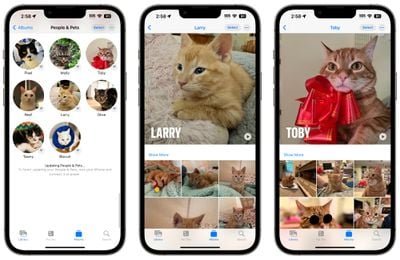
In iOS 17, Apple has improved the image recognition capabilities of the Photos app, which can now recognize not only your family and friends, but also your beloved pets.
ios 17 pets photos
The ‌‌Photos‌‌ app's ability to detect animals isn't new, but now it can identify animals that are important to you by taking into account the number of photos that you have of them. That's why the "People" album has become the "People and Pets" album, where you can add the names of your pets and confirm additional photos.

2. One-Tap Crop

In iOS 16, cropping images in the ‌Photos‌ app involves tapping into the Edit interface, choosing the crop tool, and adjusting the crop from there with either pinch zoom gestures or by dragging the corners of the cropping tool.

ios 17 crop photos app
In iOS 17, Apple has made the process quicker and easier. Now when you zoom into an image, there's a new "Crop" button that appears in the upper right. Tapping it brings up the crop interface with the zoom level that you've selected, so you can crop into the part of the image that you prefer with just a couple of taps.

3. Turn Photos into Animated Stickers

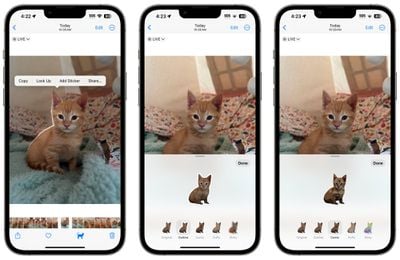
In iOS 16, Apple added a neat "remove subject from background" tool for plucking things out of images. In iOS 17, Apple has supercharged the feature, and now you can use it to make your own custom animated stickers for use in Messages.
ios 17 stickers create
When long-pressing a subject in a photo, the pop-up menu includes a new "Add Sticker" option that exports the selected subject into Messages' sticker interface. From there, you can add effects like a white sticker outline, a "puffy" sticker effect, a glittery effect, and more. Subjects pulled from Live Photos even have the option of animating.

4. Get Recipes for Food

When viewing your photos, Apple has enhanced Visual Look Up in iOS 17 in a few ways, one being the ability to find recipes for similar dishes when meals are recognized in the picture.

visual lookup recipes
When an image of food is identified in the ‌Photos‌ app, a knife and fork icon appears at the bottom of the interface. The Look Up Food option gives you direct links to recipe websites, so now you can get inspiration about what to cook, without having to trawl the web yourself in Safari.

5. Straighten Your Shooting Angle

For the last few years, the Camera app's Grid mode has included a somewhat-hidden leveling feature for top-down photos, popping up a floating crosshair to help make sure you're lined up properly above your subject.
ios 17 camera level
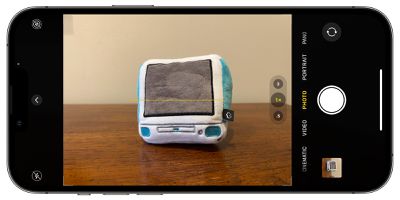
In iOS 17, Apple has enhanced the camera leveling functionality, separating it out from the Grid mode to its own option and expanding it to include a horizontal level for more traditional straight-on photos.

The Level option displays a broken horizontal line on the screen when your ‌iPhone‌ senses you're lining up for a straight-on shot and you tilt your device slightly out of horizontal. The line appears white while your phone is out of level and then turns yellow once you achieve a level orientation to indicate success.

6. Look Up What You Just Lifted

In iOS 17, when you use the "remove subject from background" tool, you can now look up information about the subject in question, thanks to a new option in the popup menu.

lookup lifted subject
Not only that, the ‌Photos‌ app now also offers the ability to pause video on any frame and look up information on a subject.

7. Visual Look Up for Auto Symbols

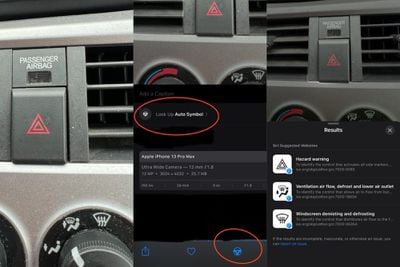
Apple hasn't publicly promoted this feature, but Reddit users digging into the iOS 17 beta have discovered that Visual Look Up can now detect car symbols on vehicle dashboards.
lookup auto symbols

Image credit: yahlover

When the ‌Photos‌ app identifies one or more symbols in an image, iOS 17 presents the name of the icon and a short description of its meaning, and offers up links to learn more about each symbol in Safari.

8. Tweaked Editing Tools Interface

Lastly, Apple in iOS 17 has made some quality of life improvements to the ‌Photos‌ app editing interface to make it a little more intuitive. The Cancel and Done buttons have been moved from the bottom of the screen to the top, and the tool icons have been given text descriptions to make their function clearer.
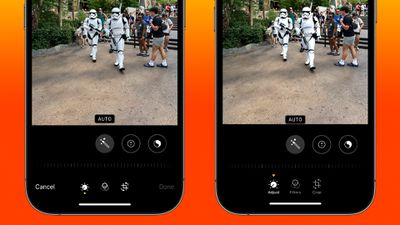
photos ui comparison

‌Photos‌ app editing UI in iOS 16 (left) vs iOS 17

In order to make it more obvious whether Adjust, Filters, or Crop is currently selected, Apple has also changed the indicator from a yellow circle beneath the active icon, to a triangle pointing down at it from above.


Related Forums: iOS 17, iPadOS 17

Popular Stories

Apple Wallet ID Illinois

Apple Plans to Expand iPhone Driver's Licenses to These 7 U.S. States

Wednesday December 24, 2025 8:40 am PST by
In select U.S. states, residents can add their driver's license or state ID to the Apple Wallet app on the iPhone and Apple Watch, and then use it to display proof of identity or age at select airports and businesses, and in select apps. The feature is currently available in 13 U.S. states and Puerto Rico, and it is expected to launch in at least seven more in the future. To set up the...
iPhone Top Left Hole Punch Face ID Feature Purple

iPhone 18 Pro Launching Next Year With These 12 New Features

Tuesday December 23, 2025 8:36 am PST by
While the iPhone 18 Pro and iPhone 18 Pro Max are not expected to launch for another nine months, there are already plenty of rumors about the devices. Below, we have recapped 12 features rumored for the iPhone 18 Pro models. The same overall design is expected, with 6.3-inch and 6.9-inch display sizes, and a "plateau" housing three rear cameras Under-screen Face ID Front camera in...
iOS 26

iOS 26.2 Adds These 8 New Features to Your iPhone

Monday December 22, 2025 8:47 am PST by
Earlier this month, Apple released iOS 26.2, following more than a month of beta testing. It is a big update, with many new features and changes for iPhones. iOS 26.2 adds a Liquid Glass slider for the Lock Screen's clock, offline lyrics in Apple Music, and more. Below, we have highlighted a total of eight new features. Liquid Glass Slider on Lock Screen A new slider in the Lock...
maxresdefault

10 Mac Apps Worth Trying in 2026

Wednesday December 24, 2025 9:27 am PST by
2026 is almost upon us, and a new year is a good time to try out some new apps. We've rounded up 10 excellent Mac apps that are worth checking out. Subscribe to the MacRumors YouTube channel for more videos. Alt-Tab (Free) - Alt-Tab brings a Windows-style alt + tab thumbnail preview option to the Mac. You can see a full window preview of open apps and app windows. One Thing (Free) -...
maxresdefault

Where's the New Apple TV?

Monday December 22, 2025 11:30 am PST by
Apple hasn't updated the Apple TV 4K since 2022, and 2025 was supposed to be the year that we got a refresh. There were rumors suggesting Apple would release the new Apple TV before the end of 2025, but it looks like that's not going to happen now. Subscribe to the MacRumors YouTube channel for more videos. Bloomberg's Mark Gurman said several times across 2024 and 2025 that Apple would...
Foldable iPhone 2023 Feature Iridescent Search

Samsung Developing 'Wide Fold' With iPhone Fold-Like Design Ahead of Apple's 2026 Launch

Tuesday December 23, 2025 11:55 am PST by
Samsung is working on a new foldable smartphone that's wider and shorter than the models that it's released before, according to Korean news site ETNews. The "Wide Fold" will compete with Apple's iPhone Fold that's set to launch in September 2026. Samsung's existing Galaxy Z Fold7 display is 6.5 inches when closed, and 8 inches when open, with a 21:9 aspect ratio when folded and a 20:18...
iOS 26

iOS 26.3 Brings AirPods-Like Pairing to Third-Party Devices in EU Under DMA

Monday December 22, 2025 3:20 pm PST by
The European Commission today praised the interoperability changes that Apple is introducing in iOS 26.3, once again crediting the Digital Markets Act (DMA) with bringing "new opportunities" to European users and developers. The Digital Markets Act requires Apple to provide third-party accessories with the same capabilities and access to device features that Apple's own products get. In iOS...
iphone fold 3d print

Have a 3D Printer? You Can Make Your Own iPhone Fold Dummy

Tuesday December 23, 2025 1:31 pm PST by
Apple is working on a foldable iPhone that's set to come out in September 2026, and rumors suggest that it will have a display that's around 5.4 inches when closed and 7.6 inches when open. Exact measurements vary based on rumors, but one 3D designer has created a mockup based on what we've heard so far. On MakerWorld, a user named Subsy has uploaded a 1:1 iPhone Fold replica (via Macworld), ...
iPhone SE Cosmopolitan Clean

Apple Discontinued These 25 Products This Year

Wednesday December 24, 2025 7:24 am PST by
With the end of 2025 near, the time has come to look back at the devices and accessories that Apple discontinued throughout the year. Most of the products that were discontinued this year were simply replaced by a new model with an updated chip. However, the iPhone SE line was entirely discontinued when the iPhone 16e launched, and the iPhone Plus line is being phased out. Below, we have...

Top Rated Comments

contacos Avatar
33 months ago
How about finally showing us which photos have already been sorted into Albums and also show WHICH Album in the photo details? It’s a mess if you do not sort them right away (I am trying to do it monthly for this reason). Often I am like „hmmm where did I leave off?!?“ hmmm did I sort those already?

On android I have a little indicator on the thumbnail in my „all photos“ feed to show me that those photos are already sorted
Score: 13 Votes (Like | Disagree)
johnmarki Avatar
33 months ago
Keep the updates to Photos coming Apple! No complaints here.
Score: 8 Votes (Like | Disagree)
StellarVixen Avatar
33 months ago
Where’s the retouch brush? Mac Photos has had it for years now
Score: 5 Votes (Like | Disagree)
Ch3ckM4te Avatar
33 months ago
Hope it recognizes all my Pet Rocks…
Score: 5 Votes (Like | Disagree)
DuforneeS Avatar
33 months ago

How about finally showing us which photos have already been sorted into Albums and also show WHICH Album in the photo details? It’s a mess if you do not sort them right away (I am trying to do it monthly for this reason). Often I am like „hmmm where did I leave off?!?“ hmmm did I sort those already?

On android I have a little indicator on the thumbnail in my „all photos“ feed to show me that those photos are already sorted
You can create a smart album that filters those images for you that are not part of any album yet. Please see attached!

Attachment Image
Score: 4 Votes (Like | Disagree)
matrix07 Avatar
33 months ago
No 4 will be huge.
Score: 4 Votes (Like | Disagree)