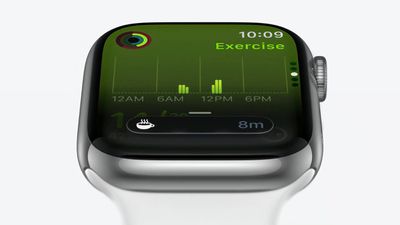
watchOS 11: Smart Stack Gains Live Activities and Suggested Widgets

Introduced in iOS 16, Live Activities changed the way users interact with their iPhone. Instead of getting multiple notifications when tracking a delivery or a sports score, for example, users see a single, dynamically updating Live Activity with real-time information right on their Lock Screen.
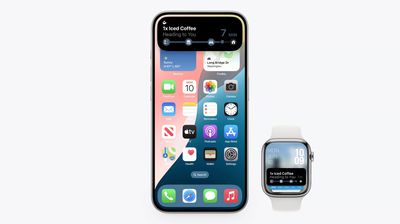
live activities watchos 11
Starting in watchOS 11, when a Live Activity begins on your ‌iPhone‌, it now automatically shows on your Apple Watch at the top of the Smart Stack, allowing you to keep tabs on it just by raising your wrist. (Notably, Apple has also made it so that the design of clock at the top of the Smart Stack aligns with your current watch face.)

Apple Watch users will know that the Smart Stack is usually accessed from the watch face by turning the Digital Crown. But in watchOS 11, the Smart Stack can now open automatically when a Live Activity starts, and will remain visible when you lower your wrist.

When you tap on the Live Activity, it opens the relevant app, and if there's no associated Apple Watch app, it turns into a convenient fullscreen view with a button to open the app on ‌iPhone‌.

Screenshot 2024 06 13 at 11
If a Live Activity begins while you are in another Apple Watch app, it will appear in a special compact version at the bottom of the display. If you pull up on the compact view, it enlarges into the full widget, and if you tap on it, you'll be taken to the app or fullscreen view.

In watchOS 11, Apple is also introducing "Suggested widgets," or widgets that the system intelligently adds or removes in the Smart Stack based on what's relevant in the moment.

For example, if it's about to rain in 15 minutes, a new precipitation widget will appear in the Smart Stack ahead of time, and then disappear when the sky clears. Cues for suggested widgets can include location, date, sleep, fitness, and more.
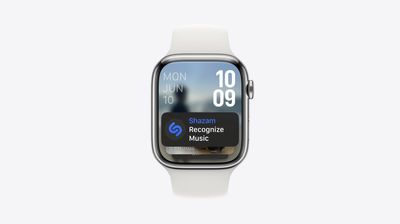
shazam widget watchos 11
Another example is the Shazam widget. It automatically appears in your Smart Stack when there's music playing around you so that you can use it to identify the song, and it will disappear when the music stops.

Lastly, Smart Stack widgets can now be interactive, and developers can bring toggles and switches into play, allowing users to perform quick actions without launching an app. An individual widget can be used to turn smart lights on and off, for example.

watchOS 11 is currently available to developers for testing purposes, with Apple planning to release the software to the public this fall.


Related Roundup: watchOS 26
Related Forum: Apple Watch

Popular Stories

Apple Wallet ID Illinois

Apple Plans to Expand iPhone Driver's Licenses to These 7 U.S. States

Wednesday December 24, 2025 8:40 am PST by
In select U.S. states, residents can add their driver's license or state ID to the Apple Wallet app on the iPhone and Apple Watch, and then use it to display proof of identity or age at select airports and businesses, and in select apps. The feature is currently available in 13 U.S. states and Puerto Rico, and it is expected to launch in at least seven more in the future. To set up the...
iPhone Top Left Hole Punch Face ID Feature Purple

iPhone 18 Pro Launching Next Year With These 12 New Features

Tuesday December 23, 2025 8:36 am PST by
While the iPhone 18 Pro and iPhone 18 Pro Max are not expected to launch for another nine months, there are already plenty of rumors about the devices. Below, we have recapped 12 features rumored for the iPhone 18 Pro models. The same overall design is expected, with 6.3-inch and 6.9-inch display sizes, and a "plateau" housing three rear cameras Under-screen Face ID Front camera in...
maxresdefault

Where's the New Apple TV?

Monday December 22, 2025 11:30 am PST by
Apple hasn't updated the Apple TV 4K since 2022, and 2025 was supposed to be the year that we got a refresh. There were rumors suggesting Apple would release the new Apple TV before the end of 2025, but it looks like that's not going to happen now. Subscribe to the MacRumors YouTube channel for more videos. Bloomberg's Mark Gurman said several times across 2024 and 2025 that Apple would...
maxresdefault

10 Mac Apps Worth Trying in 2026

Wednesday December 24, 2025 9:27 am PST by
2026 is almost upon us, and a new year is a good time to try out some new apps. We've rounded up 10 excellent Mac apps that are worth checking out. Subscribe to the MacRumors YouTube channel for more videos. Alt-Tab (Free) - Alt-Tab brings a Windows-style alt + tab thumbnail preview option to the Mac. You can see a full window preview of open apps and app windows. One Thing (Free) -...
iOS 26

iOS 26.2 Adds These 8 New Features to Your iPhone

Monday December 22, 2025 8:47 am PST by
Earlier this month, Apple released iOS 26.2, following more than a month of beta testing. It is a big update, with many new features and changes for iPhones. iOS 26.2 adds a Liquid Glass slider for the Lock Screen's clock, offline lyrics in Apple Music, and more. Below, we have highlighted a total of eight new features. Liquid Glass Slider on Lock Screen A new slider in the Lock...
airpods color prototypes

Apple Tested AirPods in Bright Colors

Saturday December 27, 2025 6:06 am PST by
Apple reportedly tested a version of the first-generation AirPods with bright, iPhone 5c-like colored charging cases. The images, shared by the Apple leaker and prototype collector known as "Kosutami," claim to show first-generation AirPods prototypes with pink and yellow exterior casings. The interior of the charging case and the earbuds themselves remain white. They seem close to some...
iPhone Fold Vertical Feature

Why Apple's Foldable iPhone May Be Smaller Than Expected

Tuesday December 23, 2025 5:21 am PST by
Apple's first foldable iPhone, rumored for release next year, may turn out to be smaller than most people imagine, if a recent report is anything to go by. According to The Information, the outer display on the book-style device will measure just 5.3 inches – that's smaller than the 5.4-inch screen on the ‌iPhone‌ mini, a line Apple discontinued in 2022 due to poor sales. The report has led ...
iPhone SE Cosmopolitan Clean

Apple Discontinued These 25 Products This Year

Wednesday December 24, 2025 7:24 am PST by
With the end of 2025 near, the time has come to look back at the devices and accessories that Apple discontinued throughout the year. Most of the products that were discontinued this year were simply replaced by a new model with an updated chip. However, the iPhone SE line was entirely discontinued when the iPhone 16e launched, and the iPhone Plus line is being phased out. Below, we have...
Foldable iPhone 2023 Feature Iridescent Search

Samsung Developing 'Wide Fold' With iPhone Fold-Like Design Ahead of Apple's 2026 Launch

Tuesday December 23, 2025 11:55 am PST by
Samsung is working on a new foldable smartphone that's wider and shorter than the models that it's released before, according to Korean news site ETNews. The "Wide Fold" will compete with Apple's iPhone Fold that's set to launch in September 2026. Samsung's existing Galaxy Z Fold7 display is 6.5 inches when closed, and 8 inches when open, with a 21:9 aspect ratio when folded and a 20:18...

Top Rated Comments

Reason077 Avatar
20 months ago
I never really use the "smart stack" on my Watch, to be honest. Too small and convoluted to be of much use. The Watch is pretty good at putting the apps you're using/need on the screen automatically, so Smart Stack seems like a mediocre solution for a problem that doesn't exist?

My main wish for WatchOS is better watch faces and complications. In particular, watch faces that clearly display active timers in a large font, without having to do any interactions to see the timer other than raising your wrist!

This is something that iOS does very well, why not WatchOS? Why is it so difficult?
Score: 11 Votes (Like | Disagree)
Simmias Avatar
20 months ago

Do we really need a clock in the smart stack and why? I'd rather use this space for other widgets because I do not need an extra clock after looking at my watchface. :D
The clock at the top of the widget stack is one of the most baffling design decisions on the watch. It's redundant with the watch face and requires an extra full turn of the crown to see any useful information.
Score: 6 Votes (Like | Disagree)
CarAnalogy Avatar
20 months ago

I never really use the "smart stack" on my Watch, to be honest. Too small and convoluted to be of much use. The Watch is pretty good at putting the apps you're using/need on the screen automatically, so Smart Stack seems like a mediocre solution for a problem that doesn't exist?

My main wish for WatchOS is better watch faces and complications. In particular, watch faces that clearly display active timers in a large font, without having to do any interactions to see the timer other than raising your wrist!

This is something that iOS does very well, why not WatchOS? Why is it so difficult?
I'm not sure what you mean by putting apps on the screen automatically. Since WatchOS 10 I've found it much more difficult to get to the apps I use, since they killed the Dock.

I still don't understand why they had to do that, and still haven't brought it back in the updates since.
Score: 6 Votes (Like | Disagree)
CarAnalogy Avatar
20 months ago

I completely agree. I haven't updated my iPhone since 17.3.1 just so I can have my watch on 9.6.3. I really don't see why the dock was removed as I find it a feature I almost can't bare to lose. I've asked family members and friends who have updated to Watch OS10, they tell me it's fine I just need to get use to the changes. I'm holding off at least until iOS18 is officially released before I decide. At least I'll have a few more months with the dock..
I’ve gotten used to every other change. But getting rid of the Dock was downright user hostile, no other way to say it.
Score: 5 Votes (Like | Disagree)
Godspeed8230 Avatar
20 months ago

We need minute marks and seconds display on analogue and digital clocks in the Smart Stack! And why can’t we pick between the two?
Do we really need a clock in the smart stack and why? I'd rather use this space for other widgets because I do not need an extra clock after looking at my watchface. :D
Score: 5 Votes (Like | Disagree)
Webcat86 Avatar
20 months ago

The Smart stack is probably the least welcome feature on my watch (Apple watch user since Series0). I am left handed so I wear my watch on my right wrist. The digital crown is facing away from my hand. This means, it very often slightly touches/rotates the crown when wearing certain clothes. Up until watchOS 10 no problem, but since 10 it often activates Smart Stack unwantedly, with no way to disable it. Let's hope watchOS brings some way to disable this.
Why not go into settings and tell it you wear it the other way? I did that because I found whenever I do push ups, the crown bumps into the back of my hand. So now I wear it with the crown on the other side
Score: 5 Votes (Like | Disagree)