

Apple is set to release iOS 18.2 in December, bringing the second round of Apple Intelligence features to iPhone 15 Pro and iPhone 16 models. This update brings several major advancements to Apple's AI integration, including completely new image generation tools and a range of Visual Intelligence-based enhancements. There are a handful of new non-AI related feature controls incoming as well.

While not all advertised Apple Intelligence features will be available immediately, iOS 18.2 introduces several capabilities that aim to make your iPhone smarter and more intuitive. Below, we've listed 10 new things your iPhone will be able to do when the update rolls out in December.
Adjust Media Volume on Lock Screen
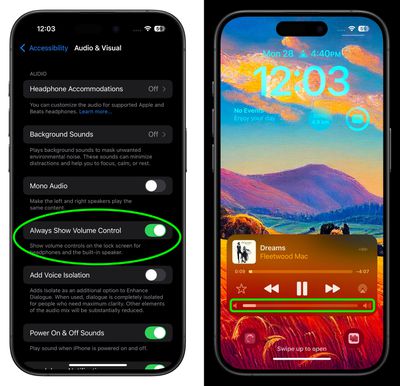
Prior to 2022, the volume slider was a familiar presence on the Lock Screen whenever media was playing. When Apple released iOS 16, however, it removed the control without explaining the reason, much to the dismay of many users.
Thankfully, Apple is bringing the control back as an option in iOS 18.2. If you're already on the iOS 18.2 beta, you'll find a toggle in Settings ➝ Accessibility ➝ Audio & Visual, labeled "Always Show Volume Control". Enable the switch, and you'll be able to adjust volume from the Lock Screen without having to unlock your iPhone or use the physical volume buttons.
Play Daily Sudoku Puzzles
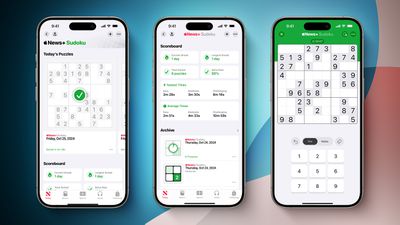
With iOS 18.2, Apple News+ subscribers in the U.S. will gain access to daily sudoku puzzles, offering easy, moderate, and challenging difficulty levels. A scoreboard will keep track of your sudoku statistics, including the total number of puzzles solved and your fastest completion times for each difficulty level.
This addition will be the fourth puzzle game available with an Apple News+ subscription, joining Crossword, Crossword Mini, and Quartiles.
Easily Manage Default Apps
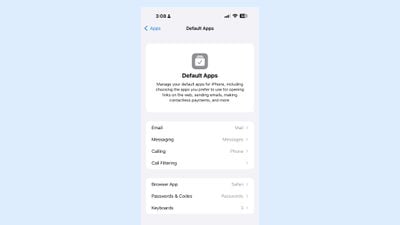
iOS 18.2 includes a new "Default Apps" section that can be found in the Settings app, which can be used to manage your default apps for the iPhone. This is a feature that Apple promised would be coming to the European Union, but it looks as if it may become available worldwide, based on the beta.
In the latest beta, US users can access the Default App interface to choose their preferred Email, Call Filtering, Browser, and Passwords, and Keyboards. EU users should have more options for choosing non-Apple apps as their default, as they are able to delete core apps like Messages, App Store, Safari, Camera, and Photos.
Categorize Emails in Mail

In iOS 18.2, Apple is introducing an updated version of the Mail app for built-in categorization. Mail Categories effectively organize your incoming emails into distinct sections for easier navigation.
Important emails are grouped in a "Primary" category, while other types are categorized into three additional sections. The "Transactions" section streamlines access to receipts, orders, and shipping information, allowing you to quickly locate your purchases. Meanwhile, the "Updates" section gathers newsletters, appointment reminders, and various subscription emails, keeping you informed. Lastly, the "Promotions" category highlights special offers and promotional messages, to make sure you don’t miss out on any deals.
Generate Images Using Prompts
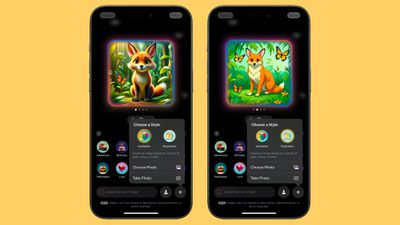
Image Playground is a totally new app designed to help you create images based on your ideas. Similar to ChatGPT, you can generate images by providing a prompt, and Apple offers suggested categories like themes, locations, and costumes to inspire your creativity. The app specializes in stylized content, meaning the generated images won't be realistic, but can choose from Animation and Illustration styles.
Additionally, you can include likenesses of friends and family by pulling images directly from your Photos app. While Image Playground functions as a standalone app, it can also be integrated into apps like Notes and Messages and added to third-party applications.
Generate Images With Sketches
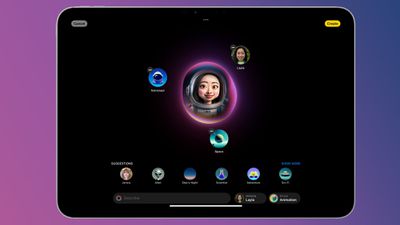
In the Notes app, Image Wand can be used to generate an image that fits into the content of your note. You can use it by circling an empty space – Image Wand will create a new image that's inspired by your text. Alternatively, you can draw something with your finger and circle it with the tool to get a new related image. And on iPad, you can draw a sketch with the Apple Pencil to have Image Wand generate an appropriate image.
Create Custom Emoji Characters
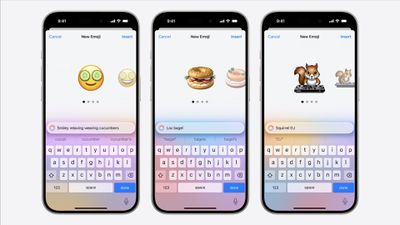
Genmoji are akin to traditional emojis but offer enhanced functionality. With Genmoji, you can create virtually any emoji you desire, freeing you from the limitations of the standard emoji set.
While they function like emojis on Apple devices, they are not encoded characters from the Unicode Consortium. Instead, Apple developed a unique API for Genmoji, ensuring they display correctly in any application that supports rich text. You can generate a Genmoji by providing a description of your desired design, and you even have the option to create Genmoji that resemble individuals from your Photos library.
Query ChatGPT via Siri
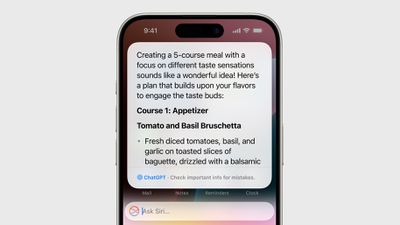
Apple is collaborating with OpenAI to incorporate ChatGPT into the iPhone, iPad, and Mac. This partnership allows Siri to handle complex requests by referring them to ChatGPT, such as generating images or creating text from scratch. With the Writing Tools feature, ChatGPT can produce and illustrate original content, expanding its capabilities beyond what Siri can currently offer.
For instance, you can open a lengthy PDF and ask Siri to summarize information on a specific topic; Siri can then pass this request to ChatGPT to generate a comprehensive summary. Apple envisions Siri as a facilitator for AI models and tools, optimizing available resources to provide you with answers without the need to switch between multiple apps.
Visual Intelligence

If you have an iPhone 16, you can make use of Visual Intelligence, a feature that offers insights about your surroundings. For instance, when you open the camera and aim it at a restaurant, you'll receive details such as opening hours and reviews.
Additional capabilities of Visual Intelligence include reading text aloud, identifying phone numbers and addresses for adding to Contacts, copying text, and summarizing information. Users can also search Google to find where to purchase a specific item they see, and by pointing the camera at an object, they can access further information through ChatGPT. Apple intends to enhance this feature by introducing more functionalities in the future.
More Options in Writing Tools
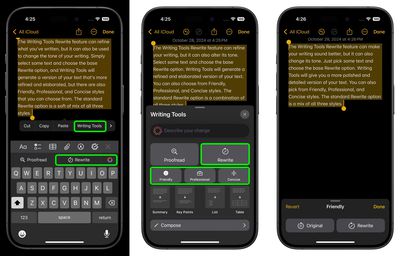
Apple is upgrading the Writing Tools feature to include options for more open-ended modifications. In iOS 18.1, Writing Tools can only adjust the tone to friendly, professional, or a simplified version. However, with the release of iOS 18.2, users will be able to specify the desired tone or content changes, such as incorporating more action words or transforming an email into a poem.

























