Google Maps Can Now Scan Your iPhone Screenshots for Places
Google Maps has gained the optional ability to scan screenshots in your iPhone's photos and save any found locations to a dedicated list.
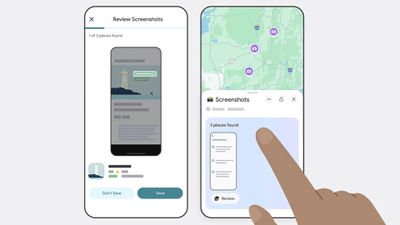
Powered by the company's Gemini AI, the new feature lets Google Maps search for any screenshots in your photos, such as social media posts, news articles, and travel blogs, and capture them in the app under a new Screenshots List under the You tab.
The feature scans for shots that include location information like names and addresses, and the app finds associated listings in Google Maps. Users can review those captures via a carousel, and Gemini will automatically identify the associated places and offer to save them with additional details.
The feature's Auto-scan option requires that Google Maps is given the "Allow Access to All Photos" permisssions, so it's not like your photos automatically get scanned. Alternatively, users can browse their photos and manually import screenshots to review. Here's how Google describes the steps involved to save screenshots in Google Maps:
- Navigate to the You tab.
- At the top of the You tab, you'll see a Screenshots list with a badge that says "Try it out!" Tap the badge. This will open a video showing you how the feature works — you'll even be able to test it out alongside the video.
- You'll see a request to allow Google Maps access to your photos. Choose when it has access. (There's also a manual option if you don't want to give Maps full access, more on that later.)
- Next time you take a screenshot that includes location information, head to Google Maps after.
- If Maps recognizes a place, a message will pop up telling you that it has places ready for you to review.
- Tap "review," and decide if you want to save the image to your screenshots list or not. (You can add these images to other lists later, too, if you want.)
- You also have the option to upload screenshots manually: When you're in the app select the Screenshots list under the You tab. From there, you can upload screenshots manually. The rest of the process is the same!
- You'll see the saved places directly on your map or can get to the list through You tab to access while you're on the go.
The new capability has rolled out to Google Maps for iOS (in U.S. English), and is likely to extend to other languages and regions soon.
Popular Stories
Bloomberg's Mark Gurman has high expectations for Apple's first foldable iPhone.
In his Power On newsletter today, he said the foldable iPhone will be "the most significant overhaul in the iPhone's history."
"iPhone 4, iPhone 6 and iPhone X were clearly a big deal, but this is a whole new design," he said.
Like Samsung's Galaxy Z Fold 7, the foldable iPhone will reportedly open up like ...
iOS 26.5 is now available for developers, and while it doesn't include any new Siri capabilities, there are some major changes for the European Union, and smaller tweaks for features available worldwide.
Suggested Places
In the Maps app, there's a new "Suggested Places" feature that recommends locations to visit based on trending places nearby and recent searches. When Apple launches ads in ...
Apple has been celebrating its upcoming 50th anniversary by hosting surprise performances and other events around the world over the past few weeks, and now Bloomberg's Mark Gurman has revealed details about the company's grand finale.
In a social media post, Gurman said Apple's celebrations will conclude this week with a finale at its Apple Park headquarters for employees.
A special...
Popular Stories
Google today added Gemini AI to Google Maps, enabling a new Ask Maps feature. Gemini in maps can answer complex, real-world questions that Google says "a map could never answer before."
There is a new Ask Maps button where Google Maps users can get answers to specific questions like "is there a public tennis court with lights on that I can play at tonight?" Google says that finding...
Bloomberg's Mark Gurman has high expectations for Apple's first foldable iPhone.
In his Power On newsletter today, he said the foldable iPhone will be "the most significant overhaul in the iPhone's history."
"iPhone 4, iPhone 6 and iPhone X were clearly a big deal, but this is a whole new design," he said.
Like Samsung's Galaxy Z Fold 7, the foldable iPhone will reportedly open up like ...
iOS 26.5 is now available for developers, and while it doesn't include any new Siri capabilities, there are some major changes for the European Union, and smaller tweaks for features available worldwide.
Suggested Places
In the Maps app, there's a new "Suggested Places" feature that recommends locations to visit based on trending places nearby and recent searches. When Apple launches ads in ...