

macOS Tahoe's New Theming System Explained

In macOS Tahoe, Apple introduces the concept of Themes, with new appearance settings that go beyond the traditional Light and Dark modes, allowing you to customize the look of your Mac desktop more than ever. Here's what's changed.
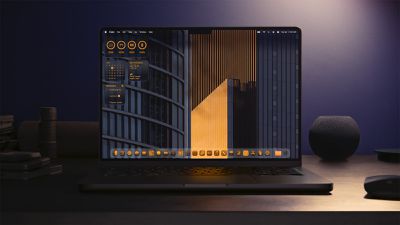
macOS Tahoe Tinted App Icons
In System Settings ➝ Appearance, there are still the standard Auto, Light, and Dark modes, but Apple has added several options that allow you to really mix things up and create your own stylized desktop environment.
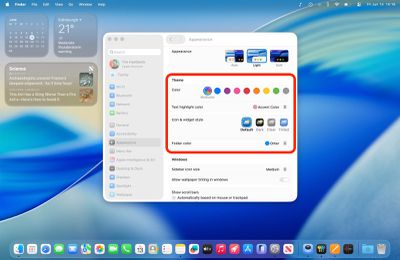
tahoe appearance 1

The new Theme section in Appearance settings

"Accent color" has become "Color," and there's a new "Text highlight color" option, so you can now make highlighted text appear in a different shade to buttons, pop‑up menus, radio buttons, checkboxes, and focused outlines.
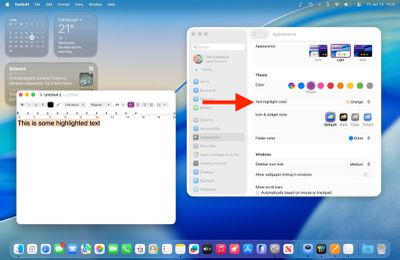
text highlight 1

The new Text highlight color option

The default setting maintains the classic macOS look with app icons displaying their original colors. But you can now customize folder colors independently through a dedicated new "Folder Color" setting. When set to Automatic, folders retain their traditional blue appearance, but switching to other colors like purple will change all folder colors system-wide.
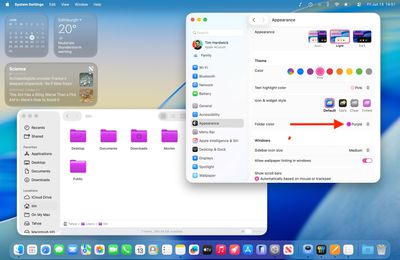
folder color 1

The new Folder color option

Meanwhile, a new "Icon & widget style" section offers three distinct modes alongside the Default. Like iOS 18, the new Dark option applies black backgrounds to icons throughout the system interface, including System Settings sidebar icons (this works in both Light and Dark modes). You can set this to Always or Automatic, which switches to dark icons at night while maintaining the default appearance during daylight hours.
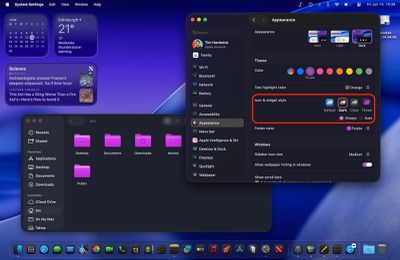
dark icons widgets macos 1

Dark icon & widget style (shown in Dark mode)

The new Clear setting emphasizes the Liquid Glass redesign and adds a new transparency by picking up background colors, creating a more translucent interface effect. Clear also includes Light and Dark variants, or it can be set to Auto for automatic day-night switching.
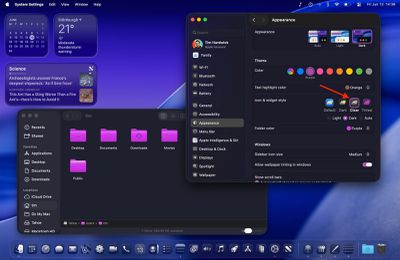
clear dark 1

The new Clear icon & widget style (shown in Dark mode)

Most notably, the Tinted option allows comprehensive color customization of both icons and folders. With "Tinted" selected, the Folder color setting becomes "Icon, widget & folder color," allowing you to select from preset colors or choose custom tints using the Other option (which includes a color picker and a theme color). Tinted mode can also be configured as Light or Dark for a more subdued appearance or set to Auto for time-based switching.
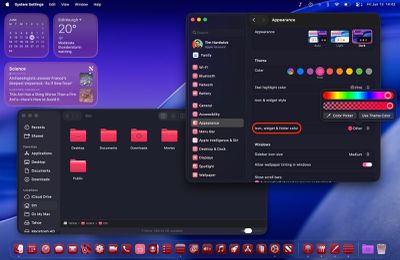
appearance tint macos 1

The new Tinted icon & widget style (shown in Dark mode)

Overall, the new Theme enhancements ensure "personalization parity" between macOS and iOS. Apple is offering unprecedented control over your desktop's visual appearance, but you still get system-wide consistency across interface elements. For added visual customization, you can even add a symbol or emoji to folders for a unique flair. What do you think of the new Theme options in macOS 26? Let us know in the comments.

Related Roundup: macOS Tahoe
Related Forum: macOS Tahoe

Popular Stories

Apple Wallet ID Illinois

Apple Plans to Expand iPhone Driver's Licenses to These 7 U.S. States

Wednesday December 24, 2025 8:40 am PST by
In select U.S. states, residents can add their driver's license or state ID to the Apple Wallet app on the iPhone and Apple Watch, and then use it to display proof of identity or age at select airports and businesses, and in select apps. The feature is currently available in 13 U.S. states and Puerto Rico, and it is expected to launch in at least seven more in the future. To set up the...
iPhone Top Left Hole Punch Face ID Feature Purple

iPhone 18 Pro Launching Next Year With These 12 New Features

Tuesday December 23, 2025 8:36 am PST by
While the iPhone 18 Pro and iPhone 18 Pro Max are not expected to launch for another nine months, there are already plenty of rumors about the devices. Below, we have recapped 12 features rumored for the iPhone 18 Pro models. The same overall design is expected, with 6.3-inch and 6.9-inch display sizes, and a "plateau" housing three rear cameras Under-screen Face ID Front camera in...
maxresdefault

Where's the New Apple TV?

Monday December 22, 2025 11:30 am PST by
Apple hasn't updated the Apple TV 4K since 2022, and 2025 was supposed to be the year that we got a refresh. There were rumors suggesting Apple would release the new Apple TV before the end of 2025, but it looks like that's not going to happen now. Subscribe to the MacRumors YouTube channel for more videos. Bloomberg's Mark Gurman said several times across 2024 and 2025 that Apple would...
iOS 26

iOS 26.2 Adds These 8 New Features to Your iPhone

Monday December 22, 2025 8:47 am PST by
Earlier this month, Apple released iOS 26.2, following more than a month of beta testing. It is a big update, with many new features and changes for iPhones. iOS 26.2 adds a Liquid Glass slider for the Lock Screen's clock, offline lyrics in Apple Music, and more. Below, we have highlighted a total of eight new features. Liquid Glass Slider on Lock Screen A new slider in the Lock...
maxresdefault

10 Mac Apps Worth Trying in 2026

Wednesday December 24, 2025 9:27 am PST by
2026 is almost upon us, and a new year is a good time to try out some new apps. We've rounded up 10 excellent Mac apps that are worth checking out. Subscribe to the MacRumors YouTube channel for more videos. Alt-Tab (Free) - Alt-Tab brings a Windows-style alt + tab thumbnail preview option to the Mac. You can see a full window preview of open apps and app windows. One Thing (Free) -...
Foldable iPhone 2023 Feature Iridescent Search

Samsung Developing 'Wide Fold' With iPhone Fold-Like Design Ahead of Apple's 2026 Launch

Tuesday December 23, 2025 11:55 am PST by
Samsung is working on a new foldable smartphone that's wider and shorter than the models that it's released before, according to Korean news site ETNews. The "Wide Fold" will compete with Apple's iPhone Fold that's set to launch in September 2026. Samsung's existing Galaxy Z Fold7 display is 6.5 inches when closed, and 8 inches when open, with a 21:9 aspect ratio when folded and a 20:18...
iOS 26

iOS 26.3 Brings AirPods-Like Pairing to Third-Party Devices in EU Under DMA

Monday December 22, 2025 3:20 pm PST by
The European Commission today praised the interoperability changes that Apple is introducing in iOS 26.3, once again crediting the Digital Markets Act (DMA) with bringing "new opportunities" to European users and developers. The Digital Markets Act requires Apple to provide third-party accessories with the same capabilities and access to device features that Apple's own products get. In iOS...
iphone fold 3d print

Have a 3D Printer? You Can Make Your Own iPhone Fold Dummy

Tuesday December 23, 2025 1:31 pm PST by
Apple is working on a foldable iPhone that's set to come out in September 2026, and rumors suggest that it will have a display that's around 5.4 inches when closed and 7.6 inches when open. Exact measurements vary based on rumors, but one 3D designer has created a mockup based on what we've heard so far. On MakerWorld, a user named Subsy has uploaded a 1:1 iPhone Fold replica (via Macworld), ...
iPhone Fold Vertical Feature

Why Apple's Foldable iPhone May Be Smaller Than Expected

Tuesday December 23, 2025 5:21 am PST by
Apple's first foldable iPhone, rumored for release next year, may turn out to be smaller than most people imagine, if a recent report is anything to go by. According to The Information, the outer display on the book-style device will measure just 5.3 inches – that's smaller than the 5.4-inch screen on the ‌iPhone‌ mini, a line Apple discontinued in 2022 due to poor sales. The report has led ...

Top Rated Comments

turbineseaplane Avatar
7 months ago
Can I get an entire "OS X Lion" theme?

That's what I actually want here.

Score: 37 Votes (Like | Disagree)
ian-mac Avatar
7 months ago
Nice to have some customisation, but damn, there are going to be some ugly desktops out there.
Score: 27 Votes (Like | Disagree)
lysingur Avatar
7 months ago
I'm not asking much—Is there an option to get this Finder icon back?


Attachment Image
Score: 17 Votes (Like | Disagree)
SRQrws Avatar
7 months ago
Not trying to be snarky, but I wish Apple would spend less time on stuff like this and more on fixing buggy OSs. Heck, I still can't get iCloud Drive to reliably sync across all my devices. I prefer wallpaper that doesn't distract me. I use solar gradients on my Macs and on my PC I use a solid color background.
Score: 16 Votes (Like | Disagree)
Oberhorst Avatar
7 months ago
What is this? Absolutely awful, who the heck "designed" this?
I hope that's just unfinished beta business. Otherwise ?

Attachment Image
Score: 16 Votes (Like | Disagree)
turbineseaplane Avatar
7 months ago


What is this? Absolutely awful, who the heck "designed" this?
I hope that's just unfinished beta business. Otherwise ?
The "everything is enclosed in a capsule" is ridiculous and wastes valuable UI space with unneeded visual clutter.

They have absolutely inept "designers" working on this.
Score: 14 Votes (Like | Disagree)



















