Apple has begun pushing Lock Screen notifications to iPhones and iPads running older versions of iOS and iPadOS, warning users of active web-based attacks.
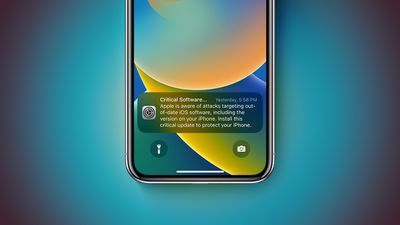
The alerts, which appear as a "Critical Software" notification from the Settings app, warn that Apple "is aware of attacks targeting out-of-date iOS software, including the version on your iPhone," and urge users to install a critical update to protect their device. The notifications are being seen on devices running a range of older iOS versions, including iOS 17.0, far beyond the iOS 13 and iOS 14 devices that Apple specifically flagged in its support documentation.
In the documentation, Apple highlighted recent reports about hacking tools that are effective against older versions of iOS. Hackers are using iOS exploit kits known as "Coruna" and "DarkSword," which can take advantage of vulnerabilities in iOS 13 through to iOS 17.2.1. Clicking a malicious link or visiting a compromised website on an unpatched device could result in data being stolen.
"If your iPhone doesn't have the latest software, update iOS to protect your data," Apple says. Users can update by going to Settings, General, and Software Update.
Apple released iOS 15.8.7 and iOS 16.7.15, along with corresponding iPadOS versions, on March 11 to address security vulnerabilities associated with the Coruna exploit kit. Devices running the latest updated versions of iOS 15 through iOS 26 are already protected, while devices on iOS 13 or iOS 14 must update to iOS 15 to receive these protections.
Apple has patched the vulnerabilities as they have come to light over the last several months, so users who have already upgraded to the newest version of iOS available for their iPhone are protected from the malicious websites and links that are circulating right now. Apple Safe Browsing in Safari is enabled by default and blocks the malicious URL domains identified in the attacks.
Users who are unable to update should consider enabling Lockdown Mode, if available, to protect against malicious web content. Lockdown Mode is available on iOS 16 and later.