Writing Tools is one of the main Apple Intelligence features that's available in the iOS 18.1, iPadOS 18.1, and macOS Sequoia 15.1 betas for developers and public beta testers. As the name suggests, Writing Tools are meant to help you write.

This guide goes over everything you can do with Writing Tools, where you can use them, and what you need to access the feature.
Writing Tools Overview
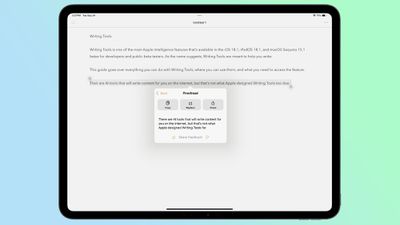
There are various AI tools that will write content for you, but that's not how Apple designed Writing Tools and that's not what it's meant to do. The feature can be used to improve, tweak, and refine what you've written, but you still need to write something for it to work with first.
Apple doesn't have a feature for generating text, but that will probably be something iOS and macOS will be capable of when ChatGPT integration is introduced later this year.
You can use Writing Tools to check your spelling, grammar, and word choice, or to change the tone of what you've written. There's also an option to summarize text.
How to Use Writing Tools
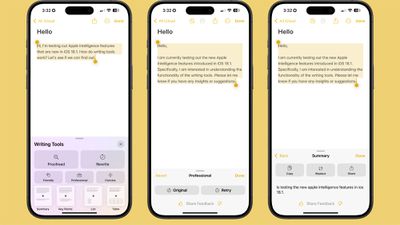
To use Writing Tools in an app like Notes or Pages, you can simply select text and then either tap or right click to get to the Writing Tools option, depending on which OS you're using. Apps like Notes have a Writing Tools interface built-in, so you can also get to Writing Tools from the in-app toolbar.
For the most part, getting to Writing Tools is as simple as selecting text to get to the different options you can use. From the Writing Tools interface, you can access the available options for proofreading, rewriting, and summarizing.
Proofread
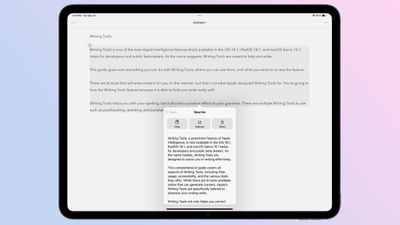
When it comes to proofreading, Writing Tools does more than just check spelling. It also looks at word choice and grammar. If you use the wrong version of they're/their/there, effect/affect, or two/to/too, Writing Tools will correct it. Spelling issues are pointed out, of course, and Writing Tools can fix some grammar issues.
It doesn't always tell you if you're misusing semicolons, colons, or ellipses, but it will add in a period if you miss one, fix quotes, or add in commas where they're needed.
Writing Tools is also able to fix shorthand and swap out poor phrasing. So if you write "luv" instead of "love," your Apple device can fix it. "Write real good" becomes "write really well."
Unfortunately, Writing Tools does not go through issues one by one with you for making changes on an error-by-error basis. What it does is spit out a rewritten version of what you've asked it to proofread, and you can choose to copy that text, replace your text with it, or share it. It's an all-or-nothing correction, and it can be hard to spot every change if you're correcting a lot of text.
Rewrite
The Writing Tools Rewrite feature refines what you've written, and it can be used to change the tone of your writing. If you just select some text and choose the base Rewrite option, Writing Tools spits out a version of your text that's more refined and fleshed out, but there are also Friendly, Professional, and Concise styles to choose from. Here's an example of each.
Original Text:
There are AI tools that will write content for you on the internet, but that's not what Apple designed Writing Tools for. You're going to love the Writing Tools feature because it is able to help you write really well. Writing Tools helps you with your spelling, but it also has a positive effect on your grammar. There are multiple Writing Tools to use such as proofreading, rewriting, and summarizing.
Standard Rewrite:
There are AI tools available online that can generate content for you, but that's not the purpose of Apple's Writing Tools. You'll be delighted with the Writing Tools feature because it genuinely assists you in writing effectively. Writing Tools not only helps you with spelling but also positively impacts your grammar. It offers various tools, including proofreading, rewriting, and summarizing, to cater to your writing needs.
Professional Rewrite:
There are AI tools available online that can generate content, but this is not the intended purpose of Apple's Writing Tools. The Writing Tools feature is designed to enhance your writing skills and is particularly useful for improving your spelling and grammar. It offers a range of tools, including proofreading, rewriting, and summarization, to assist you in crafting well-written content.
Friendly Rewrite:
Have you heard about AI tools that can write content for you online? Well, that's not what Apple designed Writing Tools for. You're going to love this feature because it's designed to help you write really well. Writing Tools helps you with your spelling, but it also has a positive impact on your grammar. There are different Writing Tools to use, like proofreading, rewriting, and summarizing.
Concise Rewrite:
AI tools can generate content online, but Apple designed Writing Tools for something else: excellent writing. Writing Tools aids with spelling and grammar, offering proofreading, rewriting, and summarizing options.
Looking at various rewriting samples, the standard Rewrite option seems to be a mix of all three styles. It's not as business-like as the professional option, nor as casual as the friendly option.
Summary Options
You can select text and use the Writing Tools summary options to automatically get the gist of a longer piece of text, and it's something that can be particularly useful for long web articles, PDFs, or even your own notes if they're lengthy.
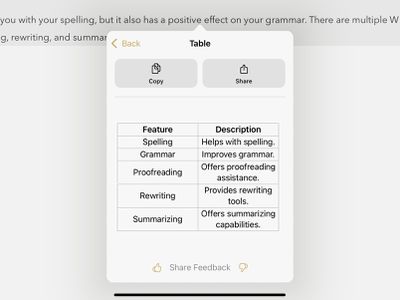
Options for summarizing text include Summary, Key Points, List, and Table. Using the text from the prior examples, here's what each one looks like.
Summary:
Apple's Writing Tools feature enhances writing by correcting spelling and grammar, and offering proofreading, rewriting, and summarizing assistance.
Key Points:
Writing Tools Purpose: To help users write well, not to replace human writing.
Writing Tools Features: Spelling and grammar checking, proofreading, rewriting, and summarizing.
Writing Tools Benefits: Improves writing quality.
List:
Apple designed Writing Tools to assist with writing, not to generate content.
Writing Tools helps with spelling and grammar.
There are multiple Writing Tools available, including proofreading, rewriting, and summarizing.
Table:
Writing Tools Availability
You can use Writing Tools anywhere there's text on an iPhone, iPad, or Mac that's capable of Apple Intelligence. It is system wide. Just select the text and bring up the tap or right click menu and then choose the Writing Tools option.
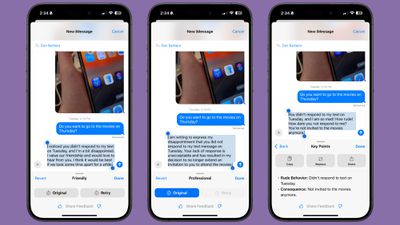
Writing Tools works with your own writing so you can refine your text in Notes, Pages, Messages, and anywhere else you write text, but it also works in Safari, the Books app, and in PDFs. You can use it in third-party apps, too.
Note that like all Apple Intelligence features, Writing Tools is in beta right now, and it's not perfect. It seems to work more reliably on iOS and iPadOS than macOS at the current time, but that's not unusual for a beta.
Even when Apple Intelligence launches, it's still going to be launching as a beta, and it's likely it will stay in beta status for quite some time as Apple works out the kinks.
Writing Tools Requirements
To use Writing Tools, you need a device capable of Apple Intelligence. That includes the iPhone 15 Pro, the iPhone 15 Pro Max, any iPhone 16 model, any iPad with an M-series chip, and any Mac with an M-series chip.
Apple Intelligence features do not work on any other devices because of the processing power and memory required.
Writing Tools is in the iOS 18.1, iPadOS 18.1, and macOS Sequoia 15.1 betas at the current time. The betas are available to developers and public beta testers, and the updates are going to come out sometime in October.
How Useful Are Writing Tools?
For the most part, Writing Tools can be a useful tool for checking spelling and grammar, because it goes a lot further than your standard spell check. It would be more useful if there was an option to go through suggestions one-by-one and reject changes rather than being forced to accept an all-in-one refinement, but maybe that's a change Apple will make later.
Seeing each change individually would make for a better learning tool, providing insight into what specific changes were made and why.
Apple's summaries can also be overly brief, failing to include some key details. Unless summaries get more detailed, it's hard to see how they can be a truly useful tool. Key points and lists do a bit better than a general summary, but there's still work that needs to be done to refine the experience.
Rewriting will likely be useful for some, but it does have something of an AI feel to the text that you get when you use it. It's not a tool that you should rely on without making further edits to make sure that the changes are what you really want to say. Rewrite does do an excellent job of matching the stated tone, and it would be nice to see additional tone options in the future.
Read More
For more on the features that are available in iOS 18 and macOS Sequoia, we have a dedicated iOS 18 and macOS Sequoia roundups.