With every iteration of iOS, Apple adds new privacy features to better protect iPhone and iPad users, and iOS 14 is no exception. This year's update is worth downloading for the privacy protections alone, which include Privacy Reports in Safari, recording indicators, an option to share approximate location with apps instead of precise locations, and more.
In this guide, we've highlighted all of the privacy-focused changes that Apple is introducing in the iOS 14 update.
Recording Indicators
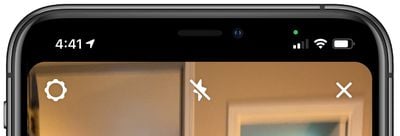
When an app is using either the camera or the microphone, a small dot appears in the status bar just above the WiFi and cellular signal bars. The dot is green when an app is using the camera, and orange when using the microphone.
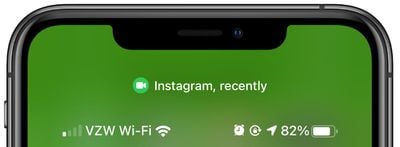
If you close the app using the camera or microphone and then open the Control Center, there will be a camera or microphone icon along with the name of the app that was recently using the feature. Recording indicators prevent the camera or microphone from being accessed by an app in the background without your knowledge, so you can be sure that apps aren't sneakily recording conversations or videos.
Safari
Password Monitoring and Compromised Password Alerts
In iOS 14, the Safari app monitors passwords saved in iCloud Keychain, and lets you know if you have a password that's been compromised in a leak or is too weak so you can change it. The feature provides direct links to websites where you can change your passwords.
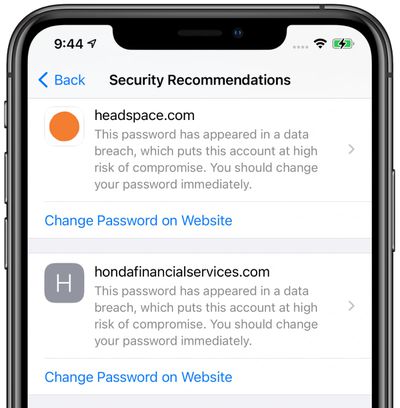
For this feature, Safari uses cryptographic techniques to regularly check derivations of your passwords against a list of breached passwords in what Apple promises is a secure and private way. Potential problems can be seen under the "Security Recommendations" heading in the Passwords section of the Settings app.
Privacy Report
A Privacy Report feature in Safari expands on Apple's Intelligent Tracking Prevention functionality that's designed to prevent websites from tracking your internet usage as you browse for ad targeting and analytics.
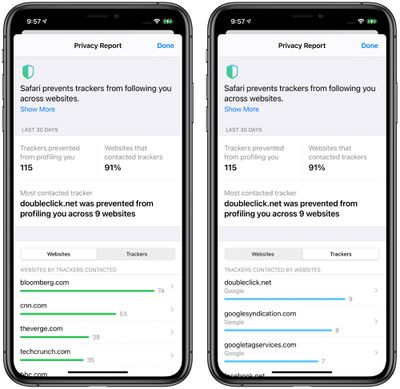
iOS 14's Privacy Report lists which sites are using trackers, how many trackers are installed on each site, and the most prevalent trackers that you encounter across multiple sites.
Privacy Reports can be accessed by tapping on the "Aa" icon in the URL bar and choosing the "Privacy Report" option. Cross-site tracking prevention needs to be enabled in Settings for Privacy Report to work, but it's on by default so most people shouldn't need to make adjustments.
For more on everything that's new in Safari, including the privacy features included in Safari for iOS 14, make sure to check out our Safari guide.
App Store Privacy Reports
Later this year, the iOS App Store will include a new privacy section on each app page that will provide a summary of the privacy practices of an app before you download it. Apple when introducing the feature at WWDC compared it to a nutritional label for food.
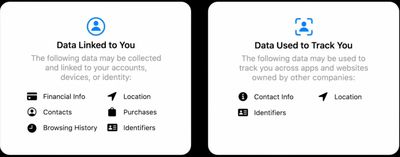
Developers will self-report their privacy practices, letting you know what data is collected and how that data might be used to track you across companies. Apple plans to require developers to implement this feature in a simple, easy-to-read format that's similar to a nutrition label for food.
App Store privacy information won't be available right when iOS 14 launches, but Apple says it will be introduced in an update to the iOS 14 operating system.
App Tracking Controls
Apps that want to use tracking mechanisms that track your behavior across various apps and websites need to get permission from you before doing so in iOS 14.
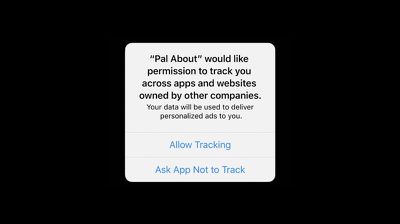
Apps that use these features will have a popup asking you to enable tracking features, which are used for targeted advertising, data collection, and similar purposes. Most people are not going to want to tap accept on these kinds of requests, and declining tracking prevents an app from accessing a device's advertising identifier.
According to Apple, apps granted permission to track you can collect data that includes device ID, name, email address, and more, which is then combined with data collected by third parties. The combined data is often used for ad targeting or shared with data brokers, linking that data to publicly available and other information about you and your device.
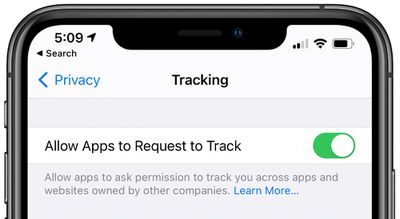
You can turn off cross-app and cross-site tracking for apps entirely by opening up the Settings app, navigating to the Privacy section, and tapping "Tracking." From there, turn off "Allow Apps to Request to Track."
Developers are responsible for ensuring they comply with user choice, and there are some situations where a developer is not required by Apple to ask for user permission, such as when information is combined on device and not sent off in a way that is personally identifiable or when used for fraud detection or prevention.
Approximate Location
There are some apps that require your location to properly function, and in iOS 14, Apple has introduced a new feature that lets you share your location data in a more secure and less targeted way.
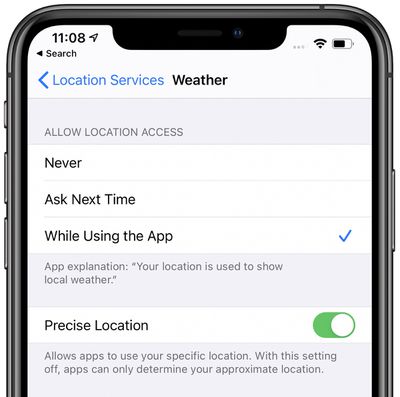
For apps that require location access, you can choose to share an Approximate Location, which is close to your location but not precisely spot on, making it harder for apps to keep track of where you're going and better protecting your location privacy.
Apps that ask for location access will pop up the Approximate Location option, but you can also get to these settings for each location using app by opening up Settings, going to the Privacy section, tapping on Location Services, and then tapping on each app that has requested location permission.
Toggle off "Precise Location" for any app that you want to use an approximate location instead. This is useful for weather apps, browsers, mapping apps, and more.
Widgets
Widgets in iOS 14 must receive user approval to access location data just like apps. Under Location Services in the Privacy section of the Settings app, there are also options to allow or disallow location access while a widget is in use.
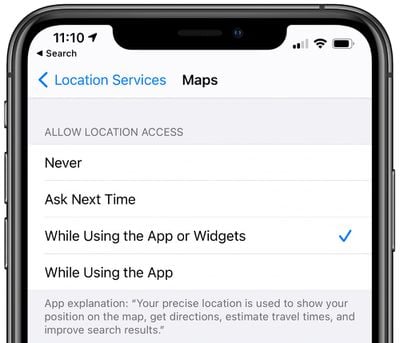
You can choose to allow both the app and its accompanying widget to access your location, or just an app. When given permission and in use, a widget can access location data for 15 minutes.
Widget location is subject to the approximate or precise location settings that are enabled for each app.
Clipboard Access
Whenever an app accesses the clipboard in iOS 14, Apple notifies you with a small banner that lets you know the clipboard was copied. There are plenty of legitimate reasons for an app to use the clipboard, such as when you're copying and pasting something from another app or through the Continuity based copy paste feature on another machine, but apps had also been abusing their clipboard access.

Apps like TikTok, Twitter, Zillow, and tons of other apps were reading the clipboard without user knowledge or permission in situations where clipboard access was not warranted. Many of these apps said that these were security features or bugs, and the warning banner from Apple has resulted in many apps making sure their clipboard access is above board.
Apps are not able to read the clipboard without you knowing about it, so you can be sure the contents of your clipboard are safe from unwarranted access.
Network Access
Apps that want to access devices on your local network need to ask permission in iOS 14, and there are some apps that ask that have no business accessing your local network, such as Facebook.
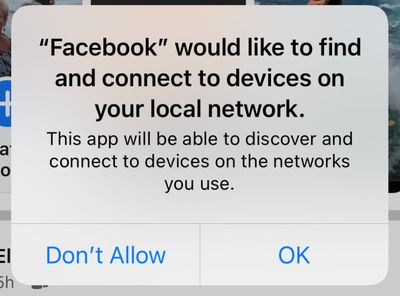
Some apps have a valid reason for accessing devices on your local network, such as those that control Bluetooth or WiFi-based devices, and you can tap to allow or disallow access. Local Network settings can also be controlled under Local Network in the Privacy section of the Settings app.
WiFi Tracking
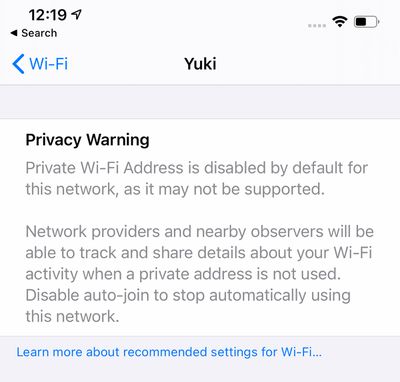
When you're connected to a WiFi network, there's an option to "Use Private Address" to prevent network operators from tracking your phone across different WiFi networks.
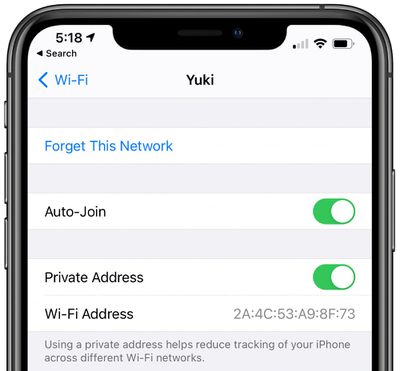
You can find this option by opening up the Settings app, tapping the WiFi section, and tapping on one of the listed networks. Apple provides a warning when connecting to a Wi-Fi network that doesn't use the Private Address feature.
Limited Photos Library Access
For apps that ask permission to access your photos, you can now choose to give access to your entire photo library or just a few photos at a time, which is useful if you don't want social networks like Facebook or Instagram seeing your entire camera roll.
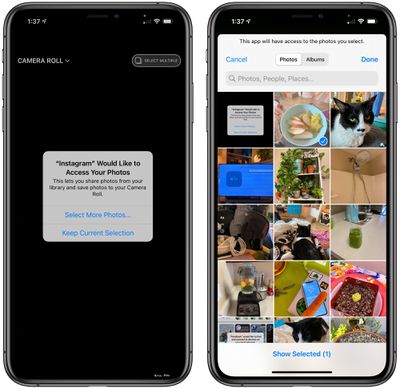
If you use the limited photos option, you can continually change the photos that are shared, selecting just a couple at a time that you want to upload or edit, depending on the app. It adds another step to workflows involving photos, but it keeps your full library safe and inaccessible.
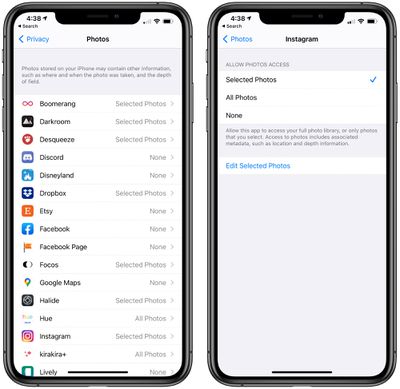
You'll be asked about limited photos access whenever an app wants permission to use photos, and you can control which apps have access to all of your photos, limited photos, or no photos in the Privacy section of the Settings app under "Photos."
New Sign in with Apple Features
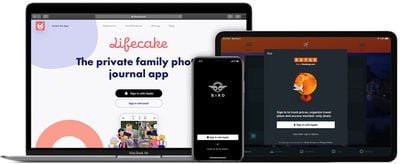
New Sign in with Apple tools for developers will make it easier for them to enable functionality for transferring existing web accounts to Sign in with Apple, which could make new options available to iPhone, iPad, and Mac users who want to convert their logins to the more secure Sign in with Apple feature.
On-Device Dictation
Dictation is designed to improve over time so for accuracy and to customize to each person's usage needs. With on-device dictation, all processing is done offline, but dictation used in search still uses server-based dictation.
Contacts Autofill
Rather than sharing Contacts with third-party apps, Apple has added an autofill feature. When you go to type someone's name, it will fill in their phone numbers, addresses, email addresses, and other info that's stored in the contacts app. Autofill is done on device and prevents contact info from being shared with third-party developers.
Guide Feedback
Have questions about the privacy features in iOS 14, know of a feature we left out, or or want to offer feedback on this guide? Send us an email here. If you want to know more about what's coming in iOS 14, make sure to check out our iOS 14 roundup.