

Everything New With the iOS 15 Notes and Reminders Apps

Those who use the Notes and Reminders apps will be pleased to hear that iOS 15 and iPadOS 15 bring some useful new features. The Notes app has enhanced functionality on the iPad with the Quick Note feature, while Reminders features better Siri integration and natural language support.
iOS 15 Notes Feature
The guide below highlights the new features that you'll find in the Notes and Reminders apps in iOS 15.

Notes

The major new feature in the Notes app, Quick Note, is exclusive to the ‌iPad‌, but Apple has added some general quality of life improvements and new features for those who share notes between multiple people.

Tags

When writing a note, you can use hashtags to tag it with a word or a phrase for organizational purposes. You can use any tag you want, like #cooking, #plants, #work, #reminders, etc.
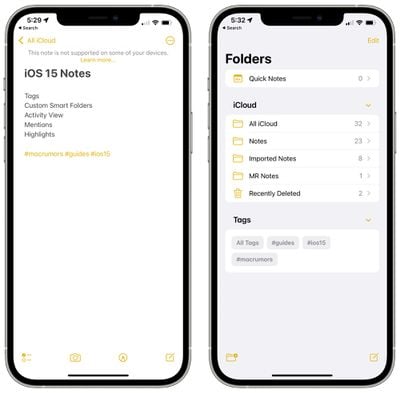
ios 15 notes tags
Once you create a tag, it's added to the "Tags" section in the Notes app overview. You can tap on any of the tag names to see all notes that contain that tag.
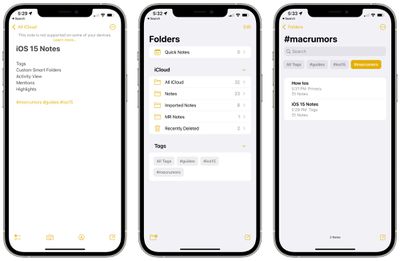
ios 15 notes tag browser

Custom Smart Folders

To go along with tags, there's a new Smart Folders option that you can use to create a folder to house tags.
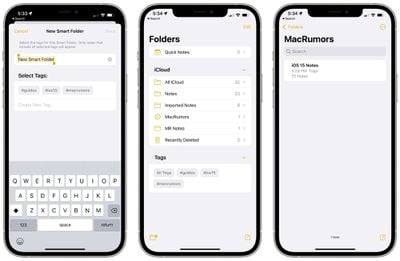
ios 15 smart folders
When creating a Smart Folder, you can choose a name and select which tags you want it to include. You can choose tags you've already created or add new tags that will be used in future notes.

Tags and Smart Folders offer a new way to organize your notes and it's a system that's quicker and more simple than manually organizing your notes into different folders.

Activity View

The Notes app has offered sharing features for some time now, but in iOS 15, Apple is making it easier to collaborate and work on a note with another person.
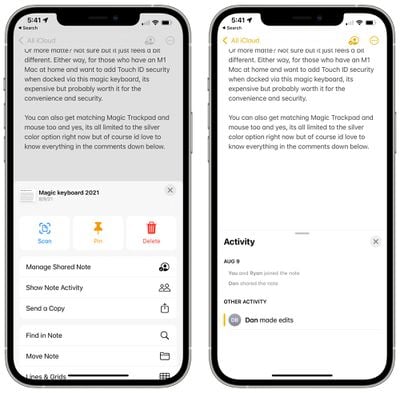
ios 15 notes sharing activity
On any shared note, if you tap the three dots in the upper right hand corner or the little person icon, you can get to an Activity View that shows you the edits that each person has made and who has interacted with the note.

If you tap on "Highlights" or swipe right in a note, you can see an overview of the portions of the note that each person has contributed. If you have a gift list or grocery list, for example, you can see the items that each person involved with the note has added.
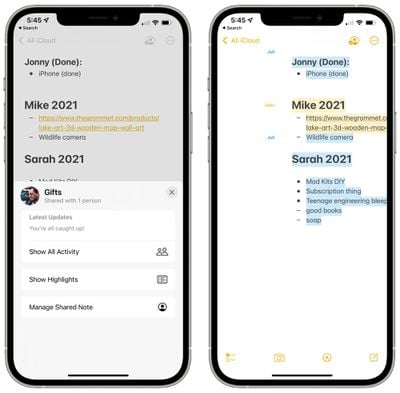
ios 15 show highlights collaboration
Edit times and dates are included, and each person's contributions are shown in a different color. When you open a note, you'll also see a notification of the changes that have been made since the last time you opened the note.

Mentions

In shared notes or folders, you can add an @ sign and type in the name of a person the note is shared with to bring their attention to it and to let them know if there's been an important update.
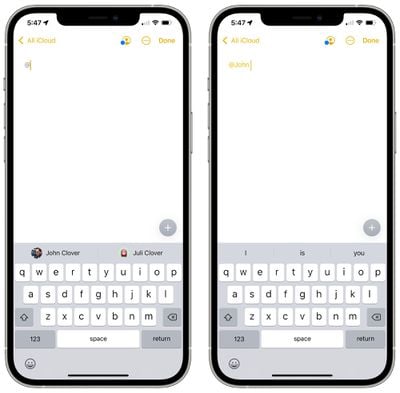
ios 15 notes mentions
With an @mention, the person receives a notification about the note, which is similar to how @mentions work in other apps.

Quick Note - iPadOS 15

On the ‌iPad‌, if you tap in the lower right corner with an Apple Pencil or swipe with a finger, you can bring up a Quick Note to jot down a thought or an idea.
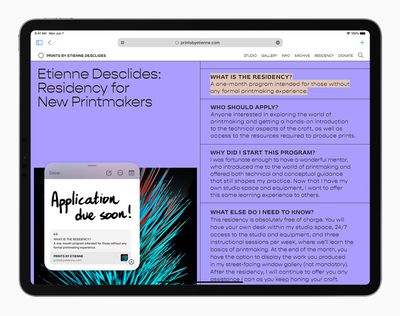
Apple iPadPro iPadOS15 QuickNote Safari 060721 big carousel
You can bring up a Quick Note from the Home Screen, in any app, when using Split View, or anywhere else in iPadOS.

You can type in a Quick Note or use the ‌Apple Pencil‌ to write, and Quick Note size can be adjusted or it can be collapsed down to the side of the ‌iPad‌ so you can bring it right back up when you need it.

Links from an app or website can be added to Quick Note for context, and when you go back to the same place in the app or on the site, a thumbnail of the Quick Note appears to remind you of your earlier note.

Quick Notes are all stored in the Quick Note folder in the Notes app and they can be viewed on the iPhone or a device that doesn't support Quick Note as a standard note.

Reminders

Some of the same new features that Apple added to Notes are also available in the Reminders app, along with a few useful bonus features like natural language support.

Tags

As with Notes, you can now add any hashtag to a reminder as a new organizational method. You can group up all reminders that are tagged with a certain word, such as "groceries," so it's a great way to split your reminders up without having to use different lists.
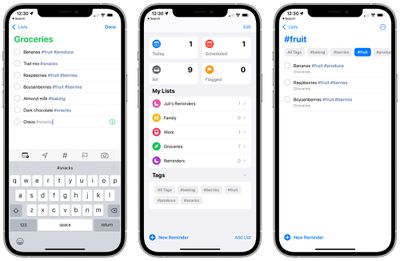
ios 15 reminders tags
Once you've added at least one tag to a reminder, the Reminders app will have a new Tag Browser that aggregates all of the tag names. Tapping on a tag shows all of the reminders using that tag.

Custom Smart Lists

Smart Lists are how your different Reminder tags can be aggregated together. Smart Lists can be made to organize reminders based on tags, dates, times, locations, flags, and priority.
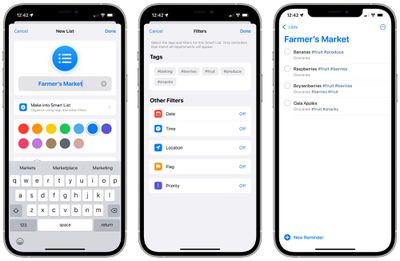
ios 15 reminders smart lists
For tags, you can create lists that will aggregate multiple tags like #cooking and #groceries so you can create the organizational system that works for you.

Natural Language Support

In iOS 15, you can use more natural phrases to create reminders more quickly. "Jog every other morning," will create an every other day reminder, for example. You can use phrases like "clean the kitchen every Friday" or "check the mail every day at 4:00 p.m." and the ‌iPhone‌ and ‌iPad‌ will accurately interpret what you're aiming for.
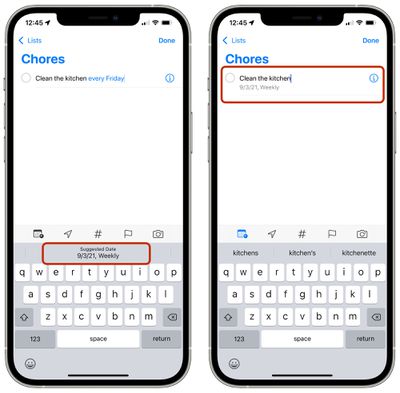
ios 15 reminders natural language

Deleting Completed Reminders

It's easier to delete completed roundups in iOS 15. In any list with a lot of reminders, you can tap on the new "Clear" label. Depending on how old the reminder is, you might see options for deleting all completed reminders, completed reminders older than a year, completed reminders older than six months, and completed reminders older than a month.
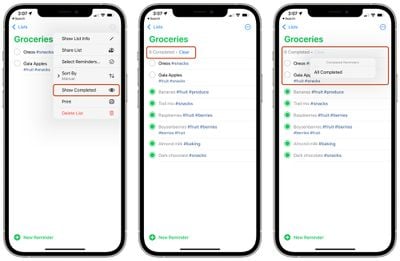
ios 15 reminders delete completed
If your completed reminders aren't visible, you can tap on the icon with the three dots and then select "Show Completed." From there, the "Clear" option for removing finished reminders will be available.

Swiping to delete, a feature that was already available, can also be used to clear completed reminders, but the new feature for clearing all finished reminders is quicker.

Announce Reminders with Siri

When a reminder that you need to attend to pops up when you're wearing AirPods or compatible Beats headphones, ‌Siri‌ will announce it similar to notifications or incoming messages.

ios 15 reminders announce notifications
This feature can be toggled on in the Settings app under ‌Siri‌ and Search > Announce Notifications > Reminders.

Expand Suggested Attributes

Adding a tag is a new quick suggestion in the Reminders toolbar along with date, location, flag, and photo.
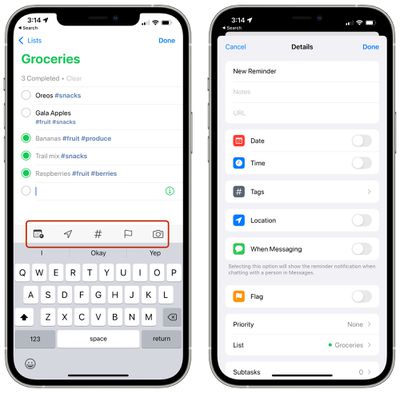
ios 15 reminders toolbar
Tapping on the info icon also now provides tags as an option alongside date, time, location, flags, when messaging a certain person, and priority.

Guide Feedback

Have questions about the new Notes and Reminders changes in iOS 15, know of a feature we left out, or want to offer feedback on this guide? Send us an email here.


Related Forum: iOS 15

Popular Stories

Apple Wallet ID Illinois

Apple Plans to Expand iPhone Driver's Licenses to These 7 U.S. States

Wednesday December 24, 2025 8:40 am PST by
In select U.S. states, residents can add their driver's license or state ID to the Apple Wallet app on the iPhone and Apple Watch, and then use it to display proof of identity or age at select airports and businesses, and in select apps. The feature is currently available in 13 U.S. states and Puerto Rico, and it is expected to launch in at least seven more in the future. To set up the...
iPhone Top Left Hole Punch Face ID Feature Purple

iPhone 18 Pro Launching Next Year With These 12 New Features

Tuesday December 23, 2025 8:36 am PST by
While the iPhone 18 Pro and iPhone 18 Pro Max are not expected to launch for another nine months, there are already plenty of rumors about the devices. Below, we have recapped 12 features rumored for the iPhone 18 Pro models. The same overall design is expected, with 6.3-inch and 6.9-inch display sizes, and a "plateau" housing three rear cameras Under-screen Face ID Front camera in...
maxresdefault

Where's the New Apple TV?

Monday December 22, 2025 11:30 am PST by
Apple hasn't updated the Apple TV 4K since 2022, and 2025 was supposed to be the year that we got a refresh. There were rumors suggesting Apple would release the new Apple TV before the end of 2025, but it looks like that's not going to happen now. Subscribe to the MacRumors YouTube channel for more videos. Bloomberg's Mark Gurman said several times across 2024 and 2025 that Apple would...
iOS 26

iOS 26.2 Adds These 8 New Features to Your iPhone

Monday December 22, 2025 8:47 am PST by
Earlier this month, Apple released iOS 26.2, following more than a month of beta testing. It is a big update, with many new features and changes for iPhones. iOS 26.2 adds a Liquid Glass slider for the Lock Screen's clock, offline lyrics in Apple Music, and more. Below, we have highlighted a total of eight new features. Liquid Glass Slider on Lock Screen A new slider in the Lock...
maxresdefault

10 Mac Apps Worth Trying in 2026

Wednesday December 24, 2025 9:27 am PST by
2026 is almost upon us, and a new year is a good time to try out some new apps. We've rounded up 10 excellent Mac apps that are worth checking out. Subscribe to the MacRumors YouTube channel for more videos. Alt-Tab (Free) - Alt-Tab brings a Windows-style alt + tab thumbnail preview option to the Mac. You can see a full window preview of open apps and app windows. One Thing (Free) -...
Foldable iPhone 2023 Feature Iridescent Search

Samsung Developing 'Wide Fold' With iPhone Fold-Like Design Ahead of Apple's 2026 Launch

Tuesday December 23, 2025 11:55 am PST by
Samsung is working on a new foldable smartphone that's wider and shorter than the models that it's released before, according to Korean news site ETNews. The "Wide Fold" will compete with Apple's iPhone Fold that's set to launch in September 2026. Samsung's existing Galaxy Z Fold7 display is 6.5 inches when closed, and 8 inches when open, with a 21:9 aspect ratio when folded and a 20:18...
iOS 26

iOS 26.3 Brings AirPods-Like Pairing to Third-Party Devices in EU Under DMA

Monday December 22, 2025 3:20 pm PST by
The European Commission today praised the interoperability changes that Apple is introducing in iOS 26.3, once again crediting the Digital Markets Act (DMA) with bringing "new opportunities" to European users and developers. The Digital Markets Act requires Apple to provide third-party accessories with the same capabilities and access to device features that Apple's own products get. In iOS...
iphone fold 3d print

Have a 3D Printer? You Can Make Your Own iPhone Fold Dummy

Tuesday December 23, 2025 1:31 pm PST by
Apple is working on a foldable iPhone that's set to come out in September 2026, and rumors suggest that it will have a display that's around 5.4 inches when closed and 7.6 inches when open. Exact measurements vary based on rumors, but one 3D designer has created a mockup based on what we've heard so far. On MakerWorld, a user named Subsy has uploaded a 1:1 iPhone Fold replica (via Macworld), ...
iPhone Fold Vertical Feature

Why Apple's Foldable iPhone May Be Smaller Than Expected

Tuesday December 23, 2025 5:21 am PST by
Apple's first foldable iPhone, rumored for release next year, may turn out to be smaller than most people imagine, if a recent report is anything to go by. According to The Information, the outer display on the book-style device will measure just 5.3 inches – that's smaller than the 5.4-inch screen on the ‌iPhone‌ mini, a line Apple discontinued in 2022 due to poor sales. The report has led ...

Top Rated Comments

tkaravou Avatar
56 months ago

I may be in the minority here but I have a hard time remembering to even use the Reminder app.
You should set a reminder for that
Score: 19 Votes (Like | Disagree)
Sciomar Avatar
56 months ago
I may be in the minority here but I have a hard time remembering to even use the Reminder app.
Score: 10 Votes (Like | Disagree)
zorinlynx Avatar
56 months ago

I may be in the minority here but I have a hard time remembering to even use the Reminder app.
I use it quite a bit! Think of it not only as a reminders app, but also as a list-keeping app. Anything that you need to keep a list of, you can put in there.

For example, I use it for groceries, I can even put a picture of the exact item I want to buy so I can reference it when shopping. And you can check off things on the list as you put them in the cart, and uncheck them at home when you need to buy more. I've gotten to the point where I don't have to type much at all to update my grocery list because all the things I regularly buy are already in there!

I also put in things like movies I want to get around to watching, etc... all in different lists.

And of course it lives up to its name, reminding me to pill my cat, pay my bills, etc. It truly is a great app.
Score: 10 Votes (Like | Disagree)
TheYayAreaLiving ?️ Avatar
56 months ago
Lovely! Notes App have come a really long way. I’m glad Apple is able to make it extremely useful.
Score: 9 Votes (Like | Disagree)
Mr Todhunter Avatar
56 months ago
I deleted the Reminders app from all my iOS devices because I find it incomprehensible.
Score: 8 Votes (Like | Disagree)
citysnaps Avatar
56 months ago
I'm glad that Apple is purposely adding features to Notes SLOWLY. Rather than trying to jam a lot of features and complexity into the application.

For me, that's the approach Evernote took 7 or so years ago making it less enjoyable and more complicated to use. And why I then switched to Notes and never looked back. I appreciate its simplicity and "just works" aspect among the devices my notes sync across, always without issue. Notes is an app I use everyday and depend on.
Score: 5 Votes (Like | Disagree)


















