

Every iOS update adds new privacy and security features, and iOS 16, available now, is no exception. Apple has added tools to make it easier to apply security updates, new Face ID capabilities, improvements to photo security, and more, with details on all of the new privacy and security options outlined below.

Safety Check
The Settings app houses a new "Safety Check" feature that is designed to make it easy for people to quickly reset all of the data and location access that they have granted to other people. According to Apple, Safety Check is aimed at people in domestic or intimate partner violence situations.
You can get to Safety Check by opening up the Settings app and tapping into the Privacy and Security section. From there, scroll down to Safety Check. Safety Check has two options, including an Emergency Reset and a checklist of all your data sharing options.
Note that Safety Check has a "Quick Exit" button that takes you right to the iPhone's Home Screen in case you're in danger of getting caught using it.
Emergency Reset
Emergency Reset is a one-tap option that lets you protect your iOS device with just a couple of taps. When you use Emergency Reset, it immediately stops sharing everything with all people and apps.
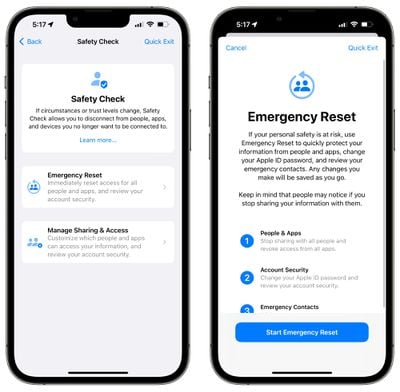
That includes anything you might be sharing with people, such as location information, your home data, photo albums, and more.
Emergency Reset also lets you remove all emergency contacts and reset your Apple ID and password so no one can log into your account.
Manage Sharing
For less of an emergency situation, there's a Manage Sharing and Access walkthrough that lets you see an overview of what you're sharing so you can't be secretly tracked or monitored using location sharing, shared albums, or other iPhone features.
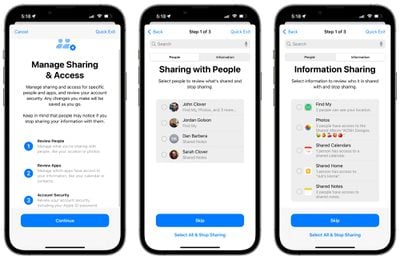
You can see exactly who you're sharing data with and what data those people have access to, along with which apps have access to your data. You can select people or apps and choose the "Stop Sharing" option to turn off sharing right away.
You will also see a list of all the third-party apps that you have installed and what data they have access to, along with tools to disable that access. You can see which permissions an app has on an individual basis, or by data such as Bluetooth, Location, Contacts, and more.
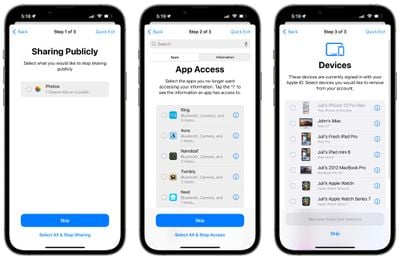
Manage Sharing will tell you exactly which devices your iCloud account is logged into, giving you the option to log out, plus it will let you reset your Apple ID and password as well as deactivate Emergency contacts.
Locked Hidden and Recently Deleted Photo Albums
In the iOS 16 Photos app, the Hidden and Recently Deleted albums are not able to be opened up without biometric authentication through Face ID, Touch ID, or a passcode.
Landscape Face ID
On iPhone 13 models, Face ID works in landscape mode after iOS 16 has been installed. This allows Face ID to unlock the iPhone regardless of whether it's held in portrait or landscape orientation.
Rapid Security Response
With iOS 16, Apple can send out security updates without needing to update the entire operating system. in iOS 15, security updates are tied to iOS updates and require a full update, but iOS 16 will make it easier for Apple to distribute security updates, and it will make them quicker to download.
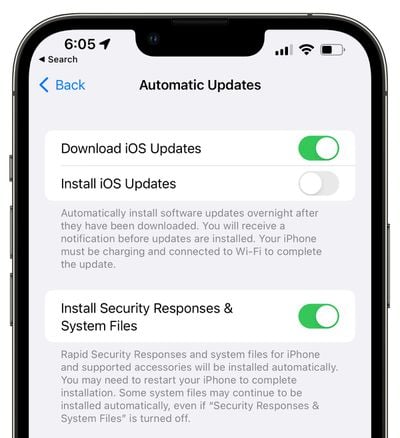
When you update to iOS 16, Apple will set your device to install security updates automatically, but the feature can be turned off under General > Software Update > Automatic Updates.
Get important security improvements to your devices even faster. These improvements can be applied automatically between standard software updates.
Pasteboard Permissions
Apps in iOS 16 need explicit user permission before accessing the clipboard to copy and paste content. Apps will need to ask to use the copy and paste feature, similar to the way apps need permission to access the microphone, camera, location, and other sensitive data.
Passkeys
With iOS 16 and its sister updates, Apple is adding Passkeys that are designed to replace traditional passwords when signing into a website or app. Apple says that Passkeys are more secure than passwords, protecting users from phishing, malware, and other attacks that attempt to gain account access. Passkeys were not implemented in the iOS 16 beta, but will be introduced later this year.
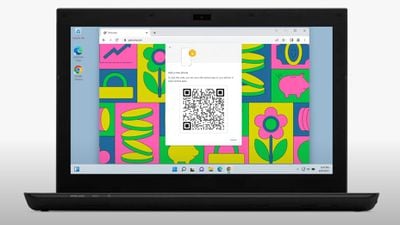
Passkeys work through a key system. One key is public and stored on the website server, while the second key is private and kept on-device. On the iPhone and other devices with biometric authentication, Face ID or Touch ID is used to authorize the passkey to authenticate the user to a website or app.
The key from the website and the key from the Apple device must match to allow for a login, and since the device key is private and only available to the user, it cannot be stolen, leaked, or phished.
Passkeys use iCloud Keychain, which requires two-factor authentication for further protection. Passkeys sync across all of a user's devices through iCloud Keychain, which is end-to-end encrypted with its own cryptographic keys.
Passkey synchronization across devices offers redundancy in case an iPhone is lost, but should all of a person's Apple devices become lost and the passkeys along with them, Apple created an iCloud keychain escrow function to recover passkey information. There is a multi-step authentication process to go through to recover an iCloud Keychain with passkeys, or users can set up a person to serve as an account recovery contact.
Passkeys sound complicated, but in practice, it will be as simple as using Touch ID or Face ID to create a passkey to go along with a login.
Apple has been working with members of the FIDO Alliance, including Google and Microsoft, to ensure that passkeys can also be used with non-Apple devices and across platforms. On non-Apple devices, Passkeys will work through QR codes that will authenticate using the iPhone, but it will require support from other companies and needs to be adopted across the tech world.
Lockdown Mode
iOS 16 adds Lockdown Mode, which has an "extreme" level of security for activists, journalists, and others who are targeted by sophisticated cyberattacks. Lockdown Mode strictly limits or disables the functionality of many of the iPhone's features as well as locking down apps and websites.
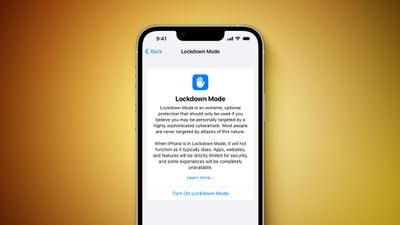
Lockdown Mode blocks most attachment types in Messages, blocks FaceTime calls from non-contacts, limits web browsing functions, prevents configuration profiles from being installed, and more, with a full list available in our Lockdown article.
Lockdown Mode is not for the average user and most people should not turn it on given how restrictive it is. The feature is disabled by default and can be activated in the Privacy and Security section of the Settings app.
Guide Feedback
Have questions about the new security and privacy features in iOS 16, know of a feature we left out, or want to offer feedback on this guide? Send us an email here.























