

Eight Privacy and Security Improvements in iOS 17: Safari, Shared Passwords, URL Tracking Removal and More

The iOS 17 and iPadOS 17 updates include a number of privacy and security improvements that make your devices safer than ever, with Apple restricting access to photos and calendar events and cutting down further on how websites track you across the web.
iOS 17 Privacy and Security Improvements Feature

Private Browsing Upgrades in Safari

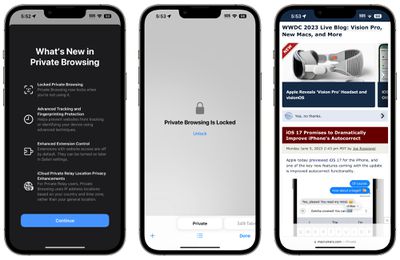
In Safari, Private browsing windows are now locked and require secondary authentication to unlock and access. If you hand your phone over to someone and they attempt to open your Safari private browsing tab, access will be denied without a Face ID/Touch ID scan or a passcode.
safari private browsing ios 17
The Private tab is locked automatically.

Tracking URL Removal

Opening up a URL in a private browsing window automatically strips all tracking information added to the URL, plus unknown trackers are completely blocked so companies aren't able to track your browsing across multiple sites.
safari tracking all browsing ios 17
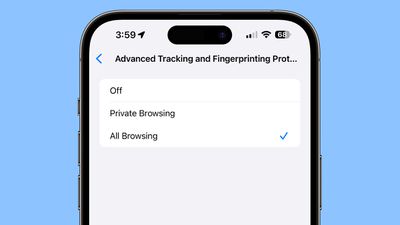
URLs can also be stripped when browsing in non-private browsing mode if the functionality is enabled. Here's how to remove URL-based tracking for all browser windows:

  1. Open up the Settings app.
  2. Scroll down to Safari.
  3. Tap on Advanced.
  4. Tap on Advanced Tracking and Fingerprinting Protection.
  5. Toggle on "All Browsing."

Turning this on will ensure that all URLs opened in Safari will strip additional tracking information that's pasted on to the end of a URL.

Shared Passwords

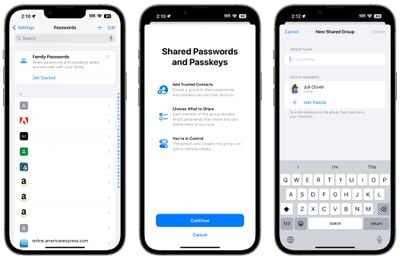
With iOS 17, iPadOS 17, and macOS Sonoma, you can securely share passwords and passkeys with friends and family members using a new shared password function. Using this feature, passwords for shared media accounts, utilities, bills, and more can be provided to multiple people.
ios 17 shared passwords
Each person can access, add to, and change passwords that are shared, with setup available by going to the Passwords section of the Settings app and choosing "Get Started" under the "Family Passwords" heading.

Passcode Resets

If you change the passcode on your iPhone and then accidentally forget the new passcode that you chose, you now have a 72-hour grace period to fix it without getting locked out of your device.
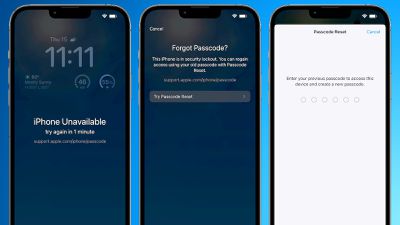
iOS 17 Passcode Reset Feature
Apple lets you use your old passcode within 72 hours of setting a new one, which is handy if you're someone who is likely to forget a newly created passcode.

When you enter an incorrect passcode after making a change, you can tap on the "Forgot Passcode?" option at the bottom of the display to use the "Try Passcode Reset" option. Tapping it allows you to use your old passcode to create yet another new passcode.

For protection in case someone has learned your passcode, there is an "Expire Previous Passcode Now" setting that you can turn on.

Photo Library Access

The Photos picker in iOS 17 is designed to allow users to share specific photos with apps while the rest of the Photo Library stays private. Apps must ask to access the user's entire photo library, and users will be shown additional information on the photo information they are sharing, such as number of photos and videos and the metadata included like location and captions.
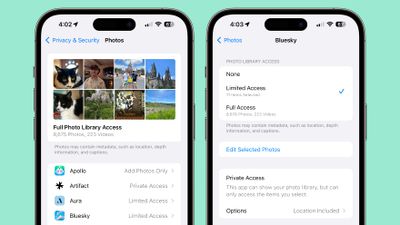
photos security ios 17
You can give apps the following access:

  • Limited Access - Apps can see only the images that you can select, and you can review the selected images anytime either in the app or by going to Settings > Privacy & Security > ‌Photos‌.
  • Full Access - Apps can see all of the images and videos in your Photo Library, and your device will tell you exactly how many photos and videos you're giving access to.
  • None - No access to the Photo Library at all.
  • Add ‌Photos‌ Only - The app can add images to your library, but not view them. This setting depends on the app, and is not available for all apps.

If you open up the Settings app and then go to the Privacy and Security section and choose ‌Photos‌, you can see the ‌Photos‌ access that all apps have access to. You can change the settings from here, and it's a good idea to go through the list to see exactly which apps can see your images. You can also opt to remove information like location and caption, and change photo format.

Downloading a new app that wants Photo Library access will bring up options to give limited or full access. In the past, apps had the option to just ask for blanket Photo Library access, which gave them the entire library, rather than just chosen images. There's much more control over what apps can see in terms of photos in iOS 17.

Your ‌iPhone‌ will also periodically remind you about apps that have access to your full Photo Library, offering up the option to change access to limited.

Calendar Access

Apps can add an event to the Calendar app without being able to view your Calendar through the "Add Events Only" option.
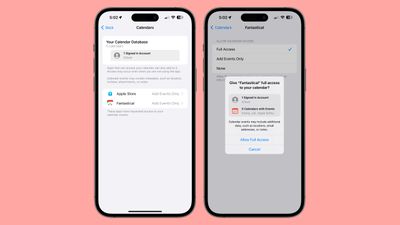
calendar app privacy ios 17
Calendar access can be managed by going to Settings > Privacy & Security > Calendars. You can give apps Full Access, choose Add Events Only, or use the None option to revoke access. This section of the Settings app also details how many calendars you have and how many accounts you're signed in to.

Apps that have full Calendar access can see location, invitees, attachments, and notes, according to Apple.

Passkeys

iOS 17 automatically assigns a passkey to an Apple ID, which is a more secure password alternative. With a passkey, users can sign into an ‌Apple ID‌ with ‌Face ID‌ or ‌Touch ID‌ instead of their password, with the feature available on icloud.com, appleid.apple.com, and other Apple websites.
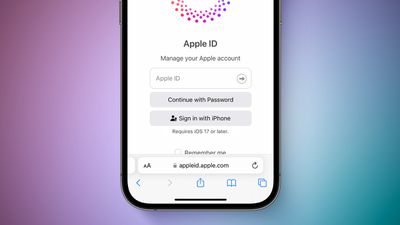
iOS 17 Passkey With Apple ID Feature 3
Passkeys use a key pair, one that is public and registered to the website or app and one that is private, held only on device. There is no way for a third party to intercept and access a passkey, so a passkey can't be stolen.

With iOS 17, macOS Sonoma, and iPadOS 17, when you sign into an Apple website, you'll use biometric authentication rather than your password. Passkeys will eventually be adopted by many sites, replacing passwords.

Home Activity History

The Home app now includes an activity history for up to 30 days, so you can see who accessed door locks, garage doors, contact sensors, and alarm sensors, and when. It can be accessed by tapping on the "Security" button at the top of the Home app and then choosing "Activity History."
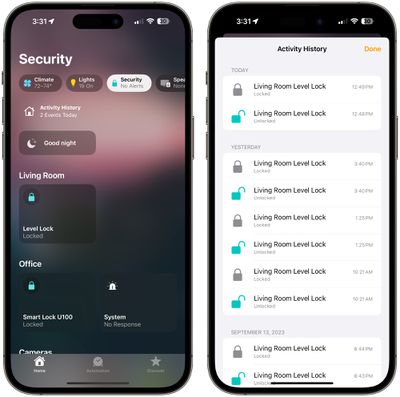
home app activity history

Read More

More information on all of the new features in the iOS 17 update can be found in our iOS 17 roundup.


Related Forums: iOS 17, iPadOS 17

Popular Stories

Apple Wallet ID Illinois

Apple Plans to Expand iPhone Driver's Licenses to These 7 U.S. States

Wednesday December 24, 2025 8:40 am PST by
In select U.S. states, residents can add their driver's license or state ID to the Apple Wallet app on the iPhone and Apple Watch, and then use it to display proof of identity or age at select airports and businesses, and in select apps. The feature is currently available in 13 U.S. states and Puerto Rico, and it is expected to launch in at least seven more in the future. To set up the...
iPhone Top Left Hole Punch Face ID Feature Purple

iPhone 18 Pro Launching Next Year With These 12 New Features

Tuesday December 23, 2025 8:36 am PST by
While the iPhone 18 Pro and iPhone 18 Pro Max are not expected to launch for another nine months, there are already plenty of rumors about the devices. Below, we have recapped 12 features rumored for the iPhone 18 Pro models. The same overall design is expected, with 6.3-inch and 6.9-inch display sizes, and a "plateau" housing three rear cameras Under-screen Face ID Front camera in...
iOS 26

iOS 26.2 Adds These 8 New Features to Your iPhone

Monday December 22, 2025 8:47 am PST by
Earlier this month, Apple released iOS 26.2, following more than a month of beta testing. It is a big update, with many new features and changes for iPhones. iOS 26.2 adds a Liquid Glass slider for the Lock Screen's clock, offline lyrics in Apple Music, and more. Below, we have highlighted a total of eight new features. Liquid Glass Slider on Lock Screen A new slider in the Lock...
maxresdefault

Where's the New Apple TV?

Monday December 22, 2025 11:30 am PST by
Apple hasn't updated the Apple TV 4K since 2022, and 2025 was supposed to be the year that we got a refresh. There were rumors suggesting Apple would release the new Apple TV before the end of 2025, but it looks like that's not going to happen now. Subscribe to the MacRumors YouTube channel for more videos. Bloomberg's Mark Gurman said several times across 2024 and 2025 that Apple would...
maxresdefault

10 Mac Apps Worth Trying in 2026

Wednesday December 24, 2025 9:27 am PST by
2026 is almost upon us, and a new year is a good time to try out some new apps. We've rounded up 10 excellent Mac apps that are worth checking out. Subscribe to the MacRumors YouTube channel for more videos. Alt-Tab (Free) - Alt-Tab brings a Windows-style alt + tab thumbnail preview option to the Mac. You can see a full window preview of open apps and app windows. One Thing (Free) -...
Foldable iPhone 2023 Feature Iridescent Search

Samsung Developing 'Wide Fold' With iPhone Fold-Like Design Ahead of Apple's 2026 Launch

Tuesday December 23, 2025 11:55 am PST by
Samsung is working on a new foldable smartphone that's wider and shorter than the models that it's released before, according to Korean news site ETNews. The "Wide Fold" will compete with Apple's iPhone Fold that's set to launch in September 2026. Samsung's existing Galaxy Z Fold7 display is 6.5 inches when closed, and 8 inches when open, with a 21:9 aspect ratio when folded and a 20:18...
iOS 26

iOS 26.3 Brings AirPods-Like Pairing to Third-Party Devices in EU Under DMA

Monday December 22, 2025 3:20 pm PST by
The European Commission today praised the interoperability changes that Apple is introducing in iOS 26.3, once again crediting the Digital Markets Act (DMA) with bringing "new opportunities" to European users and developers. The Digital Markets Act requires Apple to provide third-party accessories with the same capabilities and access to device features that Apple's own products get. In iOS...
iphone fold 3d print

Have a 3D Printer? You Can Make Your Own iPhone Fold Dummy

Tuesday December 23, 2025 1:31 pm PST by
Apple is working on a foldable iPhone that's set to come out in September 2026, and rumors suggest that it will have a display that's around 5.4 inches when closed and 7.6 inches when open. Exact measurements vary based on rumors, but one 3D designer has created a mockup based on what we've heard so far. On MakerWorld, a user named Subsy has uploaded a 1:1 iPhone Fold replica (via Macworld), ...
iPhone Fold Vertical Feature

Why Apple's Foldable iPhone May Be Smaller Than Expected

Tuesday December 23, 2025 5:21 am PST by
Apple's first foldable iPhone, rumored for release next year, may turn out to be smaller than most people imagine, if a recent report is anything to go by. According to The Information, the outer display on the book-style device will measure just 5.3 inches – that's smaller than the 5.4-inch screen on the ‌iPhone‌ mini, a line Apple discontinued in 2022 due to poor sales. The report has led ...

Top Rated Comments

TheYayAreaLiving ?️ Avatar
33 months ago
Excellent features! Glad Apple is standing behind what they always touted for. Privacy! It shows with iOS 17.
Score: 16 Votes (Like | Disagree)
SamRyouji Avatar
33 months ago
More privacy is one of the only thing we need. And sadly I dare to say only at Apple's products privacy is a common thing. Other brands? It's either a "luxury" or an empty promise, or both.
Score: 10 Votes (Like | Disagree)
Apple Fan 2008 Avatar
33 months ago
Tracking URL removal is my favorite
Score: 9 Votes (Like | Disagree)
centauratlas Avatar
33 months ago
Let's hope that Apple does something about this:
https://forums.macrumors.com/threads/apple-responds-to-report-about-thieves-spying-on-iphone-passcodes-to-steal-your-entire-digital-life.2381922/

Some of the suggestions there could fix the issue and aren't difficult. At worst give people the option to turn it on (or off depending on the default).

Every iteration improves and things like the above and ADP are huge improvements.
Score: 7 Votes (Like | Disagree)
Apple_Robert Avatar
33 months ago
Nice upcoming features. I especially like the 72 hour grace period for the passcode.
Score: 6 Votes (Like | Disagree)
zach-coleman Avatar
33 months ago
Apollo in the Photo Library Access photo is sad....
Score: 4 Votes (Like | Disagree)
















