

Apple will soon release iOS 18.1, iPadOS 18.1, and macOS Sequoia 15.1, and these updates will bring the first Apple Intelligence features for compatible iPhones, iPads, and Macs.
Not all of the Apple Intelligence features that Apple has in the works are coming in the iOS 18.1, iPadOS 18.1, and macOS Sequoia 15.1 updates, and there will be Apple Intelligence capabilities added in future iOS 18.2, iOS 18.3, and iOS 18.4 updates.
We've rounded up everything Apple Intelligence-related that will be included in the iOS 18.1, iPadOS 18.1, and macOS Sequoia 15.1 updates when the software comes out later this month.
Note that Apple Intelligence is still being refined and perfected, and when it launches, it will launch in a beta capacity.
Writing Tools
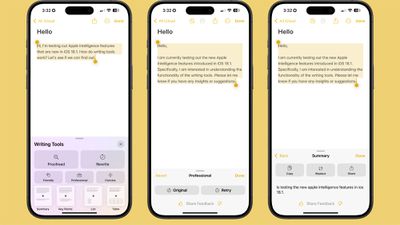
- Proofread text checks for spelling and grammar errors, including word choice and sentence structure. You can accept all suggestions with a tap or go through them one by one with explanations.
- Rewrite cleans up what you've written and shifts the tone without impacting your content. Options include Friendly, Professional, and Concise.
- You can select text and get a summary of it with Apple Intelligence. You can choose to create a paragraph, pull out key points, make a list, or create a table. Summaries are available in Mail, Messages, and more.
You can select any text on your iPhone, iPad, or Mac and use Apple Intelligence to access Writing Tools for summaries and other features.
Siri
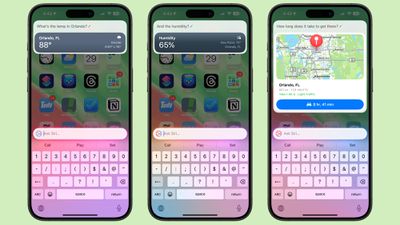
- There's a new glow around the edges of the display when Siri is activated, applicable to iPhone, iPad, and CarPlay. On Mac, the Siri window can be placed anywhere. The glow animates responsively to the sound of your voice so you can tell when Siri is listening without interrupting other things you're doing.
- A double tap at the bottom of the display brings up the Type to Siri interface so you can type requests instead of speaking them. On Mac, you need to press the Command key twice to bring up Type to Siri. Type to Siri includes suggested requests so you can get your questions answered faster.
- Siri can maintain context between requests so you can ask a question and then reference it in a second reply. If you ask about the temperature in Raleigh, for example, and then follow up with "what's the humidity?" Siri should know you mean in Raleigh.
- If you stumble over your words when speaking to Siri, or change what you're saying mid-sentence, Siri will follow along.
- Siri has Apple's product knowledge and support base for answering questions about your device's features and settings, and can even find settings when you don't know the exact name by using natural language search.
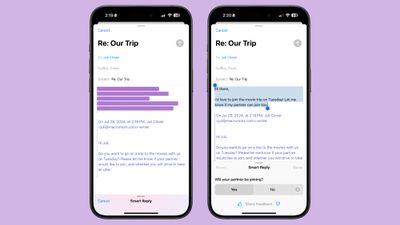
- There is a summarize button for summarizing any of your incoming emails, plus you will see a brief summary of an email in your inbox list rather than the first few lines of the email.
- Mail surfaces time sensitive messages first when applicable, putting them at the top of your inbox so you see what's important right away.
- Smart Reply provides quick-tap responses to emails that you've been sent, with contextual options based on what's in the email.
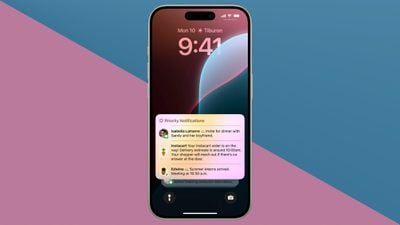
- Multiple notifications from Mail will be summarized on your Lock Screen so you can see what's in an email without opening the app.
Messages

- Messages has Smart Reply options for incoming texts, which analyze the content of messages to offer suggestions of what you might want to say.
- Multiple Messages notifications are summarized on your Lock Screen.
- You can use all of the Writing Tools features in the Messages app for proofreading and refining what you're planning to send.
Photos

- You can create a Memory Movie with just a description, such as "My cat in 2024," or "Orlando in the summer." The feature automatically picks relevant photos and chooses songs, but you can tweak through the Memory Mixes feature or choose a mood to guide the direction of the audio. You can also add in specific scenes and images you want to see throughout the memory when you're creating the prompt.
- Natural language search is available in Photos, so you can just describe what you're looking for, such as "Eric rollerskating while wearing green."
- Search can also find specific moments in video clips.
- Search offers up smart complete suggestions for narrowing down what you might want to find.
Clean Up
The Photos app also includes "Clean Up," a feature that lets you remove unwanted objects from your photos. The Clean Up tool in the Photos app is able to automatically detect objects in an image that might not be wanted, but you can also tap, circle, or brush over an unwanted object to remove it.
Zooming in on an image can help with using a finger as a brush to remove smaller blemishes and issues with an image, and it is intelligent enough not to remove part of a person even if a person or main subject is selected.

Clean Up works on all images in the Photos library, including older images and images captured by other devices like a point and shoot camera or a DSLR.
Transcription Summaries
In Notes and other apps, you can record audio and get a transcript along with a summary of your transcript, which is useful for recording lectures and other audio. Transcription isn't an Apple Intelligence feature, but summaries are.
Focus Modes
There is a dedicated Reduce Interruptions Focus Mode that only shows you important notifications that need attention while filtering out everything else.
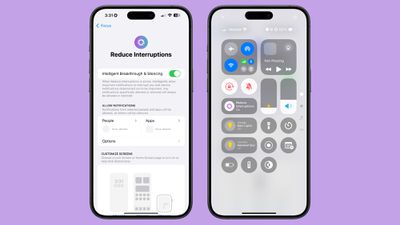
When customizing an existing Focus mode or creating a new one, there is a new toggle to turn on Intelligent Breakthrough and Silencing. This option allows important notifications to interrupt you, while muting notifications that are not important, which is the same thing that the Reduce Notifications Focus does. You can override the notification settings for specific apps and people, which is how it worked prior to iOS 18.1.
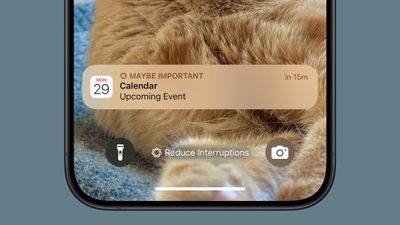
Notification Summaries
Your incoming notifications are summarized so you can see what's new for each app at a glance.
Phone
Summaries of transcriptions generated from your phone calls are supported in iOS 18.1. The iOS 18.1 update adds the option to record a phone call and get a transcription, which is not an Apple Intelligence feature. What does require Apple Intelligence, though, is getting a summary from that transcription without reading through the entire thing.
Note that you can start a recording by tapping on the record button in the upper left corner of the display when on a phone call. All participants are notified that the call is being recorded before the recording starts.
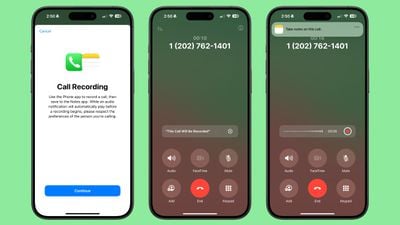
Recorded phone calls are stored in the Notes app, where you can tap in to view a transcript and get a summary generated from that transcript.
Safari
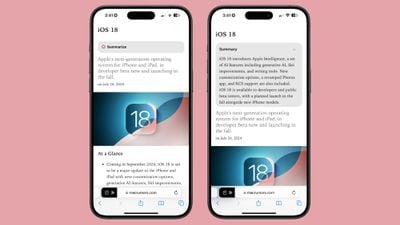
When reading an article in Reader Mode, there is an option to have Apple Intelligence summarize the article for you.
App Store
The App Store supports natural language and descriptive app tags to make it easier to find exactly what you're looking for.
Apple Intelligence Report
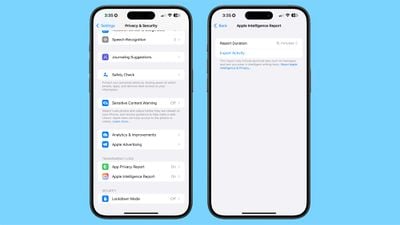
In the Privacy and Security section of the Settings app you can access an Apple Intelligence Report that lets you export your Apple Intelligence data as part of Apple's promise for transparency around Apple Intelligence. Face ID is required to access and export Apple Intelligence data.
Apple Intelligence Waitlist
When iOS 18.1, iPadOS 18.1, and macOS Sequoia 15.1 are released, you will need to go to the Settings app and join the Apple Intelligence waitlist. Apple is using a waitlist mechanic to ensure that behind the scenes downloads go smoothly and that the system isn't overloaded.
While on the waitlist, Apple devices download necessary files for on-device processing, and the waitlist should only take a few hours at most. The waitlist is on a per-account basis, so you only need to sign up for it on one device to have access on multiple devices.
Apple Intelligence Compatibility
The iOS 18.1, iPadOS 18.1, and macOS Sequoia 15.1 betas are only available to registered developers with an eligible device. Devices that cannot run Apple Intelligence will not see the update.
- All iPhone 16 models
- iPhone 15 Pro and iPhone 15 Pro Max
- All Apple silicon iPads
- All Apple silicon Macs
Apple Intelligence Availability
Apple Intelligence is only available in U.S. English at this time, and it is not available to developers in the European Union or China. Device region and language need to be set to the United States.
Apple Intelligence Launch Date
iOS 18.1, iPadOS 18.1, and macOS Sequoia 15.1 are expected to be released on Monday, October 28.
Apple Intelligence Features Coming Later
iOS 18.2, which we should get before the end of the year, is expected to bring support for ChatGPT integration with Siri, Image Playground, and Genmoji.
iOS 18.3, coming sometime around January, could bring some new Siri features, but that's not yet guaranteed.
iOS 18.4 is expected to have the bulk of the Siri Apple Intelligence features including support for on-screen awareness for responding to what's on your display, better per-app controls and app integration, and personal context for more personalized responses to queries. We'll likely get iOS 18.4 around March.
Apple will also be adding support for additional languages in 2025.























