

iOS 18.2 is the second major update to iOS 18, and it brings the first Apple Intelligence image generation features, ChatGPT integration with Siri, and plenty more changes and bug fixes.
This guide highlights everything that's new in iOS 18.2.
Apple Intelligence
There are several new Apple Intelligence features in iOS 18.2, including Image Playground and Genmoji. It's a more fun update than iOS 18.1 thanks to the image generation features.
- Image Playground - There's an Image Playground app and Messages integration for creating stylized images based on prompts and images of you and your friends.
- Image Wand - Image Wand is for adding images to what you've written in the Notes app. On iPad, you can use the Apple Pencil to make a rough sketch and have Image Wand turn it into something nicer.
- Genmoji - With Genmoji, you can create custom emoji. It's similar to Image Playground, but on a smaller emoji-sized scale. People that have iOS 18.1 installed will see Genmoji and can even get information about them, but they can only be created in iOS 18.2. In earlier versions of iOS and on Android devices, they show up as an image.
- Siri ChatGPT - Siri can now hand over requests to ChatGPT, a feature that's entirely opt-in. You don't need an account, and anything you ask Siri can be sent to ChatGPT if you want. ChatGPT has more advanced info than Siri and can also generate images and text. If you want to make it simpler to turn requests over to ChatGPT, you can toggle off the Ask Every Time setting so Siri doesn't always need your permission to contact ChatGPT. Siri with ChatGPT integration supports on-screen responses, so you can do things like ask "what's in this photo?" when you're looking at an image.
- Visual Intelligence - On iPhone 16, Visual Intelligence can be used to identify objects and places around you. Long press the Camera Control button to get to Visual Intelligence, and then point your iPhone at something. You can get hours and reviews if the camera is looking at a restaurant, copy text, get text read aloud, search for items on Google, ask ChatGPT questions about objects, and more.
- Writing Tools - The Rewrite Writing Tools feature is no longer limited to three styles. You can describe the tone or content that you want, such as adding more dynamic words or turning an email into a poem.
- Languages - With iOS 18.2, Apple Intelligence supports English in Australia, Canada, New Zealand, South Africa, and the UK in addition to U.S. English, so if you're in Canada, you no longer have to set your iPhone to U.S. English to use Apple Intelligence.
We have a much more in-depth Apple Intelligence guide that goes over all of the available features, which is well worth checking out. We also have individual guides on the new additions in iOS 18.2.
- Everything You Need to Know About Apple Intelligence
- All of the Image Playground Features
- Genmoji in iOS 18.2: Everything You Need to Know
- Siri's Apple Intelligence Features
- Apple Intelligence Image Wand: All the New Features in iOS 18.2
Camera Control
For iPhone 16 users, there's now an option lock your auto exposure and auto focus settings with a light press. The AE/AF Lock toggle can be turned on by going to Settings > Camera > Camera Control.
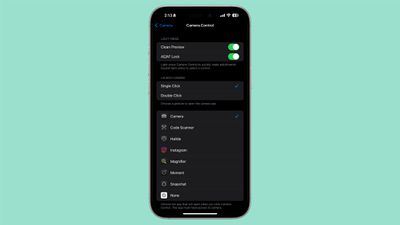
There is also an option to adjust the double click speed of Camera Control. Options include Default, Slow, and Slower. The adjustment options join prior options to tweak the double light press speed and the light press force.
As mentioned above, Camera Control now supports Visual Intelligence.
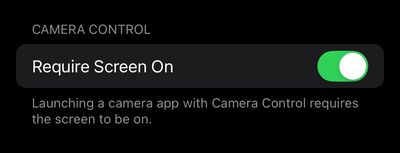
The update also adds a new setting for the Camera Control button. In the Settings app under Display & Brightness, there is now a toggle for "Require Screen On." When this setting is turned on, you can only launch the Camera app or a supported third-party camera app with the Camera Control button when the iPhone's screen is turned on.
Mail App Categorization
In the Mail app, there are new built-in categories for separating out important emails, deals, newsletters, transaction emails, and more.
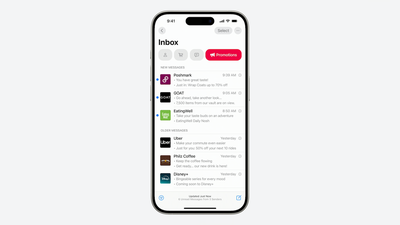
The Mail app includes bigger pictures for contacts and businesses, and all emails from a single person or source will be pooled together.
You can swap between categories (the new option) and List View (the non-categorization standard view) by tapping on the three dots in the upper right corner of the app. In the Mail section of the Settings app, you may need to go to Notifications > Customize Notifications > and toggle on All Unread Messages if you're using list view, because the other setting only shows you unread messages categorized as "Primary," which can be confusing.
Tweaked Video Player and More in Photos App
Apple added a tweaked video player that takes up more of the screen in iOS 18.2. This change eliminates the thick borders around videos that appear on earlier iOS 18 versions, meaning you no longer have to tap on a video for full-screen playback.
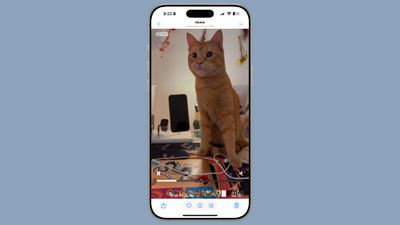
It's now possible to scrub through a video frame-by-frame, plus there is a setting to turn off auto-looping video playback in the Photos section of the Settings app.
When using the Collections views in the Photos app, you can swipe right to go back to the previous view, plus the Favorites album now appears in the Utilities collection along with the Pinned Collections section.
You're also now able to clear Recently Viewed and Recently Shared album history.
Safari
In the Safari section of the Settings app, there's a new "Not Secure Connection Warning" toggle that lets you know if you're visiting a website that does not have a valid SSL certificate for an encrypted connection. It is not advised to send passwords or other sensitive data on a site that pops up a "Not Secure" warning.
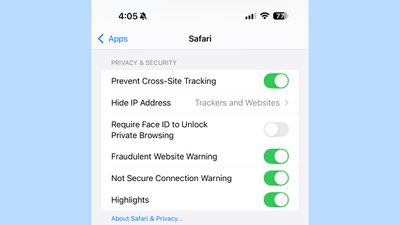
Apple's "Not Secure Connection Warning" toggle is not turned on by default. Apple says that HTTPS Priority will upgrade URLs to HTTPS whenever possible.
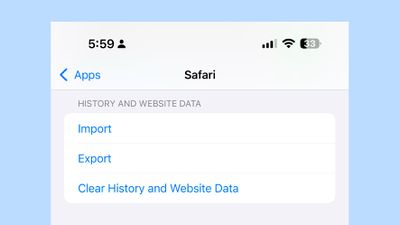
The Settings app has a new section for managing website data and history, with options for Clear History and Website Data. The Website Data section includes options for exporting data from Safari and importing data from another app into Safari.
Apple added new background images for customizing the Safari start page.
Safari Downloads
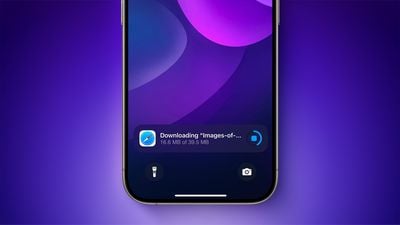
The progress of Safari downloads can now be tracked on the iPhone's Lock Screen and Dynamic Island.
Voice Memos
With Voice Memos, two tracks can be layered on top of one another. There's also an option to separate layers and edit layer mixes.
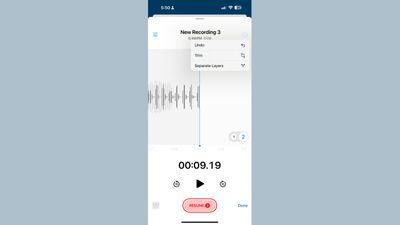
Two-track projects can be imported directly into Logic Pro on the iPhone 16 Pro and iPhone 16 Pro Max.
Find My
Find My has a new option to Share Item Location with an "airline or trusted person" that can help you locate something that you've misplaced. Choosing the Share Item Location option creates a link that lets someone view the location of a lost item when they open the link.
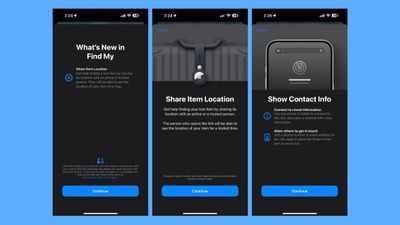
The link can be opened on a non-Apple device, so an iPhone or Mac is not required to provide someone with your item's location. Links expire after a week or when you're reunited with your lost item.
There's also an option to Show Contact Info, which lets any phone or tablet connect to an item to view a website with more information about it, including the phone number and email address of the owner.
Apple Music
Apple Music now supports natural language search. You can search for genres, moods, activity, decades, and more. Examples include "songs about cats," "songs with a vibe," "relaxing songs," "artists similar to Taylor Swift," "sad 80s songs," and "songs about food."
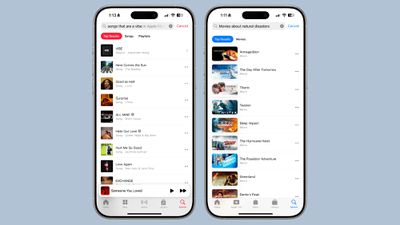
Apple Music now displays the disc number in some albums.
Apple TV
In the Apple TV app, you can also use casual language search terms to find exactly what you're looking for, typing in genres, actors, and moods. Searches like "movies about natural disasters," "movies with cats," "movies with Zendaya," and "exhilarating movies" all bring up relevant results.
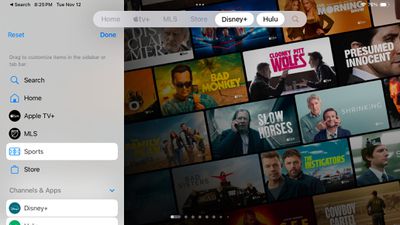
The navigation bar in the TV app can be customized, with options to add different apps and Library categories. Existing options like MLS and Apple TV+ cannot be removed.
Podcasts
You can favorite categories in the Podcasts app in iOS 18.2, and see categories in the library for a new way to navigate through shows and episodes.
A new personalized search page in Podcasts suggests the most relevant categories and editorially curated collections tailored to your listening preferences.
Apple News+
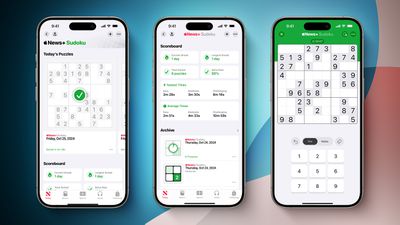
For Apple News+ subscribers in the United States, iOS 18.2 adds daily sudoku puzzles. The sudoku puzzles join existing the Crossword, Crossword Mini, and Quartiles offerings. There are three difficulty levels to complete each day, including easy, moderate, and challenging.
Stocks
In the Stocks app, there are now pre-market price quotes for tracking NASDAQ and NYSE tickers prior to when the market opens.
AirPods Pro Hearing Test and Hearing Aid Expansion
The AirPods Pro 2 Hearing Test feature is now available in Cyprus, Czechia, France, Italy, Luxembourg, Romania, Spain, United Arab Emirates, and the UK.
The Hearing Aid feature is available in the United Arab Emirates.
Apple Arcade
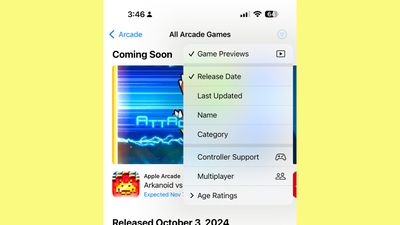
In the Apple Arcade section of the App Store, the "All Games" section has a new drop down filter menu and the option to turn off game previews.
EU App Changes
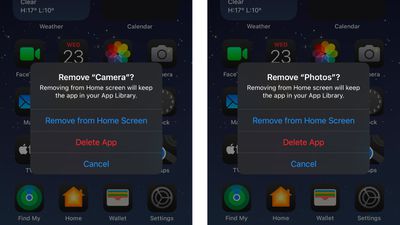
In the European Union, users can now delete core apps that include the App Store, Safari, Messages, Camera, and Photos.
Third-party browser apps in the EU will be able to create web apps for the iPhone's Home screen using their own custom engines when iOS 18.2 launches.
iPadOS 18.2 requires selecting a Default Browser when opening Safari. This is a Digital Markets Act requirement, with Apple adding an updated interface that will let users select a default web browser of their choice from a list of options.
Apple already implemented this change in iOS 18.
Default Apps Section
In the Settings app under "Apps," there's a new "Default Apps" section that can be used to manage your default apps for the iPhone.
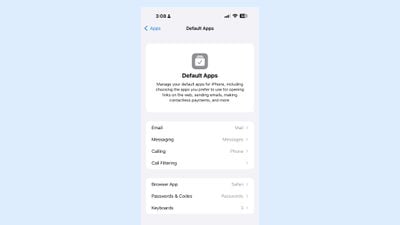
There are Default App settings for Email, Messaging, Calling, Call Filtering, Browser App, Passwords and Codes, and Keyboards. In the U.S. and other countries, you can use this section to choose your preferred Email, Call Filtering, Browser, and Passwords, and Keyboard apps. In the EU, there are more options for choosing non-Apple calling and messaging apps.
Volume Limit
In the Sound and Haptics section of the Settings app, there's a new Volume Limit option with a "Limit Maximum Volume" toggle to control how loudly the iPhone speaker can play audio like songs, movies, and other media.
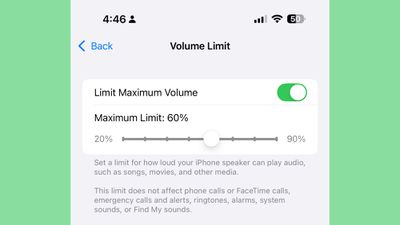
It does not impact phone calls, FaceTime calls, alarms, and other sounds.
Control Center
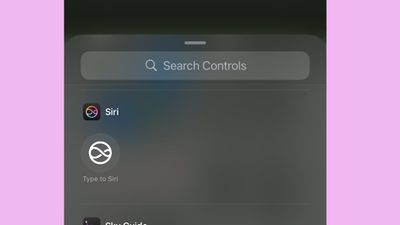
In Control Center, there's a new quick access option for Type to Siri. Apple has also removed the Satellite control from the Connectivity section, and changed the icon for Adaptive Audio.
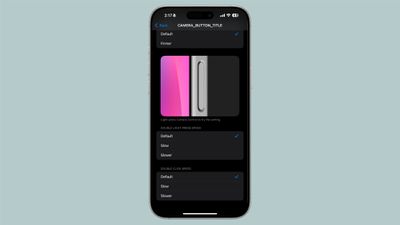
Adjusting Camera Control can be done by opening Settings and going to Accessibility > Camera Button.
Settings App Icons
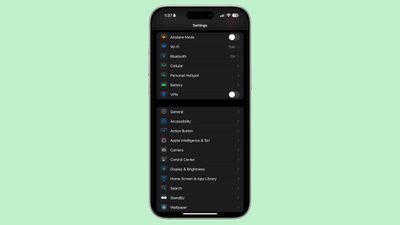
In Dark Mode, the icons in the Settings app have a new, darker look that shows color on a black background rather than icons that are a solid color with white accents.
iPhone Mirroring With Hotspot
iOS 18.2 allows you to use iPhone Mirroring while your iPhone's hotspot connection is being shared with your Mac. Having your Mac connected through Personal Hotspot previously did not allow you to use iPhone Mirroring.
Fitness Shortcut Actions
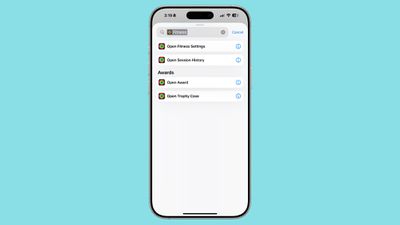
There are new Fitness app Shortcut actions that you can use when creating a Shortcut, including Open Fitness Settings, Open Award, Open Session History, and Open Trophy Case.
Lock Screen Volume Slider
In iOS 18.2, there's a new option to force the volume control bar to always be visible on the Lock Screen when adjusting sound.
The feature can be enabled in the Accessibility section of the Settings app. Accessibility > Audio and Visual > Always Show Volume Control.
Vehicle Motion Cues
There's an option see Vehicle Motion Cues in the Dynamic Island when the feature is activated. Vehicle Motion Cues are designed to cut down on motion sickness while riding in a vehicle.
Mac Connection
When connecting to a Mac or PC, you can use Face ID to trust a device.
iMessage Reporting
Children in Australia have access to a tool to report iMessages that contain nude photos and videos. Reported images will be reviewed by Apple, and actions could be taken such as disabling the sender's Apple Account or reporting the incident to law enforcement.
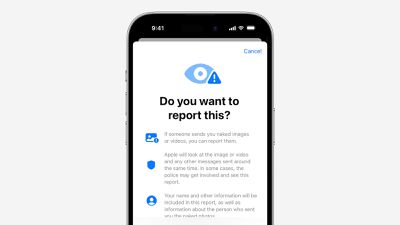
The feature will expand globally in the future.
Music Recognition
In iOS 18.2, the Music Recognition feature in the Control Center has a Musical Memories feature that shows you where you were when you identified a song. You will need to long press on the Music Recognition toggle in Control Center, tap on History, and then allow location access to use the feature.
AirDrop
The AirDrop icon in the share sheet now appears dark in Dark Mode, rather than staying white.
Web Restrictions in Utah
Utah residents under the age of 17 will be opted in to web content restrictions that block adult content in iOS 18.2. This is required by Utah law.
Bug Fixes
There are fixes for a couple of notable bugs in iOS 18.2. The update addresses an issue that could cause captured photos to not immediately appear in the All Photos grid.
It also fixes a bug that could cause Night mode photos to appear degraded when capturing long exposures, a problem that impacted the iPhone 16 Pro and iPhone 16 Pro Max.
Security Updates
iOS 18.2 addresses multiple security vulnerabilities, which means it's a good idea to update as soon as you can.
A full list of the vulnerabilities fixed can be found on Apple's website, but it includes updates for the kernel, Passwords, Safari, WebKit, VoiceOver, and more.
Read More
For more detail on the Apple Intelligence features in iOS 18.2, we have a dedicated guide. Our iOS 18 roundup has a list of all of the features in iOS 18 if you want a recap.























