

Five New Features in the iOS 18 Phone App

The Phone app doesn't often get updated, but with iOS 18 and Apple Intelligence, it's getting a major overhaul that includes one of the best new features in the iOS 18 software.

iOS 18 Phone App Feature 2
This guide highlights everything new with the Phone app.

Record Phone Calls

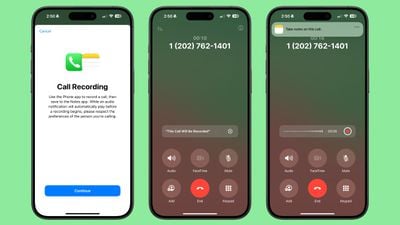
After placing or answering a call on an iPhone running iOS 18.1, you can initiate a recording that gives you an audio copy of the call.
ios 18 1 call recording 1

  1. Open the Phone app.
  2. Make a call.
  3. Tap on the record button in the top left corner to start a recording.

When you tap on the record button, everyone on the call is informed that the call is being recorded through an audible message. The message repeats for each person that is recording, so if two ‌iPhone‌ users are on a call and both record, the message will play twice.

There is no confirmation dialogue when a call is being recorded, so someone who does not want to be recorded would need to hang up the call as there is no opt out.

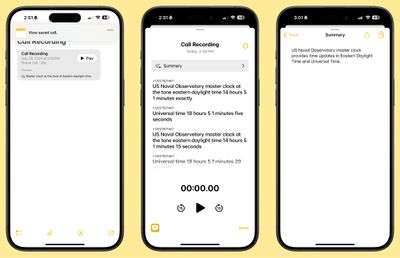
While the call is in progress, audio is recorded and saved to the Notes app for later access. When you open up the Notes app, you'll see a Call Recording labeled with the date and the time with an option to tap on Play to repeat the call or to tap into the note for more information.

Transcribe and Summarize Phone Calls

Calls that are saved in the Notes app are automatically transcribed, so you can see a full transcription of what was said on the call. You can get to a transcription by tapping into a Call Recording note.
ios 18 1 call recording 2
As you listen to the call, the transcript will update so you can read along with what's being said.

Transcriptions have a "Summary" button so you can get a quick summary of what was said in the call, plus there is a search option for searching for key words and phrases. Note that the Summary function requires an Apple Intelligence-compatible device, but recording and transcribing are general features available to everyone.

Transcripts can be added to a different note, or copied, and the audio can be saved to the Files app or shared.

Search Call History

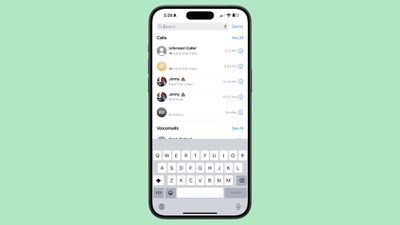
In iOS 18, Apple added a search feature for the Recents tab, which means you can now search through all of your incoming and outgoing calls and voicemails.
ios 18 phone app call history search

  1. Open up the Phone app.
  2. Tap on the Recents tab.
  3. Search for the person or number you're looking for with the search bar at the top of the interface.

You can type in phone numbers or names to see calls that have been placed, received, or missed, and contacts that have the name or phone number you're searching for.

Along with name or phone number, you can search for the date of a call, the type of call (such as FaceTime), or use multiple search parameters. If you wanted to see all calls from Eric in June, for example, you could type in "Eric" tap the name when it comes up to set the parameter, and then add in "June" to the search bar.

There are options to "See All" calls and voicemails when conducting a search to view more results.

Swap SIM cards

If you have two SIMs on your ‌iPhone‌, such as for personal and work purposes, you can swap between them using a Control Center toggle. In prior versions of iOS, you had to change numbers using the Settings app.

To swap numbers, open up Control Center, navigate to the connectivity controls, and long press on Cellular Data.

Contact Suggestions

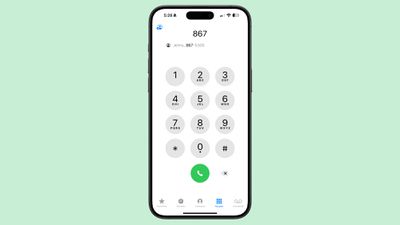
When you start typing in a number with the Keypad in iOS 18, you'll see a list of contacts so you can quickly get to who you want to call.
ios 18 auto fill phone app dialing
Type in the first digit or two of a number and then tap on the "More" icon to see all of your options. You can tap one from there to dial.

T9 Dialing

Related to the contact suggestion feature, you can actually search for names instead of numbers using T9 characters. If you have a contact in your phone under "Eric," you can type in 3 for E, 7 for R, 4 for I, and 2 for C, and the contact card for Eric will pop up.
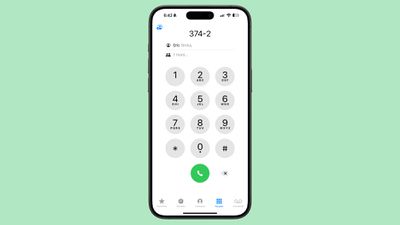
ios 18 phone app t9 dialing
T9 dialing dates back to the days before touchscreens, allowing smartphone users to type using predictive text that associated numbers with letters. The ‌iPhone‌ has not supported T9 dialing until now.

Phone App Release Info

Call recording and transcribing are iOS 18 features that will be available to anyone, but the functionality won't be added to iOS devices until iOS 18.1. Summarizing transcripts is an ‌Apple Intelligence‌ feature that will be limited to devices compatible with ‌Apple Intelligence‌. That includes the ‌iPhone‌ 15 Pro, ‌iPhone‌ 15 Pro Max, or iPhone 16, as well as M-series iPads and Macs.

Read More

Additional information on new features that Apple has added in iOS 18 can be found in our iOS 18 roundup.


Related Forums: iOS 18, iPadOS 18

Popular Stories

Apple Wallet ID Illinois

Apple Plans to Expand iPhone Driver's Licenses to These 7 U.S. States

Wednesday December 24, 2025 8:40 am PST by
In select U.S. states, residents can add their driver's license or state ID to the Apple Wallet app on the iPhone and Apple Watch, and then use it to display proof of identity or age at select airports and businesses, and in select apps. The feature is currently available in 13 U.S. states and Puerto Rico, and it is expected to launch in at least seven more in the future. To set up the...
iPhone Top Left Hole Punch Face ID Feature Purple

iPhone 18 Pro Launching Next Year With These 12 New Features

Tuesday December 23, 2025 8:36 am PST by
While the iPhone 18 Pro and iPhone 18 Pro Max are not expected to launch for another nine months, there are already plenty of rumors about the devices. Below, we have recapped 12 features rumored for the iPhone 18 Pro models. The same overall design is expected, with 6.3-inch and 6.9-inch display sizes, and a "plateau" housing three rear cameras Under-screen Face ID Front camera in...
iOS 26

iOS 26.2 Adds These 8 New Features to Your iPhone

Monday December 22, 2025 8:47 am PST by
Earlier this month, Apple released iOS 26.2, following more than a month of beta testing. It is a big update, with many new features and changes for iPhones. iOS 26.2 adds a Liquid Glass slider for the Lock Screen's clock, offline lyrics in Apple Music, and more. Below, we have highlighted a total of eight new features. Liquid Glass Slider on Lock Screen A new slider in the Lock...
maxresdefault

Where's the New Apple TV?

Monday December 22, 2025 11:30 am PST by
Apple hasn't updated the Apple TV 4K since 2022, and 2025 was supposed to be the year that we got a refresh. There were rumors suggesting Apple would release the new Apple TV before the end of 2025, but it looks like that's not going to happen now. Subscribe to the MacRumors YouTube channel for more videos. Bloomberg's Mark Gurman said several times across 2024 and 2025 that Apple would...
maxresdefault

10 Mac Apps Worth Trying in 2026

Wednesday December 24, 2025 9:27 am PST by
2026 is almost upon us, and a new year is a good time to try out some new apps. We've rounded up 10 excellent Mac apps that are worth checking out. Subscribe to the MacRumors YouTube channel for more videos. Alt-Tab (Free) - Alt-Tab brings a Windows-style alt + tab thumbnail preview option to the Mac. You can see a full window preview of open apps and app windows. One Thing (Free) -...
Foldable iPhone 2023 Feature Iridescent Search

Samsung Developing 'Wide Fold' With iPhone Fold-Like Design Ahead of Apple's 2026 Launch

Tuesday December 23, 2025 11:55 am PST by
Samsung is working on a new foldable smartphone that's wider and shorter than the models that it's released before, according to Korean news site ETNews. The "Wide Fold" will compete with Apple's iPhone Fold that's set to launch in September 2026. Samsung's existing Galaxy Z Fold7 display is 6.5 inches when closed, and 8 inches when open, with a 21:9 aspect ratio when folded and a 20:18...
iOS 26

iOS 26.3 Brings AirPods-Like Pairing to Third-Party Devices in EU Under DMA

Monday December 22, 2025 3:20 pm PST by
The European Commission today praised the interoperability changes that Apple is introducing in iOS 26.3, once again crediting the Digital Markets Act (DMA) with bringing "new opportunities" to European users and developers. The Digital Markets Act requires Apple to provide third-party accessories with the same capabilities and access to device features that Apple's own products get. In iOS...
iphone fold 3d print

Have a 3D Printer? You Can Make Your Own iPhone Fold Dummy

Tuesday December 23, 2025 1:31 pm PST by
Apple is working on a foldable iPhone that's set to come out in September 2026, and rumors suggest that it will have a display that's around 5.4 inches when closed and 7.6 inches when open. Exact measurements vary based on rumors, but one 3D designer has created a mockup based on what we've heard so far. On MakerWorld, a user named Subsy has uploaded a 1:1 iPhone Fold replica (via Macworld), ...
iPhone SE Cosmopolitan Clean

Apple Discontinued These 25 Products This Year

Wednesday December 24, 2025 7:24 am PST by
With the end of 2025 near, the time has come to look back at the devices and accessories that Apple discontinued throughout the year. Most of the products that were discontinued this year were simply replaced by a new model with an updated chip. However, the iPhone SE line was entirely discontinued when the iPhone 16e launched, and the iPhone Plus line is being phased out. Below, we have...

Top Rated Comments

AppleTO Avatar
18 months ago
What? Why is Apple Intelligence needed to record a call?
Score: 31 Votes (Like | Disagree)
antiprotest Avatar
18 months ago

I don't understand why anyone would do this when all you have to do is say, "Siri, call Eric Slivka". That's a lot easier than pecking at numbers.
"Calling your ex mother-in-law..."
Score: 14 Votes (Like | Disagree)
deathcab Avatar
18 months ago
So you need an iPhone 15 Pro (or newer) for the processing power to run *checks notes* T9 dialing?
Score: 12 Votes (Like | Disagree)
CoMoMacUser Avatar
18 months ago

Only as long as they are also in a one-party consent state. If they live in a two party consent state, then you can be held liable in that state for recording a call.
No, as my law professor explained it decades ago, it's "the law of where your feet are" when it comes to the person doing the recording.
Score: 12 Votes (Like | Disagree)
mantan Avatar
18 months ago
Another reason I'm glad I was young/single in an era before the smart phone....

Last thing I would need is to leave receipts! :)
Score: 10 Votes (Like | Disagree)
TracesOfArsenic Avatar
18 months ago

What? Why is Apple Intelligence needed to record a call?
Exactly. My phone in the 90s did this. When you're hard pressed to sell new hardware I guess you have to bend the truth a little bit.
Score: 9 Votes (Like | Disagree)
















