iOS 26: Everything New With FaceTime

All of Apple's communication apps received updates with iOS 26, including FaceTime. There's a redesigned interface that puts more emphasis on your contacts, new translation features, and more.

iOS 26 Glass FaceTime Feature

Live Translation

Along with the Phone and Messages apps, ‌FaceTime‌ supports Live Translation as long as you have a phone that works with Apple Intelligence.

ios 26 live translation facetime
With Live Translation, you can video chat with someone who speaks a different language than you do. The ‌FaceTime‌ app displays live captions that are translated into your language as the person speaks. Your response can also be translated back into their language as long as they also have a device that supports ‌Apple Intelligence‌ and runs ‌iOS 26‌, iPadOS 26, or macOS 26.

You'll need to download language packs to use Live Translation, and it works with a limited number of languages. ‌FaceTime‌'s Live Translation feature works with English, French, German, Portuguese (Brazil), and Spanish (Spain).

To use Live Translation on a ‌FaceTime‌ call, initiate the call and then tap on the button with three dots. From there, tap on the Live Translation option and select the to and from languages. Everything spoken will be translated and displayed in the same way Live Captions are displayed. To stop a translation, just tap on the Stop button.

Interface Updates

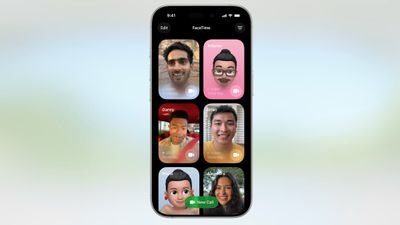
Apple updated the ‌FaceTime‌ interface in ‌iOS 26‌. Rather than a list of names of recent and suggested contacts, you'll see a card-style view that includes a full image of your contact that they've shared, if one is available. If they've sent you a video message, that will automatically play in the background as you scroll for an animated look. You can tap on one of the cards to place a ‌FaceTime‌ Audio or ‌FaceTime‌ Video call, depending on how you last contacted them.
ios 26 facetime interface
Long pressing on a card brings up an option to delete it.

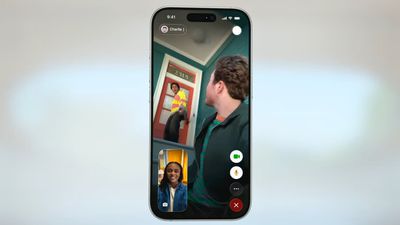
The "New Call" button is at the bottom of the ‌FaceTime‌ app rather than at the top, and filtering options can be accessed by tapping on the menu button at the top right. When you're on a call, the buttons are now at the bottom right of the display.
ios 26 facetime on call
Like all of Apple's other apps, ‌FaceTime‌ adopts the Liquid Glass aesthetic. Contact cards feature rounded corners, buttons have a rounded design, and the New Call button and some of the other interface buttons have a glass-like design.

Call Screening

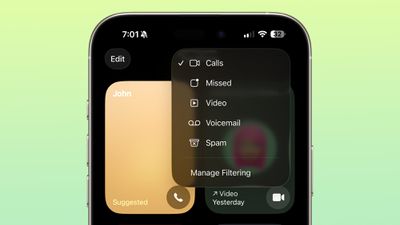
Like the Phone app, ‌FaceTime‌ has new call filtering options. There's still a Silence Unknown Callers toggle, but missed calls and voicemails from unsaved numbers will now be sorted into an Unknown Callers list that's hidden from view unless you select it.
ios 26 facetime call filtering
Calls that are identified as spam will be silenced and automatically added to a new Spam list.

Call filtering is opt-in, so if you often get calls from unknown numbers, you can turn it on. If you don't want to miss any calls, you can leave it off. The toggle for spam and unknown callers can be found in the ‌FaceTime‌ section of the Settings app under Call Filtering.

In the ‌FaceTime‌ app, you can get to the different filtered sections by tapping on the menu button in the upper right of the app. Sections include Calls, Missed, Video, Voicemail, Unknown Callers, and Spam.

Sensitive Content Blocking

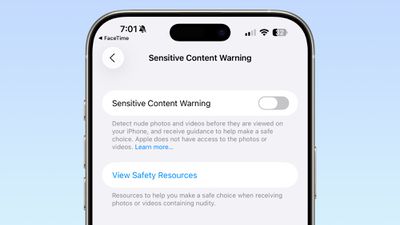
In ‌iOS 26‌, the Sensitive Content Warning and Communication Safety features are available for ‌FaceTime‌ video calls. When nudity is detected, the ‌FaceTime‌ video will pause and a warning about nude content will be displayed.
ios 26 facetime sensitive content
Communication Safety is a feature that is designed for the accounts of children and teens, and it provides warnings if images and videos of nudity are detected. Communication Safety is on by default for accounts created for children up to age 17.

Adults can use Communication Safety features too, in the form of Sensitive Content Warnings. Sensitive Content Warnings are an opt-in feature that prevents users of all ages from being subject to unwanted nude photos and videos.

Both options blur nudity in the Messages app and pause video in ‌FaceTime‌. There is no situation where an adult will see their ‌FaceTime‌ calls paused for nudity unless they have turned on the Sensitive Content Warning feature.

Sensitive Content Warnings can be turned on in the Privacy and Security section of the Settings app. Adults can also opt to turn on Communication Safety in the Screen Time section of the Settings app.

Sensitive Content Warnings and Communication Safety use on-device machine learning to analyze photos and videos. Apple does not receive an alert that nudity was detected, and does not have access to any photos or videos.

Read More

We have a dedicated iOS 26 roundup that goes into detail on all of the new features that are available in the update.


Related Roundups: iOS 26, iPadOS 26
Related Forum: iOS 26

Popular Stories

Apple Wallet ID Illinois

Apple Plans to Expand iPhone Driver's Licenses to These 7 U.S. States

Wednesday December 24, 2025 8:40 am PST by
In select U.S. states, residents can add their driver's license or state ID to the Apple Wallet app on the iPhone and Apple Watch, and then use it to display proof of identity or age at select airports and businesses, and in select apps. The feature is currently available in 13 U.S. states and Puerto Rico, and it is expected to launch in at least seven more in the future. To set up the...
iPhone Top Left Hole Punch Face ID Feature Purple

iPhone 18 Pro Launching Next Year With These 12 New Features

Tuesday December 23, 2025 8:36 am PST by
While the iPhone 18 Pro and iPhone 18 Pro Max are not expected to launch for another nine months, there are already plenty of rumors about the devices. Below, we have recapped 12 features rumored for the iPhone 18 Pro models. The same overall design is expected, with 6.3-inch and 6.9-inch display sizes, and a "plateau" housing three rear cameras Under-screen Face ID Front camera in...
iOS 26

iOS 26.2 Adds These 8 New Features to Your iPhone

Monday December 22, 2025 8:47 am PST by
Earlier this month, Apple released iOS 26.2, following more than a month of beta testing. It is a big update, with many new features and changes for iPhones. iOS 26.2 adds a Liquid Glass slider for the Lock Screen's clock, offline lyrics in Apple Music, and more. Below, we have highlighted a total of eight new features. Liquid Glass Slider on Lock Screen A new slider in the Lock...
maxresdefault

Where's the New Apple TV?

Monday December 22, 2025 11:30 am PST by
Apple hasn't updated the Apple TV 4K since 2022, and 2025 was supposed to be the year that we got a refresh. There were rumors suggesting Apple would release the new Apple TV before the end of 2025, but it looks like that's not going to happen now. Subscribe to the MacRumors YouTube channel for more videos. Bloomberg's Mark Gurman said several times across 2024 and 2025 that Apple would...
maxresdefault

10 Mac Apps Worth Trying in 2026

Wednesday December 24, 2025 9:27 am PST by
2026 is almost upon us, and a new year is a good time to try out some new apps. We've rounded up 10 excellent Mac apps that are worth checking out. Subscribe to the MacRumors YouTube channel for more videos. Alt-Tab (Free) - Alt-Tab brings a Windows-style alt + tab thumbnail preview option to the Mac. You can see a full window preview of open apps and app windows. One Thing (Free) -...
Foldable iPhone 2023 Feature Iridescent Search

Samsung Developing 'Wide Fold' With iPhone Fold-Like Design Ahead of Apple's 2026 Launch

Tuesday December 23, 2025 11:55 am PST by
Samsung is working on a new foldable smartphone that's wider and shorter than the models that it's released before, according to Korean news site ETNews. The "Wide Fold" will compete with Apple's iPhone Fold that's set to launch in September 2026. Samsung's existing Galaxy Z Fold7 display is 6.5 inches when closed, and 8 inches when open, with a 21:9 aspect ratio when folded and a 20:18...
iOS 26

iOS 26.3 Brings AirPods-Like Pairing to Third-Party Devices in EU Under DMA

Monday December 22, 2025 3:20 pm PST by
The European Commission today praised the interoperability changes that Apple is introducing in iOS 26.3, once again crediting the Digital Markets Act (DMA) with bringing "new opportunities" to European users and developers. The Digital Markets Act requires Apple to provide third-party accessories with the same capabilities and access to device features that Apple's own products get. In iOS...
iphone fold 3d print

Have a 3D Printer? You Can Make Your Own iPhone Fold Dummy

Tuesday December 23, 2025 1:31 pm PST by
Apple is working on a foldable iPhone that's set to come out in September 2026, and rumors suggest that it will have a display that's around 5.4 inches when closed and 7.6 inches when open. Exact measurements vary based on rumors, but one 3D designer has created a mockup based on what we've heard so far. On MakerWorld, a user named Subsy has uploaded a 1:1 iPhone Fold replica (via Macworld), ...
iPhone Fold Vertical Feature

Why Apple's Foldable iPhone May Be Smaller Than Expected

Tuesday December 23, 2025 5:21 am PST by
Apple's first foldable iPhone, rumored for release next year, may turn out to be smaller than most people imagine, if a recent report is anything to go by. According to The Information, the outer display on the book-style device will measure just 5.3 inches – that's smaller than the 5.4-inch screen on the ‌iPhone‌ mini, a line Apple discontinued in 2022 due to poor sales. The report has led ...

Top Rated Comments

ipedro Avatar
19 weeks ago
The only new feature I want in FaceTime is for it to detect that someone is out in public and insist that they turn off their mutha****in speakerphone. ?
Score: 16 Votes (Like | Disagree)
cybercommand Avatar
19 weeks ago
Apple needs to hurry up and get their act together when it comes to languages. It’s been years.
Score: 10 Votes (Like | Disagree)
fizzyfizz Avatar
19 weeks ago
Wish they'd include an option to swipe away my own face when chatting. I mean, why do I need to see a little video of myself?!
Score: 10 Votes (Like | Disagree)
ZipZilla Avatar
19 weeks ago

The only new feature I want in FaceTime is for it to detect that someone is out in public and insist that they turn off their mutha****in speakerphone. ?
Amen bro. the absolute worst of the worst. people have no manners
Score: 8 Votes (Like | Disagree)
Syk Avatar
19 weeks ago
Why not Spanish spoken in Mexico
Score: 6 Votes (Like | Disagree)
ZipZilla Avatar
19 weeks ago

“‌FaceTime‌ supports Live Translation as long as you have a phone that works with Apple Intelligence ('https://www.macrumors.com/guide/apple-intelligence/').”

Interesting. Yesterday, I was driving to town in a no service area, and asked Siri, “Siri, shuffle playlist 90’s favourites.”

She replied, “To do that you’ll need to be online.”

?
Other greatest hits from useless Siri:

"To do that, you'll need to unlock your phone"

"Here is what I found on the internet (for whatever you asked)"

Siri is beaten by Google Assistant on a 5-year-old Android 12 $99 Budget phone. it's embarrassing and terrible
Score: 4 Votes (Like | Disagree)