iOS 26: Every Change to the Messages App

The Messages app has the Liquid Glass redesign that's been introduced throughout iOS 26, but Apple also added several long-desired features that make for a better experience in both one-to-one and group chats, such as custom backgrounds and group typing indicators.

iOS 26 Messages Feature 2 1

Message Backgrounds

In any conversation in the Messages app, you can set a custom background, a feature that's available in many third-party messaging apps.
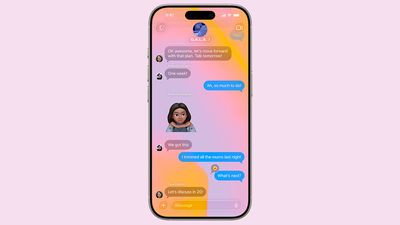
ios 26 messages backgrounds
To set a custom background, tap on the name of the person or group at the top, and choose the "Backgrounds" option. There are pre-set options like sky, water, and aurora, or you can choose a solid color.

You can also opt to select a photo from your Photo Library, or generate an image with Image Playground. Backgrounds are changed for every participant in the conversation, but you need to have ‌iOS 26‌, iPadOS 26, or macOS Tahoe. Custom backgrounds can only be set for iMessage conversations at the current time, and there won't be an option to set a custom background in a chat with someone who has an Android device.

If you don't want to see custom backgrounds that people set, you can turn off the option in the Messages section of the Settings app. Just go to Settings > Apps > Messages and toggle off Conversation Backgrounds.

Regardless of the background that you choose, message bubbles will still be blue, and bubble color can't be changed.

Polls

For conversations where you're asking people to choose one of multiple options, you can now create a poll. If you tap on the "+" button next to the Messages text, there's a poll option.
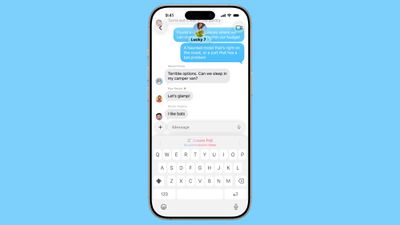
ios 26 messages poll suggestions
You can add up to 12 choices in a poll, and then send it to people in a conversation to vote on. If you send a poll and someone thinks an option is missing, they can edit it and add in another choice.

On devices that support Apple Intelligence, the Messages app will suggest a poll in relevant conversations. If you're asking the group whether to get pizza, burgers, or pasta, for example, you might see a suggestion to create a poll.

Live Translation

‌iOS 26‌ supports a live translate feature in Messages on devices with ‌Apple Intelligence‌. If you're conversing with someone that speaks another language, you can turn on translate. What they type will be translated to your language, and what you type will be translated to their language. Translations are near instantaneous and don't slow down text conversations.
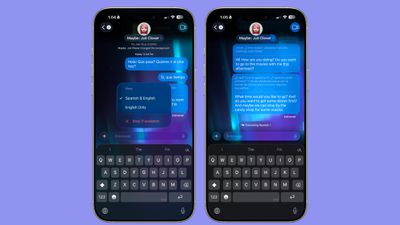
messages live translation
Languages that are supported include Chinese (Mandarin, Simplified), French, German, Italian, English, Japanese, Korean, Portuguese (Brazil), and Spanish (Spain).

To opt in to automatic translate, tap on the person's name, scroll down, and toggle on the Automatically Translate option. You will need to select a language to translate from, and download that language pack if you don't already have it installed (they're around 900MB).
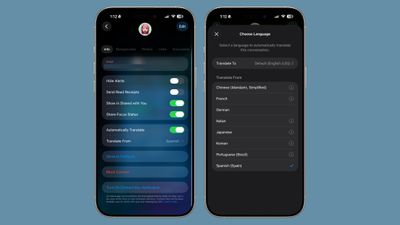
ios 26 select language messages
Messages that you send will show up in both your language and the translated language on your own phone, but the person on the other end will only see the message in their language. Messages they respond with will show their language and the translated language.
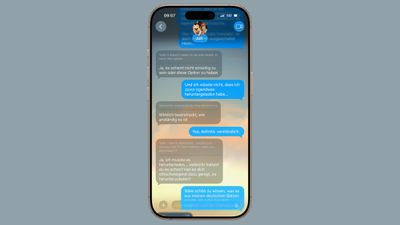
messages ios 26 live translation 2
Live Translation is an ‌Apple Intelligence‌ feature, and it works best when both participants have ‌iOS 26‌, ‌iPadOS 26‌, or ‌macOS Tahoe‌. You can use Live Translation with someone who has an older device or an Android device, and it will translate their text on your end, but your responses are not translated to their language.

Group Chat Improvements

When you're in a group chat, you'll see typing indicators for people who are typing a response.

Apple Cash is also now supported in group chats, so members of the group can send money to one another without having to split out into separate conversations.

If you're in a group chat and there's a person that you don't know, there's now an option to add that person to your Contacts app with a tap.

Copy/Paste

If you want to copy just a part of a message, such as an address or a package tracking number, there's an option in ‌iOS 26‌ to do so. Long press on the message that you want to copy and then tap on the "Select" option.
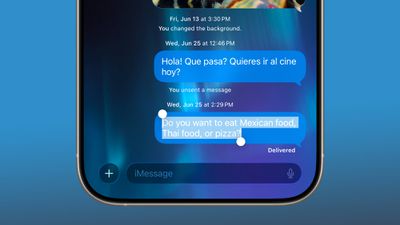
ios 26 messages select copy paste

Message Filtering

Apple separated spam messages and messages from unknown senders into two categories in ‌iOS 26‌, and both can be filtered out if you prefer.
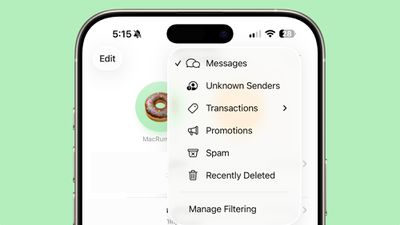
ios 26 messages filtering
There's a Filter section that you can access by tapping the icon at the top right of the Messages app interface that will let you see messages with specific content. Options include Unknown Senders, Transactions, Promotions, Spam, and Recently Deleted.

You can have messages from unknown senders (aka not saved in your Contacts) sent directly to the Unknown Senders list, and you won't get notifications. You'll see a badge in the filter section of the Messages app so you know the message is there, but you won't be bothered by it.

There's an exception you can turn on for Time Sensitive notifications, so you won't miss something like a food delivery person sending you a message. Messages classified as spam will be sent to the spam box, and you won't see a notification or a badge.

You can also turn on filtering notifications for messages that are classified as Personal (not from businesses), Transactions (order receipts and confirmations), and Promotions.

Messages supports natural language search, so you can use conversational words when looking for a text thread or something specific in a conversation.

Low Data Photo Sharing

Apple added a "Send Low Quality Photo Previews" setting that can be enabled in the Messages section of the Settings app. When it's turned on, Messages will send a lower quality preview of an image if your iPhone is in Low Data Mode. The full version of the photo is sent at a later time when you have a Wi-Fi connection.
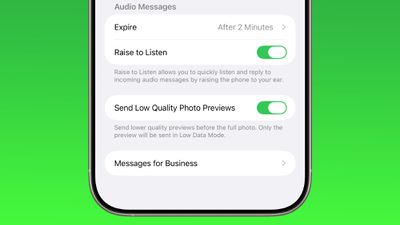
ios 26 messages low quality previews

Genmoji

In Messages, the Genmoji feature has been updated to support mixing two or more existing emoji characters together to create a new emoji.
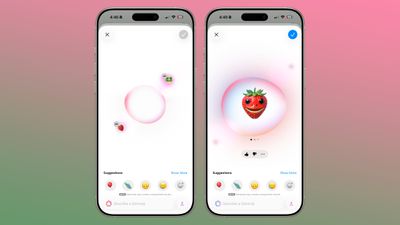
ios 26 genmoji
In a conversation, tap on ‌Genmoji‌ to make a custom emoji character. Once in the ‌Genmoji‌ interface, tap on the smile icon with a "+" next to it, and you can select the emoji characters that you want to add from the emoji menu. You can add two emoji, or even more if you want.

Combined emoji can be further edited with text-based descriptions, and if someone sends you a combo emoji, you can long press on it and choose "New Emoji" to tweak it further.

CarPlay

When you're driving, you can now respond to an incoming message with a quick Tapback response. Plus you can pin conversations to the Messages app in CarPlay so you can access your favorite contacts quickly.
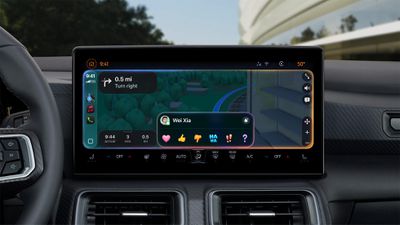
CarPlay Messages Tapbacks

EU Changes

In the European Union, there's a new EU-only API for developers that will allow third-party messages apps to send and receive RCS/MMS/SMS messages by default instead of the built-in Messages app.

End-to-End RCS Encryption

Apple is planning to bring end-to-end encryption to ‌RCS‌ conversations between ‌iPhone‌ and Android users in a future software update, but the functionality is not implemented yet.

Read More

We have a complete iOS 26 roundup that covers all of the new features that are available in the update.


Related Roundups: iOS 26, iPadOS 26
Related Forum: iOS 26

Popular Stories

Apple Wallet ID Illinois

Apple Plans to Expand iPhone Driver's Licenses to These 7 U.S. States

Wednesday December 24, 2025 8:40 am PST by
In select U.S. states, residents can add their driver's license or state ID to the Apple Wallet app on the iPhone and Apple Watch, and then use it to display proof of identity or age at select airports and businesses, and in select apps. The feature is currently available in 13 U.S. states and Puerto Rico, and it is expected to launch in at least seven more in the future. To set up the...
iPhone Top Left Hole Punch Face ID Feature Purple

iPhone 18 Pro Launching Next Year With These 12 New Features

Tuesday December 23, 2025 8:36 am PST by
While the iPhone 18 Pro and iPhone 18 Pro Max are not expected to launch for another nine months, there are already plenty of rumors about the devices. Below, we have recapped 12 features rumored for the iPhone 18 Pro models. The same overall design is expected, with 6.3-inch and 6.9-inch display sizes, and a "plateau" housing three rear cameras Under-screen Face ID Front camera in...
maxresdefault

Where's the New Apple TV?

Monday December 22, 2025 11:30 am PST by
Apple hasn't updated the Apple TV 4K since 2022, and 2025 was supposed to be the year that we got a refresh. There were rumors suggesting Apple would release the new Apple TV before the end of 2025, but it looks like that's not going to happen now. Subscribe to the MacRumors YouTube channel for more videos. Bloomberg's Mark Gurman said several times across 2024 and 2025 that Apple would...
maxresdefault

10 Mac Apps Worth Trying in 2026

Wednesday December 24, 2025 9:27 am PST by
2026 is almost upon us, and a new year is a good time to try out some new apps. We've rounded up 10 excellent Mac apps that are worth checking out. Subscribe to the MacRumors YouTube channel for more videos. Alt-Tab (Free) - Alt-Tab brings a Windows-style alt + tab thumbnail preview option to the Mac. You can see a full window preview of open apps and app windows. One Thing (Free) -...
iOS 26

iOS 26.2 Adds These 8 New Features to Your iPhone

Monday December 22, 2025 8:47 am PST by
Earlier this month, Apple released iOS 26.2, following more than a month of beta testing. It is a big update, with many new features and changes for iPhones. iOS 26.2 adds a Liquid Glass slider for the Lock Screen's clock, offline lyrics in Apple Music, and more. Below, we have highlighted a total of eight new features. Liquid Glass Slider on Lock Screen A new slider in the Lock...
iPhone Fold Vertical Feature

Why Apple's Foldable iPhone May Be Smaller Than Expected

Tuesday December 23, 2025 5:21 am PST by
Apple's first foldable iPhone, rumored for release next year, may turn out to be smaller than most people imagine, if a recent report is anything to go by. According to The Information, the outer display on the book-style device will measure just 5.3 inches – that's smaller than the 5.4-inch screen on the ‌iPhone‌ mini, a line Apple discontinued in 2022 due to poor sales. The report has led ...
airpods color prototypes

Apple Tested AirPods in Bright Colors

Saturday December 27, 2025 6:06 am PST by
Apple reportedly tested a version of the first-generation AirPods with bright, iPhone 5c-like colored charging cases. The images, shared by the Apple leaker and prototype collector known as "Kosutami," claim to show first-generation AirPods prototypes with pink and yellow exterior casings. The interior of the charging case and the earbuds themselves remain white. They seem close to some...
Foldable iPhone 2023 Feature Iridescent Search

Samsung Developing 'Wide Fold' With iPhone Fold-Like Design Ahead of Apple's 2026 Launch

Tuesday December 23, 2025 11:55 am PST by
Samsung is working on a new foldable smartphone that's wider and shorter than the models that it's released before, according to Korean news site ETNews. The "Wide Fold" will compete with Apple's iPhone Fold that's set to launch in September 2026. Samsung's existing Galaxy Z Fold7 display is 6.5 inches when closed, and 8 inches when open, with a 21:9 aspect ratio when folded and a 20:18...
iPhone SE Cosmopolitan Clean

Apple Discontinued These 25 Products This Year

Wednesday December 24, 2025 7:24 am PST by
With the end of 2025 near, the time has come to look back at the devices and accessories that Apple discontinued throughout the year. Most of the products that were discontinued this year were simply replaced by a new model with an updated chip. However, the iPhone SE line was entirely discontinued when the iPhone 16e launched, and the iPhone Plus line is being phased out. Below, we have...

Top Rated Comments

Rayansb Avatar
24 weeks ago
I can't believe it took us 18 years to be able to copy part of a text message.
Score: 11 Votes (Like | Disagree)
Flamingdeathbolts Avatar
24 weeks ago
It drove me insane for years not being able to copy/paste a portion of a text. Glad that is finally doable
Score: 10 Votes (Like | Disagree)
jclo Avatar
24 weeks ago

On the iOS 26 Beta right now I can only assign backgrounds to iMessage conversations. This article mentions it works with green bubbles. Does anyone know if that is planned or a mistake?
I shouldn't have said green bubbles. I'll update. This only works in iMessage conversations and I can't set a background for an Android convo.


As soon as I saw the feature in the keynote about setting backgrounds I wondered “Who gets to set the background?”

Will there be background battles? Maybe just the person who first started the chat can control this. What if it is an offensive background? Can you block it? Now I get so many junk messages, I wonder if they will start including backgrounds?
You sure can have background battles where you just swap back and forth. I would not be surprised to see spam messages start to include them, and while I haven't tried an NSFW picture, it seems to be possible to just choose whatever you want. Hopefully we get per-conversation options for this setting, because right now it's all or nothing.


Great to see!
Thank You @jclo for providing these summaries for us, it is very helpful for me as I would not install beta SW on my iPhone but like to see the summaries of the changes. Excellent job!
I'm really glad to hear they're helpful! More to come. I'm trying to get through every feature and app before September so there's a nice knowledge base for the people who will be installing it then.


Question: In iOS 26, does anyone know if group chats show when someone has their notifications silenced? As in, does the message “... has notifications silenced...” appear at the bottom of the chat like it does in one-on-one conversations? It’s kind of a bummer that group chats don’t show that right now.
I don't think this shows up.
Score: 5 Votes (Like | Disagree)
ApAx Avatar
24 weeks ago
I would like to see delivery and read receipts in group messages. Right now, it behaves like an individual message that didn't send so I never know it was seen until the first reply. Maybe just a counter?

"Read by 4 people"
Score: 3 Votes (Like | Disagree)
skiguy45 Avatar
24 weeks ago
whoever did this should be beaten with a rubber hose.


Attachment Image
Score: 3 Votes (Like | Disagree)
stevemiller Avatar
24 weeks ago
“Graphic design is my passion”


Attachment Image
Score: 3 Votes (Like | Disagree)