

iOS 26: What's New With Notes and Reminders

Apple is updating almost all of its built-in apps with new features and design changes in iOS 26, including Notes and Reminders. Many of the changes to the apps are visual, but there is some useful new functionality available that you won't want to miss.
iOS 26 Notes and Reminders

Liquid Glass

The Notes and Reminders apps adopt the Liquid Glass design that's been introduced in ‌iOS 26‌. Signs of Liquid Glass are more subtle in these apps than apps like Camera, but everything looks a little different.
ios 26 notes app
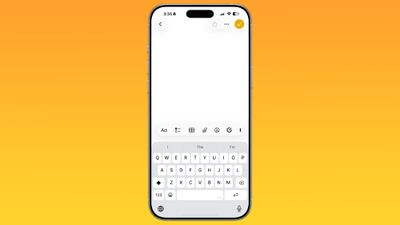
The Notes app's toolbar has rounded corners and is more compact with a frosted glass look, and the keyboard also has rounded edges. Buttons at the top are circles or pills, with the Liquid Glass effect.

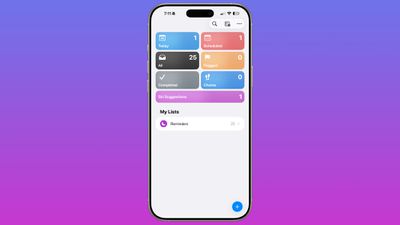
In Reminders, the different inbox sections are full color instead of white, and all of the various buttons are rounder than before with a translucent aesthetic. Interfaces for entering and editing reminders also have the rounded edges that are part of the new design.
ios 26 reminders app

Reminders

The changes in the Reminders app go beyond simple design updates, with Apple introducing some useful new AI features. The new Reminders features require a device that supports Apple Intelligence.

Siri Suggestions

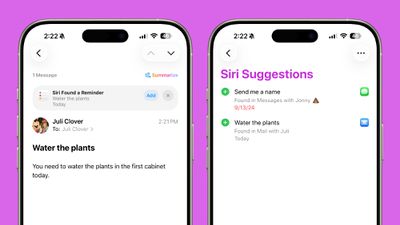
Apple added a Siri Suggestions section to the Reminders app, which will bring up items that you might want to add to your to-do lists that are found in conversations in Mail and Messages. Reminders is able to suggest tasks automatically, taking in information from notes, grocery items in a list, and more.
ios 26 reminders suggestions
You'll also see Reminder suggestions in apps like Mail, and you can tap these to add a reminder without opening the Reminders app.

Suggestions for reminders are contextual and personalized to each user, and are designed to make it easier to create reminders with fewer interactions. Apple says users will see suggestions for tasks, grocery items, and follow-ups based on emails and other text on the iPhone.

Automatic Categorization

The Reminders app is able to categorize related tasks into sections that are grouped together. If you need to pick up several items at the grocery store, for example, the Reminders app can aggregate these in one area.
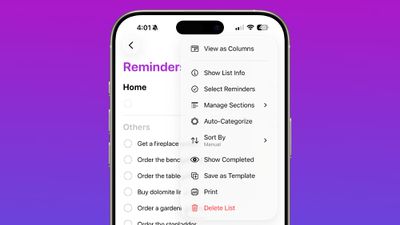
ios 26 reminders app categorize
If you have several work tasks and errands to run, the Reminders app is able to separate them out, so you don't need to spend time manually sorting your lists.

Control Center

There's now a Control Center option for creating a new reminder. You can use it from the Control Center, assign it to the Action Button, or access it from the Lock Screen by assigning it to one of the Lock Screen buttons.
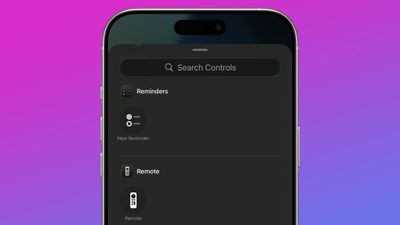
ios 26 reminders app control center

Notes

There are fewer updates in the Notes app in ‌iOS 26‌, but Apple made a couple of changes that will be useful to users.

Math Notes

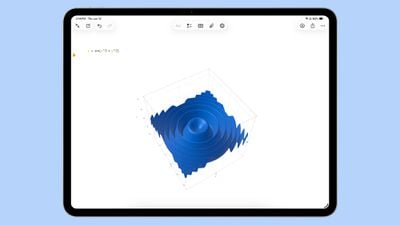
Math Notes now supports creating 3D graphs using three-variable equations. An equation like z=sin(x2 + y2), for example, will create a ripple graph.
ios 26 math notes
Using this feature can be done by typing in an equation and then tapping on one of the variables. From there, choose the Insert 3D graph option. 3D graphs can be enlarged, resized, and moved using tap and drag gestures.

3D graphs are also supported in iPadOS 26, including with handwritten equations.

Scrolling Toolbar

You can now swipe along the toolbar in Notes to see all of the available tool options. Before, you had to tap into a tool section to get to all of the features. Even though swiping is an option to get to more tools, you can still tap to open different submenus for formatting, image generation, lists, tables, and more.
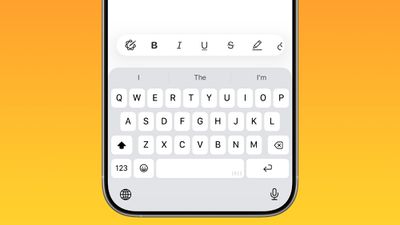
ios 26 notes app nav bar

Markdown

The Notes app supports exporting content in Markdown in ‌iOS 26‌, so you can save notes as Markdown (.md) files that can be imported into third-party apps that support Markdown. Writing in Markdown is not supported in the Notes app.
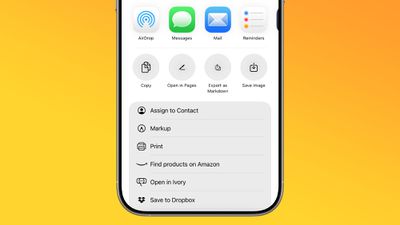
ios 26 notes app markdown

The Folders view of the Notes app now has an always-visible search bar at the bottom rather than a hidden bar that's accessible with a swipe from the top of the app.
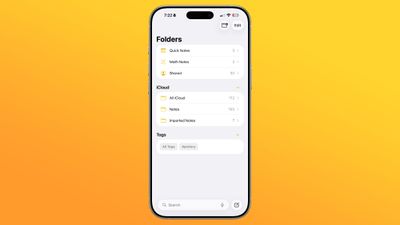
ios 26 notes app main view

Call Recordings

Conversations from the new Phone app on the iPad and the Mac can be saved as audio recordings with transcriptions in the Notes app. This was previously available on the ‌iPhone‌ in iOS 18, but with the Phone app expanding to new devices, the call recording functionality has expanded as well. Transcriptions require ‌Apple Intelligence‌.

Read More

We have an iOS 26 roundup that has more information on all of the new features that are available in ‌iOS 26‌.

Related Roundups: iOS 26, iPadOS 26
Related Forum: iOS 26

Popular Stories

Apple Wallet ID Illinois

Apple Plans to Expand iPhone Driver's Licenses to These 7 U.S. States

Wednesday December 24, 2025 8:40 am PST by
In select U.S. states, residents can add their driver's license or state ID to the Apple Wallet app on the iPhone and Apple Watch, and then use it to display proof of identity or age at select airports and businesses, and in select apps. The feature is currently available in 13 U.S. states and Puerto Rico, and it is expected to launch in at least seven more in the future. To set up the...
iPhone Top Left Hole Punch Face ID Feature Purple

iPhone 18 Pro Launching Next Year With These 12 New Features

Tuesday December 23, 2025 8:36 am PST by
While the iPhone 18 Pro and iPhone 18 Pro Max are not expected to launch for another nine months, there are already plenty of rumors about the devices. Below, we have recapped 12 features rumored for the iPhone 18 Pro models. The same overall design is expected, with 6.3-inch and 6.9-inch display sizes, and a "plateau" housing three rear cameras Under-screen Face ID Front camera in...
iOS 26

iOS 26.2 Adds These 8 New Features to Your iPhone

Monday December 22, 2025 8:47 am PST by
Earlier this month, Apple released iOS 26.2, following more than a month of beta testing. It is a big update, with many new features and changes for iPhones. iOS 26.2 adds a Liquid Glass slider for the Lock Screen's clock, offline lyrics in Apple Music, and more. Below, we have highlighted a total of eight new features. Liquid Glass Slider on Lock Screen A new slider in the Lock...
maxresdefault

Where's the New Apple TV?

Monday December 22, 2025 11:30 am PST by
Apple hasn't updated the Apple TV 4K since 2022, and 2025 was supposed to be the year that we got a refresh. There were rumors suggesting Apple would release the new Apple TV before the end of 2025, but it looks like that's not going to happen now. Subscribe to the MacRumors YouTube channel for more videos. Bloomberg's Mark Gurman said several times across 2024 and 2025 that Apple would...
maxresdefault

10 Mac Apps Worth Trying in 2026

Wednesday December 24, 2025 9:27 am PST by
2026 is almost upon us, and a new year is a good time to try out some new apps. We've rounded up 10 excellent Mac apps that are worth checking out. Subscribe to the MacRumors YouTube channel for more videos. Alt-Tab (Free) - Alt-Tab brings a Windows-style alt + tab thumbnail preview option to the Mac. You can see a full window preview of open apps and app windows. One Thing (Free) -...
Foldable iPhone 2023 Feature Iridescent Search

Samsung Developing 'Wide Fold' With iPhone Fold-Like Design Ahead of Apple's 2026 Launch

Tuesday December 23, 2025 11:55 am PST by
Samsung is working on a new foldable smartphone that's wider and shorter than the models that it's released before, according to Korean news site ETNews. The "Wide Fold" will compete with Apple's iPhone Fold that's set to launch in September 2026. Samsung's existing Galaxy Z Fold7 display is 6.5 inches when closed, and 8 inches when open, with a 21:9 aspect ratio when folded and a 20:18...
iOS 26

iOS 26.3 Brings AirPods-Like Pairing to Third-Party Devices in EU Under DMA

Monday December 22, 2025 3:20 pm PST by
The European Commission today praised the interoperability changes that Apple is introducing in iOS 26.3, once again crediting the Digital Markets Act (DMA) with bringing "new opportunities" to European users and developers. The Digital Markets Act requires Apple to provide third-party accessories with the same capabilities and access to device features that Apple's own products get. In iOS...
iphone fold 3d print

Have a 3D Printer? You Can Make Your Own iPhone Fold Dummy

Tuesday December 23, 2025 1:31 pm PST by
Apple is working on a foldable iPhone that's set to come out in September 2026, and rumors suggest that it will have a display that's around 5.4 inches when closed and 7.6 inches when open. Exact measurements vary based on rumors, but one 3D designer has created a mockup based on what we've heard so far. On MakerWorld, a user named Subsy has uploaded a 1:1 iPhone Fold replica (via Macworld), ...
iPhone Fold Vertical Feature

Why Apple's Foldable iPhone May Be Smaller Than Expected

Tuesday December 23, 2025 5:21 am PST by
Apple's first foldable iPhone, rumored for release next year, may turn out to be smaller than most people imagine, if a recent report is anything to go by. According to The Information, the outer display on the book-style device will measure just 5.3 inches – that's smaller than the 5.4-inch screen on the ‌iPhone‌ mini, a line Apple discontinued in 2022 due to poor sales. The report has led ...

Top Rated Comments

TomaxXamot Avatar
24 weeks ago
I use the Notes app a lot and there are some bugs that have persisted for me for years that I wish they’d fix. Sometimes the toolbar is missing until I force quit. Find In Note is often unusable in my longer notes, like my gym log. I’ll search for a keyword and I’ll have to scroll and scroll to find the highlighted word. That ones drives me crazy. Sometimes the cursor is flashing between lines and then when I type it jumps up or down the page to some random place. Tapping on a longer note often has a delay before anything happens. I’m on an iPhone 15 Pro and it should be able to handle a text based app with ease.
Score: 8 Votes (Like | Disagree)
chriscl Avatar
24 weeks ago
Come on, you've missed maybe the biggest new thing in Notes - synchronisation with the Apple Watch, finally, after nearly ten years.

You can now sync and view your Notes on Apple Watch directly, which was never supported before, For me, this is a real game changer for Notes, and will ensure that I use it more in the future, because my needed Notes will always be on my Watch, too.
Score: 5 Votes (Like | Disagree)
mazz0 Avatar
24 weeks ago
All this graphing stuff seems really niche for what’s otherwise a very generalist app.
Score: 3 Votes (Like | Disagree)
ThrowerGB Avatar
24 weeks ago

I use the Notes app a lot and there are some bugs that have persisted for me for years that I wish they’d fix.

Long standing bugs will be brushed aside, and a lot will be about marketing focus.

Many of the changes to the apps are visual, but there is some useful new functionality
The first few comments address the problem Apple has with not fixing "persisting" and "Long standing bugs". @TomaxXamot does a good job of highlighting some really annoying bugs in Notes, and @Macbookey highlights some negative consequences of Apple's introduction of naming it's various OS's by year.
I wish MacRumors would pay as much attention as its readers. The topic comes up more and more in recent years. Instead, they ignore it completely as in this MacRumor.
Score: 2 Votes (Like | Disagree)
Will Co Avatar
24 weeks ago
So for the reminders app pretty much a complete nothing burger. I don’t use the AI/Siri stuff because it’s currently garbage. There are so many other simple little changes that would dramatically improve useability but what we’re getting is mostly just prettification. Not quite lipstick on a pig - Reminders is a useful app - but it could be so much better. I know there are paid options elsewhere but I think a good reminder/todo facility should be a built-in, and better than it currently is.
Score: 2 Votes (Like | Disagree)
FranApple Avatar
24 weeks ago
For those of you who use the Notes app, the lack of version history doesn’t bug you at all? That’s the single feature that I’m waiting for to jump back to the Notes app from a third party app.
Score: 2 Votes (Like | Disagree)




















