The Phone app doesn't often get a lot of attention with iOS updates, but that's changing in iOS 26. There are multiple new features to prevent unwanted calls and to save you time.

Unified Design
The Phone app has a new unified design, but there is an option to use the original iOS 18 layout as well. The unified design puts recent calls, missed calls, and voicemails on a single screen.

Favorite contacts remain at the top of the interface, and there's still a tab for swapping over to contacts and the keypad. You can turn the unified view on or off by tapping on the icon with three lines in the upper right corner of the display.
Call Screening
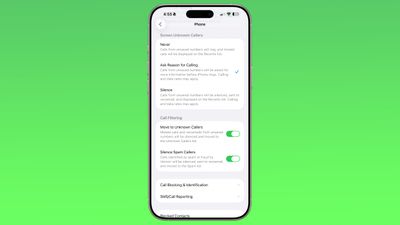
Apple has expanded call screening functionality in iOS 26. There is an option to ask unknown callers (aka people who you don't have saved in your Contacts list) for their name and reason for calling. When enabled, this is an automated process.
The iPhone intercepts an incoming call, and requests the person's name and a short reason for calling. The information is transcribed to text and relayed to you, and you can decide whether to ask for more information, accept the call, or decline the call.
The person on the other end of the call receives an automated response similar to a voicemail asking for more information, and they are placed on hold while you make a decision on accepting or declining the call.
To use this feature, toggle on "Ask Reason for Calling" in the Phone section of the Settings app.
Silence Unknown Callers
Rather than asking for more information from unknown callers, there is still a silence unknown caller option that can be turned on instead. As in iOS 18, toggling this on silences calls from unsaved numbers, sending them to voicemail automatically. Calls that are silenced will show up on the Recents list, and you will also see the voicemail for information about why someone was calling.
If you don't want to use silence unknown callers or the ask reason for calling feature, you can set the Screen Unknown Callers option to "Never." With this setting, calls from unsaved numbers ring as normal, and missed calls are shown on the Recents list.
Call Filtering
In addition to improved call screening, iOS 26 has new call filtering features. There is an option to move missed calls and voicemails from unsaved numbers to a dedicated Unknown Callers list, hiding them from the main view.
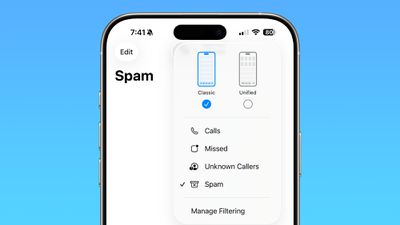
There's also a toggle to automatically silence calls that are marked as spam by a carrier. If you have Verizon, for example, Verizon automatically marks some numbers as spam, and the iPhone can automatically send those calls to voicemail and move the calls to the Spam list. This setting will vary by carrier.
With these options turned on, you can tap on the icon in the upper right of the phone app to see calls that have been moved to the Unknown Caller section or marked as spam.
Spam Voicemails
When you tap into a voicemail from an unknown number, there's now a "Report Spam" button. Tapping on it sends the voicemail to Apple, and you can either report the message as spam and keep it, or report it and delete it. Deleting a voicemail from an unknown number also brings up the option to report it as spam, and there is an option to report spam right when listening to an incoming voicemail as well.
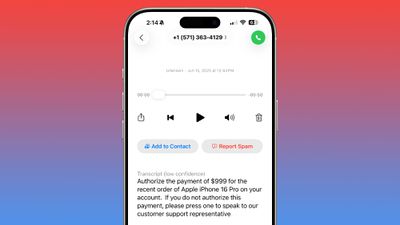
Reporting a voicemail as spam does not block the caller, and that needs to be done with a separate step. Tap on the "i" button, scroll down on the contact card, and tap on Block Contact to block a spammer.
Hold Assist
If you make a call and are placed on hold, there's a feature in iOS 26 that will wait for you so you can do other things. It listens for hold music playing, and then alerts you when a person comes on the line so you can pick up the call.
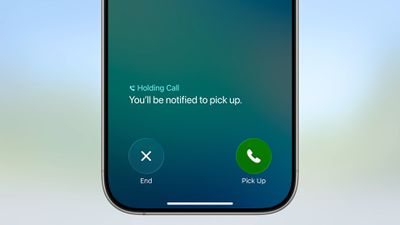
You can turn on Hold Assist on any call by placing the call, then tapping on the "..." button once the call has connected. Your phone will ring and you will be alerted to pick up when a person is on the line. If the iPhone detects hold music, it may also automatically prompt you to turn on Hold Assist.
Since the feature works by detecting hold music, it can be imperfect when a number has a voice-based automation reminding you to stay on the line, or if there's music with distinct lyrics. You will see a transcript of any spoken words, so you can determine when a person is actually on the line.
Live Translation
Live Translation is a feature that can translate incoming phone calls from one language to another. When a call is in progress, tap on the "..." button and then tap on Live Translation to use the feature.
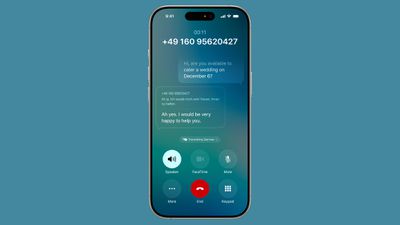
You can then select the language that you want to translate from (the language spoken by the person you're talking to) and the language that you want to translate to (your language). As of now, Live Translation for the Phone app supports English, French, German, Portuguese, and Spanish.
When a translation is in progress, you'll see a small notice at the bottom of the phone app that says "Translating [Language]" and there will be a live transcript of the call. An AI voiceover will audibly translate what's said from one language to another, with a slight delay while this is happening.
Live Translation works on the iPhone to translate what you're hearing and what you're saying, so the person on the other end does not need to have an iPhone or even a smartphone at all.
Call History
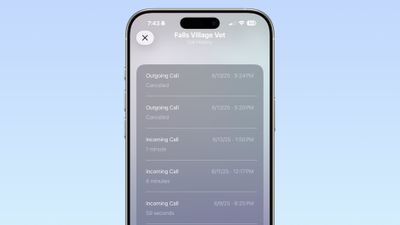
There is an extended call history available for each of your contacts in iOS 26. In the Phone app, tap on the "i" next to any name or number, and then tap on the "Call History" option. From there, you can see every time you've spoken with that person, dating years back.
Type to Siri
While on a phone call, you can now use the Type to Siri feature to ask Siri questions or to complete a task.
Screen Sharing and SharePlay
Apple added SharePlay and screen sharing support to the Phone app in iOS 26. When on a call with a person that has a compatible device, tap on the "..." button and then choose either SharePlay or Screen Sharing to access the features.
When using SharePlay, you're able to select an app to use with the feature, such as Apple TV or Apple Music.
With screen sharing, you can ask for remote access to a device, which is useful for helping troubleshoot tech problems.
Both participants need to be using a device with iOS 26, iPadOS 26, or macOS Tahoe to use screen sharing and SharePlay with the Phone app.
eSIM Improvements
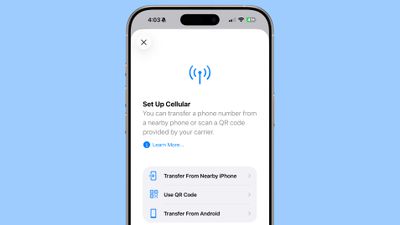
If you need to transfer an eSIM to Android or an Android eSIM to an iPhone, the process has been streamlined in iOS 26. In the iPhone's cellular settings, there is a "Transfer to Android" option for an existing SIM, as well as an option to "Transfer From Android" when adding a new SIM to an iPhone.
Phone App for iPad and Mac
The Phone app has expanded to the iPad in iPadOS 26 and the Mac in macOS Tahoe. All of the features like Call Screening, Hold Assist, and Live Translation also work on the iPad and the Mac.
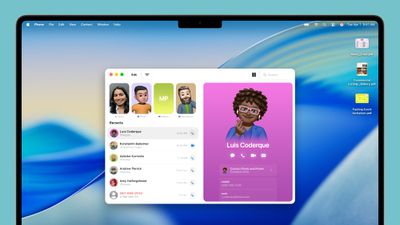
To use the Phone app on iPad or Mac, you do need an iPhone on the same Apple Account, and you need to activate Wi-Fi Calling so that calls can be accepted on other devices.
Read More
More on the features that are available in iOS 26 can be found in our iOS 26 roundup.