Here's What's New With Visual Intelligence in iOS 26

Visual Intelligence, an Apple Intelligence feature that Apple introduced last year, has some new capabilities in iOS 26 that make it more useful and better able to compete with the functionality available through some Android smartphones.
visual lookup ios 26

Onscreen Awareness

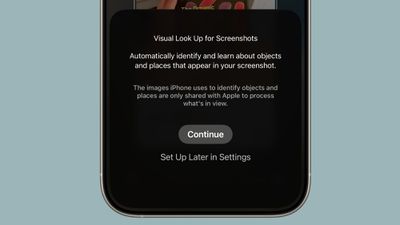
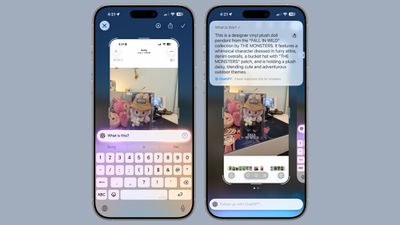
In iOS 18, ‌Visual Intelligence‌ only works with the camera, but in ‌iOS 26‌, it also works with what's on your device. You can capture a screenshot of what's on your screen and then use ‌Visual Intelligence‌ on it to identify what you're looking at, find images, and get more information through ChatGPT.

How to Get Use Onscreen Awareness for Visual Intelligence

‌Visual Intelligence‌ for screenshots works about the same as ‌Visual Intelligence‌ with the camera app, but it's located in the screenshot interface. Take a screenshot (hold down the volume up button and the side button), and then tap out of the Markup interface if it's showing.

To get out of Markup (which is the default view), tap on the little pen icon at the top of the display. From there, you should see the ‌Visual Intelligence‌ options.

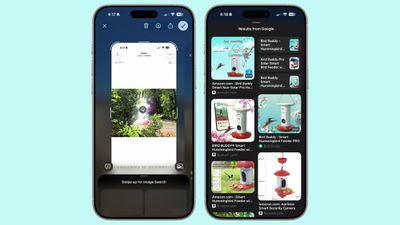
With Highlight to Search for ‌Visual Intelligence‌ onscreen content awareness, you can use a finger to draw over the object in the screenshot that you want to look up. It's similar to Android's Circle to Search feature.
visual intelligence screenshot ios 26
Highlight to Search lets you conduct an image search for a specific object in a screenshot, even if there are multiple things in the picture. It uses Google Image search by default, but Apple showed off the feature working with other apps like Etsy during its keynote event. Apps will likely need to add support for the feature.

In some cases, ‌Visual Intelligence‌ will identify individual objects in an image on its own, and you can tap without needing to use Highlight to Search. This is similar to the object identification feature in the Photos app, but it still leads to an image search.

If you don't need to isolate one object in your screenshot, you can simply tap on the Ask button to ask questions about what you're seeing. Questions will be relayed to ChatGPT, and ChatGPT will provide the information. The Search button queries Google Search for more information.
visual intelligence ios 26 screenshots
As with the standard Visual Search, if your screenshot includes dates, times, and related information for an event, it can be added directly to your calendar.

New Object Identification

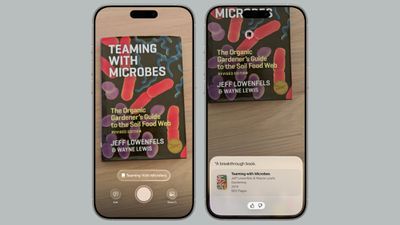
Apple didn't mention it, but ‌Visual Intelligence‌ adds support for quick identification of new types of objects. It can now identify art, books, landmarks, natural landmarks, and sculptures, in addition to the animals and plants it was able to provide information on before.
visual lookup books ios 26
If you use ‌Visual Intelligence‌ on an object that it is able to recognize, you'll see a small glowing icon pop up. Tapping on it reveals information about what's in view. What's neat about this aspect of ‌Visual Intelligence‌ is that it works with the live camera view or with a snapped photo.

For standard Ask and Search requests using ‌Visual Intelligence‌, you have to take a photo so that it can be relayed to sources like ChatGPT or Google Image Search. Art, books, landmarks, natural landmarks, sculptures, plants, and animals can be identified on-device without contacting another service.

Compatibility

‌Visual Intelligence‌ is limited to devices that support ‌Apple Intelligence‌, which includes the iPhone 15 Pro models and the iPhone 16 models. It is activated by a long press on the Camera Control button on devices that have Camera Control, or using the Action Button or a Control Center toggle.

Launch Date

‌iOS 26‌ is in beta testing right now, but it will launch to the public in September.

Related Roundups: iOS 26, iPadOS 26
Related Forum: iOS 26

Popular Stories

Apple Wallet ID Illinois

Apple Plans to Expand iPhone Driver's Licenses to These 7 U.S. States

Wednesday December 24, 2025 8:40 am PST by
In select U.S. states, residents can add their driver's license or state ID to the Apple Wallet app on the iPhone and Apple Watch, and then use it to display proof of identity or age at select airports and businesses, and in select apps. The feature is currently available in 13 U.S. states and Puerto Rico, and it is expected to launch in at least seven more in the future. To set up the...
iPhone Top Left Hole Punch Face ID Feature Purple

iPhone 18 Pro Launching Next Year With These 12 New Features

Tuesday December 23, 2025 8:36 am PST by
While the iPhone 18 Pro and iPhone 18 Pro Max are not expected to launch for another nine months, there are already plenty of rumors about the devices. Below, we have recapped 12 features rumored for the iPhone 18 Pro models. The same overall design is expected, with 6.3-inch and 6.9-inch display sizes, and a "plateau" housing three rear cameras Under-screen Face ID Front camera in...
iOS 26

iOS 26.2 Adds These 8 New Features to Your iPhone

Monday December 22, 2025 8:47 am PST by
Earlier this month, Apple released iOS 26.2, following more than a month of beta testing. It is a big update, with many new features and changes for iPhones. iOS 26.2 adds a Liquid Glass slider for the Lock Screen's clock, offline lyrics in Apple Music, and more. Below, we have highlighted a total of eight new features. Liquid Glass Slider on Lock Screen A new slider in the Lock...
maxresdefault

Where's the New Apple TV?

Monday December 22, 2025 11:30 am PST by
Apple hasn't updated the Apple TV 4K since 2022, and 2025 was supposed to be the year that we got a refresh. There were rumors suggesting Apple would release the new Apple TV before the end of 2025, but it looks like that's not going to happen now. Subscribe to the MacRumors YouTube channel for more videos. Bloomberg's Mark Gurman said several times across 2024 and 2025 that Apple would...
maxresdefault

10 Mac Apps Worth Trying in 2026

Wednesday December 24, 2025 9:27 am PST by
2026 is almost upon us, and a new year is a good time to try out some new apps. We've rounded up 10 excellent Mac apps that are worth checking out. Subscribe to the MacRumors YouTube channel for more videos. Alt-Tab (Free) - Alt-Tab brings a Windows-style alt + tab thumbnail preview option to the Mac. You can see a full window preview of open apps and app windows. One Thing (Free) -...
Foldable iPhone 2023 Feature Iridescent Search

Samsung Developing 'Wide Fold' With iPhone Fold-Like Design Ahead of Apple's 2026 Launch

Tuesday December 23, 2025 11:55 am PST by
Samsung is working on a new foldable smartphone that's wider and shorter than the models that it's released before, according to Korean news site ETNews. The "Wide Fold" will compete with Apple's iPhone Fold that's set to launch in September 2026. Samsung's existing Galaxy Z Fold7 display is 6.5 inches when closed, and 8 inches when open, with a 21:9 aspect ratio when folded and a 20:18...
iOS 26

iOS 26.3 Brings AirPods-Like Pairing to Third-Party Devices in EU Under DMA

Monday December 22, 2025 3:20 pm PST by
The European Commission today praised the interoperability changes that Apple is introducing in iOS 26.3, once again crediting the Digital Markets Act (DMA) with bringing "new opportunities" to European users and developers. The Digital Markets Act requires Apple to provide third-party accessories with the same capabilities and access to device features that Apple's own products get. In iOS...
iphone fold 3d print

Have a 3D Printer? You Can Make Your Own iPhone Fold Dummy

Tuesday December 23, 2025 1:31 pm PST by
Apple is working on a foldable iPhone that's set to come out in September 2026, and rumors suggest that it will have a display that's around 5.4 inches when closed and 7.6 inches when open. Exact measurements vary based on rumors, but one 3D designer has created a mockup based on what we've heard so far. On MakerWorld, a user named Subsy has uploaded a 1:1 iPhone Fold replica (via Macworld), ...
iPhone SE Cosmopolitan Clean

Apple Discontinued These 25 Products This Year

Wednesday December 24, 2025 7:24 am PST by
With the end of 2025 near, the time has come to look back at the devices and accessories that Apple discontinued throughout the year. Most of the products that were discontinued this year were simply replaced by a new model with an updated chip. However, the iPhone SE line was entirely discontinued when the iPhone 16e launched, and the iPhone Plus line is being phased out. Below, we have...

Top Rated Comments

Sheepish-Lord Avatar
7 months ago

More like Onscreenshot Awareness.
Yeah, really bad that you have to litter your device with screenshots when you should be able to hold down on a picture or circle something like the photos clean up tool. When they demoed it at wwdc, I knew they missed the mark…too many extra steps.
Score: 9 Votes (Like | Disagree)
klasma Avatar
7 months ago

Onscreen Awareness
More like Onscreenshot Awareness.
Score: 8 Votes (Like | Disagree)
Love-hate ? relationship Avatar
7 months ago
the fact that you have to screenshot (with the screenshot sound and everything) is the dumbest design i never thought I'd see
Score: 8 Votes (Like | Disagree)
klasma Avatar
7 months ago

I don’t mean to sound ungrateful after all the stuff that’s already coming to my iPad this fall but it sure would be nice if this wasn’t fenced off by product differentiation.
In particular since Apple Intelligence is a mix of on-device and online functions, it would really make sense to offer a cloud fallback for devices that lack the resources to do it on-device. They can still upsell to newer hardware for on-device privacy, offline capability and lower latency.
Score: 7 Votes (Like | Disagree)
It’s always something Avatar
7 months ago

My 16 pro max can’t run last years AI features without constantly crashing safari due to memory issues. So there’s no way older phones have a chance
The fine article says that the new Visual Intelligence features in iOS 26 offload at least some of the work to ChatGPT. There’s no reason they couldn’t offload *all* the work. I can use Google’s Gemini for the same stuff today on my iPad, so there’s no reason Apple can’t do it too.
Score: 5 Votes (Like | Disagree)
ipedro Avatar
7 months ago
Discoverability: 0.00pts

Hopefully this also works if you ask Siri about what's on your screen. "Hey Siri, tell me about this bird feeder". Siri assumes it's about something you're looking at on screen (and if not, it asks you to point your camera at it) and runs through the actions outlined above: screenshot, circling, Ask button.
Score: 4 Votes (Like | Disagree)