

macOS Sonoma Features You Should Check Out First

After three months of beta testing, macOS Sonoma is finally available to everyone. macOS updates often don't get as much attention as iOS updates during the beta testing process, but there are plenty of notable reasons to install the new software.


Aerial Screensavers

If you're a fan of the aerial screensavers on the Apple TV, you're in luck because Apple brought them to the Mac in macOS Sonoma.
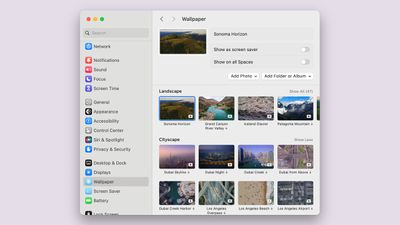
macos sonoma new aerial wallpaper
There are more than 100 videos to choose from across categories that include Landscape, Cityscape, Underwater, and Earth. Most of these are from the ‌Apple TV‌, but there are some from the Sonoma region of California that are new this year. The aerial screensavers accompany matching wallpapers that animate when you wake your display for a seamless transition from screensaver to wallpaper.

Interactive Desktop Widgets

Widgets aren't constrained to the Today Center in macOS Sonoma, and the focus on widgets is perhaps the most notable change in the update. ‌Widgets‌ can be added directly to the desktop, and they are interactive, just like widgets on iPhone.
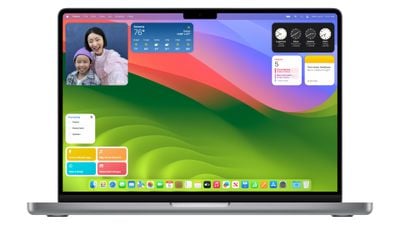
macos sonoma widgets
You can check off Reminders, control smart home products, and interact with third-party apps from your Mac's desktop without the need to open up the full app. ‌Widgets‌ blend in to the background when not in use, and through Continuity, there's also an option to see and use your ‌iPhone‌ widgets on your desktop without having to install the corresponding Mac app.

Videoconferencing

Apple added a Presenter Overlay that is designed to let you share your screen in FaceTime or third-party video apps like Zoom without blocking your face. The feature basically shows you over your background, so you can present and remain on-screen.

For fun, there are also new 3D reactions that pop up with hand gestures during ‌FaceTime‌ calls and calls in apps like Zoom. Reactions include Love (hearts), Like (thumbs up), Dislike (thumbs down), Balloons, Confetti, Lasers, Fireworks, and Thunderstorm. The gestures that trigger the effect are listed below.

  • Heart - Heart emoji
  • Thumbs up - Thumbs up emoji
  • Two thumbs up - Fireworks
  • Single thumbs down - Thumbs down emoji
  • Two thumbs down - Storm
  • Peace sign with one hand - Balloons
  • Peace sign with two hands - Confetti
  • "Rock on" sign with two hands - Lasers

You will need an Apple silicon Mac to see the reactions, and they can pop up in any app that uses the camera.

Safari Profiles

Safari supports separate profiles, so you can divide work browsing from personal browsing. Profiles have distinct browser history, extensions, Tab Groups, cookies, and favorites.
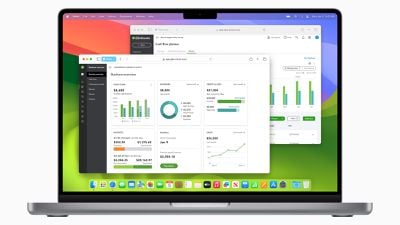
macOS Sonoma Safari Profiles
You can create different browsing profiles for any purpose, so it serves as an extension of the Tab Groups feature that came out with macOS Ventura. You can do Work and Personal, separate out hobbies, plan trips with a separate profile, and more.

Web Apps

A website like MacRumors.com can now be added to the macOS dock as a web app, so you can get to your favorite websites right from the dock. Web apps saved to the dock feature a simplified toolbar and support notifications.
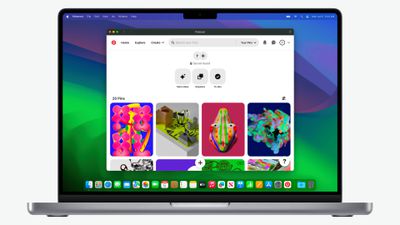
macOS Sonoma Web App 1

Game Mode

If you have an Apple silicon Mac you game on, you can turn on Game Mode, which prioritizes CPU and GPU performance for gaming purposes. Game Mode cuts down on audio latency for AirPods and input latency for select game controllers, speeding up your response times.

macos sonoma presenter overlay

Compatibility

Compared to macOS Ventura, macOS Sonoma drops support for the 2017 MacBook Pro, the 2017 iMac, and the 2017 12-inch MacBook. It can run on the Macs below:

  • iMac - 2019 and later
  • iMac Pro - 2017 and later
  • Mac mini - 2018 and later
  • MacBook Air - 2018 and later
  • MacBook Pro - 2018 and later
  • Mac Pro - 2019 and later
  • Mac Studio - 2022 and later

Read More

More on the new features that are available in macOS Sonoma can be found in our macOS Sonoma roundup.


Related Forum: macOS Sonoma

Popular Stories

Apple Wallet ID Illinois

Apple Plans to Expand iPhone Driver's Licenses to These 7 U.S. States

Wednesday December 24, 2025 8:40 am PST by
In select U.S. states, residents can add their driver's license or state ID to the Apple Wallet app on the iPhone and Apple Watch, and then use it to display proof of identity or age at select airports and businesses, and in select apps. The feature is currently available in 13 U.S. states and Puerto Rico, and it is expected to launch in at least seven more in the future. To set up the...
iPhone Top Left Hole Punch Face ID Feature Purple

iPhone 18 Pro Launching Next Year With These 12 New Features

Tuesday December 23, 2025 8:36 am PST by
While the iPhone 18 Pro and iPhone 18 Pro Max are not expected to launch for another nine months, there are already plenty of rumors about the devices. Below, we have recapped 12 features rumored for the iPhone 18 Pro models. The same overall design is expected, with 6.3-inch and 6.9-inch display sizes, and a "plateau" housing three rear cameras Under-screen Face ID Front camera in...
maxresdefault

Where's the New Apple TV?

Monday December 22, 2025 11:30 am PST by
Apple hasn't updated the Apple TV 4K since 2022, and 2025 was supposed to be the year that we got a refresh. There were rumors suggesting Apple would release the new Apple TV before the end of 2025, but it looks like that's not going to happen now. Subscribe to the MacRumors YouTube channel for more videos. Bloomberg's Mark Gurman said several times across 2024 and 2025 that Apple would...
iOS 26

iOS 26.2 Adds These 8 New Features to Your iPhone

Monday December 22, 2025 8:47 am PST by
Earlier this month, Apple released iOS 26.2, following more than a month of beta testing. It is a big update, with many new features and changes for iPhones. iOS 26.2 adds a Liquid Glass slider for the Lock Screen's clock, offline lyrics in Apple Music, and more. Below, we have highlighted a total of eight new features. Liquid Glass Slider on Lock Screen A new slider in the Lock...
maxresdefault

10 Mac Apps Worth Trying in 2026

Wednesday December 24, 2025 9:27 am PST by
2026 is almost upon us, and a new year is a good time to try out some new apps. We've rounded up 10 excellent Mac apps that are worth checking out. Subscribe to the MacRumors YouTube channel for more videos. Alt-Tab (Free) - Alt-Tab brings a Windows-style alt + tab thumbnail preview option to the Mac. You can see a full window preview of open apps and app windows. One Thing (Free) -...
Foldable iPhone 2023 Feature Iridescent Search

Samsung Developing 'Wide Fold' With iPhone Fold-Like Design Ahead of Apple's 2026 Launch

Tuesday December 23, 2025 11:55 am PST by
Samsung is working on a new foldable smartphone that's wider and shorter than the models that it's released before, according to Korean news site ETNews. The "Wide Fold" will compete with Apple's iPhone Fold that's set to launch in September 2026. Samsung's existing Galaxy Z Fold7 display is 6.5 inches when closed, and 8 inches when open, with a 21:9 aspect ratio when folded and a 20:18...
iOS 26

iOS 26.3 Brings AirPods-Like Pairing to Third-Party Devices in EU Under DMA

Monday December 22, 2025 3:20 pm PST by
The European Commission today praised the interoperability changes that Apple is introducing in iOS 26.3, once again crediting the Digital Markets Act (DMA) with bringing "new opportunities" to European users and developers. The Digital Markets Act requires Apple to provide third-party accessories with the same capabilities and access to device features that Apple's own products get. In iOS...
iPhone Fold Vertical Feature

Why Apple's Foldable iPhone May Be Smaller Than Expected

Tuesday December 23, 2025 5:21 am PST by
Apple's first foldable iPhone, rumored for release next year, may turn out to be smaller than most people imagine, if a recent report is anything to go by. According to The Information, the outer display on the book-style device will measure just 5.3 inches – that's smaller than the 5.4-inch screen on the ‌iPhone‌ mini, a line Apple discontinued in 2022 due to poor sales. The report has led ...
iphone fold 3d print

Have a 3D Printer? You Can Make Your Own iPhone Fold Dummy

Tuesday December 23, 2025 1:31 pm PST by
Apple is working on a foldable iPhone that's set to come out in September 2026, and rumors suggest that it will have a display that's around 5.4 inches when closed and 7.6 inches when open. Exact measurements vary based on rumors, but one 3D designer has created a mockup based on what we've heard so far. On MakerWorld, a user named Subsy has uploaded a 1:1 iPhone Fold replica (via Macworld), ...

Top Rated Comments

tmmacops Avatar
30 months ago
Not to be a jerk, but I find desktop widgets to be a waste. I have virtual desktops and most have a full screen of apps. I can’t see any of the widgets so a bit of a waste.

It’s an ok update, but not really seeing much. Couldn’t care less about screensavers. How about improving Mail, Calendar, and some of the other built in stuff?
Score: 36 Votes (Like | Disagree)
erikkfi Avatar
30 months ago
Widgets were better when they had their own Space (as part of Dashboard). I don't understand why I'd want a bunch of attention-grabbing widgets on my desktop. Am I misunderstanding how this works?
Score: 27 Votes (Like | Disagree)
Lynxpoint Avatar
30 months ago
I will likely update at some point, but not for any of these features.
1. I don't use screensavers
2. I don't like desktop widgets (don't use on iPad or iPhone)
3. Don't do screen sharing
4. Tried doing third party web apps in dock and did not like the clutter effect on dock, so ditched it
5. Safari profiles might be useful, although I currently accomplish the equivilant of this through the use of different browsers.
Score: 25 Votes (Like | Disagree)
BeatCrazy Avatar
30 months ago
Call me a simpleton, the aerial screensavers are my favorite feature of Sonoma.

The last few macOS releases were very limited in background/screensaver options.
Score: 22 Votes (Like | Disagree)
jchap Avatar
30 months ago
Just installed macOS Sonoma 14.0 on a MacBook Pro 16-inch 2019 (Core i9, 64 GB RAM) this morning.

Interesting to find this setting in System Settings, where you can now just click on the desktop to temporarily show the desktop and hide everything else!


Attachment Image
Score: 20 Votes (Like | Disagree)
jayducharme Avatar
30 months ago

If I add the stock widget to my desktop, it doesn't display my stocks. If I click on it, it says open on iPhone to continue? What am I missing?
A bug-free OS?
Score: 11 Votes (Like | Disagree)


















