

Apple's new Liquid Glass design has received most of the attention in news about macOS Tahoe, but there are quite a few new features that make the Mac better than ever, including some that are not super obvious. We've rounded up 10 useful macOS Tahoe features that you should know about.
Customize the Menu Bar
With macOS Tahoe, you have more control over the layout of your menu bar. You can rearrange the menu bar, remove things you're not using, and add Control Center widgets for quick access to your most used settings.

To customize your menu bar, go to System Settings > Menu Bar > Menu Bar Controls, or open Control Center, click on Edit Controls, and click on the "+" in the menu bar. You can uncheck boxes to remove items, and use the Add Controls option to add new options from both first and third-party apps.
Customize Your Mac's Lock Screen Font
macOS Tahoe lets you customize the clock that appears on your Mac's Lock Screen. You can't adjust size like you can in iOS 26, but you can change the font style and thickness.
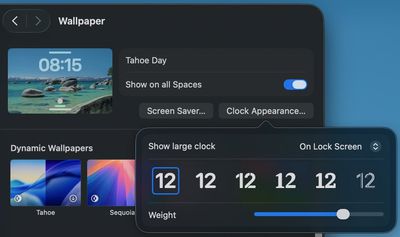
To adjust your clock, go to System Settings > Wallpaper > Clock Appearance. You can choose from six different font styles, and adjust the weight with a slider. You can opt to have the clock show on your Lock Screen or on the Lock Screen and Screen Saver.
Live Activities
If you have an iPhone and a Mac, Live Activities can now sync between your devices. When you have an active Live Activity on your iPhone, like an in-progress flight, an upcoming Uber ride, or a live sports game, it will automatically show up in your Mac's menu bar through the iPhone Mirroring feature.
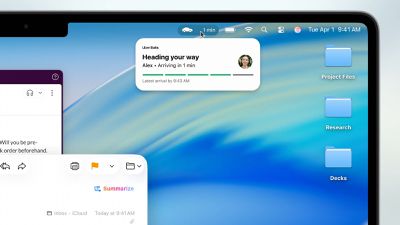
Live Activities sync automatically with iPhone Mirroring enabled, and you can turn it on with the iPhone Mirroring Mac. You can click on any Live Activity to open the associated iPhone app through iPhone Mirroring.
See Your Clipboard History
Spotlight now incorporates clipboard history, tracking what you copy and paste. It's erased every eight hours so nothing is saved longterm, but it's useful if you need to find something you copied earlier in the day.
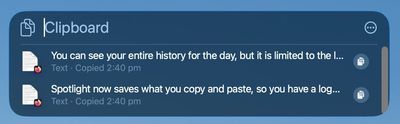
To get to your clipboard, press Command + Spacebar to open Spotlight, then press Command + 4 to swap over to the clipboard view. Click on any item to copy it.
Clipboard history is off by default, so you do need to turn it on in the Spotlight section of System Settings before you can use it.
Streamline Spotlight Search Results
When you're using Spotlight to search for something in an app, macOS Tahoe lets you add filters directly in the search bar. Open up Spotlight, type in a search term, and then click on a filter at the top to narrow down the results. If you want to find PDFs you've been sent in the Mail app, for example, you can type in PDF and then click on Mail.
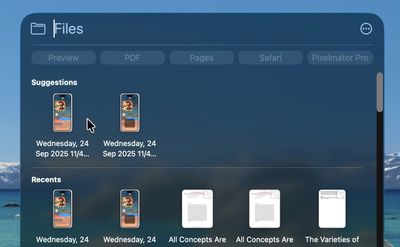
A quicker way to search is to type in the app name, like Mail, press the tab key, and then type in your second filter term like PDF.
Search Websites Faster
You can use Spotlight to perform searches on websites without having to open up Safari and navigate to the site first. Just type a website name like Etsy or Amazon, press Tab, and type what you want to search for.
Search Your Tabs
When you search in Spotlight, the results include the Safari tabs that you have open. If you tend to have dozens of tabs open at once, it can be a good way to find the specific tab you're looking for rather than clicking through them one-by-one. Open tabs show up at the top of the list when you enter a relevant search term.
Use Quick Keys
Quick Keys are shortcuts that let you perform actions in Spotlight using just a few characters. With a Quick Key, you can type in a couple of letters to do a task that you repeat often, such as sending someone a message or opening up an app.

To use it, open up Spotlight by pressing Command + Spacebar, then press Command + 3 to get to Actions. Type in the action that you want, like Open ChatGPT, and then when it appears, click on the Add Quick Key option.
From there, you can type between 1 and 12 letters as your shortcut, such as "gpt." The next time you want to execute that action, just type the Quick Key phrase.
Create Automations
macOS Tahoe has iOS-style Shortcut automations that can run automatically based on time, system events, or other triggers, which is functionality that was not previously available.
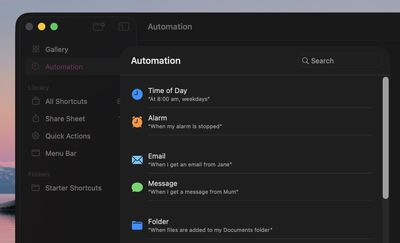
Open the Shortcuts app, click on the Automation option in the side bar, and then click on the "+" button to create an automation. Triggers include time of day, when an app opens, when a display or accessory is connected, when a Focus mode activates, when the battery gets to a certain level, when you save a file to a specific folder, and more.
Safari Picture in Picture
Picture-in-picture has been available in Safari for several years, but macOS Tahoe brings easier activation, new controls, and customization options.
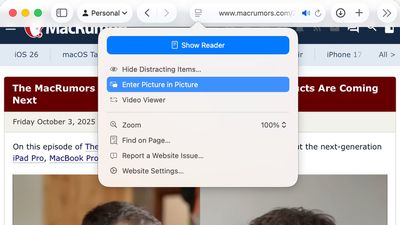
In an article where there's a video, click on the Page Menu icon in the left side of the URL bar to enter picture-in-picture mode. You can now access playback controls for skipping forward and backward, and you can skip ads directly from the picture-in-picture window.
See Your Spotlight History
You can see your past Spotlight searches and actions in macOS Tahoe, which makes it easy to get back to something that you did before.

With Spotlight open, press on the up arrow to scroll through your past queries.
Gaming Low Power Mode
macOS Tahoe updates Low Power Mode so that it's optimized for gaming, giving you a way to extend your gameplay sessions. You can set Low Power Mode to turn on automatically when your Mac is not plugged in, or let your Mac manage its power intelligently.
Whenever Low Power Mode is activated, it won't impact gameplay by lowering game performance.
Game Overlay
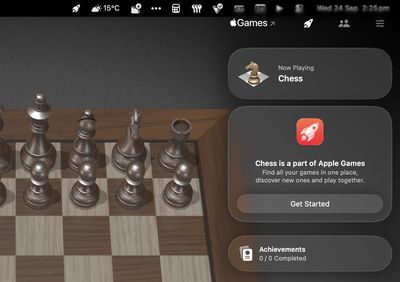
When you're playing a game in macOS Tahoe, you can tap Command + ESC to bring up a new Game Overlay. From the Game Overlay, you can view achievements and leaderboards, connect with friends, and adjust settings like brightness and volume.
macOS Tahoe packs these useful features alongside its eye-catching visual redesign. Whether you're customizing your workspace, streamlining your workflow with Quick Keys, or automating repetitive tasks, these features can make your Mac experience significantly more productive. Take some time to explore these capabilities--you might find your new favorite Mac feature hiding in plain sight.
Read More
For more on what's new in macOS Tahoe, check out our dedicated roundup.

























