

Vision Pro Not Fitting Well? Here Are Apple's Tips for Improving It

Fit is the most important aspect of the Vision Pro, because if it's not on your head in the right way, it will feel heavy and uncomfortable, plus the displays might look blurry. Apple today published several support documents on getting a good fit with the Vision Pro and what to do if you have light leakage, eye setup issues, and other problems.
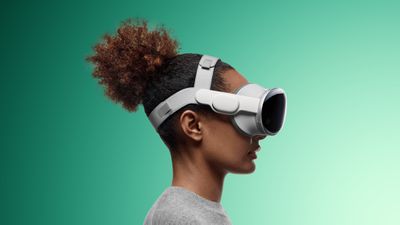
Apple Vision Pro Dual Loop Band Teal Feature 2

Selecting a Band

There are two bands for the Vision Pro, the Solo Knit Band and the Dual Loop Band. With either band, the Vision Pro should feel balanced across the cheeks and forehead, and it should be snug but not too tight. A head band that is too tight can cause skin sensitivity, general discomfort, or marks and indentations on the face, but Apple says that some "temporary, light markings" are expected after general usage.

Users should select the band that feels the most comfortable, and then adjust from there.

Solo Knit Band Adjustments

  • Rotate the Fit Dial counterclockwise and pull the device by the frame away from the face to loosen the band if it's too tight. If it won't loosen enough, you might need a larger size.
  • If the band feels too loose, turn it clockwise to tighten it. If it won't tighten more, a different size might be required.
  • If you feel pressure on your forehead, raise the Solo Knit Band by pulling it up slightly on the back of the head.
  • To fix pressure on the cheeks, lower the Solo Knit Band by pulling it slightly down on the back of the head.
  • To relieve pressure across the bridge of the nose, swap to the Light Cushion marked with a + or use the Dual Loop Band.

Dual Loop Band Adjustments

  • If the head band is too tight, hold the Vision Pro to your face and loosen the upper and lower straps of the Dual Loop Band with the other hand. Pull the device by the frame away from your face.
  • To relieve pressure on the forehead, hold the frame, loosen the lower strap, and tighten the upper strap.
  • To relieve pressure on the cheeks, hold the frame, pull down the lower strap, and loosen the upper strap.
  • To relieve pressure across the bridge of the nose, swap to the Light Cushion marked with a + or use the Solo Knit Band.

Light Seal Cushion Fit

  • If your eyelashes brush against the Vision Pro or you get a notification that your eyes are too close, swap to the Light Cushion marked with a +. If that does not fix it, a different Light Seal size might be required.
  • If your eyes are too far from the displays, swap to the thinner Light Seal Cushion. If that does not work, a different Light Seal Size might be required.

Realign Displays

If you feel pressure on the bridge of your nose and adjustments to the band don't help, Apple suggests using the Realign Displays feature under Settings > Eyes and Hands.

To move the displays slightly away from the nose, press the Top Button to move the displays outward. Press and hold the Digital Crown to move the displays inwards for ideal visual alignment.

Fixing Light Leakage

Apple says to determine whether you're experiencing light leakage, you should use the Vision Pro in both a brightly lit and dimly lit room.

If the Vision Pro experience improves in a dimly lit room, there is a light leakage problem that needs to be addressed by adjusting the fit of the Vision Pro head band or choosing a different Light Seal Cushion.

If the dimly lit room does not improve the experience, Apple says there may be light originating from the display causing some reflections within the optical system.

Some light leakage around the nose is normal.

Tips for Getting a Good Fit

  • Apple suggests that facial jewelry like nose rings or eyebrow rings should be removed before you put on Apple Vision Pro.
  • Uneven facial discomfort, such as pressure on the forehead, cheeks, or nose, is an indication that a different Light Seal or Light Seal Cushion might be required. Other signs include light leakage, eyelashes brushing on the display, and alerts about eye position.
  • Make sure that hair does not get caught in either the band or the cable to avoid tugging.
  • The Vision Pro is not designed to be worn by children under the age of 13 and it may not fit.

Solving Eye Setup Issues

If the Vision Pro eye setup feature cannot be completed, Apple has several solutions.

  • Ensure that the fit is correct and follow the directions of any alerts that are shown on the display.
  • If you're experiencing issues with eye setup, Apple warns that eyelash extensions and items near the eyes like rhinestones or glitter can cause problems.
  • Eyes that are too wet or too dry might impact eye setup.
  • Debris on the Vision Pro display or ZEISS Optical Inserts can cause issues.
  • Cosmetic contact lenses are not compatible with Vision Pro and need to be removed.
  • Hard contact lenses might not work with Vision Pro.
  • Medical conditions like eyelid drooping, changes in eye alignment, or uncontrolled eye movements can make it difficult for the Vision Pro to detect your eyes. There are several Accessibility features that can help.

More Help

Apple says that if the fit tips do not help, that users should visit a local Apple Store to get help. It is important to do this quickly because the exchange process must begin within 14 days of receiving the Vision Pro and accessories.


Related Roundup: Apple Vision Pro
Buyer's Guide: Vision Pro (Buy Now)
Related Forum: Apple Vision Pro

Popular Stories

Apple Wallet ID Illinois

Apple Plans to Expand iPhone Driver's Licenses to These 7 U.S. States

Wednesday December 24, 2025 8:40 am PST by
In select U.S. states, residents can add their driver's license or state ID to the Apple Wallet app on the iPhone and Apple Watch, and then use it to display proof of identity or age at select airports and businesses, and in select apps. The feature is currently available in 13 U.S. states and Puerto Rico, and it is expected to launch in at least seven more in the future. To set up the...
iPhone Top Left Hole Punch Face ID Feature Purple

iPhone 18 Pro Launching Next Year With These 12 New Features

Tuesday December 23, 2025 8:36 am PST by
While the iPhone 18 Pro and iPhone 18 Pro Max are not expected to launch for another nine months, there are already plenty of rumors about the devices. Below, we have recapped 12 features rumored for the iPhone 18 Pro models. The same overall design is expected, with 6.3-inch and 6.9-inch display sizes, and a "plateau" housing three rear cameras Under-screen Face ID Front camera in...
maxresdefault

Where's the New Apple TV?

Monday December 22, 2025 11:30 am PST by
Apple hasn't updated the Apple TV 4K since 2022, and 2025 was supposed to be the year that we got a refresh. There were rumors suggesting Apple would release the new Apple TV before the end of 2025, but it looks like that's not going to happen now. Subscribe to the MacRumors YouTube channel for more videos. Bloomberg's Mark Gurman said several times across 2024 and 2025 that Apple would...
maxresdefault

10 Mac Apps Worth Trying in 2026

Wednesday December 24, 2025 9:27 am PST by
2026 is almost upon us, and a new year is a good time to try out some new apps. We've rounded up 10 excellent Mac apps that are worth checking out. Subscribe to the MacRumors YouTube channel for more videos. Alt-Tab (Free) - Alt-Tab brings a Windows-style alt + tab thumbnail preview option to the Mac. You can see a full window preview of open apps and app windows. One Thing (Free) -...
iOS 26

iOS 26.2 Adds These 8 New Features to Your iPhone

Monday December 22, 2025 8:47 am PST by
Earlier this month, Apple released iOS 26.2, following more than a month of beta testing. It is a big update, with many new features and changes for iPhones. iOS 26.2 adds a Liquid Glass slider for the Lock Screen's clock, offline lyrics in Apple Music, and more. Below, we have highlighted a total of eight new features. Liquid Glass Slider on Lock Screen A new slider in the Lock...
iPhone Fold Vertical Feature

Why Apple's Foldable iPhone May Be Smaller Than Expected

Tuesday December 23, 2025 5:21 am PST by
Apple's first foldable iPhone, rumored for release next year, may turn out to be smaller than most people imagine, if a recent report is anything to go by. According to The Information, the outer display on the book-style device will measure just 5.3 inches – that's smaller than the 5.4-inch screen on the ‌iPhone‌ mini, a line Apple discontinued in 2022 due to poor sales. The report has led ...
airpods color prototypes

Apple Tested AirPods in Bright Colors

Saturday December 27, 2025 6:06 am PST by
Apple reportedly tested a version of the first-generation AirPods with bright, iPhone 5c-like colored charging cases. The images, shared by the Apple leaker and prototype collector known as "Kosutami," claim to show first-generation AirPods prototypes with pink and yellow exterior casings. The interior of the charging case and the earbuds themselves remain white. They seem close to some...
Foldable iPhone 2023 Feature Iridescent Search

Samsung Developing 'Wide Fold' With iPhone Fold-Like Design Ahead of Apple's 2026 Launch

Tuesday December 23, 2025 11:55 am PST by
Samsung is working on a new foldable smartphone that's wider and shorter than the models that it's released before, according to Korean news site ETNews. The "Wide Fold" will compete with Apple's iPhone Fold that's set to launch in September 2026. Samsung's existing Galaxy Z Fold7 display is 6.5 inches when closed, and 8 inches when open, with a 21:9 aspect ratio when folded and a 20:18...
iPhone SE Cosmopolitan Clean

Apple Discontinued These 25 Products This Year

Wednesday December 24, 2025 7:24 am PST by
With the end of 2025 near, the time has come to look back at the devices and accessories that Apple discontinued throughout the year. Most of the products that were discontinued this year were simply replaced by a new model with an updated chip. However, the iPhone SE line was entirely discontinued when the iPhone 16e launched, and the iPhone Plus line is being phased out. Below, we have...

Top Rated Comments

Fuzzball84 Avatar
25 months ago
I thought this was MACrumors…. But i seem to keep getting redirected to a scuba diving forum…

People are talking about straps for best fit and hand gestures… ?
Score: 11 Votes (Like | Disagree)
Velin Avatar
25 months ago
Version two really needs to improve on this. First step: delete the front glass. The digital eyes are creepy as F.

Save weight, improve the internal OLED lenses, cut the price, make this thing much more comfortable and consumer-price friendly while delivering the most lifelike image possible.
Score: 9 Votes (Like | Disagree)
Chuckeee Avatar
25 months ago
Duct Tape. Always the answer when in doubt.
Score: 6 Votes (Like | Disagree)
Fuzzball84 Avatar
25 months ago

Is anyone getting a perfect seal down by the nose? I’ve tried on several light seals and bands and light keeps leaking in there.
Ive had alot of water get in before but if you tighten it up… it seems to do the trick.

I guess this is something they will really work on for the second gen… maybe even offer custom moldings.
Score: 6 Votes (Like | Disagree)
danielsutton Avatar
25 months ago

('https://www.macrumors.com/guide/vision-pro-fit/')

Fit is the most important aspect of the Vision Pro, because if it's not on your head in the right way, it will feel heavy and uncomfortable, plus the displays might look blurry. Apple today published several support documents on getting a good fit ('https://support.apple.com/en-us/117730') with the Vision Pro and what to do if you have light leakage ('https://support.apple.com/en-us/HT213953'), eye setup issues ('https://support.apple.com/en-us/HT214019'), and other problems.


Selecting a Band

There are two bands for the Vision Pro, the Solo Knit Band and the Dual Loop Band. With either band, the Vision Pro should feel balanced across the cheeks and forehead, and it should be snug but not too tight. A head band that is too tight can cause skin sensitivity, general discomfort, or marks and indentations on the face, but Apple says that some "temporary, light markings" are expected after general usage.

Users should select the band that feels the most comfortable, and then adjust from there.

Solo Knit Band Adjustments


* Rotate the Fit Dial counterclockwise and pull the device by the frame away from the face to loosen the band if it's too tight. If it won't loosen enough, you might need a larger size.
* If the band feels too loose, turn it clockwise to tighten it. If it won't tighten more, a different size might be required.
* If you feel pressure on your forehead, raise the Solo Knit Band by pulling it up slightly on the back of the head.
* To fix pressure on the cheeks, lower the Solo Knit Band by pulling it slightly down on the back of the head.
* To relieve pressure across the bridge of the nose, swap to the Light Cushion marked with a + or use the Dual Loop Band.

Dual Loop Band Adjustments


* If the head band is too tight, hold the Vision Pro to your face and loosen the upper and lower straps of the Dual Loop Band with the other hand. Pull the device by the frame away from your face.
* To relieve pressure on the forehead, hold the frame, loosen the lower strap, and tighten the upper strap.
* To relieve pressure on the cheeks, hold the frame, pull down the lower strap, and loosen the upper strap.
* To relieve pressure across the bridge of the nose, swap to the Light Cushion marked with a + or use the Solo Knit Band.

Light Seal Cushion Fit


* If your eyelashes brush against the Vision Pro or you get a notification that your eyes are too close, swap to the Light Cushion marked with a +. If that does not fix it, a different Light Seal size might be required.
* If your eyes are too far from the displays, swap to the thinner Light Seal Cushion. If that does not work, a different Light Seal Size might be required.

Realign Displays

If you feel pressure on the bridge of your nose and adjustments to the band don't help, Apple suggests using the Realign Displays feature under Settings > Eyes and Hands.

To move the displays slightly away from the nose, press the Top Button to move the displays outward. Press and hold the Digital Crown to move the displays inwards for ideal visual alignment.
Fixing Light Leakage

Apple says to determine whether you're experiencing light leakage, you should use the Vision Pro in both a brightly lit and dimly lit room.

If the Vision Pro experience improves in a dimly lit room, there is a light leakage problem that needs to be addressed by adjusting the fit of the Vision Pro head band or choosing a different Light Seal Cushion.

If the dimly lit room does not improve the experience, Apple says there may be light originating from the display causing some reflections within the optical system.

Some light leakage around the nose is normal.
Tips for Getting a Good Fit


* Apple suggests that facial jewelry like nose rings or eyebrow rings should be removed before you put on Apple Vision Pro.
* Uneven facial discomfort, such as pressure on the forehead, cheeks, or nose, is an indication that a different Light Seal or Light Seal Cushion might be required. Other signs include light leakage, eyelashes brushing on the display, and alerts about eye position.
* Make sure that hair does not get caught in either the band or the cable to avoid tugging.
* The Vision Pro is not designed to be worn by children under the age of 13 and it may not fit.

Solving Eye Setup Issues

If the Vision Pro eye setup feature cannot be completed, Apple has several solutions.

* Ensure that the fit is correct and follow the directions of any alerts that are shown on the display.
* If you're experiencing issues with eye setup, Apple warns that eyelash extensions and items near the eyes like rhinestones or glitter can cause problems.
* Eyes that are too wet or too dry might impact eye setup.
* Debris on the Vision Pro display or ZEISS Optical Inserts can cause issues.
* Cosmetic contact lenses are not compatible with Vision Pro and need to be removed.
* Hard contact lenses might not work with Vision Pro.
* Medical conditions like eyelid drooping, changes in eye alignment, or uncontrolled eye movements can make it difficult for the Vision Pro to detect your eyes. There are several Accessibility features ('https://support.apple.com/guide/apple-vision-pro/get-started-with-accessibility-features-tan426c48bdc/visionos') that can help.

More Help

Apple says that if the fit tips do not help, that users should visit a local Apple Store to get help. It is important to do this quickly because the exchange process must begin within 14 days of receiving the Vision Pro and accessories.

Article Link: Vision Pro Not Fitting Well? Here Are Apple's Tips for Improving It ('https://www.macrumors.com/guide/vision-pro-fit/')

You’re not wearing it the right way!!!!
Score: 5 Votes (Like | Disagree)
Poot Windbreaker Avatar
25 months ago
Here’s how you select the band:
Are you currently being filmed for an Apple advertisement or making a YouTube video that will be seen by at least 10 million people? If Yes: You choose the Solo Knit. If No: You Choose the Dual Band.
Score: 4 Votes (Like | Disagree)
















