

In iOS 16, Apple has introduced a variety of customization options for the iPhone Lock Screen, including the ability to add widgets and style the look of the digital clock.
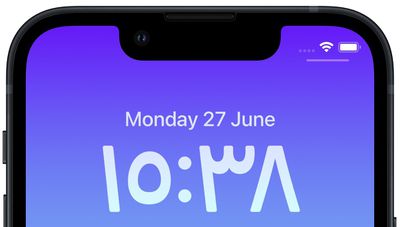
Among the new changes you can make to the digital clock readout on the Lock Screen, Apple now allows you to switch the time display from Arabic numerals to Arabic-Indic symbols. The following steps show you how it's done in iOS 16.
- Unlock your iPhone with Face ID or Touch ID.
- Press and hold on the Lock Screen to activate the gallery view.
- If necessary, swipe to the Lock Screen wallpaper you want to edit, then tap Customize.
- Tap within the frame surrounding the time to bring up the editor panel.
- Tap the globe icon in the top-left corner of the Font & Color panel.

- Select Arabic Indic from the options.
- When you're finished editing, tap Done in the top-right corner of the screen.
- Tap the Lock Screen in the wallpaper gallery to activate it.
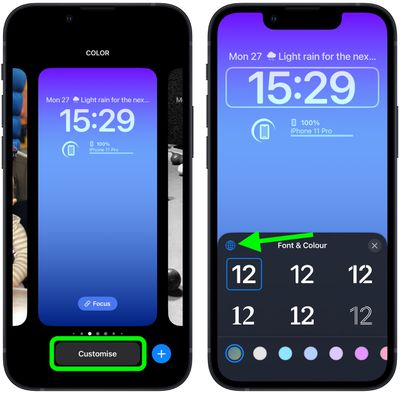

Note that you can customize the current Lock Screen at any time by invoking the gallery view from the Lock Screen with a long press, or by going into Settings -> Wallpapers.





















