 With the release of iOS 13, Apple added a Download Manager to the mobile version of its Safari browser that's similar to the one found in Safari for Mac and Safari for Windows. It helps you keep track of any currently downloading files and can be used to navigate to the storage location of your downloads.
By default, Safari's Download Manager saves files in the "Downloads" section of the Files app, but you can easily customize the storage location by following these steps.
- Launch the Settings app.
- Scroll down and tap Safari.
- Tap Downloads.
- Choose to store downloaded files in iCloud Drive, On My iPhone, or in another location of your choosing (Other...).
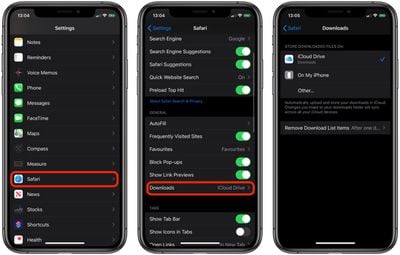
The Downloads screen in Safari settings also includes an option to Remove Download List Items automatically After one day (the default), Upon successful download, or Manually.
Tag: Safari
Related Forum: iOS 13